⚠ 這是歷史版本頁面 — 查看 4K YouTube to MP3 25.3.4 (32-bit) 最新版本 →

4K YouTube to MP3 5.6.2 (32-bit)
v 5.6.2 (32-bit)
Windows
試用版
8.24/10 (38)
- 目前版本5.6.2 (32-bit)
- 更新日期2024-10-12
- 檔案大小819.2 KB
- 檔案名稱4kyoutubetomp3_5.6.2_online.exe
- 作業系統Windows 7 / Windows 8 / Windows 10
- 支援語系English
- 授權型式試用版
- 開發商 Open Media
- 軟體分類Windows 軟體 / 檔案傳輸與網路
##
編輯短評
4K YouTube to MP3 是一款专为 Windows 设计的工具,主要解决从 YouTube 提取音轨的需求。它最大的特色是能一键下载整个播放列表或频道,并自动生成 m3u 文件,方便整理。界面干净、操作直观,下载速度也相当快。这款软件更新相当活跃,长期维护中,在同类工具里算是评价普遍不错的选项。
如果你经常需要把 YouTube 上的音乐存到手机、平板或随身碟里,这款软件会很实用。它适合想批量下载播放列表的用户,省去逐首处理的麻烦。相比其他下载工具,它专注在音频提取,功能相对单纯,但少了影片下载等额外功能。要注意的是,它提供的是试用版,仅支持英文界面,而且只适用于 Windows 平台。
##
翻譯排程處理中,以下暫以英文原文呈現
軟體介紹
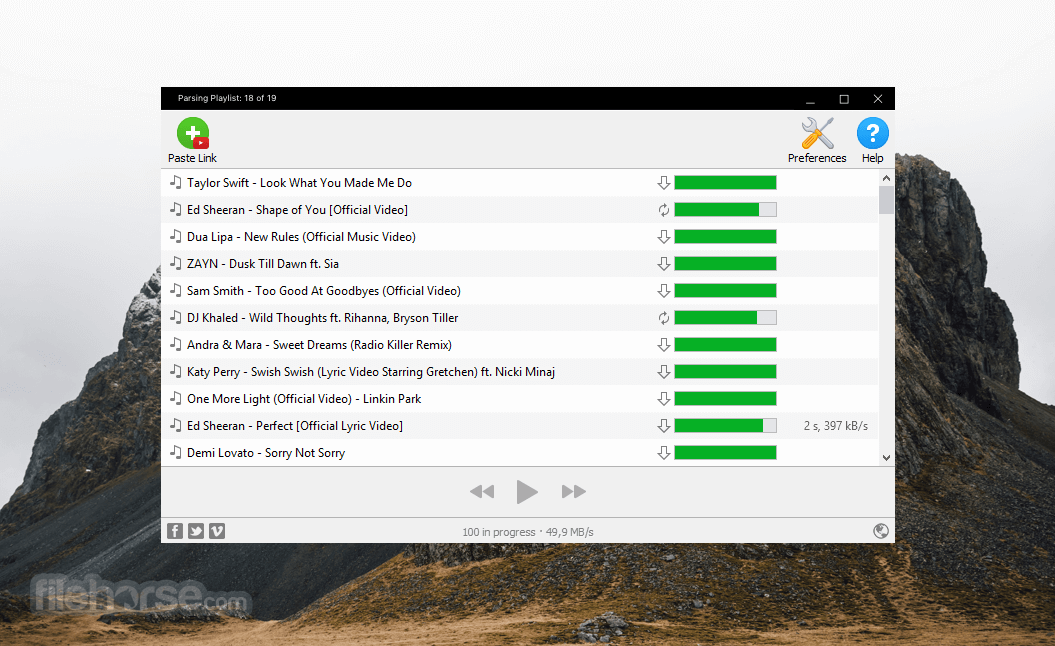
With 4K YouTube to MP3 32bit, you can easily download YouTube playlists and channels in one click! Just paste the link to a song you want to download into the application — it’s going to be on your computer in mere seconds.
Clean interface, straightforward operation, and quick music saving. Transfer the downloaded tracks to your smartphone, tablet, or flash drive to enjoy it everywhere you go.
Download songs from the most popular music services directly to your computer. Grab audio in the same quality it is stored on the website. Download and install 4K YouTube to MP3 software now!
Features and Highlights
YouTube Premium Download
Get access to a higher quality of YouTube audio. Save songs from YouTube Premium and extract audio from YouTube Originals series. Available only to YouTube Premium subscribers.
All popular websites support
Download audio from YouTube, Soundcloud, Vimeo, Instagram, Facebook, Flickr, Dailymotion, Metacafe, Twitch, and Tumblr.
Audiobooks download
Download podcasts and audiobooks from YouTube. Play to them on the go through your car stereo or on your iPod, iPad, iPhone, Samsung, and other mobile devices.
Built-in Music Player
Listen to music via native music player, no need to open another application, just 4K YouTube to MP3 app!
Easy proxy setup
Change your IP through in-app proxy settings and download audio blocked in your region.
Smart File Organization
Save playlists and channels into automatically created subfolders. Obtain audio tags based on the track name. Get .m3u files for downloaded playlists to quickly play them.
Start for free to get a foretaste, then upgrade to get unlimited access to all features. A personal plan is optimal for all. Pro is for those who want everything and more (commercial use included).
How to Use
Also Available: 4K YouTube to MP3 (64-bit)
Download 4K YouTube to MP3 (32-bit) Latest Version Why is this app published on FileHorse? (More info)
Clean interface, straightforward operation, and quick music saving. Transfer the downloaded tracks to your smartphone, tablet, or flash drive to enjoy it everywhere you go.
- Extract audio from YouTube videos and save it in MP3, M4A, or OGG in high quality.
- Download full YouTube playlists or channels and generate m3u files.
- Transfer downloaded tracks automatically into iTunes and upload them on your iPhone or iPod.
- Listen to music via a native built-in music player.
- Download and extract audio tracks from SoundCloud, Vimeo, Flickr, and DailyMotion videos.
- Download audiobooks from YouTube.
- Extract audio tracks even from embedded in HTML page videos.
Download songs from the most popular music services directly to your computer. Grab audio in the same quality it is stored on the website. Download and install 4K YouTube to MP3 software now!
Features and Highlights
YouTube Premium Download
Get access to a higher quality of YouTube audio. Save songs from YouTube Premium and extract audio from YouTube Originals series. Available only to YouTube Premium subscribers.
All popular websites support
Download audio from YouTube, Soundcloud, Vimeo, Instagram, Facebook, Flickr, Dailymotion, Metacafe, Twitch, and Tumblr.
Audiobooks download
Download podcasts and audiobooks from YouTube. Play to them on the go through your car stereo or on your iPod, iPad, iPhone, Samsung, and other mobile devices.
Built-in Music Player
Listen to music via native music player, no need to open another application, just 4K YouTube to MP3 app!
Easy proxy setup
Change your IP through in-app proxy settings and download audio blocked in your region.
Smart File Organization
Save playlists and channels into automatically created subfolders. Obtain audio tags based on the track name. Get .m3u files for downloaded playlists to quickly play them.
Start for free to get a foretaste, then upgrade to get unlimited access to all features. A personal plan is optimal for all. Pro is for those who want everything and more (commercial use included).
How to Use
- Launch the application on your Windows PC.
- Copy the URL of the YouTube video you want to convert.
- Click the "Paste Link" button in the software.
- Choose the audio format and quality settings.
- Start the conversion process by clicking the download button.
- Wait for the download to complete.
- Access the saved MP3 file in your chosen directory.
- Operating System: Windows 7/8/10/11 (32-bit)
- Processor: Intel or AMD 1 GHz or faster
- RAM: 512 MB minimum (1 GB recommended)
- Storage: 100 MB of available disk space
- Internet: Required for downloading and activation
- Simple and user-friendly interface
- Supports multiple audio formats
- Allows batch downloading
- High-quality audio extraction
- No ads or bundled software
- Limited features in free version
- No built-in audio editor
- Cannot download videos in 4K
- Requires internet for activation
- Occasional download speed issues
Also Available: 4K YouTube to MP3 (64-bit)
Download 4K YouTube to MP3 (32-bit) Latest Version Why is this app published on FileHorse? (More info)
##
畫面截圖
- 2025-10-24 4K YouTube to MP3 25.3.4 (32-bit) 819.2 KB
- 2025-10-16 4K YouTube to MP3 25.3.3 (32-bit) 819.2 KB
- 2025-09-26 4K YouTube to MP3 25.3.2 (32-bit) 819.2 KB
- 2025-09-05 4K YouTube to MP3 25.3.1 (32-bit) 819.2 KB
- 2025-08-22 4K YouTube to MP3 25.3.0 (32-bit) 819.2 KB
- 2025-06-07 4K YouTube to MP3 25.1.2 (32-bit) 819.2 KB
- 2025-05-27 4K YouTube to MP3 25.1.1 (32-bit) 819.2 KB
- 2025-05-13 4K YouTube to MP3 25.1.0 (32-bit) 819.2 KB