Advanced SystemCare Free 19.5.0.231
v 19.5.0.231
Windows
免費軟體
8.18/10 (779)
- 目前版本19.5.0.231
- 更新日期2026-08-14
- 檔案大小60.8 MB
- 檔案名稱advanced-systemcare-setup.exe
- 作業系統Windows 7 / Windows 8 / Windows 10 / Windows 11
- 支援語系English
- 授權型式免費軟體
- 開發商 IObit Lab
- 軟體分類Windows 軟體 / 系統優化
##
翻譯排程處理中,以下暫以英文原文呈現
軟體介紹
Advanced SystemCare Free is a robust PC optimization tool developed by IObit, designed to enhance system performance, improve security, and streamline day-to-day computing tasks.
This software caters to users looking for a free yet comprehensive solution to clean junk files, optimize system settings, and protect their privacy.
With a user-friendly design and powerful scanning tools, it has become a popular choice among individuals seeking effortless PC maintenance.
What`s New
AI Mode
Intelligently clean and speed up PC according to your optimization habits and PC performance status.
Main Features
System Optimization
Cleans up junk files, invalid registry entries, and leftover files from uninstalled applications.
Optimizes startup processes to improve boot times.
Privacy Protection
Detects and removes potential privacy leaks.
Clears browser history and traces to safeguard sensitive user data.
Performance Enhancements
Turbo Boost mode frees up system resources by disabling unnecessary background processes.
Real-time performance monitoring provides insights into CPU, RAM, and disk usage.
Security Features
Scans for spyware and other potential security threats.
Offers additional protection for browsers to prevent malicious modifications.
System Care
Integrates multiple tools like disk optimization, shortcut repair, and driver updater.
User Interface
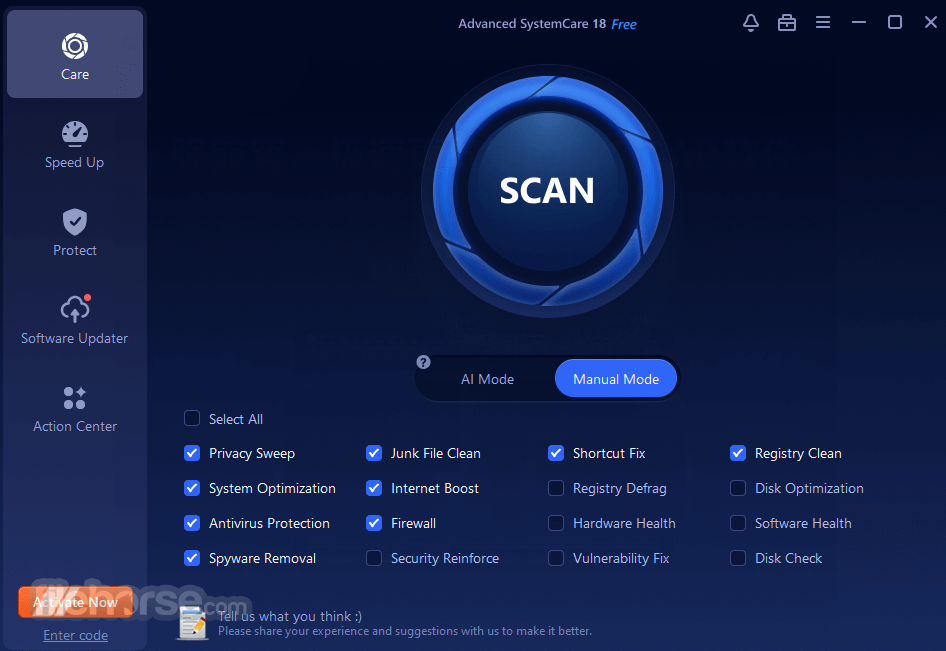
It boasts an intuitive and visually appealing interface. The dashboard is organized into clear sections, making navigation straightforward even for less tech-savvy users.
Key features are accessible via tabs such as "Care," "Speed Up," and "Protect," ensuring users can quickly locate desired tools. The one-click optimization option simplifies the cleaning process for beginners.
Installation and Setup
How to Clean Your Windows PC Efficiently
Let AI simplify your PC maintenance! Advanced SystemCare’s new AI mode creates a personalized plan to scan and remove junk files, logs, caches, and leftovers from third-party tools, browsers, and Windows 11 and Windows 10.
It adapts to your habits and PC performance to identify and fix issues, ensuring a smoother experience. With just one click daily, you can enjoy a refreshed PC.
Easily clean junk files from popular apps like Dropbox, Steam, Java, Adobe Photoshop Lightroom, Spotify, and MS OneDrive.
How to Use
Initial Scan:
Open the application and click the "Scan" button on the home screen.
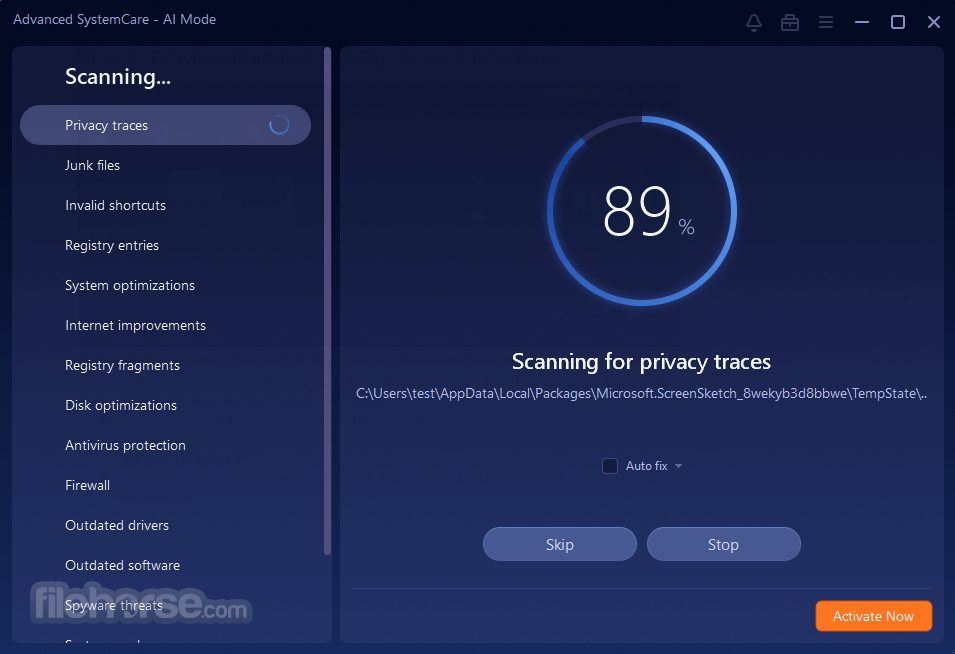
Wait for the software to analyze your system for junk files, security vulnerabilities, and performance bottlenecks.
Apply Fixes:
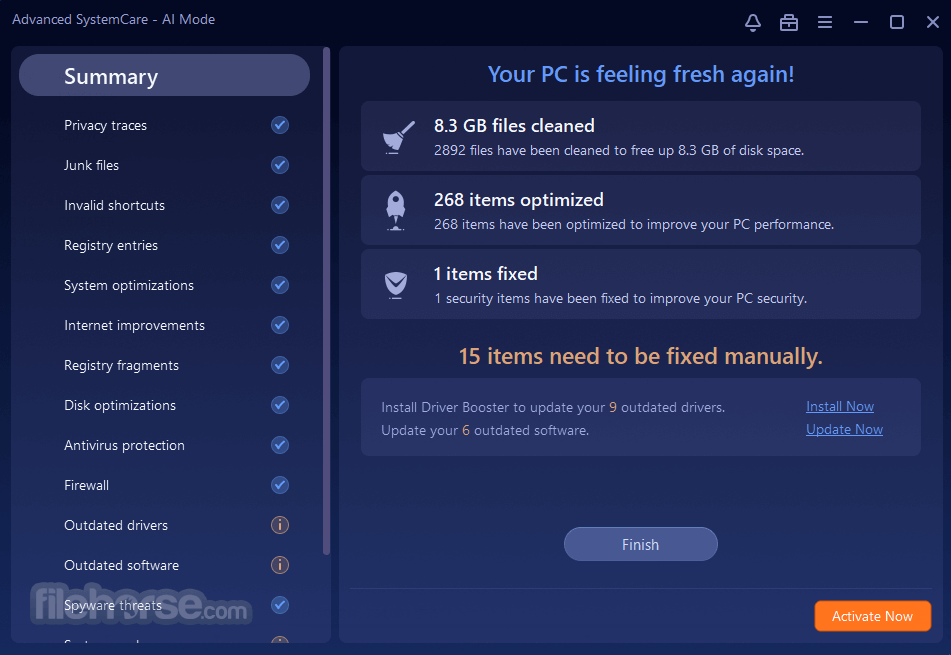
Review the detected issues and click "Fix" to resolve them. Advanced SystemCare Free provides explanations for each problem for better understanding.
Turbo Boost:
Navigate to the "Speed Up" tab and activate Turbo Boost to temporarily disable unnecessary services and applications.
Privacy Sweep:
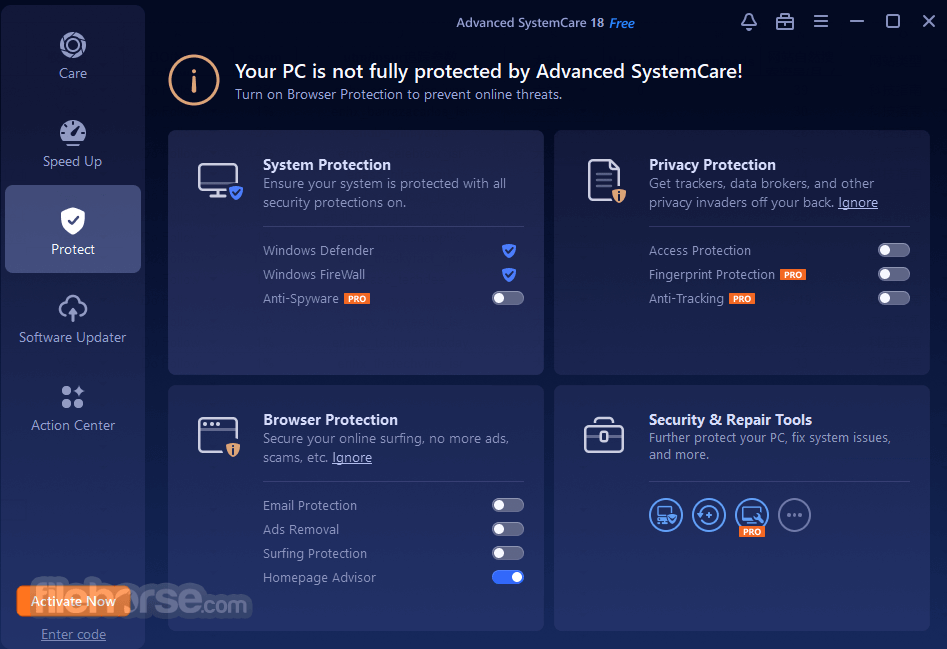
Use the "Protect" section to clean browser history and other sensitive data.
Additional Tools:
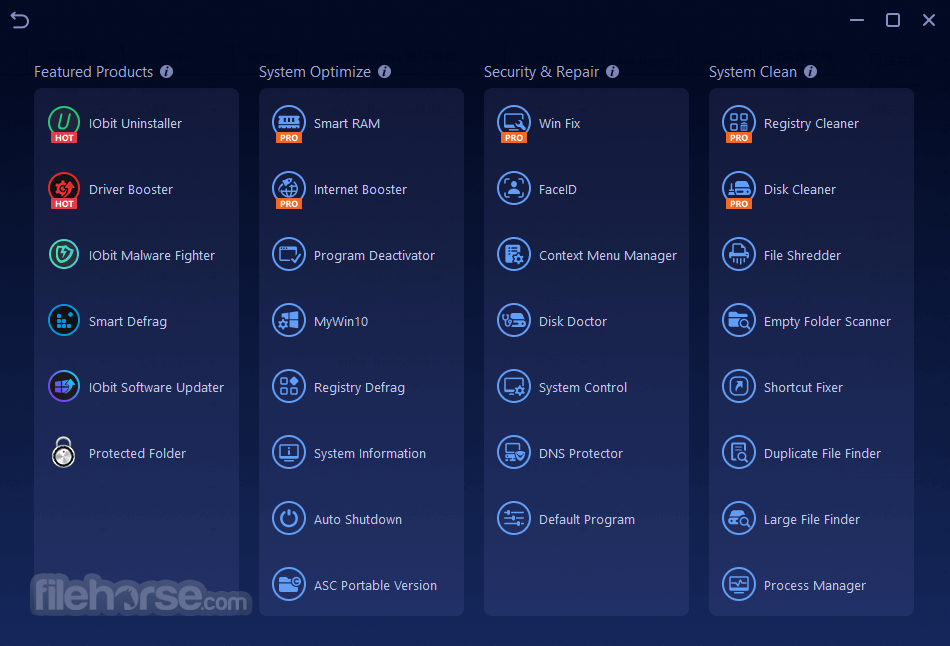
Explore the "Toolbox" for specialized utilities like disk cleanup, internet booster, and driver updater.
FAQ
Is Advanced SystemCare Free safe to use?
Yes, it is a legitimate and widely trusted PC optimization tool. However, always download from the official website to avoid counterfeit versions.
Does the free version include real-time protection?
No, real-time protection is only available in the Pro version. The free version provides essential cleaning and optimization tools.
Can Advanced SystemCare Free improve gaming performance?
Yes, the Turbo Boost feature helps free up system resources, potentially enhancing gaming performance.
Does it work on macOS?
No, Advanced SystemCare Free is specifically designed for Windows operating systems.
Is it necessary to upgrade to the Pro version?
Upgrading provides advanced features like deep registry cleaning, real-time protection, and automatic updates, but the free version is sufficient for basic maintenance.
Alternatives
CCleaner: A lightweight tool focused on cleaning and privacy management.
Ashampoo WinOptimizer: Provides similar cleaning and optimization tools at a competitive price.
Glary Utilities Pro: Offers a wide range of utilities for system maintenance.
System Mechanic Pro: Known for its deep system optimization and repair features.
Wise Care 365 Pro: A budget-friendly alternative with effective cleaning and speedup features.
Pricing
Free Version: Includes essential features like junk file cleanup, privacy protection, and system optimization.
Pro Version: $19.99/year. Unlocks advanced features such as deep registry cleaning, real-time protection, and automatic updates.
Ultimate Version: $29.99/year for 3 PCs (often discounted on the official website). All-in-one utility boosts PC performance by up to 200% and provides real-time protection against threats with Bitdefender.
System Requirements
Advanced SystemCare Free is an excellent choice for users seeking a reliable and user-friendly PC optimization tool. Its powerful scanning features, intuitive interface, and versatile utilities make it a standout option in the free software category.
While the free version covers most basic maintenance needs, upgrading to the Pro version can unlock even greater potential for users requiring more advanced features. Overall, Advanced SystemCare Free remains a top contender in the realm of PC optimization, delivering value without compromising quality.
Download Advanced SystemCare Free Latest Version Why is this app published on FileHorse? (More info)
This software caters to users looking for a free yet comprehensive solution to clean junk files, optimize system settings, and protect their privacy.
With a user-friendly design and powerful scanning tools, it has become a popular choice among individuals seeking effortless PC maintenance.
What`s New
AI Mode
Intelligently clean and speed up PC according to your optimization habits and PC performance status.
Main Features
System Optimization
Cleans up junk files, invalid registry entries, and leftover files from uninstalled applications.
Optimizes startup processes to improve boot times.
Privacy Protection
Detects and removes potential privacy leaks.
Clears browser history and traces to safeguard sensitive user data.
Performance Enhancements
Turbo Boost mode frees up system resources by disabling unnecessary background processes.
Real-time performance monitoring provides insights into CPU, RAM, and disk usage.
Security Features
Scans for spyware and other potential security threats.
Offers additional protection for browsers to prevent malicious modifications.
System Care
Integrates multiple tools like disk optimization, shortcut repair, and driver updater.
User Interface
It boasts an intuitive and visually appealing interface. The dashboard is organized into clear sections, making navigation straightforward even for less tech-savvy users.
Key features are accessible via tabs such as "Care," "Speed Up," and "Protect," ensuring users can quickly locate desired tools. The one-click optimization option simplifies the cleaning process for beginners.
Installation and Setup
- Visit the official IObit website or FileHorse.com and download the installation file.
- Run the installer and follow the on-screen instructions.
- Customize the installation by choosing additional components or sticking to default settings.
- Launch the application and perform an initial scan to identify potential improvements.
- The software automatically detects system issues and offers recommendations for optimization after the first scan.
How to Clean Your Windows PC Efficiently
Let AI simplify your PC maintenance! Advanced SystemCare’s new AI mode creates a personalized plan to scan and remove junk files, logs, caches, and leftovers from third-party tools, browsers, and Windows 11 and Windows 10.
It adapts to your habits and PC performance to identify and fix issues, ensuring a smoother experience. With just one click daily, you can enjoy a refreshed PC.
Easily clean junk files from popular apps like Dropbox, Steam, Java, Adobe Photoshop Lightroom, Spotify, and MS OneDrive.
How to Use
Initial Scan:
Open the application and click the "Scan" button on the home screen.
Wait for the software to analyze your system for junk files, security vulnerabilities, and performance bottlenecks.
Apply Fixes:
Review the detected issues and click "Fix" to resolve them. Advanced SystemCare Free provides explanations for each problem for better understanding.
Turbo Boost:
Navigate to the "Speed Up" tab and activate Turbo Boost to temporarily disable unnecessary services and applications.
Privacy Sweep:
Use the "Protect" section to clean browser history and other sensitive data.
Additional Tools:
Explore the "Toolbox" for specialized utilities like disk cleanup, internet booster, and driver updater.
FAQ
Is Advanced SystemCare Free safe to use?
Yes, it is a legitimate and widely trusted PC optimization tool. However, always download from the official website to avoid counterfeit versions.
Does the free version include real-time protection?
No, real-time protection is only available in the Pro version. The free version provides essential cleaning and optimization tools.
Can Advanced SystemCare Free improve gaming performance?
Yes, the Turbo Boost feature helps free up system resources, potentially enhancing gaming performance.
Does it work on macOS?
No, Advanced SystemCare Free is specifically designed for Windows operating systems.
Is it necessary to upgrade to the Pro version?
Upgrading provides advanced features like deep registry cleaning, real-time protection, and automatic updates, but the free version is sufficient for basic maintenance.
Alternatives
CCleaner: A lightweight tool focused on cleaning and privacy management.
Ashampoo WinOptimizer: Provides similar cleaning and optimization tools at a competitive price.
Glary Utilities Pro: Offers a wide range of utilities for system maintenance.
System Mechanic Pro: Known for its deep system optimization and repair features.
Wise Care 365 Pro: A budget-friendly alternative with effective cleaning and speedup features.
Pricing
Free Version: Includes essential features like junk file cleanup, privacy protection, and system optimization.
Pro Version: $19.99/year. Unlocks advanced features such as deep registry cleaning, real-time protection, and automatic updates.
Ultimate Version: $29.99/year for 3 PCs (often discounted on the official website). All-in-one utility boosts PC performance by up to 200% and provides real-time protection against threats with Bitdefender.
System Requirements
- Operating System: Windows 7, 8, 8.1, 10, and 11.
- Processor: 1 GHz or faster.
- RAM: 1 GB or more.
- Disk Space: 300 MB free space.
- New AI mode feature.
- Easy-to-use interface.
- Effective junk file cleanup and optimization.
- Free version offers robust features.
- Turbo Boost for improved performance.
- Regular updates from a reputable developer.
- Some features are locked behind the Pro version.
- Includes optional bundled software during installation.
- Limited real-time protection in the free version.
Advanced SystemCare Free is an excellent choice for users seeking a reliable and user-friendly PC optimization tool. Its powerful scanning features, intuitive interface, and versatile utilities make it a standout option in the free software category.
While the free version covers most basic maintenance needs, upgrading to the Pro version can unlock even greater potential for users requiring more advanced features. Overall, Advanced SystemCare Free remains a top contender in the realm of PC optimization, delivering value without compromising quality.
Download Advanced SystemCare Free Latest Version Why is this app published on FileHorse? (More info)
##
畫面截圖