⚠ 這是歷史版本頁面 — 查看 Amazon Music 最新版本 →

- 目前版本7.6.0.1902
- 更新日期2019-08-07
- 檔案大小67 MB
- 檔案名稱AmazonMusicInstaller.exe
- 作業系統Windows 7 / Windows 8 / Windows 10 / Windows 11
- 支援語系English
- 授權型式免費軟體
- 開發商 Amazon Inc
- 軟體分類Windows 軟體 / 音訊軟體
##
編輯短評
Amazon Music 是亞馬遜官方推出的音樂播放軟體,主要解決電腦與雲端音樂庫的整合管理問題。它能將本機的專輯、歌曲與播放清單集中管理,並支援一鍵下載數位購買的音樂,方便離線收聽。最鮮明的特色是與 Amazon 雲端服務深度整合,同時也提供串流音樂、精選播放清單與電台功能。這套軟體自 2019 年起持續收錄版本,但近一年未見更新,維護步調趨緩;在音訊軟體分類中屬於中等熱門的工具,使用者評價普遍一般。
這套軟體適合已經使用 Amazon 音樂服務、或習慣在電腦上管理大量音樂檔案的人。如果你常需要離線聽歌,或想把手邊的音樂收藏與雲端同步,它會是順手的選擇。與 iTunes 或 Virtual DJ 等替代軟體相比,Amazon Music 更聚焦在播放與串流,而非進階混音或裝置管理,功能取向較單純。需要注意的是,它僅提供英文介面,免費使用但部分串流功能需搭配付費訂閱;平台涵蓋 Windows 與 macOS,下載前可先確認自己的系統版本是否相容。
##
翻譯排程處理中,以下暫以英文原文呈現
軟體介紹
With Amazon Music for Windows PC, your music is the star. All your albums, songs, and playlists on your computer and in the cloud are at your fingertips. Download your digital music purchases automatically or with one click and enjoy your music even when you're offline.
Amazon Desktop Music is a popular music streaming service provided by Amazon. It offers a vast library of songs, albums, and playlists, catering to a wide range of musical tastes.
With this program, users can access millions of tracks on demand, download music for offline listening, and enjoy curated playlists and radio stations. The service is available on various platforms, including PC, smartphones, tablets, and smart devices like Amazon Echo.
The brand new instant search feature makes finding your music easy and quick. Play albums and songs directly from the search results.
Prime Music is a music streaming benefit featuring a growing selection of two million songs, Alexa voice-integration, and personalized recommendations at no additional cost with your Amazon Prime Membership. Unlock even more music with Amazon Music Unlimited, plus get an exclusive Prime member discount.
Features
Extensive Music Library
It boasts a massive collection of over 75 million songs, spanning various genres and languages. Users can find everything from the latest hits to classic tracks.
High-Quality Audio
It offers high-quality audio streaming, including HD and Ultra HD options. This feature is especially appealing to audiophiles who appreciate superior sound quality.
Offline Listening
One of the standout features is the ability to download music for offline listening. This is perfect for users who want to enjoy their favorite tracks without worrying about internet connectivity.
Personalized Recommendations
It uses advanced algorithms to provide personalized music recommendations based on users' listening habits. This ensures that users always have fresh and relevant music to discover.
Curated Playlists and Stations
The service offers a wide range of curated playlists and radio stations, catering to various moods, activities, and genres. These playlists are curated by music experts and updated regularly.
Alexa Integration
The app is seamlessly integrated with Alexa, Amazon's virtual assistant. Users can control their music playback using voice commands, making it convenient for hands-free listening.
Lyrics Display
It provides real-time lyrics display for many tracks. This feature enhances the listening experience, allowing users to sing along or understand the lyrics better.
Family and Student Plans
It offers family and student plans, making it affordable for multiple users to enjoy the service. These plans provide access to all the features at a reduced cost.
User Interface
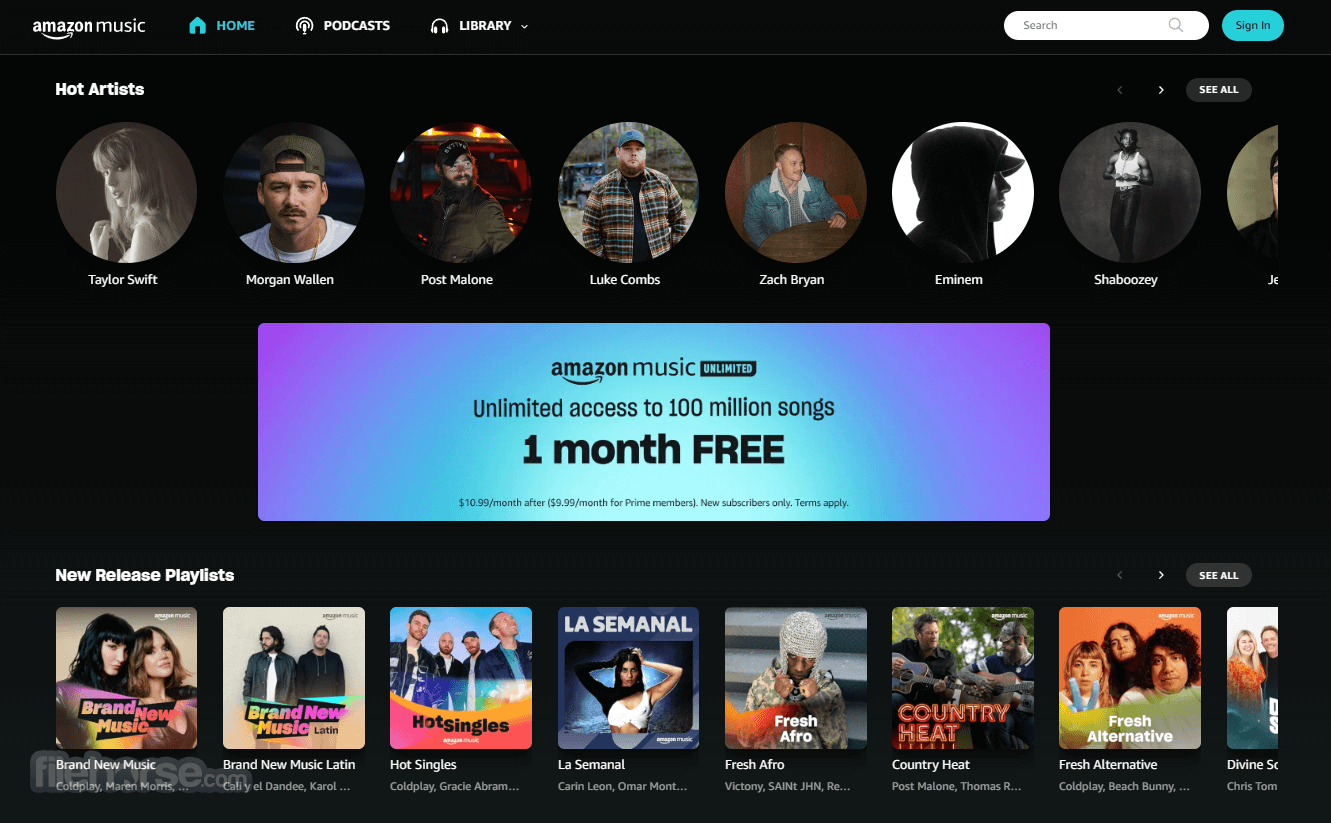
Amazon Music's user interface is sleek, modern, and user-friendly. The home screen features a clean layout with easy navigation options. Users can quickly access their library, playlists, recommendations, and settings. The search function is robust, allowing users to find specific songs, albums, artists, or genres with ease.
The Now Playing screen is visually appealing, displaying album art, song title, artist, and playback controls. The lyrics display, if available, is neatly integrated into this screen. Users can also access additional options like adding a song to a playlist, sharing it, or viewing more tracks by the same artist.
Installation and Setup
Exploring the Music Library
Can I use Amazon Music offline?
Yes, you can download songs, albums, and playlists for offline listening with Amazon Music Prime or Amazon Music Unlimited.
How does Amazon Music compare to other streaming services?
It offers a vast library, high-quality audio options, and seamless Alexa integration. While it has a smaller user base than Spotify or Apple Music, it is competitive in terms of features and content.
What devices support Amazon Music?
The app is available on a wide range of devices, including PC, Mac, iOS, Android, Fire tablets, Fire TV, and Amazon Echo devices.
How do I cancel my Amazon Music subscription?
You can cancel your subscription by visiting the app settings page on the web or within the app and following the cancellation instructions.
Alternatives
Spotify - Spotify is one of the most popular music streaming services, offering a vast library, personalized playlists, and social sharing features. It also provides free and premium subscription options.
Apple Music - Apple Music offers a similar music library size, high-quality audio, and exclusive content. It integrates seamlessly with Apple's ecosystem and offers curated playlists and radio stations.
Tidal - Tidal is known for its high-fidelity audio streaming and exclusive content. It caters to audiophiles and offers various subscription plans, including HiFi and HiFi Plus.
YouTube Music - YouTube Music combines music streaming with the vast video content available on YouTube. It offers personalized playlists and music videos, along with offline listening options.
Pandora - Pandora provides personalized radio stations based on users' preferences. It offers both free and premium subscription options, with features like offline listening and on-demand playback.
Pricing
Amazon Music Free
Amazon Music is a robust and versatile music streaming service that offers a comprehensive range of features to satisfy music lovers. With its extensive library, high-quality audio options, and seamless integration with Amazon's ecosystem, it provides a compelling alternative to other streaming services.
Whether you're a casual listener or an audiophile, it has something to offer. The various subscription plans ensure that there's an option for everyone, from free users to those seeking the best audio quality. While it may not have the same level of social features as Spotify or the exclusivity of Apple Music, it stands out with its personalized recommendations, Alexa integration, and overall value, especially for Amazon Prime members.
Overall, Amazon Music is a great choice for anyone looking to explore and enjoy a vast array of music with the added convenience of offline listening and voice control.
Note: Requires an Amazon account.
Also Available: Download Amazon Music for Mac
Download Amazon Music Latest Version Why is this app published on FileHorse? (More info)
Amazon Desktop Music is a popular music streaming service provided by Amazon. It offers a vast library of songs, albums, and playlists, catering to a wide range of musical tastes.
With this program, users can access millions of tracks on demand, download music for offline listening, and enjoy curated playlists and radio stations. The service is available on various platforms, including PC, smartphones, tablets, and smart devices like Amazon Echo.
The brand new instant search feature makes finding your music easy and quick. Play albums and songs directly from the search results.
Prime Music is a music streaming benefit featuring a growing selection of two million songs, Alexa voice-integration, and personalized recommendations at no additional cost with your Amazon Prime Membership. Unlock even more music with Amazon Music Unlimited, plus get an exclusive Prime member discount.
Features
Extensive Music Library
It boasts a massive collection of over 75 million songs, spanning various genres and languages. Users can find everything from the latest hits to classic tracks.
High-Quality Audio
It offers high-quality audio streaming, including HD and Ultra HD options. This feature is especially appealing to audiophiles who appreciate superior sound quality.
Offline Listening
One of the standout features is the ability to download music for offline listening. This is perfect for users who want to enjoy their favorite tracks without worrying about internet connectivity.
Personalized Recommendations
It uses advanced algorithms to provide personalized music recommendations based on users' listening habits. This ensures that users always have fresh and relevant music to discover.
Curated Playlists and Stations
The service offers a wide range of curated playlists and radio stations, catering to various moods, activities, and genres. These playlists are curated by music experts and updated regularly.
Alexa Integration
The app is seamlessly integrated with Alexa, Amazon's virtual assistant. Users can control their music playback using voice commands, making it convenient for hands-free listening.
Lyrics Display
It provides real-time lyrics display for many tracks. This feature enhances the listening experience, allowing users to sing along or understand the lyrics better.
Family and Student Plans
It offers family and student plans, making it affordable for multiple users to enjoy the service. These plans provide access to all the features at a reduced cost.
User Interface
Amazon Music's user interface is sleek, modern, and user-friendly. The home screen features a clean layout with easy navigation options. Users can quickly access their library, playlists, recommendations, and settings. The search function is robust, allowing users to find specific songs, albums, artists, or genres with ease.
The Now Playing screen is visually appealing, displaying album art, song title, artist, and playback controls. The lyrics display, if available, is neatly integrated into this screen. Users can also access additional options like adding a song to a playlist, sharing it, or viewing more tracks by the same artist.
Installation and Setup
- Download the App: Visit the official website or FileHorse and download the PC app.
- Install the App: Run the installer and follow the on-screen instructions to complete the installation.
- Sign In: Launch the app and sign in with your Amazon account. If you don't have an account, you'll need to create one.
- Choose a Subscription Plan: It offers different subscription plans, including Amazon Music Free, Amazon Music Prime, and Amazon Music Unlimited. Select the plan that suits your needs.
- Start Listening: Once set up, you can start exploring the vast music library, create playlists, and enjoy your favorite tracks.
Exploring the Music Library
- Use the search bar to find specific songs, albums, or artists.
- Browse through curated playlists and radio stations.
- Check out personalized recommendations on the home screen.
- Navigate to 'My Music' and select 'Create Playlist.'
- Add songs by searching for them or selecting from your library.
- Find the song or album you want to download.
- Click the download icon next to the track or album.
- Ensure Alexa is enabled on your device.
- Use commands like "Alexa, play my favorite playlist on Amazon Music."
- Play a song and click on the lyrics icon if available.
Can I use Amazon Music offline?
Yes, you can download songs, albums, and playlists for offline listening with Amazon Music Prime or Amazon Music Unlimited.
How does Amazon Music compare to other streaming services?
It offers a vast library, high-quality audio options, and seamless Alexa integration. While it has a smaller user base than Spotify or Apple Music, it is competitive in terms of features and content.
What devices support Amazon Music?
The app is available on a wide range of devices, including PC, Mac, iOS, Android, Fire tablets, Fire TV, and Amazon Echo devices.
How do I cancel my Amazon Music subscription?
You can cancel your subscription by visiting the app settings page on the web or within the app and following the cancellation instructions.
Alternatives
Spotify - Spotify is one of the most popular music streaming services, offering a vast library, personalized playlists, and social sharing features. It also provides free and premium subscription options.
Apple Music - Apple Music offers a similar music library size, high-quality audio, and exclusive content. It integrates seamlessly with Apple's ecosystem and offers curated playlists and radio stations.
Tidal - Tidal is known for its high-fidelity audio streaming and exclusive content. It caters to audiophiles and offers various subscription plans, including HiFi and HiFi Plus.
YouTube Music - YouTube Music combines music streaming with the vast video content available on YouTube. It offers personalized playlists and music videos, along with offline listening options.
Pandora - Pandora provides personalized radio stations based on users' preferences. It offers both free and premium subscription options, with features like offline listening and on-demand playback.
Pricing
Amazon Music Free
- Free tier with ads.
- Limited features and song selection.
- Included with Amazon Prime membership.
- Access to over 2 million songs.
- Ad-free listening and offline playback.
- Individual Plan: $9.99/month or $7.99/month for Prime members.
- Family Plan: $14.99/month (up to 6 accounts).
- Single Device Plan: $3.99/month (limited to one Echo or Fire device).
- Access to the full library of over 75 million songs.
- HD and Ultra HD streaming options.
- Included in Amazon Music Unlimited at no extra cost.
- Offers HD and Ultra HD streaming.
- Operating System: Windows 11/10
- Processor: Intel Core i3 or equivalent
- RAM: 2 GB or more
- Storage: At least 200 MB of available space
- Internet Connection: Broadband recommended for streaming
- Extensive music library with over 75 million songs.
- High-quality audio streaming, including HD and Ultra HD options.
- Offline listening capability.
- Seamless integration with Alexa for voice control.
- Personalized recommendations and curated playlists.
- Multiple subscription plans to suit different needs.
- Free tier includes ads and limited features.
- Smaller user base compared to Spotify and Apple Music.
- Some users may find the interface less intuitive than competitors.
Amazon Music is a robust and versatile music streaming service that offers a comprehensive range of features to satisfy music lovers. With its extensive library, high-quality audio options, and seamless integration with Amazon's ecosystem, it provides a compelling alternative to other streaming services.
Whether you're a casual listener or an audiophile, it has something to offer. The various subscription plans ensure that there's an option for everyone, from free users to those seeking the best audio quality. While it may not have the same level of social features as Spotify or the exclusivity of Apple Music, it stands out with its personalized recommendations, Alexa integration, and overall value, especially for Amazon Prime members.
Overall, Amazon Music is a great choice for anyone looking to explore and enjoy a vast array of music with the added convenience of offline listening and voice control.
Note: Requires an Amazon account.
Also Available: Download Amazon Music for Mac
Download Amazon Music Latest Version Why is this app published on FileHorse? (More info)
##
畫面截圖
- 2025-06-27 Amazon Music 9.5.2.2478 83.5 MB
- 2023-06-22 Amazon Music 9.4.3.2420 85.4 MB
- 2021-11-10 Amazon Music 8.8.1.2303 82.9 MB
- 2021-02-18 Amazon Music 8.3.0.2240 82.4 MB
- 2020-12-18 Amazon Music 8.1.1.2233 82.4 MB
- 2020-12-10 Amazon Music 8.1.0.2232 82.4 MB
- 2020-10-27 Amazon Music 8.0.0.2215 82.5 MB
- 2020-09-09 Amazon Music 7.13.0.2210 74.6 MB