- 目前版本1.8.36
- 更新日期2025-11-17
- 檔案大小1.9 MB
- 檔案名稱apowermirror.exe
- 作業系統Windows 7 / Windows 8 / Windows 10 / Windows 11
- 支援語系English
- 授權型式試用版
- 開發商 Apowersoft Ltd.
- 軟體分類Windows 軟體 / 手機工具
##
翻譯排程處理中,以下暫以英文原文呈現
軟體介紹
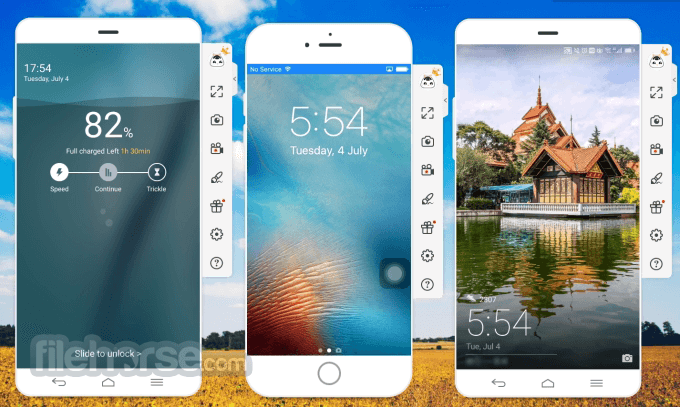
ApowerMirror is a screen mirroring application for both iOS and Android devices, with full compatibility for Windows 11 and 10. With mobile phones and tablets running Android 5.0 or higher that support Chromecast, users can install this program for screen share with a PC.
Any iOS device with AirPlay capability can also display the cell phone screen on the computer using this tool.
Compatible with the latest iOS 26/18/17, Android 16/15/14, and iPhone 17/16/15/Plus/Pro/Pro Max.
It supports streaming video, photos, and other media files from a mobile to a computer monitor or projector wirelessly. Display options include Full-Screen mode or Landscape mode, providing you with different viewing options on a more convenient, bigger screen that everyone can see together.
Mirror iOS & Control Android from PC, Stream Gameplay and Media Files in Real Time!
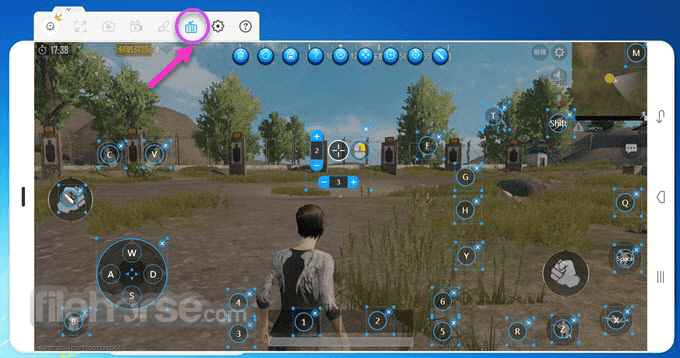
ApowerMirror by Apowersoft enables you to control your Android from a PC seamlessly. Easily manipulate a phone's screen with your mouse and keyboard, including WhatsApp messages and SMS text messages. Game lovers can play Android-based games on their computers without an emulator and without rooting the device.
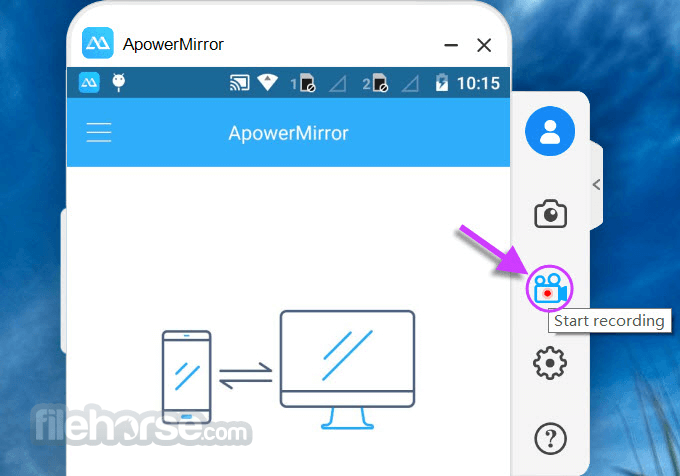
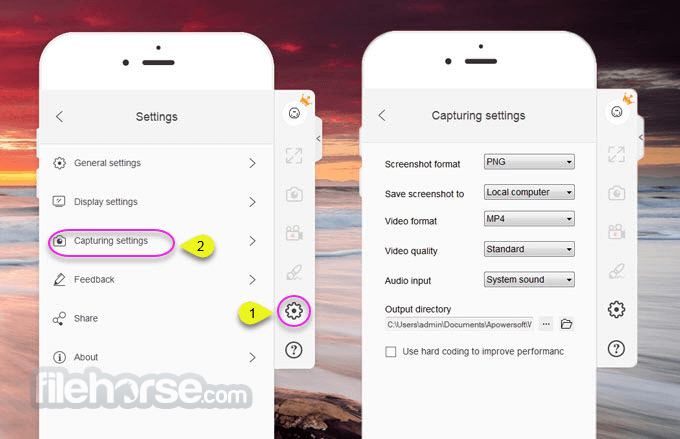
ApowerMirror comes with additional features of recording phone screens and taking screenshots. Unlike other similar apps, it offers a great user experience, with its simple operation and the convenience of recording all the activities on the mobile screen from a PC.
Features and Highlights
Full-screen display
Enjoy videos and gameplay on a bigger screen.
Take screenshots
Take a screenshot on Android / iPhone like a breeze.
Record screen
Record iPhone / Android screen from PC in one click.
Cast PC screen to phone
Display and control a PC from a phone.
Screen Mirroring between devices
Mirror phone to tablet and stream tablet to phone.
Whiteboard
Draw and take notes during the presentation.
FAQs
What is ApowerMirror used for?
ApowerMirror is a screen mirroring application that allows users to display their Android or iOS device screens on a PC or Mac. It supports real-time mirroring with high-quality resolution and can also record screens, take screenshots, and control mobile devices directly from a computer.
How do I connect my phone to ApowerMirror?
You can connect your phone to ApowerMirror either through a USB cable or via Wi-Fi. For Android devices, both options are supported, while iOS users typically connect through Wi-Fi by ensuring both devices are on the same network and using the screen mirroring feature.
Does ApowerMirror support screen control from PC?
Yes, ApowerMirror allows users to control Android devices directly from a PC using a mouse and keyboard once connected via USB or Wi-Fi. This makes it ideal for gaming, typing messages, and managing apps from a larger screen with better precision.
Is ApowerMirror safe to use?
Yes, ApowerMirror is considered safe and secure, provided it’s downloaded from the official Apowersoft website or FileHorse servers. It uses encrypted connections for data transfer, ensuring that user information and mirrored content remain private during use.
Pricing
ApoweMirror is available in two options, Personal or Business Plan.
AnyMirror - Versatile screen mirroring with recording.
LetsView - Free mirroring with annotation features.
Reflector - Wireless screen mirroring with media streaming.
AirServer - Mirroring for multiple devices with AirPlay support.
Vysor - Mirror and control Android devices on PC.
PROS
Also Available: Download ApowerMirror for Mac
Download ApowerMirror Latest Version Why is this app published on FileHorse? (More info)
Any iOS device with AirPlay capability can also display the cell phone screen on the computer using this tool.
Compatible with the latest iOS 26/18/17, Android 16/15/14, and iPhone 17/16/15/Plus/Pro/Pro Max.
It supports streaming video, photos, and other media files from a mobile to a computer monitor or projector wirelessly. Display options include Full-Screen mode or Landscape mode, providing you with different viewing options on a more convenient, bigger screen that everyone can see together.
Mirror iOS & Control Android from PC, Stream Gameplay and Media Files in Real Time!
ApowerMirror by Apowersoft enables you to control your Android from a PC seamlessly. Easily manipulate a phone's screen with your mouse and keyboard, including WhatsApp messages and SMS text messages. Game lovers can play Android-based games on their computers without an emulator and without rooting the device.
ApowerMirror comes with additional features of recording phone screens and taking screenshots. Unlike other similar apps, it offers a great user experience, with its simple operation and the convenience of recording all the activities on the mobile screen from a PC.
Features and Highlights
Full-screen display
Enjoy videos and gameplay on a bigger screen.
Take screenshots
Take a screenshot on Android / iPhone like a breeze.
Record screen
Record iPhone / Android screen from PC in one click.
Cast PC screen to phone
Display and control a PC from a phone.
Screen Mirroring between devices
Mirror phone to tablet and stream tablet to phone.
Whiteboard
Draw and take notes during the presentation.
FAQs
What is ApowerMirror used for?
ApowerMirror is a screen mirroring application that allows users to display their Android or iOS device screens on a PC or Mac. It supports real-time mirroring with high-quality resolution and can also record screens, take screenshots, and control mobile devices directly from a computer.
How do I connect my phone to ApowerMirror?
You can connect your phone to ApowerMirror either through a USB cable or via Wi-Fi. For Android devices, both options are supported, while iOS users typically connect through Wi-Fi by ensuring both devices are on the same network and using the screen mirroring feature.
Does ApowerMirror support screen control from PC?
Yes, ApowerMirror allows users to control Android devices directly from a PC using a mouse and keyboard once connected via USB or Wi-Fi. This makes it ideal for gaming, typing messages, and managing apps from a larger screen with better precision.
Is ApowerMirror safe to use?
Yes, ApowerMirror is considered safe and secure, provided it’s downloaded from the official Apowersoft website or FileHorse servers. It uses encrypted connections for data transfer, ensuring that user information and mirrored content remain private during use.
Pricing
ApoweMirror is available in two options, Personal or Business Plan.
- Monthly - $19.95
- Annual - $39.95
- Lifetime - $69.95
AnyMirror - Versatile screen mirroring with recording.
LetsView - Free mirroring with annotation features.
Reflector - Wireless screen mirroring with media streaming.
AirServer - Mirroring for multiple devices with AirPlay support.
Vysor - Mirror and control Android devices on PC.
PROS
- Multi-Platform Screen Mirroring Support
- Stable and High-Quality Screen Projection
- Wireless and Wired Connection Options
- Easy Setup and User-Friendly Interface
- Real-Time Screen Control and Annotation
- Occasional Connection Drops or Delays
- High Data Consumption for HD Mirroring
- Premium Features Require Paid Subscription
- Limited Free Version Capabilities
- Compatibility Issues with Older Devices
Also Available: Download ApowerMirror for Mac
Download ApowerMirror Latest Version Why is this app published on FileHorse? (More info)
##
畫面截圖