⚠ 這是歷史版本頁面 — 查看 ASIO4ALL 最新版本 →

- 目前版本2.14
- 更新日期2019-05-24
- 檔案大小451.42 KB
- 檔案名稱ASIO4ALL_2_14_English.exe
- 作業系統Windows 10 / Windows 11
- 支援語系English
- 授權型式免費軟體
- 開發商 Michael Tippach
- 軟體分類Windows 軟體 / 驅動程式
##
編輯短評
ASIO4ALL 是一款通用的 Windows ASIO 驅動程式,主要解決系統內建音效堆疊延遲過高的問題,讓一般音效硬體也能與數位音樂工作站(DAW)順暢溝通。它的核心特色是大幅降低音訊延遲,提供更即時的錄音與監聽體驗,對音樂創作者和音訊工程師來說相當實用。這款工具由 Michael Tippach 開發,長期持續維護,更新頻率穩定,在同類驅動程式中屬於熱門選擇,使用者評價普遍不錯。
它特別適合沒有原生 ASIO 驅動的音效卡使用者,例如筆電內建音效或入門級錄音介面,在需要低延遲監聽、多軌錄音或播放高品質音訊時派得上用場。與各家硬體廠商提供的專屬驅動相比,ASIO4ALL 是通用替代方案,不綁定特定裝置,但功能上可能不如原生驅動完整。軟體為免費授權,僅支援 Windows 平台,介面為英文,使用前需留意語系與系統相容性。
##
翻譯排程處理中,以下暫以英文原文呈現
軟體介紹
ASIO4ALL, which stands for "Audio Stream Input/Output for All," is a universal Windows ASIO driver that serves as a bridge between your audio hardware and digital audio workstation (DAW) software.
It was created to overcome limitations in the Windows audio stack, offering lower latency and improved audio performance for musicians, audio engineers, and anyone seeking high-quality audio playback and recording.
Key Features
Low Latency: It significantly reduces audio latency, ensuring a more responsive and real-time audio experience, crucial for musicians and audio professionals.
Compatibility: It's compatible with a wide range of audio interfaces, sound cards, and DAW software, making it a versatile choice for audio enthusiasts.
Customizable Settings: It allows users to fine-tune settings for individual audio devices, enabling precise control over input and output parameters.
Multi-Client Support: The software supports multiple audio applications simultaneously, enabling you to use various audio software tools without conflicts.
Stability: It enhances the stability of audio applications, reducing the chances of crashes or audio dropouts during recording or playback.
User Interface
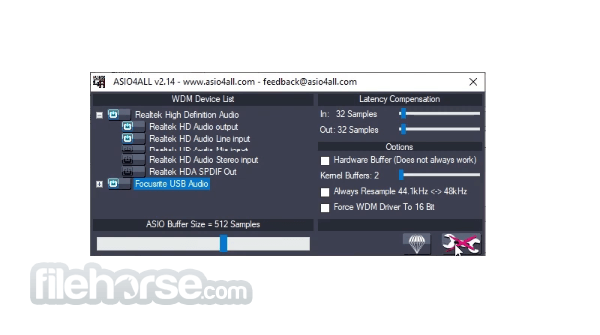
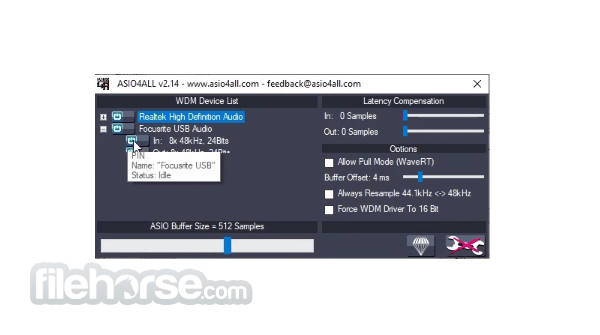
The program does not have a conventional user interface. Instead, it resides in your system tray as an icon. Configuration and customization are done through your audio application's settings, where you can select the driver as your audio driver and access its control panel.
Installation and Setup
Download: Visit the official website or FileHorse and download the latest version of the software.
Installation: Run the installer and follow the on-screen instructions. It's a straightforward process that doesn't require any special technical knowledge.
Configuration: After installation, open your audio software and navigate to its audio settings. Here, select ASIO4ALL as the audio driver and access the control panel for advanced settings.
How to Use
Is ASIO4ALL compatible with my audio interface?
The software is compatible with a wide range of audio interfaces and sound cards. However, compatibility can vary, so it's advisable to check the official website or user forums for specific device support.
Does ASIO4ALL work with all DAW software?
The driver is compatible with most DAW software, but some applications may require additional configuration. Refer to the software's documentation for guidance.
How do I adjust latency settings in ASIO4ALL?
You can adjust latency settings in the control panel. Simply open it from your DAW's settings and navigate to the "Latency" or "Buffer Size" options.
Does ASIO4ALL improve audio quality?
It primarily focuses on reducing latency and improving performance. While it can indirectly contribute to better audio quality by reducing audio artifacts, the primary goal is latency reduction.
Is ASIO4ALL FREE to use?
Yes, the tool is FREE to download and use.
Alternatives
Voicemeeter: Voicemeeter is a virtual audio mixer that provides a GUI for audio routing, mixing, and equalization.
FxSound: Boost the sound quality of your music with FxSound Enhancer powered by DFX.
Boom 3D: The Best System-Wide Volume Booster & Equalizer Software For PC.
SteelSeries GG: GameSense & Customization Software for the Best Gaming Experience.
Nahimic: The best audio experience it contains audio effects and microphone effects!
Pricing
The tool is completely FREE to download and use, making it an excellent choice for those on a budget or anyone looking for a straightforward ASIO solution.
System Requirements
The program is designed to be lightweight and compatible with various Windows versions, including Windows XP, 7, 8, 10 or 11.
It does not have strict system requirements and should work on most Windows PCs.
PROS
ASIO4ALL is a valuable tool for Windows users seeking to enhance their audio recording and playback experiences. With its low latency, compatibility with a wide range of hardware and software, and customizable settings, it offers an accessible solution for musicians, audio engineers, and enthusiasts alike.
While it may not have a graphical user interface, its benefits in terms of reduced latency and improved stability make it a must-have for those looking to elevate their audio production capabilities. Best of all, it's completely FREE!, making it a no-brainer for anyone serious about audio quality on their Windows PC.
Note: Requires a WDM-driver for your audio hardware.
Download ASIO4ALL Latest Version Why is this app published on FileHorse? (More info)
It was created to overcome limitations in the Windows audio stack, offering lower latency and improved audio performance for musicians, audio engineers, and anyone seeking high-quality audio playback and recording.
Key Features
Low Latency: It significantly reduces audio latency, ensuring a more responsive and real-time audio experience, crucial for musicians and audio professionals.
Compatibility: It's compatible with a wide range of audio interfaces, sound cards, and DAW software, making it a versatile choice for audio enthusiasts.
Customizable Settings: It allows users to fine-tune settings for individual audio devices, enabling precise control over input and output parameters.
Multi-Client Support: The software supports multiple audio applications simultaneously, enabling you to use various audio software tools without conflicts.
Stability: It enhances the stability of audio applications, reducing the chances of crashes or audio dropouts during recording or playback.
User Interface
The program does not have a conventional user interface. Instead, it resides in your system tray as an icon. Configuration and customization are done through your audio application's settings, where you can select the driver as your audio driver and access its control panel.
Installation and Setup
Download: Visit the official website or FileHorse and download the latest version of the software.
Installation: Run the installer and follow the on-screen instructions. It's a straightforward process that doesn't require any special technical knowledge.
Configuration: After installation, open your audio software and navigate to its audio settings. Here, select ASIO4ALL as the audio driver and access the control panel for advanced settings.
How to Use
- Open your DAW or audio application.
- Navigate to the audio settings.
- Choose ASIO4ALL as your audio driver.
- Access the control panel to customize settings for your specific audio device.
- Adjust buffer size and latency settings as needed for your project.
- Save your preferences and start recording or playing back audio with reduced latency and improved performance.
Is ASIO4ALL compatible with my audio interface?
The software is compatible with a wide range of audio interfaces and sound cards. However, compatibility can vary, so it's advisable to check the official website or user forums for specific device support.
Does ASIO4ALL work with all DAW software?
The driver is compatible with most DAW software, but some applications may require additional configuration. Refer to the software's documentation for guidance.
How do I adjust latency settings in ASIO4ALL?
You can adjust latency settings in the control panel. Simply open it from your DAW's settings and navigate to the "Latency" or "Buffer Size" options.
Does ASIO4ALL improve audio quality?
It primarily focuses on reducing latency and improving performance. While it can indirectly contribute to better audio quality by reducing audio artifacts, the primary goal is latency reduction.
Is ASIO4ALL FREE to use?
Yes, the tool is FREE to download and use.
Alternatives
Voicemeeter: Voicemeeter is a virtual audio mixer that provides a GUI for audio routing, mixing, and equalization.
FxSound: Boost the sound quality of your music with FxSound Enhancer powered by DFX.
Boom 3D: The Best System-Wide Volume Booster & Equalizer Software For PC.
SteelSeries GG: GameSense & Customization Software for the Best Gaming Experience.
Nahimic: The best audio experience it contains audio effects and microphone effects!
Pricing
The tool is completely FREE to download and use, making it an excellent choice for those on a budget or anyone looking for a straightforward ASIO solution.
System Requirements
The program is designed to be lightweight and compatible with various Windows versions, including Windows XP, 7, 8, 10 or 11.
It does not have strict system requirements and should work on most Windows PCs.
PROS
- Reduces audio latency for a more responsive experience.
- Broad compatibility with various audio interfaces and software.
- Customizable settings for fine-tuning audio device parameters.
- Stability improvements for audio applications.
- Free to use, making it accessible to all.
- Lack of a graphical user interface may be intimidating for some users.
- Compatibility with specific audio hardware can vary.
- Configuration may require some technical knowledge.
ASIO4ALL is a valuable tool for Windows users seeking to enhance their audio recording and playback experiences. With its low latency, compatibility with a wide range of hardware and software, and customizable settings, it offers an accessible solution for musicians, audio engineers, and enthusiasts alike.
While it may not have a graphical user interface, its benefits in terms of reduced latency and improved stability make it a must-have for those looking to elevate their audio production capabilities. Best of all, it's completely FREE!, making it a no-brainer for anyone serious about audio quality on their Windows PC.
Note: Requires a WDM-driver for your audio hardware.
Download ASIO4ALL Latest Version Why is this app published on FileHorse? (More info)
##
畫面截圖
- 2026-07-22 ASIO4ALL 2.22 544.17 KB
- 2026-06-11 ASIO4ALL 2.21 386.7 KB
- 2026-04-28 ASIO4ALL 2.20 420.03 KB
- 2026-04-19 ASIO4ALL 2.19 417.66 KB
- 2026-03-29 ASIO4ALL 2.18 417.42 KB
- 2026-03-08 ASIO4ALL 2.17 416.36 KB
- 2024-07-18 ASIO4ALL 2.16 381.77 KB
- 2022-05-19 ASIO4ALL 2.15 310.13 KB