ASUS Smart Gesture 4.0.12 (32-bit)
v 4.0.12 (32-bit)
Windows
免費軟體
8.34/10 (12)
- 目前版本4.0.12 (32-bit)
- 更新日期2025-12-07
- 檔案大小53.74 MB
- 檔案名稱SmartGesture_Win10_32_VER4012.zip
- 作業系統Windows XP / Vista / Windows 7 / Windows 8 / Windows 10
- 支援語系English
- 授權型式免費軟體
- 開發商 Asus
- 軟體分類Windows 軟體 / 驅動程式
##
翻譯排程處理中,以下暫以英文原文呈現
軟體介紹
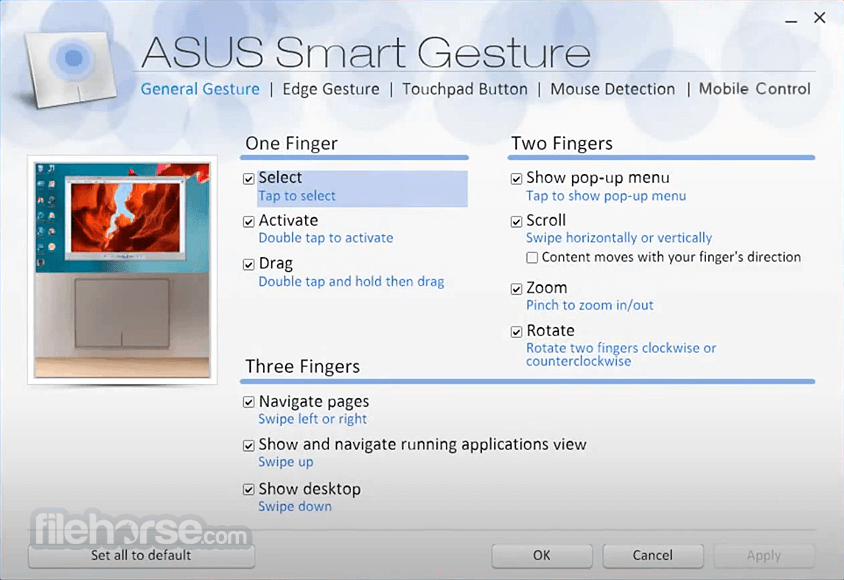
ASUS Smart Gesture is a smart touchpad driver that helps you control more precise gestures, including tapping, scrolling, dragging, clicking, and more.
Check out the new ASUS Touchpad Driver.
For Intel 7th and 8th Generation units, Smart Gesture is replaced by the PTP driver, and it’s pre-installed in Windows 11/10, so you don’t need to download and install it. Please be aware that you also need to update the related ATK driver if you are using the 64-bit version of the ASUS Smart Gesture program.
When "Disable touchpad when the mouse is plugged in” is enabled, the touchpad function becomes disabled after an external mouse is plugged in. This includes a USB cable mouse, a wireless mouse, and a Bluetooth mouse. You can use your mobile phone to remotely control your PC through WiFi or Bluetooth. (You need to install Remote Link from App Store or Google Play first).
You might also like:
Driver Easy - Automatically updates and maintains your Windows PC's drivers in just a few simple steps.
System Requirements
The system requirements for this driver vary depending on the version of the software and the specifications of the ASUS laptop. Generally, the software is compatible with Windows operating systems and ASUS laptop models equipped with compatible touchpads.
PROS
Download ASUS Smart Gesture (32-bit) Latest Version Why is this app published on FileHorse? (More info)
Check out the new ASUS Touchpad Driver.
For Intel 7th and 8th Generation units, Smart Gesture is replaced by the PTP driver, and it’s pre-installed in Windows 11/10, so you don’t need to download and install it. Please be aware that you also need to update the related ATK driver if you are using the 64-bit version of the ASUS Smart Gesture program.
When "Disable touchpad when the mouse is plugged in” is enabled, the touchpad function becomes disabled after an external mouse is plugged in. This includes a USB cable mouse, a wireless mouse, and a Bluetooth mouse. You can use your mobile phone to remotely control your PC through WiFi or Bluetooth. (You need to install Remote Link from App Store or Google Play first).
You might also like:
Driver Easy - Automatically updates and maintains your Windows PC's drivers in just a few simple steps.
System Requirements
The system requirements for this driver vary depending on the version of the software and the specifications of the ASUS laptop. Generally, the software is compatible with Windows operating systems and ASUS laptop models equipped with compatible touchpads.
PROS
- Enhances touchpad functionality with multi-finger gestures.
- Customization options for gesture settings.
- Palm rejection technology prevents accidental input.
- Improves productivity and navigation on ASUS laptops.
- Intuitive user interface.
- This product is not being developed actively anymore.
- Limited to ASUS laptops, not compatible with other brands.
- May have compatibility issues with certain applications.
- No support for custom gestures.
- Limited support for external input devices.
Download ASUS Smart Gesture (32-bit) Latest Version Why is this app published on FileHorse? (More info)
##
畫面截圖