- 目前版本4.1.22
- 更新日期2026-07-21
- 檔案大小44.1 MB
- 檔案名稱cool-mobile-transfer.exe
- 作業系統Windows 7 / Windows 8 / Windows 10 / Windows 11
- 支援語系English
- 授權型式試用版
- 開發商 Coolmuster Studio
- 軟體分類Windows 軟體 / 手機工具
##
翻譯排程處理中,以下暫以英文原文呈現
軟體介紹
Plan to switch to a new phone but find it troublesome to transfer data from phone to phone? Or find it difficult to transfer files between 2 phones with different operating systems? Want to transfer contacts and SMS from one phone to another but it seems to be a huge task?
These problems have been solved! With the professional phone-to-phone transfer tool – Coolmuster Mobile Transfer, these problems are just a piece of cake.
Compatible with the latest iOS 26/18, Android 16/15 and iPhone 17/16/Plus/Pro/Pro Max.
Now, let’s see how the Coolmuster Mobile Transfer helps with these data transfer problems between 2 mobile phones. You’ll know if you check the main features of it below:
Transfer Data from Android to Android with 1 Click
Various files are supported to be transferred from one Android phone to another with only one click, such as contacts, SMS, call logs, music, videos, photos, eBooks, and apps.
Move Data from iOS to iOS with 1 Click
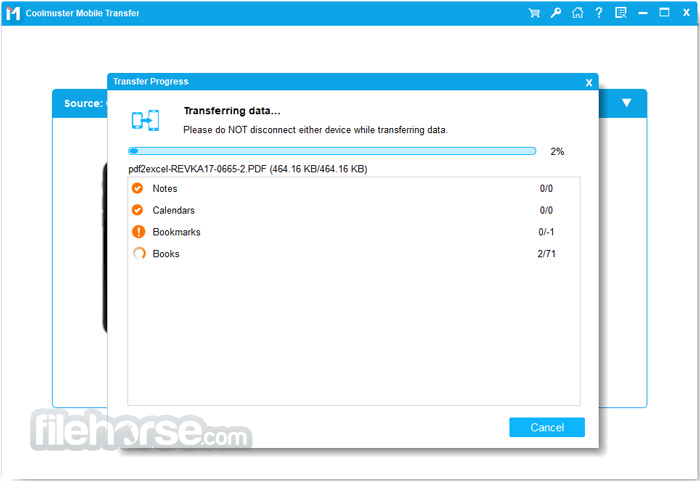
It enables you to easily transfer files from one iDevice to another with 1 click, no matter whether it is an iPhone, iPad, or iPod touch. Various files are supported, including contacts, calendars, bookmarks, eBooks (PDFs & ePubs), and notes.
Sync Data from Android to iOS with 1 Click
It enables you to sync different files from Android phone to iPhone/iPad/iPod with one click, such as contacts, eBooks (PDFs and ePubs), and more.
Switch Data from iOS to Android with 1 Click
If you want to switch from iPhone/iPad/iPod to an Android phone, it can also help you out. Different files are supported, like contacts, SMS, music, videos, photos, and eBooks (PDFs & ePubs).
Easy to Use
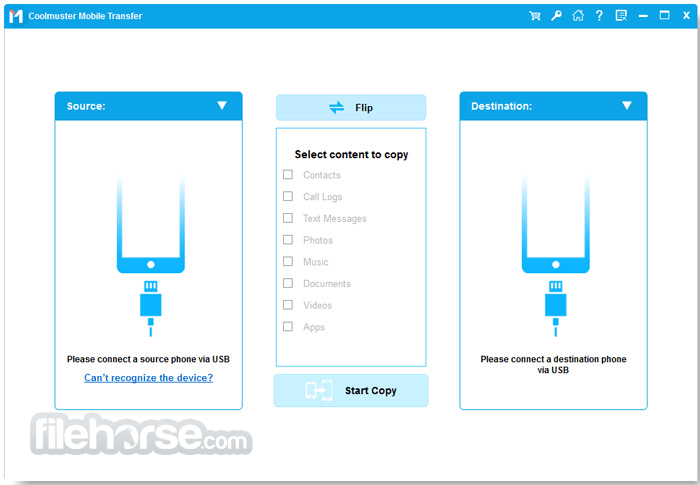
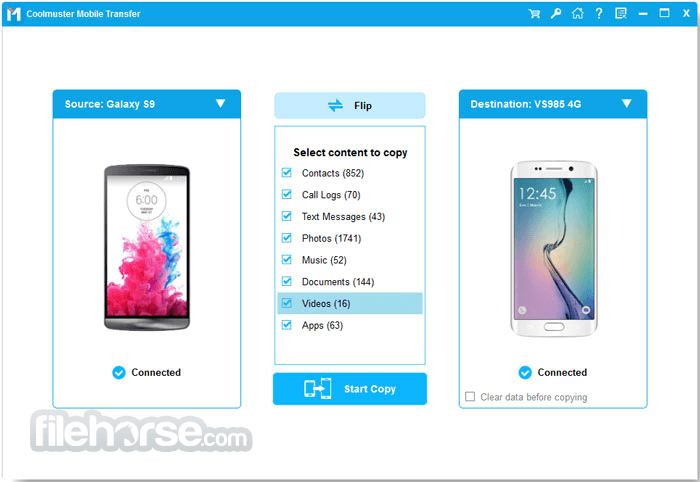
Without any technical skills, you can easily handle it. Simply connect your phones, choose the files you need, and start transferring data by clicking the “Start Copy” button.
Supported File Types
Android to Android: Apps, Contacts, SMS, Music, Photos, Videos, Documents, Call Logs
Android to iOS: Contacts, Documents (PDF and ePub)
iOS to Android: Contacts, SMS, Books (PDF and ePub), Music, Videos, Photos
iOS to iOS: Contacts, Notes, Calendars, Safari Bookmarks, Books
Supported Devices
Android: Support most of Android phones and tablets, including Samsung, Xiaomi, OPPO, Oneplus, TECNO, Infinix, Itel, vivo, Honor, realme, Motorola, TCL, Google, T-Mobile, BLU, Alcatel, Wiko, Nokia, Boost, SONIM, Sony, CAT, ZTE, LG, Meizu, Lenovo, Coolpad, Micromax, Asus, DELL, Acer, Amazon, Apanda, HTC, etc. For more detailed phone models, you can refer to the tech spec page of Android Assistant.
iOS: iPhone 17 Pro Max, iPhone 17 Pro, iPhone 17, iPhone 16 Pro Max, iPhone 16 Pro, iPhone 16, iPhone 15 Pro Max, iPhone 15 Pro, iPhone 15 Plus, iPhone 15, iPhone 14 Pro Max, iPhone 14 Pro, iPhone 14, iPhone 14 Plus, iPhone 13, iPhone 13 Pro Max, iPhone 13 Pro, iPhone 13 Mini, iPhone 12, iPhone SE (2022), iPhone 11, iPhone 11 Pro, iPhone 11 Pro Max, iPhone Xs Max, iPhone Xs, iPhone XR, iPhone X, iPhone 8/8 Plus, iPhone 7 Plus, iPhone 7, iPhone 6s Plus, iPhone 6s, iPhone 6, iPhone 6 Plus, iPhone 5s, iPhone 5c, iPhone 5, iPhone 4S, iPhone 4, etc.; iPad Pro, iPad air, iPad mini 4/3/2,, iPad mini with Retina display, iPad with Retina display, The New iPad, iPad 2, iPad (including the 10th generation), etc.; iPod touch 7, iPod touch 6, iPod touch 5, iPod touch 4, iPod touch 3.
System Requirements
Also Available: Download Coolmuster Mobile Transfer for Mac
Download Coolmuster Mobile Transfer Latest Version Why is this app published on FileHorse? (More info)
These problems have been solved! With the professional phone-to-phone transfer tool – Coolmuster Mobile Transfer, these problems are just a piece of cake.
Compatible with the latest iOS 26/18, Android 16/15 and iPhone 17/16/Plus/Pro/Pro Max.
Now, let’s see how the Coolmuster Mobile Transfer helps with these data transfer problems between 2 mobile phones. You’ll know if you check the main features of it below:
Transfer Data from Android to Android with 1 Click
Various files are supported to be transferred from one Android phone to another with only one click, such as contacts, SMS, call logs, music, videos, photos, eBooks, and apps.
Move Data from iOS to iOS with 1 Click
It enables you to easily transfer files from one iDevice to another with 1 click, no matter whether it is an iPhone, iPad, or iPod touch. Various files are supported, including contacts, calendars, bookmarks, eBooks (PDFs & ePubs), and notes.
Sync Data from Android to iOS with 1 Click
It enables you to sync different files from Android phone to iPhone/iPad/iPod with one click, such as contacts, eBooks (PDFs and ePubs), and more.
Switch Data from iOS to Android with 1 Click
If you want to switch from iPhone/iPad/iPod to an Android phone, it can also help you out. Different files are supported, like contacts, SMS, music, videos, photos, and eBooks (PDFs & ePubs).
Easy to Use
Without any technical skills, you can easily handle it. Simply connect your phones, choose the files you need, and start transferring data by clicking the “Start Copy” button.
Supported File Types
Android to Android: Apps, Contacts, SMS, Music, Photos, Videos, Documents, Call Logs
Android to iOS: Contacts, Documents (PDF and ePub)
iOS to Android: Contacts, SMS, Books (PDF and ePub), Music, Videos, Photos
iOS to iOS: Contacts, Notes, Calendars, Safari Bookmarks, Books
Supported Devices
Android: Support most of Android phones and tablets, including Samsung, Xiaomi, OPPO, Oneplus, TECNO, Infinix, Itel, vivo, Honor, realme, Motorola, TCL, Google, T-Mobile, BLU, Alcatel, Wiko, Nokia, Boost, SONIM, Sony, CAT, ZTE, LG, Meizu, Lenovo, Coolpad, Micromax, Asus, DELL, Acer, Amazon, Apanda, HTC, etc. For more detailed phone models, you can refer to the tech spec page of Android Assistant.
iOS: iPhone 17 Pro Max, iPhone 17 Pro, iPhone 17, iPhone 16 Pro Max, iPhone 16 Pro, iPhone 16, iPhone 15 Pro Max, iPhone 15 Pro, iPhone 15 Plus, iPhone 15, iPhone 14 Pro Max, iPhone 14 Pro, iPhone 14, iPhone 14 Plus, iPhone 13, iPhone 13 Pro Max, iPhone 13 Pro, iPhone 13 Mini, iPhone 12, iPhone SE (2022), iPhone 11, iPhone 11 Pro, iPhone 11 Pro Max, iPhone Xs Max, iPhone Xs, iPhone XR, iPhone X, iPhone 8/8 Plus, iPhone 7 Plus, iPhone 7, iPhone 6s Plus, iPhone 6s, iPhone 6, iPhone 6 Plus, iPhone 5s, iPhone 5c, iPhone 5, iPhone 4S, iPhone 4, etc.; iPad Pro, iPad air, iPad mini 4/3/2,, iPad mini with Retina display, iPad with Retina display, The New iPad, iPad 2, iPad (including the 10th generation), etc.; iPod touch 7, iPod touch 6, iPod touch 5, iPod touch 4, iPod touch 3.
System Requirements
- OS: Windows 11, 10, 8 or 7
- Android: Android 4.0 and up (Android 16 included)
- iOS: iOS 5 and up (iOS 26 included)
- 512 MB or more
- 1GHz (32 bit or 64 bit) or above
- 200 MB or more free space
- Easy-to-Use Interface
- Supports Multiple Devices
- Fast Data Transfer
- No Data Loss Assurance
- Wide File Type Compatibility
- Limited Free Version
- No Cross-Platform Support
- Occasional Transfer Errors
- Requires Stable Connection
Also Available: Download Coolmuster Mobile Transfer for Mac
Download Coolmuster Mobile Transfer Latest Version Why is this app published on FileHorse? (More info)
##
畫面截圖