- 目前版本5.3
- 更新日期2026-02-18
- 檔案大小4.5 MB
- 檔案名稱FreeCountdownTimerSetup.exe
- 作業系統Windows 7 / Windows 8 / Windows 10 / Windows 11
- 支援語系English
- 授權型式免費軟體
- 開發商 Comfort Software Group
- 軟體分類Windows 軟體 / 桌面強化
##
翻譯排程處理中,以下暫以英文原文呈現
軟體介紹
Countdown Timer is a free, competent clock and time management app that empowers Windows PC users to take full control over their timed notifications and time their activities with an incredibly streamlined user interface and a wide set of tools.
Developed from the ground up by Comfort Software Group, this Countdown Timer desktop app features one of the most extensive sets of time management tools that anyone can imagine, helping users of all knowledge levels to set a large variety of customizable countdown timers.
The app can manage any type of short-term timers that count toward various daily activities (finishing of productivity tasks, cooking, break timers…), important personal events (medical reminders, pregnancy-related events, meetings with friends and family…), the long-term events that are still months and years away (vacation and birthday reminders, Valentine's Day countdown timers…) and much more.
Here are some ideas for a countdown clock:
The app is lightweight and fast, and therefore can easily run in the background and be an unobtrusive service that users can rely on to get accurate reminders featuring notification messages, strong audio feedback, or even playback of their favorite song.
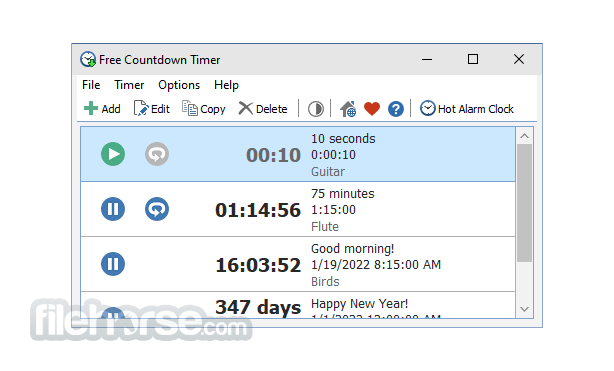
The main dashboard of this app features a streamlined and easy-to-use interface that promotes an eye-catching listing of soon-to-expire countdowns and an easy way to add brand-new countdown timers.
New timers can be added by simply clicking on the “Add” button at the top of the main dashboard screen, opening an extensive configuration popup window that features exact time configuration, label with a custom message, and Alarm settings (system sound or custom file playback, volume controls, repeat sound, snooze, and turn on monitor tool).
What`s new
The timer app has undergone various improvements, including changes to the form for editing timers, the ability for the main window to remain hidden on startup if it was hidden previously, and hiding of the audio slider when the "Turn on the volume" setting is unchecked. The overdue time label format in the alert window has also been updated, and a new timer mode, "OnZero: Run as stopwatch," has been added.
Additionally, some interface languages have been corrected, an empty folder creation issue has been fixed, and various other bug fixes and improvements have been made.
FAQs
What is Free Countdown Timer used for?
Free Countdown Timer is a Windows application that allows users to create one or multiple countdown timers for specific dates or time intervals. It is commonly used for reminders, events, study sessions, workouts, cooking, and productivity tasks.
Can you run multiple timers at the same time?
Yes. One of the key features of Countdown Timer is the ability to run multiple timers simultaneously. Each timer can have its own name, duration, and custom alarm sound, making it useful for managing different tasks at once.
Is the Countdown Timer free and easy to use?
Yes. The software is free to use and features a simple, user-friendly interface. It does not require a complex setup, and users can quickly create, edit, and manage timers with minimal configuration.
PROS
Download Countdown Timer Latest Version Why is this app published on FileHorse? (More info)
Developed from the ground up by Comfort Software Group, this Countdown Timer desktop app features one of the most extensive sets of time management tools that anyone can imagine, helping users of all knowledge levels to set a large variety of customizable countdown timers.
The app can manage any type of short-term timers that count toward various daily activities (finishing of productivity tasks, cooking, break timers…), important personal events (medical reminders, pregnancy-related events, meetings with friends and family…), the long-term events that are still months and years away (vacation and birthday reminders, Valentine's Day countdown timers…) and much more.
Here are some ideas for a countdown clock:
- Expert Tea Steeping
- Appointment Reminder
- Break Timer
- Cooking Timer
- Birthday Countdown Timer
- Graduation Countdown Timer
- Pregnancy Countdown Timer
- Sports Countdown Timer
- Vacation Countdown Timer
- Wedding Countdown Timer
- Christmas Countdown Timer
- Halloween Countdown Timer
- New Year Countdown Timer
- Saint Patrick's Day Countdown Timer
- Thanksgiving Countdown Timer
- Valentine's Day Countdown Timer
The app is lightweight and fast, and therefore can easily run in the background and be an unobtrusive service that users can rely on to get accurate reminders featuring notification messages, strong audio feedback, or even playback of their favorite song.
The main dashboard of this app features a streamlined and easy-to-use interface that promotes an eye-catching listing of soon-to-expire countdowns and an easy way to add brand-new countdown timers.
New timers can be added by simply clicking on the “Add” button at the top of the main dashboard screen, opening an extensive configuration popup window that features exact time configuration, label with a custom message, and Alarm settings (system sound or custom file playback, volume controls, repeat sound, snooze, and turn on monitor tool).
What`s new
The timer app has undergone various improvements, including changes to the form for editing timers, the ability for the main window to remain hidden on startup if it was hidden previously, and hiding of the audio slider when the "Turn on the volume" setting is unchecked. The overdue time label format in the alert window has also been updated, and a new timer mode, "OnZero: Run as stopwatch," has been added.
Additionally, some interface languages have been corrected, an empty folder creation issue has been fixed, and various other bug fixes and improvements have been made.
FAQs
What is Free Countdown Timer used for?
Free Countdown Timer is a Windows application that allows users to create one or multiple countdown timers for specific dates or time intervals. It is commonly used for reminders, events, study sessions, workouts, cooking, and productivity tasks.
Can you run multiple timers at the same time?
Yes. One of the key features of Countdown Timer is the ability to run multiple timers simultaneously. Each timer can have its own name, duration, and custom alarm sound, making it useful for managing different tasks at once.
Is the Countdown Timer free and easy to use?
Yes. The software is free to use and features a simple, user-friendly interface. It does not require a complex setup, and users can quickly create, edit, and manage timers with minimal configuration.
PROS
- An extensive set of time management tools
- Customizable countdown timers for various activities and events
- Streamlined and easy-to-use interface
- Lightweight and fast, can run in the background
- Support for legacy versions of Windows OS
- Features notification messages, audio feedback, and custom file playback
- Some interface languages have been corrected
Download Countdown Timer Latest Version Why is this app published on FileHorse? (More info)
##
畫面截圖