Das Keyboard Q 4.3.0
v 4.3.0
Windows
免費軟體
7/10 (3)
- 目前版本4.3.0
- 更新日期2025-09-11
- 檔案大小129 MB
- 檔案名稱das-keyboard-q-4.3.0+Setup.exe
- 作業系統Windows 8 / Windows 10 / Windows 11
- 支援語系English
- 授權型式免費軟體
- 開發商 Das Keyboard
- 軟體分類Windows 軟體 / 桌面強化
##
翻譯排程處理中,以下暫以英文原文呈現
軟體介紹
Das Keyboard Q is an official input utility for a specific range of Q keyboards created by the famous manufacturer Das Keyboard.
Since modern keyboards can perform so many functions with their advanced processing and input control, the creators of this highly reliable and precise keyboard have created an official app for assigning different functions to any key user desires.
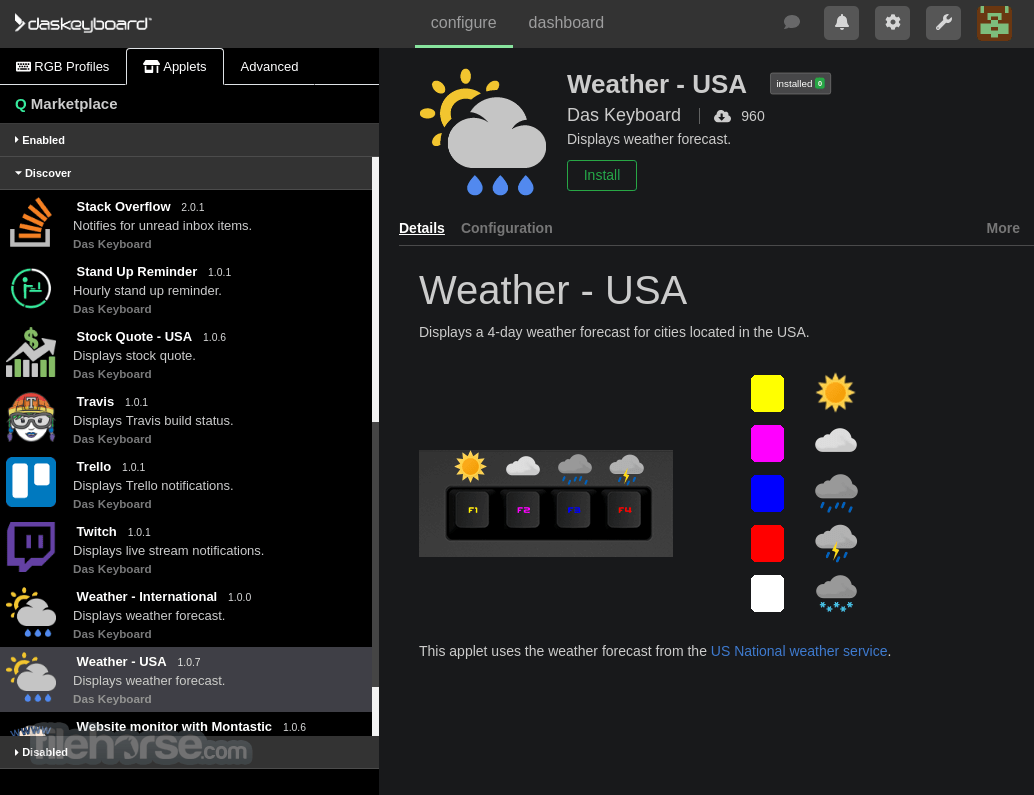
In addition to the standard service of remapping keys, this app also comes with built-in access to its own Marketplace service where users can download and activate applet plugins that can dramatically configure what each key is capable of executing during regular, school, and work usage.
Das Keyboard company is famous around the world for their highly durable, precise, and reliable keyboards that use the best Cherry switches that can make each keyboard last for a decade or more.
But customization of the keyboard is done with the help of this useful Das Keyboard Q software that is distributed online as an automated installer that can be easily deployed on any modern desktop PC running several versions of Windows OS.
Once installed, the app can run in both public mode and Q cloud account mode where more functions are unlocked. All users can see a detailed overview of their keyboard, see what keys are currently mapped, and more importantly, get full control over the RGB illumination.
Q-lineup of Das Keyboard product features RGB illumination that can be configured in two ways. Via RGB Profiles Tab that is located in the top left corner of the app dashboard, and via the “Applets” tab. While the “Profiles” tab can be used for the creation of usual RGB visual themes, Applets are much more powerful and can dramatically enhance the expressiveness of the keyboard.
These small plugins can illuminate keys to perform various functions, including displaying notifications from several productivity cloud services (Asana, Basecamp), automating workflows more easily with Bamzooka, showing a visual representation of CPU Usage, Display Time, real-time changes in crypto prices, and even website pinging tool that can assign a color to any key, enabling website engineers to always know if their online destinations are accessible by the public.
These plugins can be installed with a simple click on a green “Install” button, and then additionally configured by switching from the Details to Configuration tab.
All in all, Das Keyboard Q is an essential configuration utility for all owners of the Q-line of Das Keyboard products. The app is FREE and can run on Windows 10, and 11 (64-bit only).
How to Use
Download Das Keyboard Q Latest Version Why is this app published on FileHorse? (More info)
Since modern keyboards can perform so many functions with their advanced processing and input control, the creators of this highly reliable and precise keyboard have created an official app for assigning different functions to any key user desires.
In addition to the standard service of remapping keys, this app also comes with built-in access to its own Marketplace service where users can download and activate applet plugins that can dramatically configure what each key is capable of executing during regular, school, and work usage.
Das Keyboard company is famous around the world for their highly durable, precise, and reliable keyboards that use the best Cherry switches that can make each keyboard last for a decade or more.
But customization of the keyboard is done with the help of this useful Das Keyboard Q software that is distributed online as an automated installer that can be easily deployed on any modern desktop PC running several versions of Windows OS.
Once installed, the app can run in both public mode and Q cloud account mode where more functions are unlocked. All users can see a detailed overview of their keyboard, see what keys are currently mapped, and more importantly, get full control over the RGB illumination.
Q-lineup of Das Keyboard product features RGB illumination that can be configured in two ways. Via RGB Profiles Tab that is located in the top left corner of the app dashboard, and via the “Applets” tab. While the “Profiles” tab can be used for the creation of usual RGB visual themes, Applets are much more powerful and can dramatically enhance the expressiveness of the keyboard.
These small plugins can illuminate keys to perform various functions, including displaying notifications from several productivity cloud services (Asana, Basecamp), automating workflows more easily with Bamzooka, showing a visual representation of CPU Usage, Display Time, real-time changes in crypto prices, and even website pinging tool that can assign a color to any key, enabling website engineers to always know if their online destinations are accessible by the public.
These plugins can be installed with a simple click on a green “Install” button, and then additionally configured by switching from the Details to Configuration tab.
All in all, Das Keyboard Q is an essential configuration utility for all owners of the Q-line of Das Keyboard products. The app is FREE and can run on Windows 10, and 11 (64-bit only).
How to Use
- Connect your Das Keyboard Q to your PC via USB
- Launch the software and log in or create an account
- Customize key functions and lighting in the software
- Set up notifications for emails, tasks, or system alerts
- Create macros and shortcuts for enhanced productivity
- Sync cloud services and third-party integrations
- Save and apply profiles for different workflows
- Update firmware for the latest features and fixes
- Troubleshoot connectivity or software issues if needed
- Windows 10 or Windows 11
- USB 2.0 or higher port
- Internet connection for cloud features
- Minimum 2GB RAM
- 200MB free storage space
- Customizable RGB lighting and notifications
- Programmable keys for automation
- High-quality mechanical switches
- Cloud integration with multiple apps
- Durable build with an ergonomic design
- Requires an internet connection for full features
- Software can be complex for beginners
- Limited support for non-cloud users
- Higher price compared to standard keyboards
- No dedicated media control keys
Download Das Keyboard Q Latest Version Why is this app published on FileHorse? (More info)
##
影片介紹
##
畫面截圖