- 目前版本1.1
- 更新日期2025-09-04
- 檔案大小254.15 KB
- 檔案名稱DimScreen.zip
- 作業系統Windows XP / Vista / Windows 7 / Windows 8 / Windows 10 / Windows 11
- 支援語系English
- 授權型式開源軟體
- 開發商 Skrommel
- 軟體分類Windows 軟體 / 桌面強化
##
翻譯排程處理中,以下暫以英文原文呈現
軟體介紹
DimScreen is a useful system tool that can help all PC users, and not only laptop owners, to easily control the screen brightness of a PC display.
While laptop users have enjoyed this feature for decades as one of the best ways to prolong the life of the finite built-in battery, PC desktop/laptop users have never gotten a streamlined way to regulate the brightness of their monitor.
Key Features
Dim Screen app is distributed online as a portable archive that features no automated installer or uninstaller. Simply extract the app to any location on your local or external storage drive, and run the app. Its interface is truly minimal after the app has settled on your taskbar.
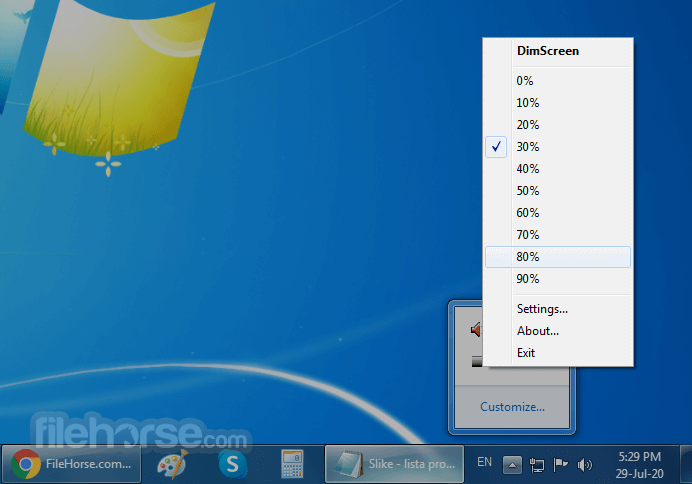
User can click on its icon and access a large dropdown menu with 0-100% brightness selection in steps of 10%, and a Settings window where keyboard shortcuts can be assigned.
However, only three keyboard shortcut tools are offered: activation of the app, decreasing brightness, and increasing brightness. The user can set their preferred key combination, but the ability to set a shortcut for a specific brightness amount (let’s say 70%) is not possible.
The only alternative to this issue can be found in the setting called “Startup dimming” which can set the display brightness to the desired level on app startup.
DimScreen is a very useful app that does its advertised job very well. It can reduce and increase brightness on any screen, finally enabling desktop PC users to easily set their monitor or TV brightness levels depending on their environment (day or night) or content that they are enjoying (bright documents, multimedia, gaming).
Note: It's been a long time since there was an update on the official website.
PROS
Download DimScreen Latest Version Why is this app published on FileHorse? (More info)
While laptop users have enjoyed this feature for decades as one of the best ways to prolong the life of the finite built-in battery, PC desktop/laptop users have never gotten a streamlined way to regulate the brightness of their monitor.
Key Features
- Change the brightness by selecting a `% in the tray menu.
- Or use the hotkeys Ctrl++ and Ctrl+-.
- Change hotkeys using Settings in the tray menu.
- Doesn't work properly with video windows.
Dim Screen app is distributed online as a portable archive that features no automated installer or uninstaller. Simply extract the app to any location on your local or external storage drive, and run the app. Its interface is truly minimal after the app has settled on your taskbar.
User can click on its icon and access a large dropdown menu with 0-100% brightness selection in steps of 10%, and a Settings window where keyboard shortcuts can be assigned.
However, only three keyboard shortcut tools are offered: activation of the app, decreasing brightness, and increasing brightness. The user can set their preferred key combination, but the ability to set a shortcut for a specific brightness amount (let’s say 70%) is not possible.
The only alternative to this issue can be found in the setting called “Startup dimming” which can set the display brightness to the desired level on app startup.
DimScreen is a very useful app that does its advertised job very well. It can reduce and increase brightness on any screen, finally enabling desktop PC users to easily set their monitor or TV brightness levels depending on their environment (day or night) or content that they are enjoying (bright documents, multimedia, gaming).
Note: It's been a long time since there was an update on the official website.
PROS
- Easy-to-use brightness adjustment.
- Minimal system resource usage.
- Quick access via the system tray.
- Portable, no installation needed.
- Customizable hotkeys for brightness control.
- Limited advanced features.
- No multi-monitor support.
- No automatic brightness adjustment.
- Basic user interface.
- No support for brightness scheduling.
- Lack of official support and updates.
Download DimScreen Latest Version Why is this app published on FileHorse? (More info)
##
畫面截圖