- 目前版本24.3
- 更新日期2026-04-17
- 檔案大小92.7 MB
- 檔案名稱dvd-ripper.exe
- 作業系統Windows 7 / Windows 8 / Windows 10 / Windows 11
- 支援語系English
- 授權型式商業試用
- 開發商 WonderFox Soft, Inc.
- 軟體分類Windows 軟體 / 光碟藍光
##
翻譯排程處理中,以下暫以英文原文呈現
軟體介紹
WonderFox DVD Ripper Pro - The real No. 1 speed smart DVD ripping software that provides the quickest solution to rip your extensive DVD collection to virtually any video, audio, and device.
Enjoy your DVD just gets simpler and faster. The video I create will be in perfect quality (even in high-definition). No missing key frames, redraw issues, or crashes.
Based on my built-in leading DVD decryption and decoding technology, I’m always ready to help you rip any DVD (Disc/Folder/ISO) to standard video formats, including DVD to AVI, DVD to MP4, DVD to MKV, DVD to MPG, WMV, MOV, MTS, M4V, ASF, DVC, MTS, M2TS, WEBM, FLV, SWF, VOB, F4V, 3GP and 3GP2 to meet your different demands and also DVDs to HD video formats for better playback on a larger screen. WonderFox DVD Ripper Pro is Amazing!
As the No.1 utility for DVD rip movie and also the best DVD ripper Windows 11/10/8/7 software, I’m going to let you watch your favorite DVD discs on various screens and displays.
Appreciating the one who created me. I just find myself happy with the simple things, that is to say, I have preset optimized parameters for all pop devices such as DVD to iPad, DVD to iPhone, DVD to Android device, Samsung, Microsoft, Google Android, LG, Amazon, Moto, Sony, HUAWEI, Nokia, BlackBerry, HTC, Xbox, Projector (4K/FHD/720P) and many more.
Highlights
Perfect Balance in Compression Ratio, File Size, and Output Quality
Compress a DVD (7.5 GB) to digital video (1.2 GB) without losing quality.
Fastest DVD-to-digital Conversion Speed
Only 20 minutes to rip a 150 minutes DVD to MP4, AVI, MKV, MOV, WMV with 0-Quality-Loss, and much less time to backup a DVD to MPG (only 5~10 minutes).
Intelligently Detect Main Title for DVD Movie and TV Show
Easily find out the right title from 99 titles as well as remove unwanted ads, trailers, video clips, and some other things.
Features
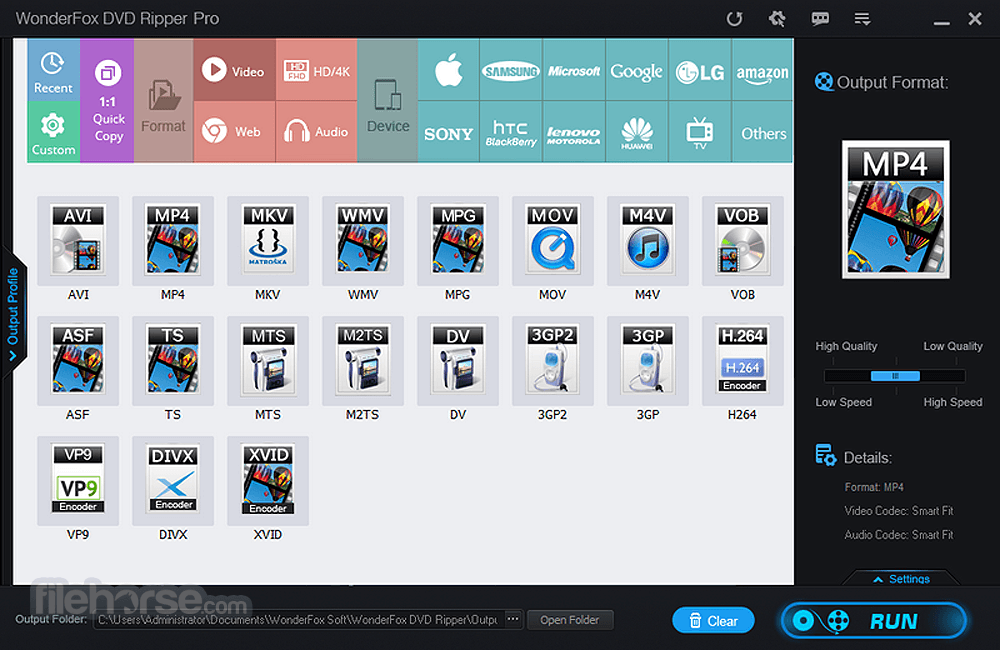
Wide Format Support: Converts DVDs to numerous video and audio formats, including MP4, AVI, MKV, MPG, and MP3.
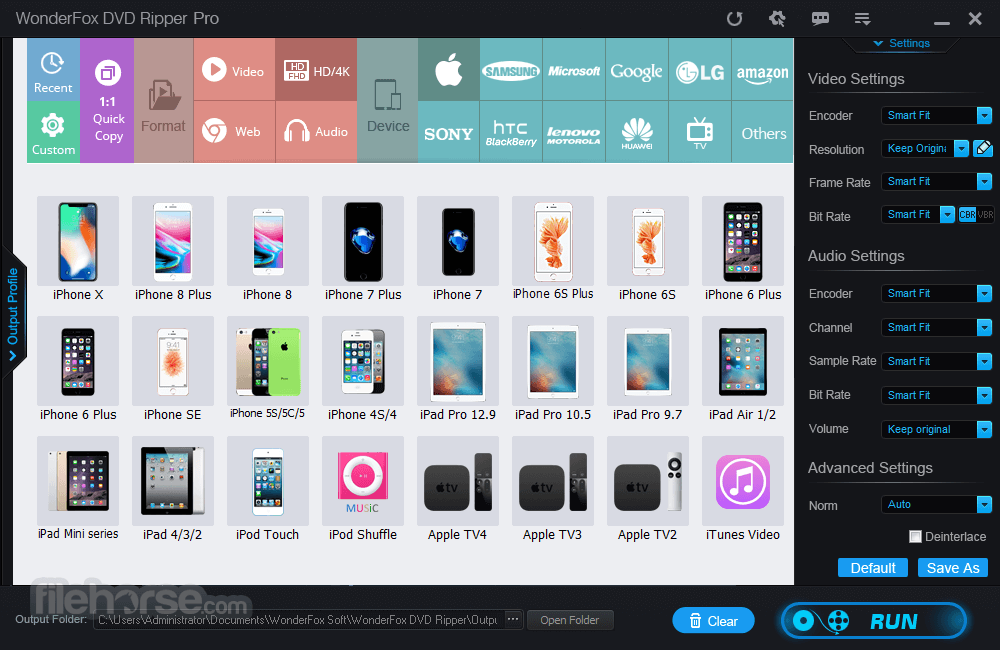
Device Optimization: Pre-configured profiles for various devices such as iPhones, Android phones, smart TVs, and gaming consoles.
High-Speed Conversion: Utilizes GPU acceleration technology to ensure fast ripping without compromising quality.
Advanced Editing Tools: Allows users to trim, crop, merge, and add subtitles to videos.
Bypass Protections: Supports ripping of copy-protected and region-locked DVDs.
High-Quality Output: Ensures that converted videos retain their original quality, including 1:1 DVD-to-MP4 conversions.
Batch Processing: Allows multiple DVD files to be ripped simultaneously.
User-Friendly Interface: Intuitive layout suitable for both novice and advanced users.
User Interface
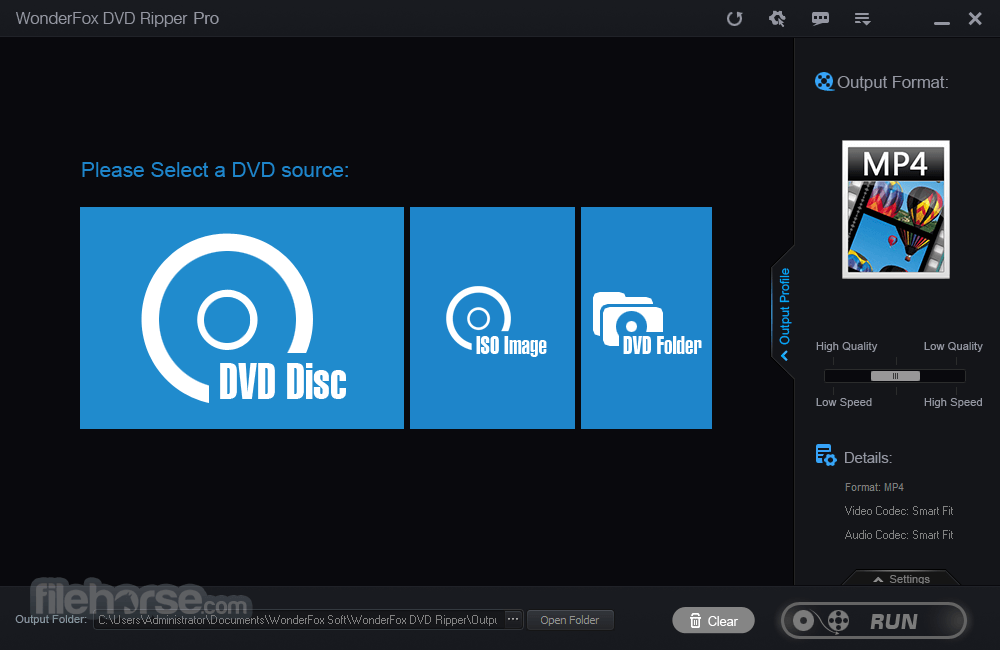
Main Dashboard: Centralized access to add DVDs, select output formats, and initiate the ripping process.
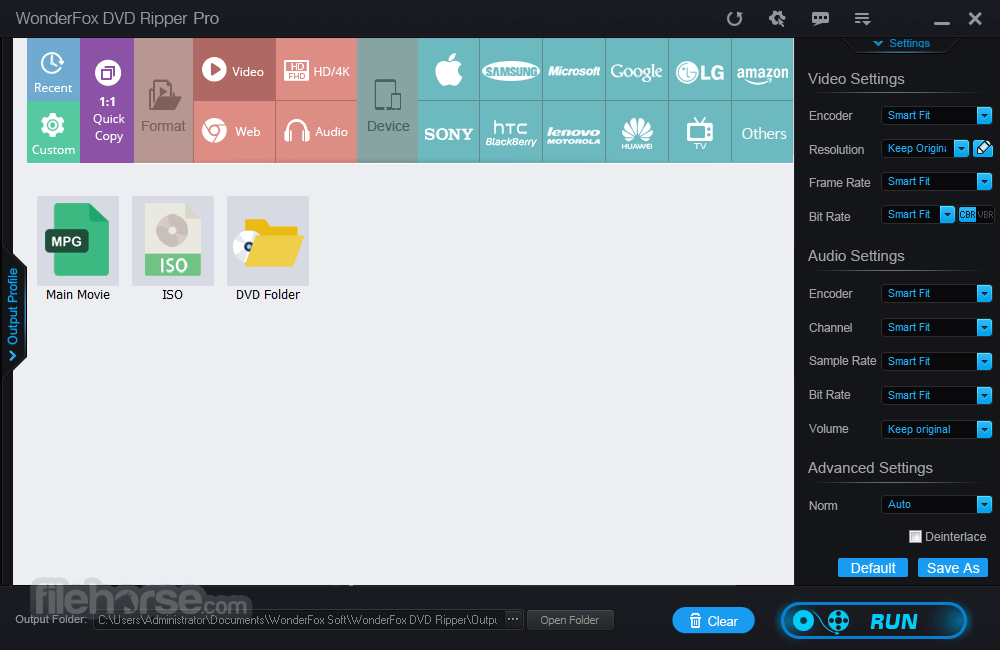
Settings Menu: Easy access to advanced customization options like resolution, bitrate, and frame rate.
Preview Window: Enables users to preview their DVD content before ripping.
Device Profiles: A sidebar with pre-configured settings for various devices.
The layout is straightforward, reducing the learning curve for new users while offering advanced features for tech-savvy individuals.
Installation and Setup
Download: Visit the official website or FileHorse.com and download the installation file.
Install: Follow the step-by-step installation wizard. The software requires minimal system resources, making it a quick setup.
Register (Optional): Activate the full version using a license key to unlock all features.
The entire process takes under five minutes, with clear instructions provided during each step.
How to Use
Load DVD: Insert your DVD into the drive and click "Load DVD" to import its contents.
Select Output Format: Choose your desired video or audio format from the list.
Customize Settings: Adjust parameters like resolution, frame rate, and subtitles (optional).
Edit Video (Optional): Use the built-in editor to trim, crop, or merge video clips.
Start Conversion: Click "Run" to begin the ripping process. A progress bar will indicate the estimated completion time.
FAQ
Can DVD Ripper Pro rip copy-protected DVDs?
Yes, it supports ripping DVDs with various types of copy protection, including CSS, region codes, and UOPs.
Does the software support Blu-ray discs?
No, DVD Ripper Pro is specifically designed for standard DVDs. WonderFox offers a separate product for Blu-ray ripping.
Can I use the software on macOS?
Unfortunately, DVD Ripper Pro is only available for Windows. Mac users will need to use alternative software.
Is the output quality affected during conversion?
No, the software ensures high-quality output, preserving the original video and audio fidelity.
Is there a free trial version?
Yes, a free trial is available but with limited features, such as restricted ripping time and fewer output options.
Alternatives
WinX DVD Ripper: Similar functionality with a focus on speed and format diversity.
HandBrake: A free, open-source option with robust features but a steeper learning curve.
DVDFab DVD Ripper: A premium option with advanced features like cloud integration.
Pricing
It offers two pricing tiers:
Single License: $29.95 for a lifetime license for one PC.
Family Pack: $69.95 for three licenses, ideal for households.
Both options include free updates and customer support.
License code will be sent to you via email automatically within minutes after payment.
System Requirements
DVD Ripper Pro by WonderFox Soft, Inc. is an excellent tool for anyone looking to digitize their DVD collection. It balances ease of use with advanced features, making it suitable for both beginners and professionals. While its lack of macOS support and Blu-ray compatibility may be drawbacks for some, the software's performance and affordability make it a standout choice in the DVD ripping market.
Whether you're looking to preserve your DVDs, create backups, or enjoy content on modern devices, DVD Ripper Pro is a reliable and efficient solution worth considering.
Note: You can rip only the first 15 minutes of the video.
Download DVD Ripper Pro Latest Version Why is this app published on FileHorse? (More info)
Enjoy your DVD just gets simpler and faster. The video I create will be in perfect quality (even in high-definition). No missing key frames, redraw issues, or crashes.
Based on my built-in leading DVD decryption and decoding technology, I’m always ready to help you rip any DVD (Disc/Folder/ISO) to standard video formats, including DVD to AVI, DVD to MP4, DVD to MKV, DVD to MPG, WMV, MOV, MTS, M4V, ASF, DVC, MTS, M2TS, WEBM, FLV, SWF, VOB, F4V, 3GP and 3GP2 to meet your different demands and also DVDs to HD video formats for better playback on a larger screen. WonderFox DVD Ripper Pro is Amazing!
As the No.1 utility for DVD rip movie and also the best DVD ripper Windows 11/10/8/7 software, I’m going to let you watch your favorite DVD discs on various screens and displays.
Appreciating the one who created me. I just find myself happy with the simple things, that is to say, I have preset optimized parameters for all pop devices such as DVD to iPad, DVD to iPhone, DVD to Android device, Samsung, Microsoft, Google Android, LG, Amazon, Moto, Sony, HUAWEI, Nokia, BlackBerry, HTC, Xbox, Projector (4K/FHD/720P) and many more.
Highlights
Perfect Balance in Compression Ratio, File Size, and Output Quality
Compress a DVD (7.5 GB) to digital video (1.2 GB) without losing quality.
Fastest DVD-to-digital Conversion Speed
Only 20 minutes to rip a 150 minutes DVD to MP4, AVI, MKV, MOV, WMV with 0-Quality-Loss, and much less time to backup a DVD to MPG (only 5~10 minutes).
Intelligently Detect Main Title for DVD Movie and TV Show
Easily find out the right title from 99 titles as well as remove unwanted ads, trailers, video clips, and some other things.
Features
Wide Format Support: Converts DVDs to numerous video and audio formats, including MP4, AVI, MKV, MPG, and MP3.
Device Optimization: Pre-configured profiles for various devices such as iPhones, Android phones, smart TVs, and gaming consoles.
High-Speed Conversion: Utilizes GPU acceleration technology to ensure fast ripping without compromising quality.
Advanced Editing Tools: Allows users to trim, crop, merge, and add subtitles to videos.
Bypass Protections: Supports ripping of copy-protected and region-locked DVDs.
High-Quality Output: Ensures that converted videos retain their original quality, including 1:1 DVD-to-MP4 conversions.
Batch Processing: Allows multiple DVD files to be ripped simultaneously.
User-Friendly Interface: Intuitive layout suitable for both novice and advanced users.
User Interface
Main Dashboard: Centralized access to add DVDs, select output formats, and initiate the ripping process.
Settings Menu: Easy access to advanced customization options like resolution, bitrate, and frame rate.
Preview Window: Enables users to preview their DVD content before ripping.
Device Profiles: A sidebar with pre-configured settings for various devices.
The layout is straightforward, reducing the learning curve for new users while offering advanced features for tech-savvy individuals.
Installation and Setup
Download: Visit the official website or FileHorse.com and download the installation file.
Install: Follow the step-by-step installation wizard. The software requires minimal system resources, making it a quick setup.
Register (Optional): Activate the full version using a license key to unlock all features.
The entire process takes under five minutes, with clear instructions provided during each step.
How to Use
Load DVD: Insert your DVD into the drive and click "Load DVD" to import its contents.
Select Output Format: Choose your desired video or audio format from the list.
Customize Settings: Adjust parameters like resolution, frame rate, and subtitles (optional).
Edit Video (Optional): Use the built-in editor to trim, crop, or merge video clips.
Start Conversion: Click "Run" to begin the ripping process. A progress bar will indicate the estimated completion time.
FAQ
Can DVD Ripper Pro rip copy-protected DVDs?
Yes, it supports ripping DVDs with various types of copy protection, including CSS, region codes, and UOPs.
Does the software support Blu-ray discs?
No, DVD Ripper Pro is specifically designed for standard DVDs. WonderFox offers a separate product for Blu-ray ripping.
Can I use the software on macOS?
Unfortunately, DVD Ripper Pro is only available for Windows. Mac users will need to use alternative software.
Is the output quality affected during conversion?
No, the software ensures high-quality output, preserving the original video and audio fidelity.
Is there a free trial version?
Yes, a free trial is available but with limited features, such as restricted ripping time and fewer output options.
Alternatives
WinX DVD Ripper: Similar functionality with a focus on speed and format diversity.
HandBrake: A free, open-source option with robust features but a steeper learning curve.
DVDFab DVD Ripper: A premium option with advanced features like cloud integration.
Pricing
It offers two pricing tiers:
Single License: $29.95 for a lifetime license for one PC.
Family Pack: $69.95 for three licenses, ideal for households.
Both options include free updates and customer support.
License code will be sent to you via email automatically within minutes after payment.
System Requirements
- Operating System: Windows 7/8/8.1/10/11
- Processor: 1 GHz or higher
- RAM: 512 MB minimum (1 GB recommended)
- Disk Space: 50 MB for installation
- Additional: DVD drive
- User-friendly interface
- Supports copy-protected DVDs
- High-speed conversion with GPU acceleration
- Wide range of output formats
- Affordable pricing
- Limited to Windows OS
- No support for Blu-ray discs
DVD Ripper Pro by WonderFox Soft, Inc. is an excellent tool for anyone looking to digitize their DVD collection. It balances ease of use with advanced features, making it suitable for both beginners and professionals. While its lack of macOS support and Blu-ray compatibility may be drawbacks for some, the software's performance and affordability make it a standout choice in the DVD ripping market.
Whether you're looking to preserve your DVDs, create backups, or enjoy content on modern devices, DVD Ripper Pro is a reliable and efficient solution worth considering.
Note: You can rip only the first 15 minutes of the video.
Download DVD Ripper Pro Latest Version Why is this app published on FileHorse? (More info)
##
畫面截圖