⚠ 這是歷史版本頁面 — 查看 EF Commander 最新版本 →

- 目前版本25.04
- 更新日期2025-03-10
- 檔案大小8.7 MB
- 檔案名稱EF_Commander_25.04.exe
- 作業系統Windows 7 / Windows 8 / Windows 10 / Windows 11
- 支援語系English
- 授權型式商業試用
- 開發商 EFSoftware
- 軟體分類Windows 軟體 / 檔案傳輸與網路
##
編輯短評
EF Commander 是一款功能完整的 Windows 文件管理工具,整合了档案浏览、管理、查看、压缩与 FTP 客户端等多项能力。它承袭 Norton Commander 的双窗口设计,强调透过键盘快速下达指令,并支援拖放、按扩展名自动排序、强大搜寻与属性编辑等功能,适合需要同时处理本地与外部存储装置档案的使用者。此软件更新相当活跃,但在同分类中属于小众工具,使用者评价普遍不错,不过评分样本数不多。
这款软件适合习惯传统双窗格操作、追求高效率档案整理的进阶使用者,尤其当需要整合远端 FTP 传输与压缩功能时,能省去切换多套软件的麻烦。与同分类热门的 Internet Download Manager 或 uTorrent 等单一功能工具相比,EF Commander 提供的是全面性的管理方案,但操作逻辑需要时间适应。它仅提供 Windows 平台与英文语系,没有中文版,且采用试用版授权,下载前需留意试用限制。
##
翻譯排程處理中,以下暫以英文原文呈現
軟體介紹
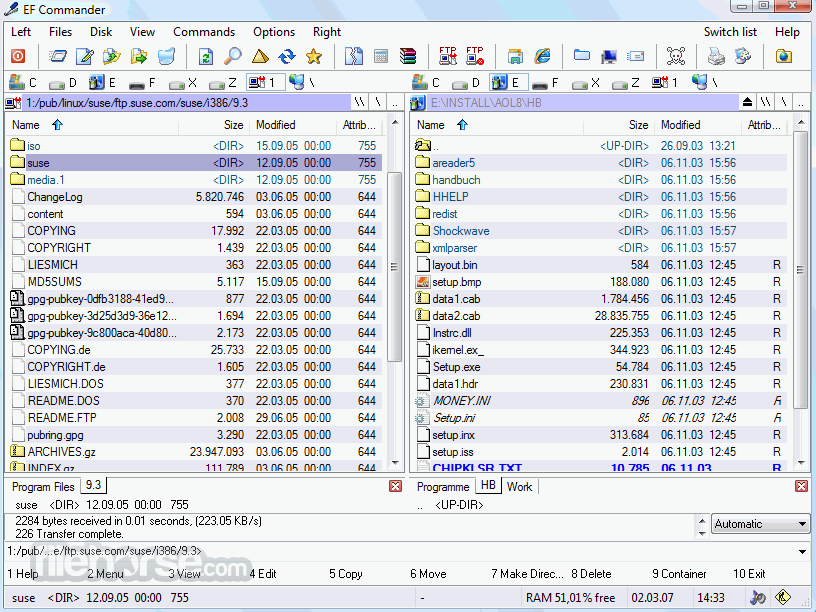
EF Commander is a fully-featured file explorer, manager, viewer, archiver, and FTP client for all versions of Windows.
Built on the principles established by the famous Norton Commander, EF Commander continues the focus on the dual-windowed file management and easy commands for taking complete control over your files on both local and external storage.
This includes support for drag & drop, manual selection of files, automatic sorting by extensions, powerful search tool, checking and editing of attributes, search & replace function, and others.
Developers of EF Commander Free have spent a lot of effort on making sure the program interface can equally serve both novices who want a fast and easy way to control their data and experienced users who want to deeply customize every aspect of their daily work.
Some of the popular options include fully customizable tabs, customized fonts, colors, and user-defined columns, the ability to add or edit keyboard shortcuts, and more.
Highlights
One of the most celebrated achievements of the tool is its ability to natively support a direct link to PDAs with Windows CE operating system, which no other file manager was able to do when this feature was originally introduced.
In addition to this feature, the app also has built-in support for online networking via FTP standard, support for integration with Nero Burning ROM, and management of over 20 types of compressed data archives.
Here is the full listing of key features of EF Commander:
How to Use
Download EF Commander Latest Version Why is this app published on FileHorse? (More info)
Built on the principles established by the famous Norton Commander, EF Commander continues the focus on the dual-windowed file management and easy commands for taking complete control over your files on both local and external storage.
This includes support for drag & drop, manual selection of files, automatic sorting by extensions, powerful search tool, checking and editing of attributes, search & replace function, and others.
Developers of EF Commander Free have spent a lot of effort on making sure the program interface can equally serve both novices who want a fast and easy way to control their data and experienced users who want to deeply customize every aspect of their daily work.
Some of the popular options include fully customizable tabs, customized fonts, colors, and user-defined columns, the ability to add or edit keyboard shortcuts, and more.
Highlights
One of the most celebrated achievements of the tool is its ability to natively support a direct link to PDAs with Windows CE operating system, which no other file manager was able to do when this feature was originally introduced.
In addition to this feature, the app also has built-in support for online networking via FTP standard, support for integration with Nero Burning ROM, and management of over 20 types of compressed data archives.
Here is the full listing of key features of EF Commander:
- An optimized interface that allows deep customization
- Tabbed interface for easier management of your local or remote data.
- Built-in media player that can handle several formats of HQ audio (WAV, MP3 (with ID3 Tag support), Ogg/Vorbis, FLAC, and WMA).
- Text and HEX editor
- Thumbnail support for enabling easier sorting of your images.
- Powerful multi-rename tool
- File joiner and splitter
- Checksum creation and verification
- Parallel file operation, for boosting the performance of larger file management tasks.
- Support for direct link communication to PDAs with Windows CE. Gain direct access like PDA files is just another external storage drive.
- Direct support for over 20 types of compressed data archives (including ZIP, RAR, 7-ZIP, ISO, ARC, ARJ, CAB, and others).
- Fast FTP/FTPS client for effortless management of remote data.
- Synchronization tool for easier copying of data between your various devices.
- External plugin support for expanding the functionality of the app with various packers, viewers, file systems, and other services. Plugins have to be in WLX, WCX, WFX, and Winamp decode formats.
- Built-in support for communication with 3rd party programs such as Nero Burning ROM, Irfan View, and XnView.
- Support for over 20 languages
How to Use
- Launch the desktop program and configure your preferences.
- Use the dual-pane interface for easy file management.
- Drag and drop files to copy or move them.
- Use the built-in viewer to preview files.
- Compress and extract files using the archive feature.
- Connect to FTP servers for remote file access.
- Customize keyboard shortcuts for quick operations.
- Synchronize directories to keep files updated.
- Use the search function to find files quickly.
- Operating System: Windows 7, 8, 10, 11 (32/64-bit)
- Processor: Intel or AMD, 1 GHz or faster
- RAM: Minimum 512 MB (1 GB recommended)
- Storage: At least 50 MB of free disk space
- Display: 1024x768 resolution or higher
- Dual-pane file management
- Built-in FTP client support
- Customizable user interface
- Powerful search and file sync
- Supports multiple archive formats
- Outdated interface design
- No free version available
- Limited advanced cloud features
- Occasional performance slowdowns
Download EF Commander Latest Version Why is this app published on FileHorse? (More info)
##
畫面截圖
- 2026-08-12 EF Commander 26.08 8.93 MB
- 2026-07-08 EF Commander 26.07 8.92 MB
- 2026-06-13 EF Commander 26.06 8.92 MB
- 2026-05-29 EF Commander 26.05 8.92 MB
- 2026-04-15 EF Commander 26.04 8.92 MB
- 2026-03-03 EF Commander 26.03 8.92 MB
- 2026-02-11 EF Commander 26.02.2 8.91 MB
- 2026-01-30 EF Commander 26.02 8.91 MB