⚠ 這是歷史版本頁面 — 查看 EMCO Ping Monitor Free 最新版本 →

EMCO Ping Monitor Free 7.1.2
v 7.1.2
Windows
試用版
6.96/10 (23)
- 目前版本7.1.2
- 更新日期2019-11-16
- 檔案大小84.19 MB
- 檔案名稱PingMonitorFreeSetup.exe
- 作業系統Windows 7 / Windows 8 / Windows 10 / Windows 11
- 支援語系English
- 授權型式試用版
- 開發商 EMCO Software
- 軟體分類Windows 軟體 / 檔案傳輸與網路
##
編輯短評
EMCO Ping Monitor Free 是一款 Windows 平台的網路連線監控工具,透過定期送出 ping 封包,自動檢查單一或多台主機的連線狀態,並在偵測到中斷或恢復時發出通知。它最特別的地方在於可設定自訂指令或啟動應用程式,當連線異常時自動執行後續動作,並提供正常運行時間、中斷次數等統計數據。這款軟體持續維護中,近一年仍有更新,不過在同類工具中排名中後段,評價中等,樣本數不多,並非主流首選。
適合需要 24/7 監控伺服器或網路設備連線的 IT 管理人員,尤其當斷線時希望自動觸發重啟或通知的情境。與同分類常見的下載工具(如 Internet Download Manager)定位不同,它專注於監控而非傳輸,若只是要下載檔案則不適用。需留意的是,它僅提供英文介面,且為試用版授權,雖然名稱帶有 Free,但功能可能受限,使用前建議先確認是否符合需求。
##
翻譯排程處理中,以下暫以英文原文呈現
軟體介紹
EMCO Ping Monitor is a robust ping monitoring tool for automatic checking connection to network hosts. By making regular pings it monitors network connections and notifies you about detected ups/downs.
It also provides connection statistics info, including uptime, outages, failed pings, etc. You can easily extend functionality and configure The Ping Monitor to execute custom commands or launch applications when connections are lost or restored.
What is EMCO Ping Monitor?
It can work in the 24/7 mode to track the states of the connection of one or multiple hosts. The application analyzes ping replies to detect connection outages and report connection statistics. It can automatically detect connection outages and show Windows Tray balloons, play sounds, and send e-mail notifications. It can also generate reports and send them by e-mail or save as PDF or HTML files.
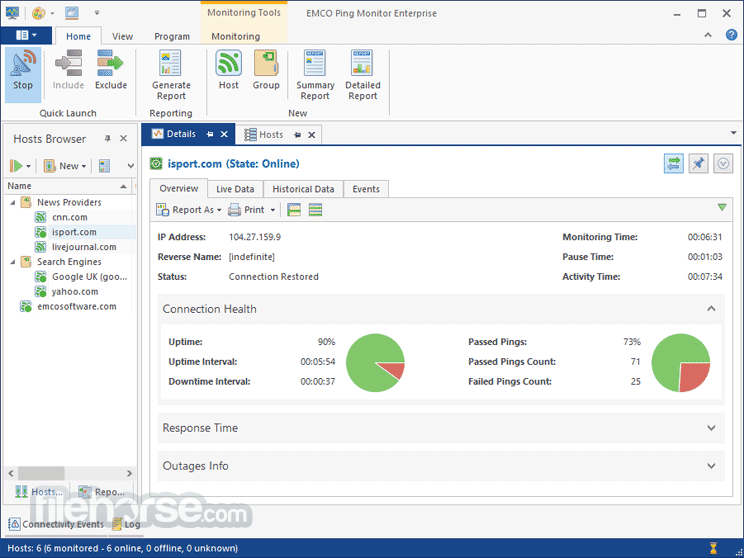
The program allows you to get information about the statuses of all the hosts, check the detailed statistics of a selected host, and compare the performance of different hosts. The program stores the collected ping data in the database, so you can check statistics for a selected time period. The available information includes min/max/avg ping time, ping deviation, list of connection outages, etc. This information can be represented as grid data and charts.
How does it work?
The tool can be used to perform ping monitoring of just a few hosts or thousands of hosts. All hosts are monitored in real-time by dedicated working threads, so you can get real-time statistics and notifications connection state changes for every host. The program doesn't have special requirements for hardware - you can monitor a few thousands of hosts on a typical modern PC.
The program uses pings to detect connection outages. If a few pings are failed in a raw - it reports an outage and notifies you about the problem. When a connection is established and pings start to pass through - the program detects the end of an outage and notifies you about that. You can customize outage and restore detection conditions and also notifications used by the program.
Compare Features
FREE EDITION
The Free edition allows performing ping monitoring of up to 5 hosts. It does not allow any specific configuration for hosts. It runs as a Windows program, so monitoring is stopped if you close the UI or log off from Windows.
PROFESSIONAL EDITION
The Professional edition allows monitoring of up to 250 hosts concurrently. Every host can have a custom configuration such as notification of e-mail recipients or custom actions to be executed on connection lost and restore events. It runs as a Windows service, so monitoring continues even if you close the UI or log off from Windows.
ENTERPRISE EDITION
The Enterprise edition does not have limitations on the number of monitored hosts. On a modern PC, it is possible to monitor 2500+ hosts depending on the hardware configuration.
This edition includes all the available features and works as a client/server. The server works as a Windows service to ensure ping monitoring in the 24/7 mode. The client is a Windows program that can connect to a server running on a local PC or to a remote server through a LAN or the Internet. Multiple clients can connect to the same server and work concurrently. This edition also includes web reports, that allow reviewing host monitoring statistics remotely in a web browser.
Features and Highlights
Multi-Host Ping Monitoring
The application can monitor multiple hosts concurrently. The EMCO Ping Monitor Free edition of the application allows monitoring up to five hosts; the Professional edition doesn't have any limitation for the number of monitored hosts. The monitoring of every host works independently from other hosts. You can monitor tens of thousands of hosts from a modern PC.
Connection Outages Detection
The application sends ICMP ping echo requests and analyzes ping echo replies to monitor the connection state in the 24/7 mode. If the preset number of pings fail in a row, the application detects a connection outage and notifies you of the problem. The application tracks all outages, so you can see when a host was offline.
Connection Quality Analysis
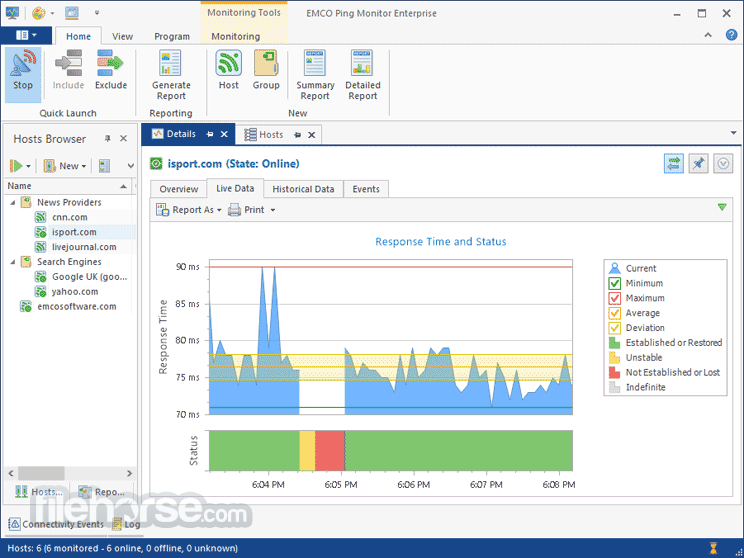
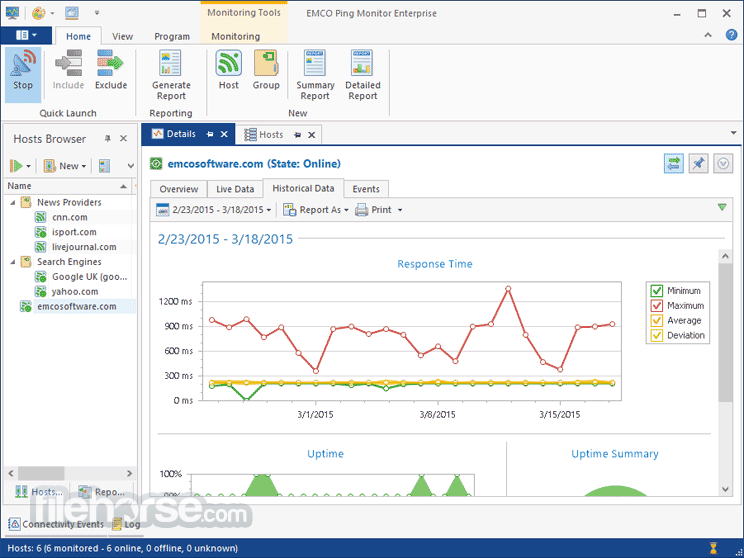
When the application pings a monitored host, it saves and aggregates data about every ping, so you can get information about the minimum, maximum and average ping response times and the ping response deviation from the average for any reporting period. That allows you to estimate the quality of the network connection.
Flexible Notifications
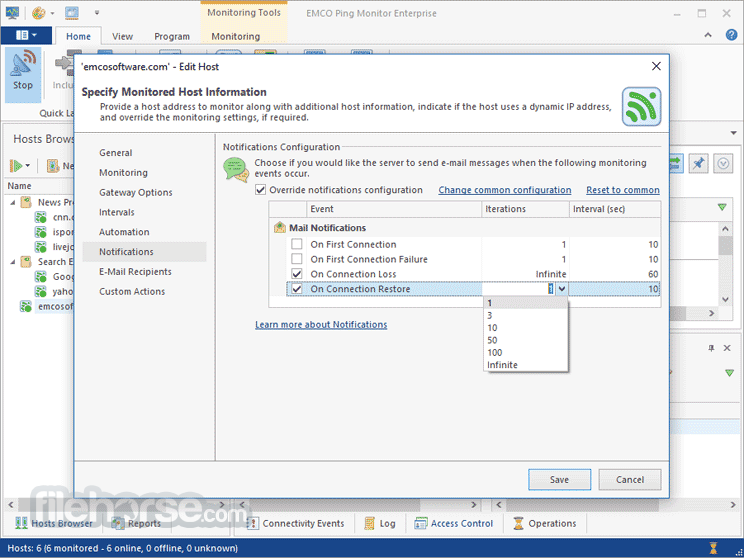
If you would like to get notifications about Connection Lost, Connection Restored and other events detected by the application, you can configure the application to send e-mail notifications, play sounds, and show Windows Tray balloons. The application can send a single notification of any type of repeat notifications multiple times.
Charts and Reports
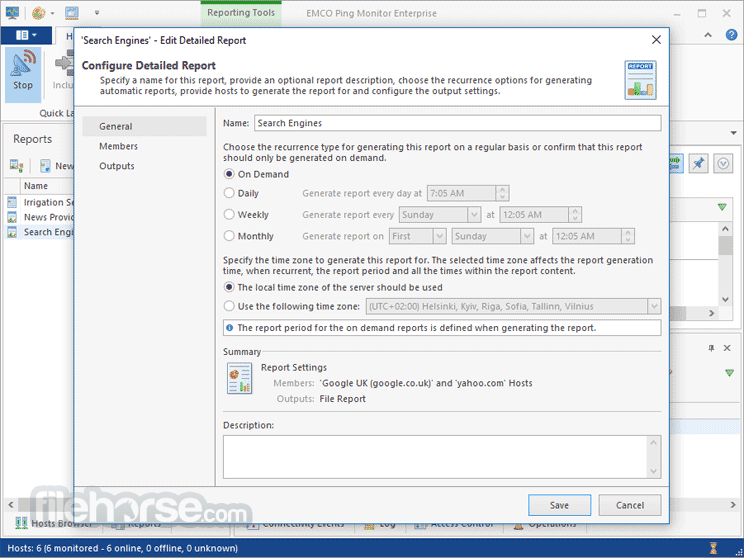
All statistical information collected by the application can be represented visually by charts. You can see the ping and uptime statistics for a single host and compare the performance of multiple hosts on charts. The application can automatically generate reports in different formats on a regular basis to represent the host statistics.
Custom Actions
You can integrate the application with external software by executing external scripts or executable files when connections are lost or restored or in case of other events. For example, you can configure the application to run an external command-line tool to send SMS notifications about any changes in the host statuses.
Get a free 30-days trial of the Enterprise edition, which provides access to all features of the program. After the trial period expires, the program reverts to the Free edition. Alternatively, you can upgrade to a commercial edition anytime by ordering a license.
Trial limitations:
Download EMCO Ping Monitor Latest Version Why is this app published on FileHorse? (More info)
It also provides connection statistics info, including uptime, outages, failed pings, etc. You can easily extend functionality and configure The Ping Monitor to execute custom commands or launch applications when connections are lost or restored.
What is EMCO Ping Monitor?
It can work in the 24/7 mode to track the states of the connection of one or multiple hosts. The application analyzes ping replies to detect connection outages and report connection statistics. It can automatically detect connection outages and show Windows Tray balloons, play sounds, and send e-mail notifications. It can also generate reports and send them by e-mail or save as PDF or HTML files.
The program allows you to get information about the statuses of all the hosts, check the detailed statistics of a selected host, and compare the performance of different hosts. The program stores the collected ping data in the database, so you can check statistics for a selected time period. The available information includes min/max/avg ping time, ping deviation, list of connection outages, etc. This information can be represented as grid data and charts.
How does it work?
The tool can be used to perform ping monitoring of just a few hosts or thousands of hosts. All hosts are monitored in real-time by dedicated working threads, so you can get real-time statistics and notifications connection state changes for every host. The program doesn't have special requirements for hardware - you can monitor a few thousands of hosts on a typical modern PC.
The program uses pings to detect connection outages. If a few pings are failed in a raw - it reports an outage and notifies you about the problem. When a connection is established and pings start to pass through - the program detects the end of an outage and notifies you about that. You can customize outage and restore detection conditions and also notifications used by the program.
Compare Features
FREE EDITION
The Free edition allows performing ping monitoring of up to 5 hosts. It does not allow any specific configuration for hosts. It runs as a Windows program, so monitoring is stopped if you close the UI or log off from Windows.
PROFESSIONAL EDITION
The Professional edition allows monitoring of up to 250 hosts concurrently. Every host can have a custom configuration such as notification of e-mail recipients or custom actions to be executed on connection lost and restore events. It runs as a Windows service, so monitoring continues even if you close the UI or log off from Windows.
ENTERPRISE EDITION
The Enterprise edition does not have limitations on the number of monitored hosts. On a modern PC, it is possible to monitor 2500+ hosts depending on the hardware configuration.
This edition includes all the available features and works as a client/server. The server works as a Windows service to ensure ping monitoring in the 24/7 mode. The client is a Windows program that can connect to a server running on a local PC or to a remote server through a LAN or the Internet. Multiple clients can connect to the same server and work concurrently. This edition also includes web reports, that allow reviewing host monitoring statistics remotely in a web browser.
Features and Highlights
Multi-Host Ping Monitoring
The application can monitor multiple hosts concurrently. The EMCO Ping Monitor Free edition of the application allows monitoring up to five hosts; the Professional edition doesn't have any limitation for the number of monitored hosts. The monitoring of every host works independently from other hosts. You can monitor tens of thousands of hosts from a modern PC.
Connection Outages Detection
The application sends ICMP ping echo requests and analyzes ping echo replies to monitor the connection state in the 24/7 mode. If the preset number of pings fail in a row, the application detects a connection outage and notifies you of the problem. The application tracks all outages, so you can see when a host was offline.
Connection Quality Analysis
When the application pings a monitored host, it saves and aggregates data about every ping, so you can get information about the minimum, maximum and average ping response times and the ping response deviation from the average for any reporting period. That allows you to estimate the quality of the network connection.
Flexible Notifications
If you would like to get notifications about Connection Lost, Connection Restored and other events detected by the application, you can configure the application to send e-mail notifications, play sounds, and show Windows Tray balloons. The application can send a single notification of any type of repeat notifications multiple times.
Charts and Reports
All statistical information collected by the application can be represented visually by charts. You can see the ping and uptime statistics for a single host and compare the performance of multiple hosts on charts. The application can automatically generate reports in different formats on a regular basis to represent the host statistics.
Custom Actions
You can integrate the application with external software by executing external scripts or executable files when connections are lost or restored or in case of other events. For example, you can configure the application to run an external command-line tool to send SMS notifications about any changes in the host statuses.
Get a free 30-days trial of the Enterprise edition, which provides access to all features of the program. After the trial period expires, the program reverts to the Free edition. Alternatively, you can upgrade to a commercial edition anytime by ordering a license.
Trial limitations:
- Free evaluation of the program during 30 days
- E-mail notifications and generated reports include trial watermarks
- Real-time Monitoring: Provides continuous monitoring of network connectivity.
- Detailed Reports: Offers comprehensive reports and statistics on network performance.
- Alert System: Customizable alerts for network issues.
- User-friendly Interface: Easy to navigate and use.
- Scalability: Suitable for both small and large networks.
- Resource Intensive: Can be demanding on system resources.
- Complex Setup: Initial setup may be complex for beginners.
- Limited Free Version: Some features are locked behind the paid version.
- Learning Curve: Requires time to learn all features and functionalities.
Download EMCO Ping Monitor Latest Version Why is this app published on FileHorse? (More info)
##
影片介紹
##
畫面截圖
- 2026-06-05 EMCO Ping Monitor Free 9.3.0 117.09 MB
- 2025-10-22 EMCO Ping Monitor Free 9.2.1 116.37 MB
- 2025-02-04 EMCO Ping Monitor Free 9.2.0 116 MB
- 2024-10-17 EMCO Ping Monitor Free 9.1.2 115.89 MB
- 2024-08-31 EMCO Ping Monitor Free 9.1.1 115.93 MB
- 2024-07-11 EMCO Ping Monitor Free 9.1.0 115.8 MB
- 2023-09-14 EMCO Ping Monitor Free 9.0.9 116.91 MB
- 2023-08-01 EMCO Ping Monitor Free 9.0.8 116.95 MB