⚠ 這是歷史版本頁面 — 查看 FFmpeg 最新版本 →

FFmpeg 5.1
v 5.1
Windows
開源軟體
8.04/10 (95)
- 目前版本5.1
- 更新日期2022-02-13
- 檔案大小42.17 MB
- 檔案名稱ffmpeg-2022-02-10-git-b6bb6b9f22-full_build.7z
- 作業系統Windows 7 64 / Windows 8 64 / Windows 10 64 / Windows 11
- 支援語系English
- 授權型式開源軟體
- 開發商 FFmpeg Developers
- 軟體分類Windows 軟體 / 影片軟體
##
編輯短評
FFmpeg 是影音處理領域的旗艦級開源框架,能解碼、編碼、轉碼、封裝、拆封、串流、濾波與播放幾乎所有已知的影音格式,從早期罕見的古老規格到最新的壓縮標準都涵蓋在內。它最具辨識度的特色就是格式支援的廣度與深度,堪稱業界事實上的標準工具。此專案長期活躍維護,版本更新頻繁,在同類工具中屬於主流首選,使用者評價普遍不錯,是許多專業軟體背後的運算核心。
這套工具適合需要批次轉檔、影音處理或開發相關應用的進階使用者,例如影片剪輯、格式轉換、串流伺服器建置等情境。與 KMPlayer、K-Lite Codec Pack 等播放器或解碼包相比,FFmpeg 是命令列工具,功能更全面且可程式化,但學習門檻較高,沒有圖形介面。它採用開源授權,可自由使用與修改,但官方僅提供英文介面,且 Windows 版本需自行下載對應的執行檔,使用前最好先熟悉基本指令操作。
##
翻譯排程處理中,以下暫以英文原文呈現
軟體介紹
FFmpeg is the leading multimedia framework, able to decode, encode, transcode, mux, demux, stream, filter and play pretty much anything that humans and machines have created.
It supports the most obscure ancient formats up to the cutting edge. No matter if they were designed by some standards committee, the community, or a corporation.
It is also highly portable: The software compiles, runs, and passes testing infrastructure FATE across Linux, macOS, Microsoft Windows, the BSDs, Solaris, etc. under a wide variety of build environments, machine architectures, and configurations.
It contains libavcodec, libavutil, libavformat, libavfilter, libavdevice, libswscale, and libswresample which can be used by applications.
As well as ffmpeg, ffserver, ffplay, and ffprobe which can be used by end-users for transcoding, streaming, and playing.
FFmpeg Tools:
ffmpeg
A command-line tool to convert multimedia files between formats
ffserver
A multimedia streaming server for live broadcasts
ffplay
A simple media player based on SDL and the FF mpeg libraries
ffprobe
A simple multimedia stream analyzer
FFmpeg Libraries for developers:
Download FFmpeg from the official website or FileHorse.com
Extract the ZIP archive to a folder
Add FFmpeg to the Windows system PATH
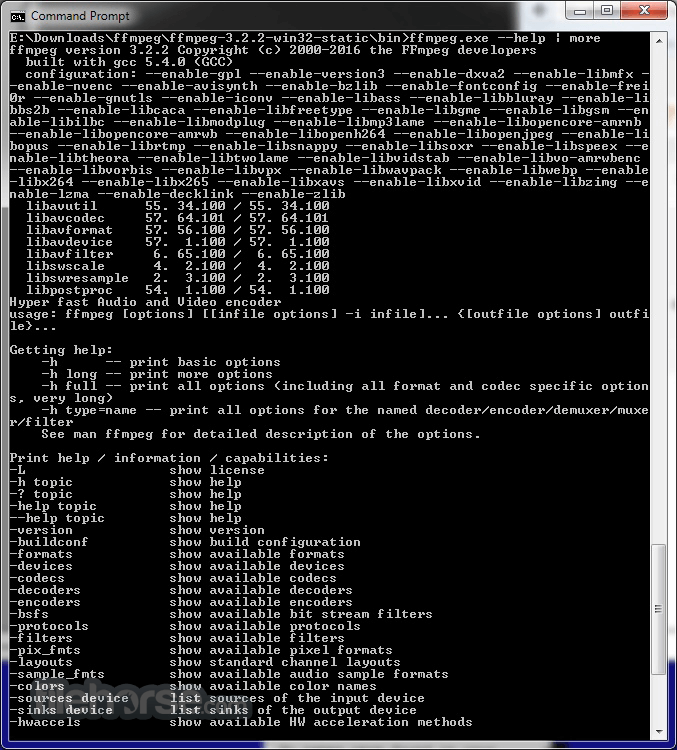
Open Command Prompt to check FFmpeg version
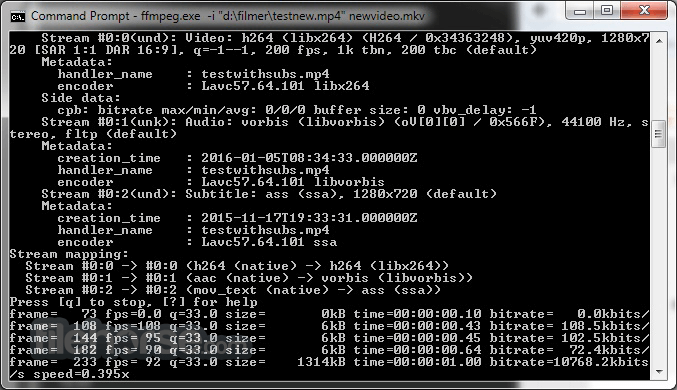
Use commands to convert or process media files
System Requirements
Download FFmpeg Latest Version Why is this app published on FileHorse? (More info)
It supports the most obscure ancient formats up to the cutting edge. No matter if they were designed by some standards committee, the community, or a corporation.
It is also highly portable: The software compiles, runs, and passes testing infrastructure FATE across Linux, macOS, Microsoft Windows, the BSDs, Solaris, etc. under a wide variety of build environments, machine architectures, and configurations.
It contains libavcodec, libavutil, libavformat, libavfilter, libavdevice, libswscale, and libswresample which can be used by applications.
As well as ffmpeg, ffserver, ffplay, and ffprobe which can be used by end-users for transcoding, streaming, and playing.
FFmpeg Tools:
ffmpeg
A command-line tool to convert multimedia files between formats
ffserver
A multimedia streaming server for live broadcasts
ffplay
A simple media player based on SDL and the FF mpeg libraries
ffprobe
A simple multimedia stream analyzer
FFmpeg Libraries for developers:
- libavutil is a library containing functions for simplifying programming, including random number generators, data structures, mathematics routines, core multimedia utilities, and much more.
- libavcodec is a library containing decoders and encoders for audio/video codecs.
- libavformat is a library containing demuxers and muxers for multimedia container formats.
- libavdevice is a library containing input and output devices for grabbing from and rendering to many common multimedia input/output software frameworks, including Video4Linux, Video4Linux2, VfW, and ALSA.
- libavfilter is a library containing media filters.
- libswscale is a library performing highly optimized image scaling and color space/pixel format conversion operations.
- libswresample is a library performing highly optimized audio resampling, rematrixing, and sample format conversion operations.
Download FFmpeg from the official website or FileHorse.com
Extract the ZIP archive to a folder
Add FFmpeg to the Windows system PATH
Open Command Prompt to check FFmpeg version
Use commands to convert or process media files
System Requirements
- OS: Windows 7 or later (64-bit recommended)
- CPU: Intel or AMD processor with SSE2 support
- RAM: Minimum 2 GB (4 GB or more recommended)
- Storage: At least 100 MB free space
- GPU: Not required but helps with hardware acceleration
- Supports a wide range of formats
- Completely free and open-source
- Powerful command-line interface
- Cross-platform compatibility
- Regular updates and active support
- No official graphical interface
- Complex commands for basic tasks
- Limited documentation for some features
- Requires manual setup and config
Download FFmpeg Latest Version Why is this app published on FileHorse? (More info)
##
畫面截圖
- 2026-08-12 FFmpeg 9.0.1 158.06 MB
- 2026-08-05 FFmpeg 9.0 158.08 MB
- 2026-06-28 FFmpeg 8.1.2 159 MB
- 2026-05-05 FFmpeg 8.1.1 155.23 MB
- 2026-03-17 FFmpeg 8.1 153.45 MB
- 2025-11-20 FFmpeg 8.0.1 145.68 MB
- 2025-08-23 FFmpeg 8.0 59.46 MB
- 2025-03-12 FFmpeg 7.1.1 51.74 MB