- 目前版本12.31
- 更新日期2026-07-11
- 檔案大小26.3 MB
- 檔案名稱fp1231.exe
- 作業系統Windows 7 / Windows 8 / Windows 10 / Windows 11
- 支援語系English
- 授權型式試用版
- 開發商 Fineprint Software
- 軟體分類Windows 軟體 / 辦公商務
##
翻譯排程處理中,以下暫以英文原文呈現
軟體介紹
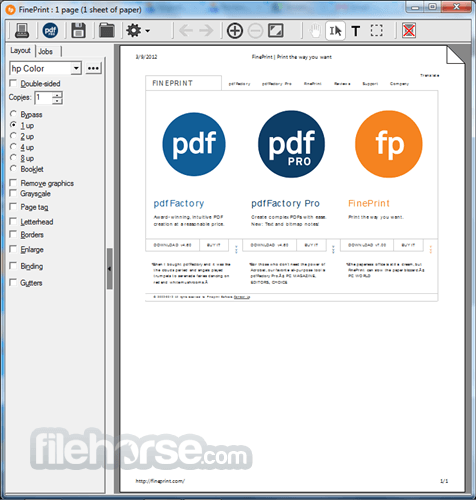
FinePrint saves you money on paper and toner, weight in your briefcase, and time and hassle in managing your print jobs. FinePrint is an Amazing and universal print preview with editing capability for Windows PC!
With FinePrint working for you, annoying printing problems disappear.
Features include save paper and ink, booklet printing, double-sided printing, print multiple pages onto a sheet, delete unwanted pages, electronic letterhead, watermarks, headers, footers, save as JPEG, TIF, BMP, server version, works with all printers, and Windows applications
Features and Highlights
Bullzip PDF Printer – Offers similar virtual printer functionality with more customization options.
PDFCreator – Open-source virtual printer with encryption and digital signature support.
Adobe Acrobat Pro – Full-featured PDF editor but requires a subscription.
How to Use
Download FinePrint Latest Version Why is this app published on FileHorse? (More info)
With FinePrint working for you, annoying printing problems disappear.
Features include save paper and ink, booklet printing, double-sided printing, print multiple pages onto a sheet, delete unwanted pages, electronic letterhead, watermarks, headers, footers, save as JPEG, TIF, BMP, server version, works with all printers, and Windows applications
Features and Highlights
- Print Preview: Universal print preview with editing capability. Easily add blank pages, delete pages, and re-sequence jobs.
- Ink Saver: Provides options to convert colored text to black and skip graphics.
- Multiple Pages on a single sheet: Print 2, 4, or 8 pages on a single sheet of paper.
- Watermarks Headers and Footers: Watermark, header, and footer option allow documents to be marked with the date, time, system variables, or custom text.
- Forms and Letterheads: Allows the simplified creation of electronic forms and letterhead. The preview feature shows how the output will appear before you print it to ensure correct alignment.
- Combine Print Jobs: Allows multiple documents to be combined together as a single print job. This is useful for creating booklets based on web pages, etc.
- File saving: Save pages and jobs to TIFF, JPEG, BMP, text, and FP formats.
- Clipboard Support: Any printed output can be copied to the clipboard in text, bitmap or
- Double-Sided Printing Support: Booklet making and double-sided printing are supported with all documents and printers. Booklets create a professional touch to all documents and are easy to read and carry. Double-sided printing cuts paper use in half and reduces travel weight.
- Paper Scaling: Allows large pages to be scaled so that they fit on standard paper sizes such as letter or A4.
- Adjustable Margins: Margin adjustment allows for increased text sizes for better readability, by using more of the printable area on the page.
- Gutter Support: Gutter capability provides space for binding documents.
- Multiple FinePrinters: Multiple FinePrinters can be created. This allows the creation of "virtual printers" that have different pre-defined settings. For example, you could have a "booklet printer" that automatically prints a booklet or a "letterhead printer" that prints on your letterhead without the Fine Print dialog box appearing.
- Easy server deployment: Install on a server as a shared printer for easy group or enterprise deployment.
Bullzip PDF Printer – Offers similar virtual printer functionality with more customization options.
PDFCreator – Open-source virtual printer with encryption and digital signature support.
Adobe Acrobat Pro – Full-featured PDF editor but requires a subscription.
How to Use
- Download and install FinePrint from the official website
- Open any document and select "Print" from the menu
- Choose "FinePrint" as your printer in the print dialog
- Adjust settings like duplex printing, page layout, and margins
- Preview the print job and make necessary modifications
- Click "Print" to send the final job to your physical printer
- Save documents as PDFs or export to other formats
- Manage and reorder pages using the FinePrint interface
- Remove unwanted pages to save ink and paper
- Set up custom watermarks and annotations before printing
- Windows 11, 10, 8.1, 8, 7 (32-bit or 64-bit)
- 2 GHz or faster processor
- 2 GB RAM or more
- 100 MB available disk space
- Compatible with all Windows applications
- Saves ink and paper
- Built-in PDF creation
- Customizable print layouts
- Easy-to-use interface
- Works with all printers
- Limited editing features
- Not available for macOS
- Occasional compatibility issues
- No cloud integration
Download FinePrint Latest Version Why is this app published on FileHorse? (More info)
##
畫面截圖