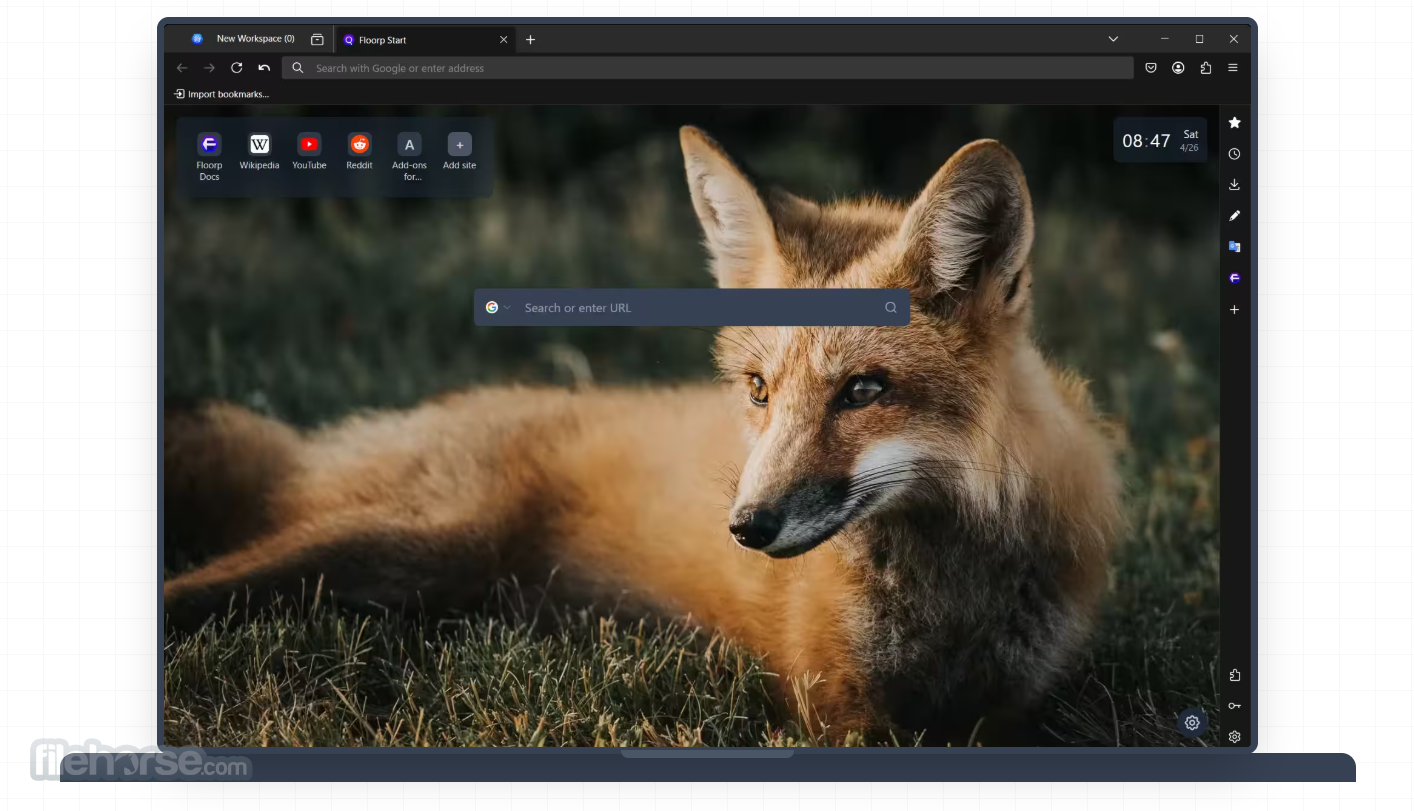
Floorp Browser 12.16.4
v 12.16.4
Windows
免費軟體
10/10 (1)
- 目前版本12.16.4
- 更新日期2026-07-26
- 檔案大小96.3 MB
- 檔案名稱floorp-windows-x86_64.installer.exe
- 作業系統Windows 10 / Windows 11
- 支援語系English
- 授權型式免費軟體
- 開發商 Ablaze
- 軟體分類Windows 軟體 / 瀏覽器與外掛
##
翻譯排程處理中,以下暫以英文原文呈現
軟體介紹
Floorp Browser is a free, open-source web browser designed for users who want considerably more interface and workflow customization than mainstream browsers normally provide.
Floorp for Windows PC is built on Mozilla Firefox technology, which gives it broad website compatibility, access to Firefox extensions, and familiar privacy controls.
Its main advantage is not raw simplicity but flexibility.
Users can reorganize tabs, create separate workspaces, display websites in a dedicated sidebar, install websites as desktop-style apps, configure mouse gestures, and select from several interface designs.
Floorp is particularly suitable for power users, developers, researchers, multitaskers, and anyone who regularly works with many tabs.
New users may need time to explore its options, but the browser can also be used with mostly default settings.
Key Features
Floorp initially resembles Firefox, making the transition relatively straightforward.
Its interface becomes more distinctive after opening Floorp Hub, the browser’s centralized customization area.
Users can change toolbar placement, tab behavior, themes, sidebars, gestures, and numerous visual details.
The Panel Sidebar is especially useful for keeping messaging services, reference pages, or productivity tools available without opening another window.
However, the number of options can feel overwhelming. Floorp rewards users willing to configure their workspace rather than those seeking the simplest possible browser.
Installation and SetupDownload from FileHorse.com and launch the Windows installer. Review the installation location and available shortcuts. Complete the installation and open Floorp. Import bookmarks, passwords, history, and other supported data from another browser. Choose a default theme and tab layout. Open Floorp Hub to configure workspaces, sidebars, gestures, and appearance. Sign in to Firefox Sync when cross-device synchronization is required. How to Use
Is Floorp Browser free?
Yes. It is FREE and distributed as open-source software under the Mozilla Public License 2.0.
Does Floorp Browser have a portable version?
Yes. Floorp Browser is available in a free portable version, which can be downloaded from the official download page.
Is Floorp based on Chromium?
No. It is based on Mozilla Firefox and uses the Gecko browser engine.
Can it use Firefox extensions?
Yes. Most extensions available for Firefox can also be installed in Floorp, although occasional compatibility issues are possible.
Does Floorp support vertical tabs?
Yes. Current versions use the vertical-tab implementation inherited from Firefox rather than Floorp’s older custom system.
Can Floorp replace my primary browser?
Yes. It includes standard browsing, synchronization, extensions, bookmarks, password management, private browsing, and advanced productivity features.
Alternatives
Firefox – A simpler upstream browser with strong privacy controls and extensive extension support.
Vivaldi – A Chromium-based browser offering advanced tab management and deep customization.
Brave – A privacy-oriented Chromium browser with integrated blocking and optional rewards.
Zen Browser – A minimalist Firefox-based browser focused on modern design and workspaces.
Edge – A Windows-integrated browser with productivity, synchronization, and AI features.
Pricing
This browser is completely FREE.
There are no premium plans, subscriptions, feature restrictions, or mandatory payments.
Development is supported through optional sponsorships and community contributions.
System Requirements
Floorp Browser is a capable Firefox-based alternative for Windows 10/11 users who value customization, tab organization, and efficient multitasking.
Its workspaces, Panel Sidebar, flexible layouts, gestures, and web apps provide excellent productivity tools.
Although beginners may find its settings extensive, experienced users can build a highly personalized browsing environment without paying a subscription.
Download Floorp Browser Latest Version Why is this app published on FileHorse? (More info)
Floorp for Windows PC is built on Mozilla Firefox technology, which gives it broad website compatibility, access to Firefox extensions, and familiar privacy controls.
Its main advantage is not raw simplicity but flexibility.
Users can reorganize tabs, create separate workspaces, display websites in a dedicated sidebar, install websites as desktop-style apps, configure mouse gestures, and select from several interface designs.
Floorp is particularly suitable for power users, developers, researchers, multitaskers, and anyone who regularly works with many tabs.
New users may need time to explore its options, but the browser can also be used with mostly default settings.
Key Features
- Workspaces: Organizes tabs into separate areas for work, research, entertainment, or individual projects.
- Panel Sidebar: Opens websites, bookmarks, history, downloads, notes, and supported extension pages beside the main page.
- Enhanced Split View: Displays multiple websites together, with support for arranging up to four tabs in one view.
- Flexible Tab Layouts: Supports horizontal, vertical, hidden, bottom-positioned, and multi-row tab configurations.
- Interface Designs: Provides Proton, Lepton, Photon, Firefox UI Fix, and Floorp’s Fluerial design.
- Mouse Gestures: Performs navigation and browser actions through customizable mouse movements.
- Web Apps: Installs supported websites as standalone applications accessible from the Windows Start menu or taskbar.
- Tab Controls: Adjusts tab width, opening position, scrolling behavior, pinned-tab titles, and double-click actions.
- Command Palette: Provides quick access to browser commands without navigating through several menus.
- Firefox Extension Support: Works with a large selection of compatible add-ons and themes.
Floorp initially resembles Firefox, making the transition relatively straightforward.
Its interface becomes more distinctive after opening Floorp Hub, the browser’s centralized customization area.
Users can change toolbar placement, tab behavior, themes, sidebars, gestures, and numerous visual details.
The Panel Sidebar is especially useful for keeping messaging services, reference pages, or productivity tools available without opening another window.
However, the number of options can feel overwhelming. Floorp rewards users willing to configure their workspace rather than those seeking the simplest possible browser.
Installation and Setup
- Open this app and enter a website address or search term.
- Import existing browser data from the settings menu.
- Open Floorp Hub to select an interface design.
- Create workspaces for different projects or activities.
- Add frequently used websites to the Panel Sidebar.
- Drag tabs into the page area to create a split layout.
- Enable and customize mouse gestures for faster navigation.
- Install compatible extensions to expand browser functionality.
- Review privacy, permission, download, and update settings.
Is Floorp Browser free?
Yes. It is FREE and distributed as open-source software under the Mozilla Public License 2.0.
Does Floorp Browser have a portable version?
Yes. Floorp Browser is available in a free portable version, which can be downloaded from the official download page.
Is Floorp based on Chromium?
No. It is based on Mozilla Firefox and uses the Gecko browser engine.
Can it use Firefox extensions?
Yes. Most extensions available for Firefox can also be installed in Floorp, although occasional compatibility issues are possible.
Does Floorp support vertical tabs?
Yes. Current versions use the vertical-tab implementation inherited from Firefox rather than Floorp’s older custom system.
Can Floorp replace my primary browser?
Yes. It includes standard browsing, synchronization, extensions, bookmarks, password management, private browsing, and advanced productivity features.
Alternatives
Firefox – A simpler upstream browser with strong privacy controls and extensive extension support.
Vivaldi – A Chromium-based browser offering advanced tab management and deep customization.
Brave – A privacy-oriented Chromium browser with integrated blocking and optional rewards.
Zen Browser – A minimalist Firefox-based browser focused on modern design and workspaces.
Edge – A Windows-integrated browser with productivity, synchronization, and AI features.
Pricing
This browser is completely FREE.
There are no premium plans, subscriptions, feature restrictions, or mandatory payments.
Development is supported through optional sponsorships and community contributions.
System Requirements
- Operating System: Windows 10 or Windows 11.
- Processor Architecture: 64-bit x86 processor.
- ARM Support: Windows ARM64 is not currently supported.
- Memory: 4 GB RAM minimum; 8 GB recommended for heavy multitasking.
- Storage: Approximately 500 MB of available space recommended.
- Internet Connection: Required for browsing, updates, synchronization, and extensions.
- Highly customizable browser interface.
- Useful workspace organization.
- Powerful sidebar and web panels.
- Flexible multi-row and vertical tabs.
- Supports Firefox extensions.
- Free and open-source.
- No paid feature restrictions.
- Some features require manual activation.
- Smaller development team than major browsers.
- Occasional extension compatibility issues.
- Advanced layouts may use more screen space.
- Updates can change experimental features.
Floorp Browser is a capable Firefox-based alternative for Windows 10/11 users who value customization, tab organization, and efficient multitasking.
Its workspaces, Panel Sidebar, flexible layouts, gestures, and web apps provide excellent productivity tools.
Although beginners may find its settings extensive, experienced users can build a highly personalized browsing environment without paying a subscription.
Download Floorp Browser Latest Version Why is this app published on FileHorse? (More info)
##
畫面截圖