
- 軟體名稱Genymotion
- 目前版本2.12.0
- 更新日期2018-03-02
- 檔案大小46.01MB
- 檔案名稱genymotion-2.12.0.exe
- 作業系統Windows 10 / Windows 11
- 支援語系English
- 授權型式免費軟體
- 開發商 Genymobile
- 軟體分類Windows 軟體 / 開發者工具
編輯短評
Genymotion 是一款專為開發者設計的 Android 模擬器,主要用途是在電腦上建立虛擬的 Android 環境,方便測試應用程式在不同裝置與系統版本下的表現。它支援從 Android 2.3 到 5.0 的多種版本,也能模擬多款實體裝置的硬體特性,這是它與一般娛樂取向模擬器最明顯的區隔。開發商 Genymobile 持續維護,更新頻率不算密集但仍在進行,在開發者工具分類中屬於有一定能見度的選擇,評價普遍不錯。
這套工具適合需要針對多種 Android 版本與裝置規格進行測試的開發者,尤其是應用程式需要涵蓋舊版系統相容性的情境。與 BlueStacks 這類偏重一般使用者玩遊戲或跑 App 的模擬器相比,Genymotion 更強調開發流程中的可控性與環境隔離,但代價是操作門檻較高,且建立虛擬裝置前必須先登入 Genymotion 帳號。它提供免費版本,但僅有英文介面,使用前需留意帳號需求與語言門檻。
軟體介紹
不同於傳統模擬器可能又慢又耗資源,Genymotion 提供快速且最佳化的體驗,運用 OpenGL 與硬體加速,帶來流暢的Android 模擬。
由 Genymobile 開發,它提供功能豐富的環境,讓開發人員可以在各種虛擬裝置上建立、測試與除錯 Android 應用程式,無需實體手機。
廣泛應用於行動應用程式開發者、QA 測試人員,以及需要自動化測試流程的企業。
主要特色
跨平台支援 – 可在 Windows、macOS 與 Linux 上運作,讓所有開發人員都能使用。
雲端版與桌面版 – 同時提供桌面應用程式,以及透過 Genymotion Cloud 提供的雲端解決方案。
廣泛的裝置相容性 – 允許使用者模擬多種 Android 裝置,包含不同螢幕尺寸、解析度與 Android 版本。
硬體加速 – 利用 OpenGL 與 VirtualBox 提升效能與速度。
預先設定的虛擬裝置 – 提供多種預先設定、不同 API 等級的 Android 裝置。
與 Android Studio 無縫整合 – 完全相容於 Android Studio 與 Eclipse,便於應用程式測試與開發。
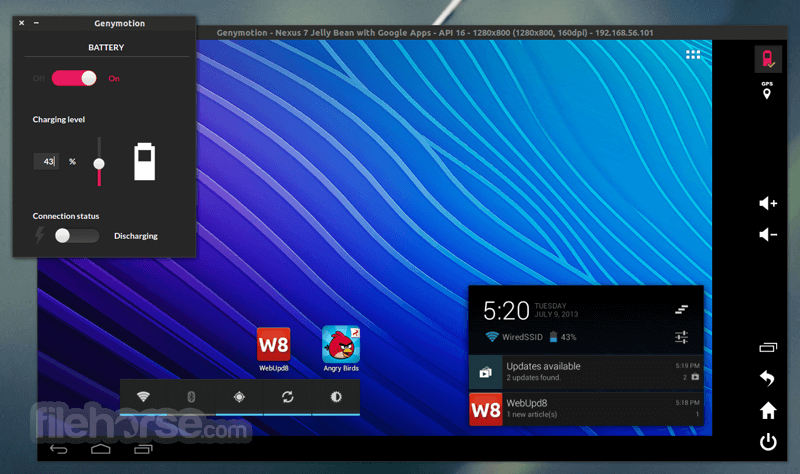
GPS、電池與網路模擬 – 可在各種條件下測試應用程式,包括 GPS 位置變更、電池電量與網路強度。
腳本與自動化 – 支援 ADB 指令,並可透過 Java API 進行自動化,適用於進階測試情境。
螢幕錄製與截圖功能 – 有助於建立應用程式示範與除錯問題。
感應器模擬 – 模擬裝置感應器,例如加速度計、陀螺儀與多點觸控輸入。
使用者介面
它擁有簡潔、現代且使用者友善的介面。儀表板組織良好,讓建立與管理虛擬裝置變得容易。使用者可以透過直觀的 UI 快速啟動新實例、存取裝置設定並監控效能。
模擬器也提供互動式工具列,包含 GPS 模擬、電池電量調整、網路設定與相機存取等選項,確保提供完整的測試環境,無需真實硬體。
安裝與設定
步驟 1:下載
前往官方網站或 FileHorse.com,下載適用於你作業系統的安裝程式。
步驟 2:安裝 VirtualBox
如果你尚未安裝 VirtualBox,請從 Oracle 網站下載並安裝。
步驟 3:安裝
執行應用程式安裝程式,並依照螢幕指示操作。
步驟 4:登入與設定
安裝完成後,開啟 Genymotion,使用你的帳號登入,並設定偏好選項。
步驟 5:建立虛擬裝置
選擇 Android 版本與裝置型號,然後下載並安裝。
啟動虛擬裝置,開始測試你的應用程式!
使用方式
啟動虛擬裝置 – 開啟應用程式,選擇已設定的裝置,然後點擊「開始」按鈕。
安裝應用程式 – 直接將 APK 檔案拖曳到模擬器中,或使用 Google Play 商店(若已啟用)。
測試功能 – 使用 GPS、電池與網路模擬工具進行各種測試情境。
除錯 – 透過 ADB 將此軟體連接到 Android Studio,進行即時除錯。
自動化測試 – 使用腳本與自動化工具進行持續整合測試。
常見問題
Genymotion 的 PC 版免費嗎?
它提供個人使用的免費版本,但專業使用者與團隊需要付費訂閱才能使用進階功能。
我可以在 Genymotion 上使用 Google Play 商店嗎?
預設情況下不包含 Google Play 服務,但使用者可以手動安裝 Open GApps 來啟用 Play 商店存取。
Genymotion 支援 macOS 嗎?
是的,此應用程式相容於 macOS,但需要 VirtualBox 才能執行虛擬裝置。
Genymotion Desktop 與 Genymotion Cloud 有什麼不同?
Genymotion Desktop 在你的 PC 上本機執行,而 Genymotion Cloud 允許使用者在雲端執行虛擬 Android 裝置,並可透過網頁瀏覽器存取。
Genymotion 支援 ARM 架構的應用程式嗎?
此程式主要支援 x86 架構,但使用者可以安裝 ARM 轉譯程式庫來執行 ARM 架構的應用程式。
替代方案
BlueStacks – 熱門的 Android 模擬器,最佳化於遊戲而非開發。
LDPlayer – 專注於遊戲,但也支援一些開發功能。
NoxPlayer – 另一個專注於遊戲的模擬器,效能強勁。
Android Studio Emulator – Google 官方模擬器,專為 Android 應用程式開發與測試設計。
MEmu – 支援多開的遊戲模擬器。
價格
免費版本 – 提供個人使用,功能有限。
桌面版 – 個人開發者每年 136 美元起。
雲端版 – 價格依使用量而異,隨選存取每小時 0.50 美元起。
企業方案 – 針對需要大量授權與進階功能的企業與團隊提供客製化價格。
系統需求
最低需求:
- 作業系統:Windows 11/10/8/7
- 處理器:64 位元 CPU,需啟用 VT-x/AMD-V
- 記憶體:最低 4GB(建議 8GB)
- 儲存空間:2GB 可用磁碟空間
- 虛擬化:需要 VirtualBox 才能執行虛擬裝置
- 具備硬體加速的高效能 Android 模擬。
- 支援多種 Android 版本與裝置設定。
- 與 Android Studio 和 Eclipse 無縫整合。
- 進階測試工具,如 GPS、電池與網路模擬。
- 同時提供桌面版與雲端版模擬器。
- 需要安裝 VirtualBox。
- 商業使用需要付費訂閱。
- 不原生支援 Google Play 商店(需手動安裝)。
- 部分 ARM 架構應用程式可能無法正常運作。
Genymotion 是開發人員與測試人員在建立與測試應用程式時,最優秀的 Android 模擬器之一,提供可靠且功能豐富的環境。
它提供卓越的效能、靈活性與相容性,是行動開發者與 QA 團隊的理想選擇。雖然完整存取需要付費訂閱,但其豐富的功能與雲端能力,使其成為專業使用的值得投資。
如果你在尋找遊戲模擬器,BlueStacks 或 NoxPlayer 等替代方案可能更適合。但如果你需要專注於開發、具備強大測試能力的解決方案,Genymotion 是一流的選擇,能滿足你 Android 開發與測試的一切需求。
注意:需要 Oracle VirtualBox。
另有提供:下載 Genymotion Mac 版
下載 Genymotion 最新版本 為什麼此應用程式發佈在 FileHorse 上?(更多資訊)
畫面截圖
2 張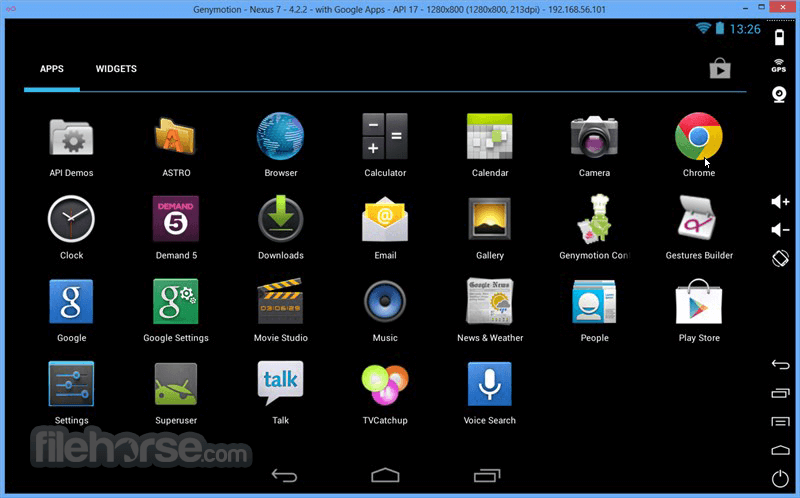

更新日誌
2.12.0 Improvements:
Android 8.0 Oreo is now fully supported.
The internal architectural has been reworked to enable more performance and modularity in the future. Old virtual devices won’t be compatible anymore but a free updater is now provided to all users.
If you’re using an older version of Genymotion, you can now create virtual devices matching your version.
Rendering performances have been improved.
With a poor Internet connection, retries of network calls are automatically performed on timeouts to avoid errors.
Support for `adb shell screenrecord` has been added for all Android versions from 4.4 onwards. The 3-minute time limit has been removed.
Genymotion Cloud virtual devices now support the `adb reverse` command, allowing them to access chosen private endpoints inside your network.
You can now register your newly purchased licenses while still on a trial license.
On Genymotion Cloud, you can now start adbtunnel on a specific port
The version of VirtualBox bundled in the Windows installer has been updated to 5.2.6.
Corrections:
In some cases, adbtunnel for Genymotion Cloud could become unresponsive. This has been fixed.
GPS timestamps are not impacted anymore by timezone changes.
A popup window of the “Disk I/O” feature has been reworded.
On macOS, orientation used to stop working when the computer exited sleep mode. This has been fixed.
On Ubuntu 17.10, the display of some Gnome 3 notifications has been fixed.
The link to the renewal page has been fixed.
When using the latest version of Genymotion, the device updater could create invalid devices. This has been fixed.
On some Linux environments, licenses could not be registered. This has been fixed.
On macOS, a bug preventing the virtual device from starting has been fixed.
The clone command now fails when trying to overwrite an existing virtual device.
歷史版本
完整清單 →- 2026-04-01 Genymotion 3.10.0 154.8 MB
- 2025-05-15 Genymotion 3.9.0 112.98 MB
- 2024-12-16 Genymotion 3.8.0 101.59 MB
- 2024-05-28 Genymotion 3.7.1 93.37 MB
- 2024-05-24 Genymotion 3.7.0 93.36 MB
- 2023-12-20 Genymotion 3.6.0 93.44 MB
- 2023-10-10 Genymotion 3.5.1 93.37 MB
- 2023-07-31 Genymotion 3.5.0 92.02 MB