
- 軟體名稱GlassWire
- 目前版本3.9.1102
- 更新日期2026-06-30
- 檔案大小82.6 MB
- 檔案名稱GlassWireSetup.exe
- 作業系統Windows 7 / Windows 8 / Windows 10 / Windows 11
- 支援語系English
- 授權型式試用版
- 開發商 GlassWire Team
- 軟體分類Windows 軟體 / 安全工具
編輯短評
GlassWire 是一款專注於網路監控與防火牆管理的安全工具,能即時顯示每個應用程式、主機或程序的連線活動,並以圖表與警報呈現,讓使用者一眼看懂網路流量的去向。它的最大辨識度在於視覺化介面,比起傳統防火牆更直覺,適合想掌握網路行為卻不熟悉指令的用戶。目前更新頻率不算高,但仍有持續維護;在同類安全工具中屬於中段班,使用者評價普通,不算特別突出。
這套軟體適合需要追蹤數據用量、偵測異常連線或管理應用程式上網權限的人,例如家庭用戶或小型辦公室。與 Folder Lock、360 Total Security 等替代方案相比,GlassWire 更聚焦於網路層面的監控與控管,而非全面防毒或檔案加密,取捨上較為單一。需注意的是,它提供的是試用版,僅支援英文介面,且主要對應 Windows 平台,使用前最好確認是否符合需求。
軟體介紹
GlassWire 是一款專為 Windows 11/10 設計的全面性網路安全工具(在其他平台上的功能則較為有限)。它將即時網路監控、數據用量分析與防火牆管理整合在一個簡潔且易於使用的介面中。
憑藉其視覺化的設計,GlassWire for PC 讓使用者能透過圖表與警示查看網路活動,無論是專業人士或一般使用者都能輕鬆上手。
主要功能
網路監控:即時追蹤每個應用程式、主機或程序的網路活動。
防火牆整合:控制並封鎖未經授權的網路連線。
頻寬用量監控:分析每日、每週與每月的數據消耗量。
入侵偵測:針對潛在威脅(包括惡意軟體與間諜軟體)發出警示。
歷史數據:透過詳細的歷史圖表回顧過去的網路活動。
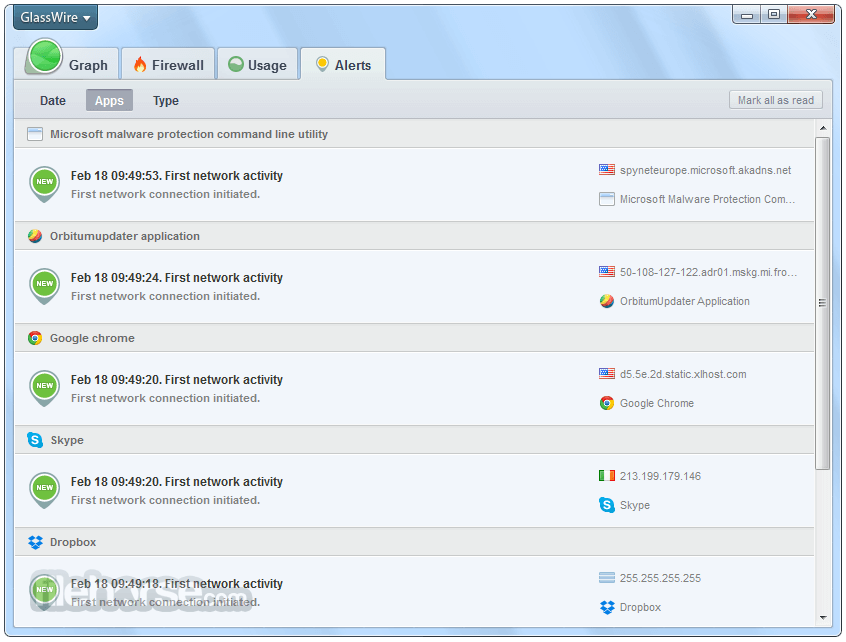
自訂警示:接收關於新應用程式連線、可疑行為或異常活動的通知。
多裝置監控:在同一網路上追蹤多台電腦。
無痕模式:使用此功能隱藏 GlassWire 的監控歷史紀錄。
使用者介面
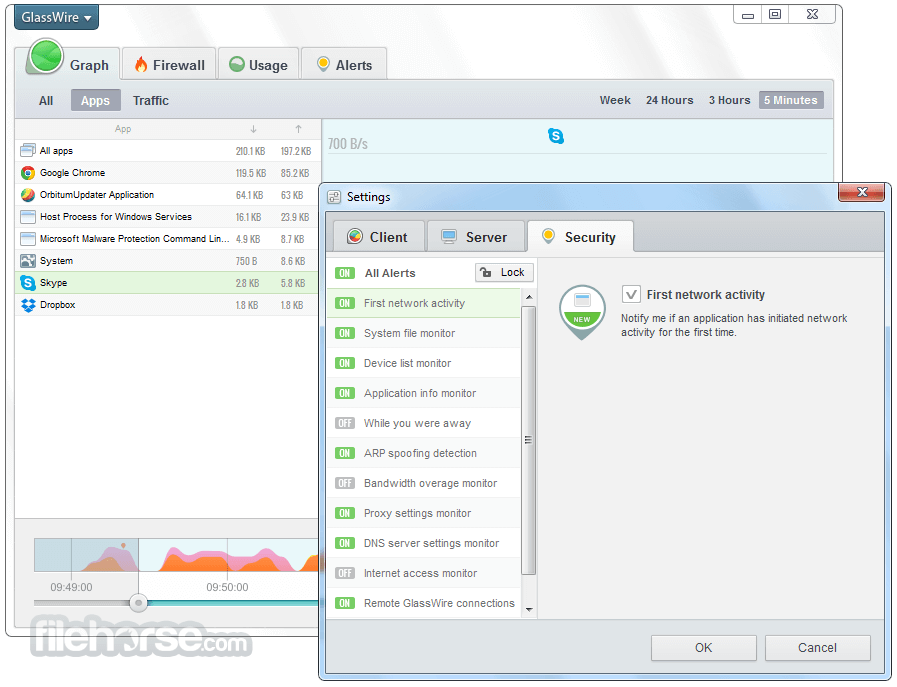
GlassWire 的介面是其最大亮點之一。它採用直覺式佈局,即使是非技術背景的使用者也能輕鬆操作。主儀表板顯示即時的網路活動圖表。
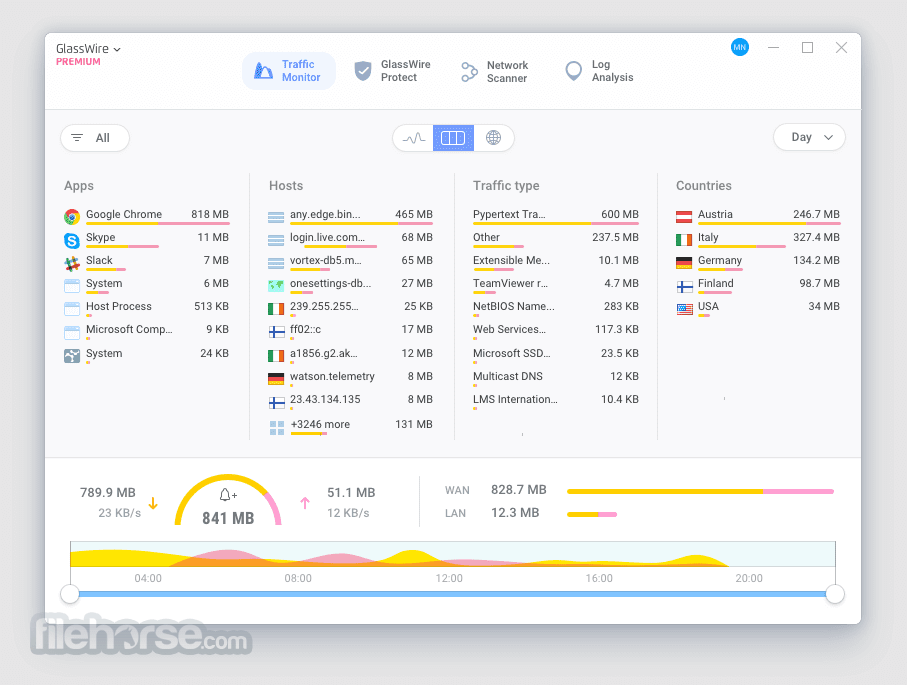
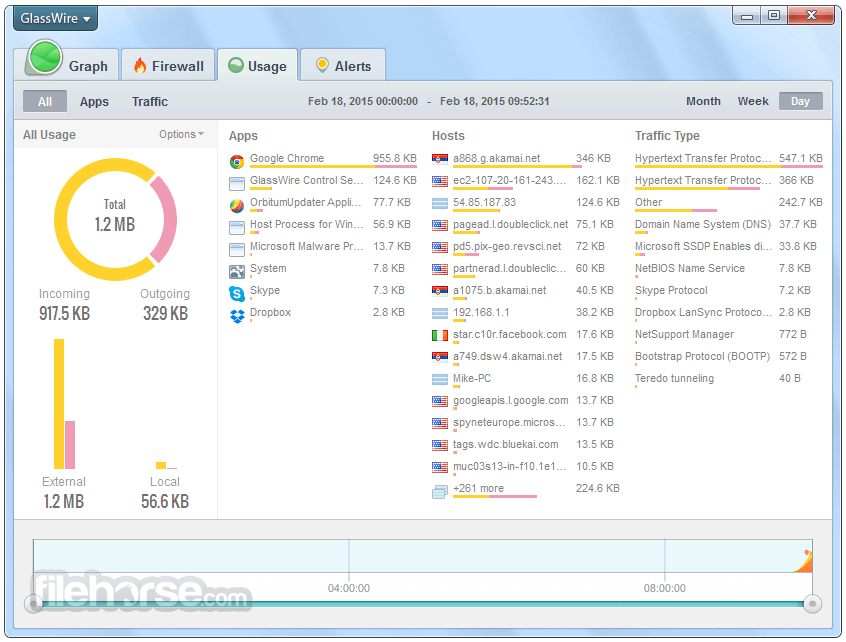
像是「圖表」、「用量」、「防火牆」與「警示」等分頁提供了流暢的體驗,讓使用者能輕鬆切換各項功能。
色彩標示的圖表、分類的用量明細,以及防火牆的切換開關,都提升了軟體的易用性。此外,深色模式選項對偏好減少眼睛疲勞的使用者來說是一大加分。
憑藉其視覺化的設計,GlassWire for PC 讓使用者能透過圖表與警示查看網路活動,無論是專業人士或一般使用者都能輕鬆上手。
主要功能
網路監控:即時追蹤每個應用程式、主機或程序的網路活動。
防火牆整合:控制並封鎖未經授權的網路連線。
頻寬用量監控:分析每日、每週與每月的數據消耗量。
入侵偵測:針對潛在威脅(包括惡意軟體與間諜軟體)發出警示。
歷史數據:透過詳細的歷史圖表回顧過去的網路活動。
自訂警示:接收關於新應用程式連線、可疑行為或異常活動的通知。
多裝置監控:在同一網路上追蹤多台電腦。
無痕模式:使用此功能隱藏 GlassWire 的監控歷史紀錄。
使用者介面
GlassWire 的介面是其最大亮點之一。它採用直覺式佈局,即使是非技術背景的使用者也能輕鬆操作。主儀表板顯示即時的網路活動圖表。
像是「圖表」、「用量」、「防火牆」與「警示」等分頁提供了流暢的體驗,讓使用者能輕鬆切換各項功能。
色彩標示的圖表、分類的用量明細,以及防火牆的切換開關,都提升了軟體的易用性。此外,深色模式選項對偏好減少眼睛疲勞的使用者來說是一大加分。
畫面截圖
5 張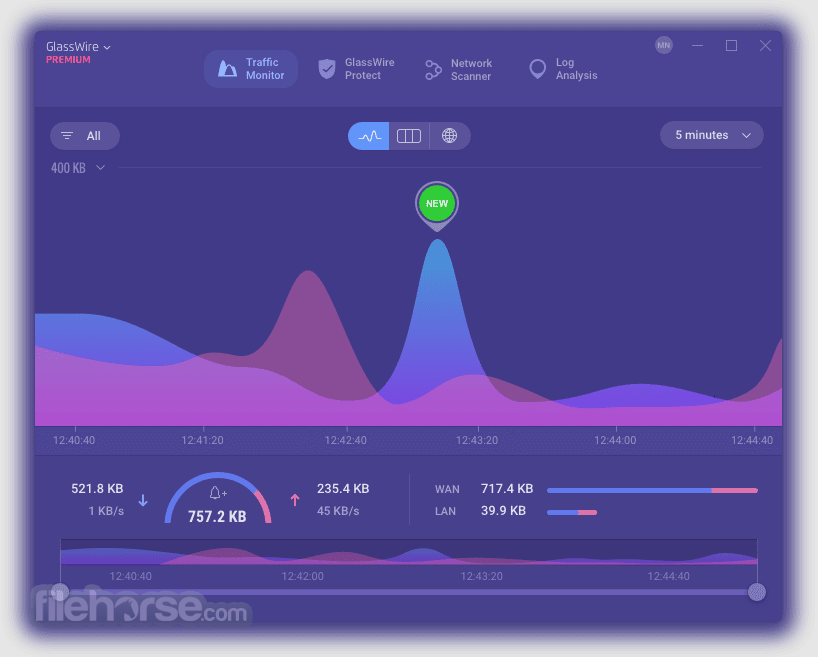

更新日誌
3.9.1102
GW now supports ARM devices.
Version control and cleanup features to remove app redundancy.
Installation and Setup
Download: Visit the official website or FileHorse.com and download the installer.
Install: Run the installer and follow the on-screen instructions.
Setup: Once installed, the app auto-configures itself for immediate use. Users can tweak settings like monitoring intervals, alert preferences, and firewall rules post-installation.
How to Use
Monitoring Network Activity:
Open the app, and the default “Graph” tab displays live network activity.
Hover over spikes to identify applications or hosts causing traffic surges.
Managing the Firewall:
Navigate to the “Firewall” tab.
Toggle the firewall switch to block or allow specific apps or hosts.
Setting Alerts:
Go to the “Settings” menu and customize alerts for suspicious activity, new app connections, or excessive bandwidth usage.
Analyzing Data Usage:
Use the “Usage” tab to view a breakdown of data usage by app, host, or traffic type.
FAQ
Can I use GlassWire for free?
Yes, it offers a free version with basic features. However, premium plans unlock advanced functionalities like firewall control and multiple PC monitoring.
Does GlassWire work with other firewalls?
Yes, it works alongside other firewalls, including Windows Defender. It enhances existing firewall functionality by providing a user-friendly interface.
Is GlassWire resource-intensive?
No, the program is lightweight and optimized to run in the background without significantly affecting system performance.
Can GlassWire detect malware?
While this software isn’t an antivirus, it provides alerts for suspicious behavior, which can help identify malware or spyware.
Can I monitor multiple devices?
Yes, premium versions allow users to monitor multiple devices within the same network.
Alternatives
PRTG Network Monitor: Comprehensive network monitoring for businesses and IT professionals.
NetLimiter: Focused on controlling and monitoring internet traffic, NetLimiter is a great alternative for bandwidth regulation.
Wireshark: A powerful network protocol analyzer for advanced users seeking detailed packet inspection.
Pricing
Free Version
GlassWire is an excellent choice for users seeking a balance between functionality and aesthetics in network monitoring. Its real-time tracking, intuitive design, and robust feature set make it a standout option for personal and small-business use.
While the free version offers basic capabilities, investing in a premium plan unlocks its full potential, making it worth considering for anyone serious about network security and bandwidth management.
Note: Limited functionality in demo version.
Download GlassWire Latest Version Why is this app published on FileHorse? (More info)
Version control and cleanup features to remove app redundancy.
Installation and Setup
Download: Visit the official website or FileHorse.com and download the installer.
Install: Run the installer and follow the on-screen instructions.
Setup: Once installed, the app auto-configures itself for immediate use. Users can tweak settings like monitoring intervals, alert preferences, and firewall rules post-installation.
How to Use
Monitoring Network Activity:
Open the app, and the default “Graph” tab displays live network activity.
Hover over spikes to identify applications or hosts causing traffic surges.
Managing the Firewall:
Navigate to the “Firewall” tab.
Toggle the firewall switch to block or allow specific apps or hosts.
Setting Alerts:
Go to the “Settings” menu and customize alerts for suspicious activity, new app connections, or excessive bandwidth usage.
Analyzing Data Usage:
Use the “Usage” tab to view a breakdown of data usage by app, host, or traffic type.
FAQ
Can I use GlassWire for free?
Yes, it offers a free version with basic features. However, premium plans unlock advanced functionalities like firewall control and multiple PC monitoring.
Does GlassWire work with other firewalls?
Yes, it works alongside other firewalls, including Windows Defender. It enhances existing firewall functionality by providing a user-friendly interface.
Is GlassWire resource-intensive?
No, the program is lightweight and optimized to run in the background without significantly affecting system performance.
Can GlassWire detect malware?
While this software isn’t an antivirus, it provides alerts for suspicious behavior, which can help identify malware or spyware.
Can I monitor multiple devices?
Yes, premium versions allow users to monitor multiple devices within the same network.
Alternatives
PRTG Network Monitor: Comprehensive network monitoring for businesses and IT professionals.
NetLimiter: Focused on controlling and monitoring internet traffic, NetLimiter is a great alternative for bandwidth regulation.
Wireshark: A powerful network protocol analyzer for advanced users seeking detailed packet inspection.
Pricing
Free Version
- Suspicious Host monitoring
- Anomaly Detection
- GlassWire Score
- New Device Connection
- Evil Twin Detection
- System File Monitor
- Device List Monitor
- Summarized Activity While Idle
- ARP Spoofing Detection
- Proxy Settings Monitor
- Traffic Monitoring
- Network Time Machine
- First Network Activity
- Remote GlassWire Connections
- Export Usage Data
- Internet Access Monitor
- Application Information Monitor
- Interactive World Map
- Lockdown Mode
- Ask to Connect
- Firewall Profiles
- RDP Connection Detection
- Network Scanner
- Additional Skins and Themes
- Mini Viewer
- And Many More!
- Operating System: Windows 7, 8, 10, or 11
- RAM: Minimum 1 GB
- Disk Space: 30 MB
- Processor: Dual-core processor or higher
- User-friendly and visually appealing interface.
- Real-time network monitoring with historical data.
- Effective bandwidth usage tracking.
- Lightweight and non-intrusive.
- Works alongside existing firewalls.
- Limited functionality in the free version.
- Premium pricing may be steep for some users.
- Not available on macOS.
GlassWire is an excellent choice for users seeking a balance between functionality and aesthetics in network monitoring. Its real-time tracking, intuitive design, and robust feature set make it a standout option for personal and small-business use.
While the free version offers basic capabilities, investing in a premium plan unlocks its full potential, making it worth considering for anyone serious about network security and bandwidth management.
Note: Limited functionality in demo version.
Download GlassWire Latest Version Why is this app published on FileHorse? (More info)