⚠ 這是歷史版本頁面 — 查看 Gradle 最新版本 →

- 目前版本9.3.0
- 更新日期2026-01-17
- 檔案大小224 MB
- 檔案名稱gradle-9.3.0-all.zip
- 作業系統Windows 7 / Windows 8 / Windows 10 / Windows 11
- 支援語系English
- 授權型式開源軟體
- 開發商 Gradle Inc.
- 軟體分類Windows 軟體 / 開發者工具
##
編輯短評
Gradle 是一套進階的建置自動化工具,專為多語言軟體開發設計,在 Java 生態系中尤其常見,常用於建置、測試與部署應用程式。它採用有向無環圖(DAG)來最佳化建置效率,比傳統的 Apache Ant 或 Maven 更具彈性與效能。Gradle 以 Groovy 和 Kotlin 撰寫,提供強大的腳本語言讓開發者自訂建置流程。目前由 Gradle Inc. 持續維護,更新相當活躍,在開發者工具中屬於評價不錯的選擇,不過評分人數不算多。
這套工具適合需要複雜建置流程的開發者,尤其是 Java 或 Kotlin 專案,也支援多語言整合。與 Maven 等替代工具相比,Gradle 的學習曲線較陡,但換來更高的彈性與效能。它整合了許多常見開發工具,方便串接。要注意的是,目前僅提供英文介面,且為開源軟體,可在 Windows 平台上使用。若你偏好圖形化操作或需要中文支援,可能需要額外尋找其他方案。
##
翻譯排程處理中,以下暫以英文原文呈現
軟體介紹
Gradle is an advanced build automation tool designed for multi-language software development.
It is particularly popular in the Java ecosystem and is widely used for building, testing, and deploying applications.
Unlike traditional build tools such as Apache Ant and Maven, Gradle for Windows offers a more flexible and high-performance approach, utilizing a directed acyclic graph (DAG) to optimize build efficiency.
Gradle is written in Groovy and Kotlin, offering developers a powerful scripting language to configure and manage their build processes.
It integrates seamlessly with other tools such as Android Studio, IntelliJ IDEA, and Eclipse, making it a preferred choice for Android and Java developers.
Key Features
Incremental Builds – It optimizes tasks by only executing necessary updates, improving build performance.
Multi-Project Builds – It efficiently handles complex multi-module projects with dependency management.
Kotlin DSL Support – Offers scripting with Kotlin, providing better readability and IDE support.
Dependency Management – Supports Maven, Ivy, and custom repositories for managing project dependencies.
Custom Build Logic – Allows developers to define custom tasks and workflows in Groovy or Kotlin.
Task Parallelization – Runs independent tasks in parallel to speed up the build process.
Continuous Build Feature – Detects changes in source files and automatically triggers a new build.
Extensibility – Highly customizable with plugins and third-party integrations.
Command Line Interface (CLI) – Offers powerful CLI commands for managing builds.
Integration with CI/CD Tools – Works well with Jenkins, GitHub Actions, and other automation tools.
User Interface
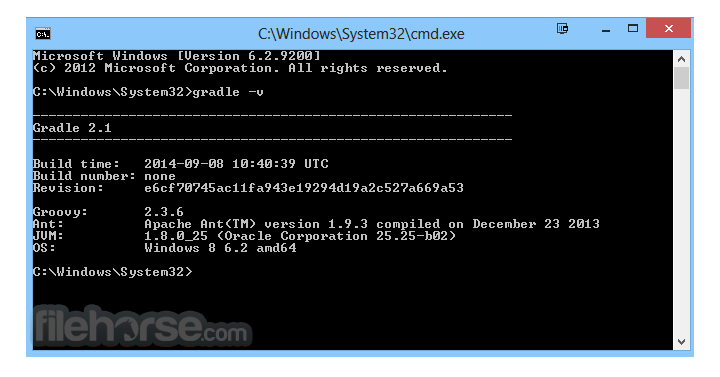
Gradle does not have a traditional graphical user interface (GUI); it operates mainly via the command line and integrates with various IDEs. The build scripts are written in text-based formats (Groovy or Kotlin), making it accessible for developers familiar with scripting languages.
For those using Gradle with an IDE such as Android Studio, IntelliJ IDEA, or Eclipse, it provides a more visual way to manage dependencies, tasks, and configurations through built-in UI components in the IDE.
FAQ
Can I use Gradle with Maven dependencies?
Yes, it supports Maven and Ivy repositories, allowing you to import dependencies from pom.xml files.
How does Gradle improve build performance?
It uses incremental builds, caching, and parallel execution to reduce build times.
Is Gradle only for Java projects?
No, it supports various languages, including Kotlin, Groovy, Scala, C++, and JavaScript.
How do I debug a Gradle build issue?
Use the --stacktrace or --debug flag in the CLI to get detailed error logs.
Can Gradle be used in CI/CD pipelines?
Yes, it integrates with Jenkins, GitHub Actions, GitLab CI, and other automation tools.
Alternatives
This program is open-source and FREE to use under the Apache License 2.0. However, Gradle Enterprise, a paid version, offers enhanced build analytics and acceleration for large teams.
System Requirements
Gradle is a powerful and flexible build automation tool, especially suited for Java and Android development. Its performance optimizations, extensive customization, and robust dependency management make it a preferred choice over traditional build tools like Maven and Ant. However, its steep learning curve and complexity may pose challenges for beginners.
For developers working with large-scale projects requiring efficiency, automation, and scalability, Gradle is an excellent option. Whether you're a beginner or an advanced user, investing time in mastering Gradle can significantly improve your build and deployment workflows.
Download Gradle Latest Version Why is this app published on FileHorse? (More info)
It is particularly popular in the Java ecosystem and is widely used for building, testing, and deploying applications.
Unlike traditional build tools such as Apache Ant and Maven, Gradle for Windows offers a more flexible and high-performance approach, utilizing a directed acyclic graph (DAG) to optimize build efficiency.
Gradle is written in Groovy and Kotlin, offering developers a powerful scripting language to configure and manage their build processes.
It integrates seamlessly with other tools such as Android Studio, IntelliJ IDEA, and Eclipse, making it a preferred choice for Android and Java developers.
Key Features
Incremental Builds – It optimizes tasks by only executing necessary updates, improving build performance.
Multi-Project Builds – It efficiently handles complex multi-module projects with dependency management.
Kotlin DSL Support – Offers scripting with Kotlin, providing better readability and IDE support.
Dependency Management – Supports Maven, Ivy, and custom repositories for managing project dependencies.
Custom Build Logic – Allows developers to define custom tasks and workflows in Groovy or Kotlin.
Task Parallelization – Runs independent tasks in parallel to speed up the build process.
Continuous Build Feature – Detects changes in source files and automatically triggers a new build.
Extensibility – Highly customizable with plugins and third-party integrations.
Command Line Interface (CLI) – Offers powerful CLI commands for managing builds.
Integration with CI/CD Tools – Works well with Jenkins, GitHub Actions, and other automation tools.
User Interface
Gradle does not have a traditional graphical user interface (GUI); it operates mainly via the command line and integrates with various IDEs. The build scripts are written in text-based formats (Groovy or Kotlin), making it accessible for developers familiar with scripting languages.
For those using Gradle with an IDE such as Android Studio, IntelliJ IDEA, or Eclipse, it provides a more visual way to manage dependencies, tasks, and configurations through built-in UI components in the IDE.
FAQ
Can I use Gradle with Maven dependencies?
Yes, it supports Maven and Ivy repositories, allowing you to import dependencies from pom.xml files.
How does Gradle improve build performance?
It uses incremental builds, caching, and parallel execution to reduce build times.
Is Gradle only for Java projects?
No, it supports various languages, including Kotlin, Groovy, Scala, C++, and JavaScript.
How do I debug a Gradle build issue?
Use the --stacktrace or --debug flag in the CLI to get detailed error logs.
Can Gradle be used in CI/CD pipelines?
Yes, it integrates with Jenkins, GitHub Actions, GitLab CI, and other automation tools.
Alternatives
- Maven – XML-based build tool with a convention-over-configuration approach.
- Ant – Flexible but lacks dependency management features.
- Bazel – Google's build tool with high scalability and performance.
- Make – Traditional Unix-based build tool with limited flexibility.
- Buck – Facebook’s open-source build system optimized for large projects.
This program is open-source and FREE to use under the Apache License 2.0. However, Gradle Enterprise, a paid version, offers enhanced build analytics and acceleration for large teams.
System Requirements
- OS: Windows 7, 8, 10, 11 (32/64bit)
- JDK: Java 8 or higher
- Memory: 4GB RAM (8GB recommended)
- Storage: 500MB free disk space
- Additional: IDE support (IntelliJ IDEA, Eclipse, or Android Studio recommended)
- High performance with incremental builds and caching
- Supports multi-language development
- Flexible and highly customizable
- Strong dependency management
- Seamless integration with CI/CD pipelines and IDEs
- Higher learning curve compared to Maven
- No official GUI, mostly command-line-based
- Requires manual setup for Windows installation
- Gradle scripts can become complex for large projects
- Not as widely adopted as Maven in some enterprise environments
Gradle is a powerful and flexible build automation tool, especially suited for Java and Android development. Its performance optimizations, extensive customization, and robust dependency management make it a preferred choice over traditional build tools like Maven and Ant. However, its steep learning curve and complexity may pose challenges for beginners.
For developers working with large-scale projects requiring efficiency, automation, and scalability, Gradle is an excellent option. Whether you're a beginner or an advanced user, investing time in mastering Gradle can significantly improve your build and deployment workflows.
Download Gradle Latest Version Why is this app published on FileHorse? (More info)
##
畫面截圖
- 2026-08-07 Gradle 9.7.0 245 MB
- 2026-06-28 Gradle 9.6.1 229 MB
- 2026-06-19 Gradle 9.6.0 229 MB
- 2026-05-13 Gradle 9.5.1 229 MB
- 2026-05-08 Gradle 8.14.5 215 MB
- 2026-05-08 Gradle 9.5.0 230 MB
- 2026-03-19 Gradle 9.4.1 227 MB
- 2026-03-05 Gradle 9.4.0 227 MB