
- 目前版本0.9.3
- 更新日期2008-11-24
- 檔案大小6.23MB
- 檔案名稱HandBrake-0.9.3-Win_GUI.exe
- 作業系統Windows 10 / Windows 11
- 支援語系English
- 授權型式開源軟體
- 開發商 Handbrake Team
- 軟體分類Windows 軟體 / 影片軟體
編輯短評
HandBrake 是一套開放原始碼的影片轉碼工具,主要解決將 DVD 或藍光影片轉換為 MP4、MKV 等常見格式的需求,也能把影片轉成適合 iPhone、iPod 等行動裝置觀看的規格。它最具辨識度的特色在於支援多執行緒轉檔,並能直接讀取 VIDEO_TS 目錄、DVD 映像檔或光碟,輸出時可選擇 H.264、MPEG-4、AAC 等多種編碼,彈性相當大。這套軟體由社群長期維護,更新頻率穩定,在同類工具中屬於熱門選擇,使用者評價普遍不錯。
HandBrake 適合需要批次轉檔或處理光碟備份的使用者,尤其是想把收藏的 DVD 轉成數位檔案、或將影片調整為特定裝置可播放格式的人。與 KMPlayer、K-Lite Codec Pack 這類播放或解碼工具不同,HandBrake 專注於轉檔而非播放,因此若只是要看影片,它並非替代選項;但若需要格式轉換,它提供的控制選項比一般簡易轉檔軟體更深入。軟體以 GPL 授權釋出,完全免費,支援 Windows、macOS 與 Linux,不過目前介面僅有英文,使用上需留意選單與設定皆為原文。
軟體介紹
最初是為了擷取 DVD 而開發,HandBrake 已發展成功能完整的轉檔工具,無論是一般使用者或專業人士都適用。
支援批次處理、預設模式,以及多種自訂選項,HandBrake 是 Windows 電腦上強大的影片轉檔解決方案。
主要功能
多格式支援:可轉換多種格式的影片,包括 MP4、MKV、AVI 等。
內建預設模式:提供裝置專屬預設(例如 iPhone、Android、Roku),讓轉檔輕鬆無負擔。
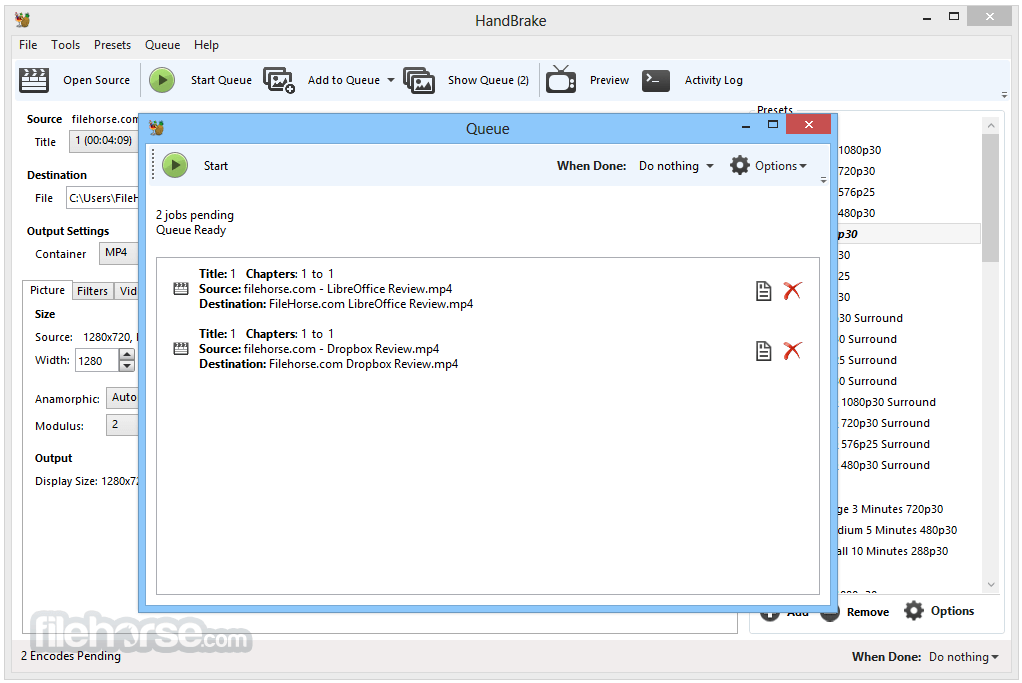
批次編碼:可將多個檔案加入佇列進行轉換,節省時間。
硬體加速:支援 Intel QSV、NVIDIA NVENC 與 AMD VCE 的 GPU 編碼。
進階濾鏡:可套用去交錯、縮放、裁切、降噪等影片濾鏡。
字幕支援:可新增、移除或直接傳輸字幕(SRT、VobSub 等)。
章節標記:在輸出檔案中保留或新增章節標記。
可自訂輸出設定:可微調影片/音訊編碼、位元率、解析度等。
使用者介面
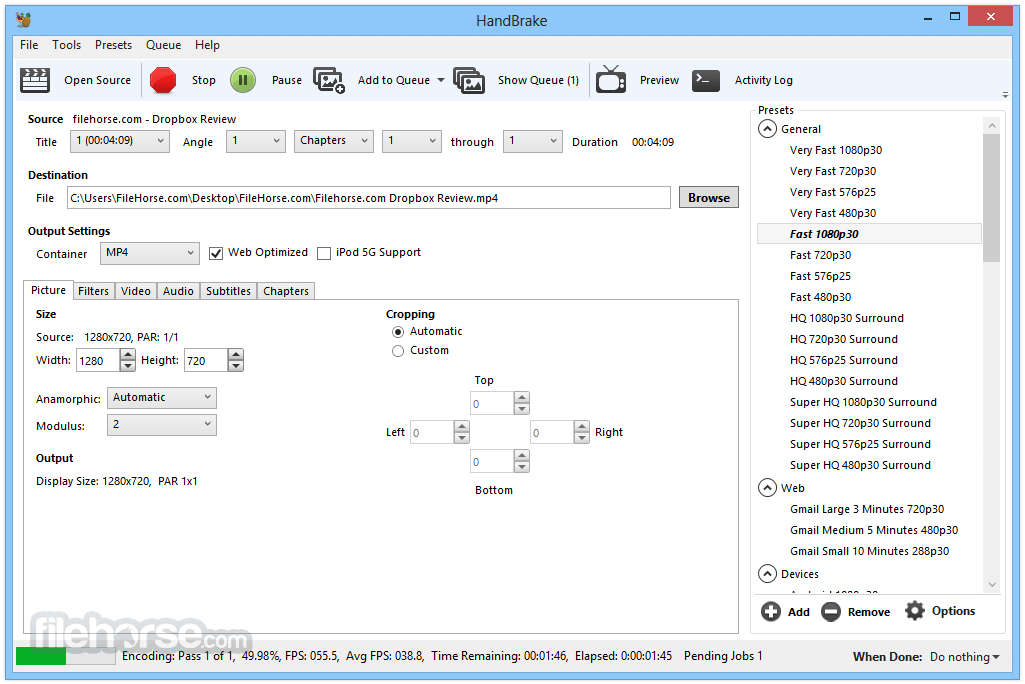
HandBrake 的介面注重實用而非花俏。它提供簡單的儀表板,使用者可以載入影片、選擇輸出設定、選取預設模式,然後開始編碼。
基本操作上介面相當直覺,但進階功能分散在各個分頁中,新手可能需要一些時間熟悉。
即時預覽功能在確認編碼設定時非常方便。
安裝與設定
安裝這款影片程式非常簡單。從官方網站下載安裝檔、執行,然後依照指示操作即可。
安裝過程輕量,不包含任何垃圾軟體或第三方推廣。安裝完成後即可直接使用,無需額外安裝編碼器或外掛。
使用方式
- 啟動 HandBrake,透過拖曳或點擊「Open Source」按鈕載入來源檔案。
- 從右側面板選擇預設模式(例如「Fast 1080p30」)。
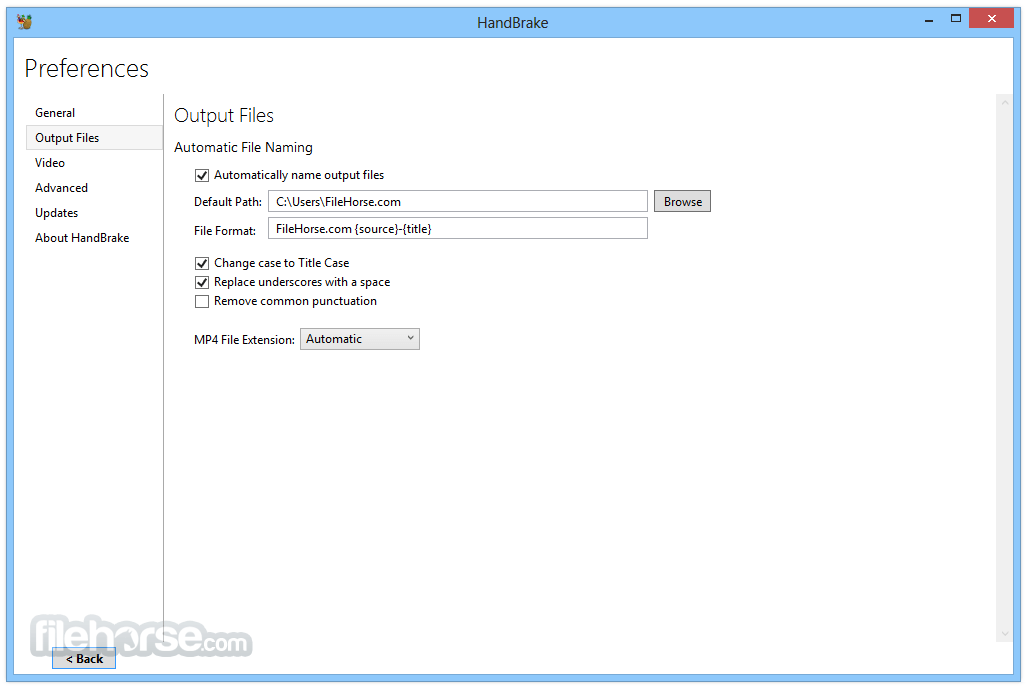
- 選擇目的地資料夾與檔案名稱。
- 如有需要,可自訂影片/音訊/字幕設定。
- 點擊「Start Encode」開始轉檔。
其他功能
- 支援輸出 MP4、MKV 與 WebM 格式。
- 相容於 AV1、H.265、H.264、MPEG-4、MPEG-2、VP8 與 VP9 影片編碼器。
- 提供選用的硬體加速影片編碼。
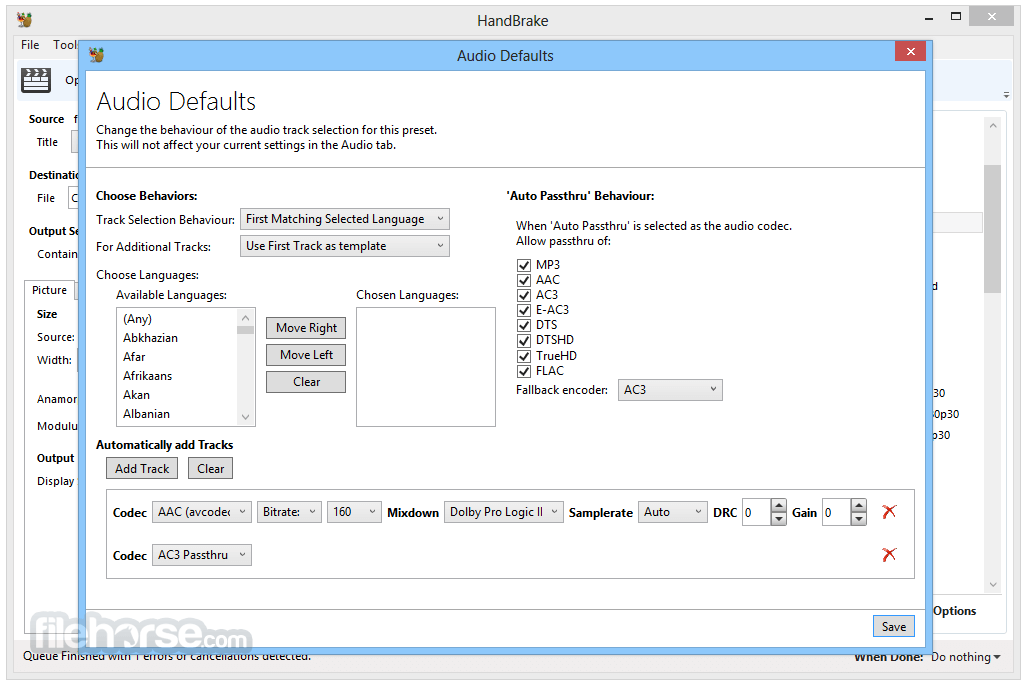
- 音訊編碼支援 AAC、HE-AAC、MP3、FLAC、AC3、E-AC3、Opus 與 Vorbis 格式。
- 允許音訊直接傳輸 AC-3、E-AC3、FLAC、DTS、DTS-HD、TrueHD、AAC、Opus、MP3 與 MP2。
- 支援標題、章節與範圍選擇進行編碼。
- 可批次掃描並同時將多個編碼任務加入佇列。
- 輸出檔案中包含章節標記。
- 字幕支援 VobSub、CEA-608 隱藏式字幕、SSA 與 SRT 格式。
- 提供固定品質與平均位元率兩種編碼選項。
- 支援可變幀率(VFR)與固定幀率(CFR)。
- 內建去交錯、去梳、降噪、去電視電影、去區塊、灰階、色彩空間、裁切與縮放等濾鏡。
- 編碼期間提供即時靜態與影片預覽。
- 支援 HDR 直通,保留高動態範圍內容。
HandBrake 可以轉檔 DVD 或藍光嗎?
可以,但僅限未受保護的光碟。對於商業光碟,需要第三方工具來繞過 DRM 保護。
HandBrake 支援批次處理嗎?
支援。您可以將多個檔案加入佇列,依序處理。
轉檔後可以保留字幕嗎?
可以。根據您的設定,可以直通或燒錄字幕。
HandBrake 安全且無廣告嗎?
是的,它是開放原始碼軟體,完全沒有廣告或綑綁軟體。
它支援硬體加速嗎?
支援。它支援 Intel QSV、NVIDIA NVENC 與 AMD VCE,可加速編碼。
替代方案
FFmpeg:命令列工具,控制力更強,但學習曲線較陡。
Format Factory:整合影片、音訊與圖片轉檔於一體。
Any Video Converter:易於使用的工具,具備額外編輯功能。
MediaCoder:高度可自訂的轉檔器,但較不直覺。
價格
這款工具 100% 免費且開放原始碼。沒有付費版本或付費功能。
系統需求
- 作業系統:Windows 11 或 Windows 10(僅限 64 位元)
- CPU:Intel 或 AMD 處理器,支援 SSE4
- 記憶體:最低 4 GB,建議 8 GB
- 儲存空間:安裝至少需 100 MB;處理檔案時需要更多空間
- GPU:選用,用於硬體加速
- 免費且開放原始碼
- 強大的編碼選項
- 支援硬體加速
- 定期更新
- 支援批次處理
- 進階功能對新手不友善
- 不支援加密的 DVD/藍光
- 編輯功能有限
HandBrake 是一款強大且可靠的影片轉檔工具,非常適合需要多功能轉檔與最佳化影片內容的 Windows 使用者。雖然對於進階工作流程,它可能不適合完全的新手,但其預設模式、效能與自由度,讓它成為業界愛用的工具,絕非偶然。
注意:需要 .NET Framework。
另有提供:下載 HandBrake Mac 版
下載 HandBrake 最新版本 為什麼這個應用程式會發布在 FileHorse 上?(更多資訊)
畫面截圖
5 張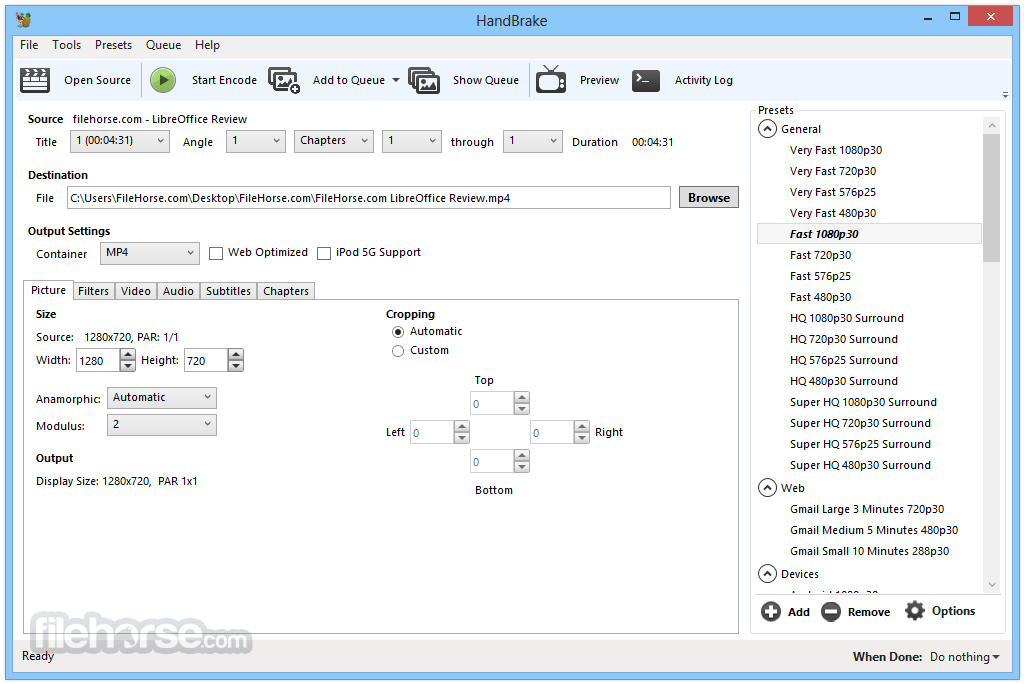

更新日誌
0.9.3 Universal input
HandBrake is no longer limited to DVDs: it will now accept practically any type of video as a source. This massive enhancement was achieved by tapping into the power of libavcodec and libavformat from the FFmpeg project.
Linux GUI
There is now an official GTK graphical interface for Linux, available as a binary for Ubuntu. This is the real deal, interacting directly with HandBrake's core library instead of just putting a pretty face on a command line interface. It has full feature parity with the Mac interface.
Video quality
The x264 project has really come into its own this year, and HandBrake 0.9.3 integrates the latest improvements to the H.264 encoding library. Picture quality has enhanced dramatically through the use of psychovisual rate distortion and adaptive quantization, and there have been significant speed optimizations.
Audio flexibility
HandBrake now offers total control over multiple audio tracks.
No more internal DVD decryption
Yeah, we know, no one reading this is going "Oh wow, no more DVD decryption--what a great new feature!" but...deal.
HandBrake will dynamically load VLC's copy of libdvdcss if you have it in your Applications folder in Mac OS X, and if you're on Linux, and you want to live on the wild side, you can install libdvdcss on your system and get the same effect.
Translation of the last paragraph from nerdese:
We're not about to stop you from choosing to decrypt DVDs. If you're on a Mac, and you have VLC 0.9.x installed, you won't even notice the internal capability's gone. If you're on Linux, all you have to do is install a library.
Persistent queues
When queueing up a bunch of videos to encode, you need no longer fear a crash in HandBrake's graphical interfaces. Queued jobs are cached to disk for safekeeping between sessions.
New, better organized presets (Be sure to run "Update Built-In Presets" from the Presets menu!)
The presets are now "nested" in folders and have evolved. Notably, there is a new Apple "Universal" preset, designed to play and look good doing so on anything from an iPod Nano to an AppleTV.
There have been many changes to most of them. Please be aware that most presets now use different settings. This means most of them are not suited for benchmarking 0.9.3 against 0.9.2. For example, the AppleTV preset is slower because it is now quality based, and produces much more efficient output. The Normal preset uses psychovisual rate distortion. The High Profile presets use psychovisual trellising. All of these setting changes can influence encoding time and output file size.
For comparison purposes, there are several presets in the Apple->Legacy folder (the old iPod High-Rez, the old AppleTV, and the old iPhone presets) which remain unchanged since 0.9.2.
Audio-video synchronization
HandBrake should now keep lip-synch as well as a DVD player can.
Decomb filter
HandBrake now offers a decomb filter, in the style of AviSynth's. It is a deinterlacer that can be left on all the time without degrading picture quality, because it only deinterlaces video when it visibly needs to be.
Multi-threaded deinterlacing
The "Slow" and "Slower" filters, as well as the new decomb filter, will now take advantage of as many processors as you can throw at them.
"Same as source framerate" really is the same as the source framerate
HandBrake now, by default, passes through the exact video framerate of the source instead of smoothing to a constant rate, which could lead to frames being duplicated or dropped.
Theora video encoding
HandBrake now can encode video using the Theora codec.
Updated libraries
Besides x264, updated libraries include libsamplerate, libogg, xvidcore, libmpeg2, lame, faac, and ffmpeg's libavcodec, libavformat, and libswscale.
Massive improvements to all interfaces
- 2026-06-08 HandBrake 1.11.2 24.16 MB
- 2026-03-23 HandBrake 1.11.1 24.13 MB
- 2026-03-09 HandBrake 1.11.0 24.11 MB
- 2025-09-07 HandBrake 1.10.2 23.18 MB
- 2025-08-24 HandBrake 1.10.1 23.19 MB
- 2025-08-11 HandBrake 1.10.0 23.18 MB
- 2025-02-24 HandBrake 1.9.2 23.16 MB
- 2025-02-13 HandBrake 1.9.1 23.13 MB