Icecream Video Editor 3.26
v 3.26
Windows
免費軟體
8/10 (70)
- 目前版本3.26
- 更新日期2026-07-02
- 檔案大小69.7 MB
- 檔案名稱video_editor_setup.exe
- 作業系統Windows 7 / Windows 8 / Windows 10 / Windows 11
- 支援語系English
- 授權型式免費軟體
- 開發商 IceCream Apps
- 軟體分類Windows 軟體 / 影片軟體
##
翻譯排程處理中,以下暫以英文原文呈現
軟體介紹
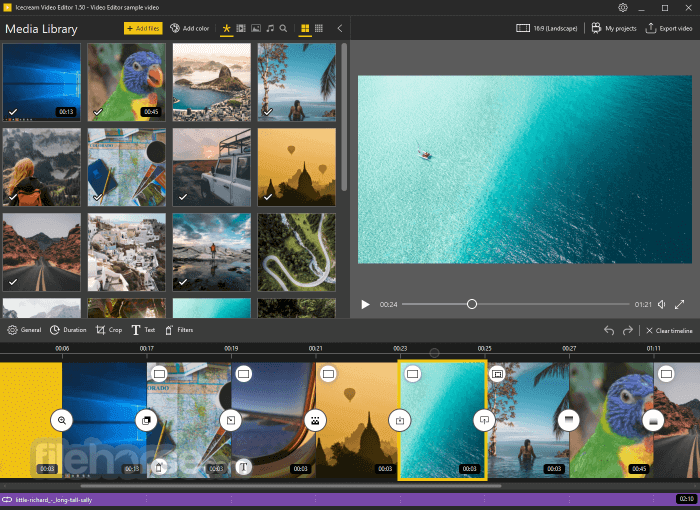
Icecream Video Editor is an easy-to-use free video editing software that enables you to edit videos and create new ones from both videos and photos in a few minutes.
The Icecream Video Editor 2026 video editor provides support for a wide range of popular video, image and audio formats, including MP4, AVI, WEBM, MOV, JPG, PNG, GIF, MP3, WAV and more.
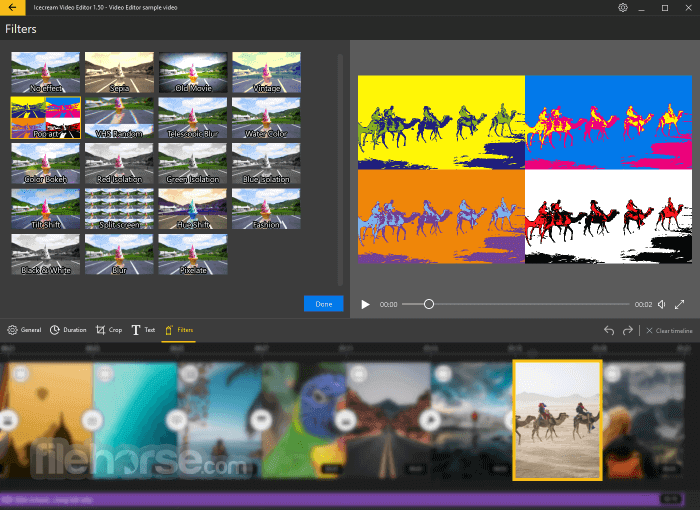
Trim videos, add transitions and background audio, add titles and apply visual effects. You can also rotate, speed up, blur videos, and much more. Customize audio: tune volume, add effects, fade-in, fade-out, and much more!
Features and Highlights
Cut and Split Videos: Easily adjust video length or split footage into scenes with one click. Trim the beginning or end using the ‘Trim’ mode.
Add Audio: Include background music, loop audio, adjust volume, add effects, and use fade-in/out features. Sync soundtracks with the original audio automatically.
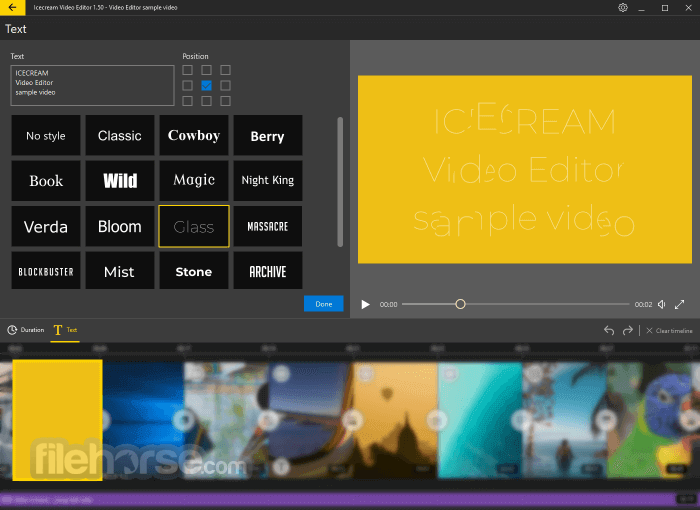
Add Text: Insert text with style presets or customize font color, position, size, and motion speed.
Change Speed: Modify playback speed from 0.25x to 10x for the entire video or specific parts.
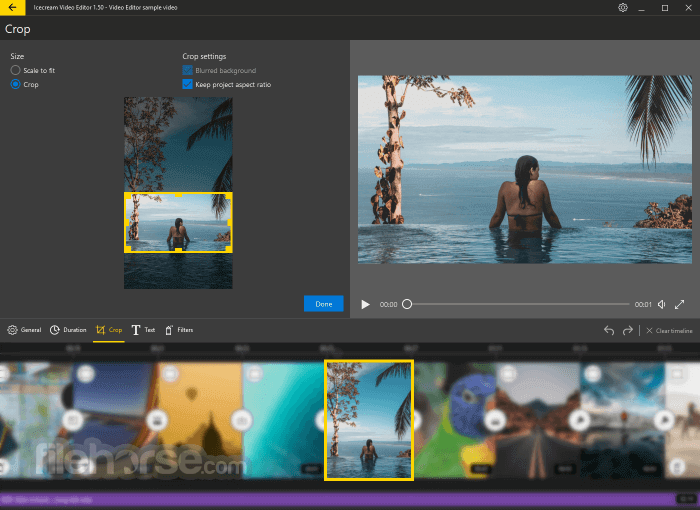
Resize and Crop: Crop unwanted parts and resize for specific aspect ratios. Features include blurred backgrounds and auto-enlarging.
Flip and Rotate: Rotate videos or flip scenes horizontally/vertically. Vertical files are auto-adjusted for convenience.
Record Voiceover: Add and trim voice-over narrations to match the timeline seamlessly.
Add Subtitles: Create subtitles or import SRT files. Customize color, size, font, transparency, and style.
Convert Videos: Convert media formats to MP4, WebM, or export audio as MP3.
Manage Projects: Save and revisit projects in the ‘Projects’ section for further editing.
FAQ
Is Icecream Video Editor safe to install?
Yes, it is completely safe to download and use any software by Icecream Apps, including Icecream Video Editor.
How often is the Video Editor updated?
The software is updated regularly to introduce new features and ensure a bug-free experience. For detailed updates, refer to the Video Editor's changelog.
Is the Video Editor free to use?
Yes, the Free version of Icecream Video Editor offers all main features. Upgrading to the PRO version allows you to add more than 10 scenes to the timeline and export videos longer than 5 minutes without watermarks.
Do I need a powerful computer to edit videos?
It has modest system requirements. However, we recommend checking your computer's specifications for optimal performance.
Does Icecream Video Editor support 4K videos?
Yes, the software supports 4K video editing on Windows 10 and 11, enabling you to work with high-resolution videos for enhanced visual clarity.
Alternatives
Filmora – A widely used video editing tool for both novices and seasoned professionals.
DaVinci Resolve – A professional video editing software that offers advanced features and AI capabilities.
Adobe Premiere Pro – A fully featured video editing software from the famous Adobe Creative Cloud suite.
UniFab – AI-powered 8-in-1 comprehensive video processing PC tool.
Topaz Video AI – Stunning video enlargements with groundbreaking AI technology!
System Requirements
OS
Windows 11, Windows 10, Windows 8.1, Windows 8, Windows 7
Processor
Intel®, AMD or any other compatible processor, 2.66Ghz
Ram
4GB of RAM minimum (16GB for better performance)
Display resolution
1280x720 minimum
Disk space
100MB - 5GB
Languages
English, German, Spanish, French, Italian, Japanese, Dutch, Polish, Portuguese, Russian, Turkish, Chinese Simplified, Traditional Chinese
PROS
Download Icecream Video Editor Latest Version Why is this app published on FileHorse? (More info)
The Icecream Video Editor 2026 video editor provides support for a wide range of popular video, image and audio formats, including MP4, AVI, WEBM, MOV, JPG, PNG, GIF, MP3, WAV and more.
Trim videos, add transitions and background audio, add titles and apply visual effects. You can also rotate, speed up, blur videos, and much more. Customize audio: tune volume, add effects, fade-in, fade-out, and much more!
Features and Highlights
Cut and Split Videos: Easily adjust video length or split footage into scenes with one click. Trim the beginning or end using the ‘Trim’ mode.
Add Audio: Include background music, loop audio, adjust volume, add effects, and use fade-in/out features. Sync soundtracks with the original audio automatically.
Add Text: Insert text with style presets or customize font color, position, size, and motion speed.
Change Speed: Modify playback speed from 0.25x to 10x for the entire video or specific parts.
Resize and Crop: Crop unwanted parts and resize for specific aspect ratios. Features include blurred backgrounds and auto-enlarging.
Flip and Rotate: Rotate videos or flip scenes horizontally/vertically. Vertical files are auto-adjusted for convenience.
Record Voiceover: Add and trim voice-over narrations to match the timeline seamlessly.
Add Subtitles: Create subtitles or import SRT files. Customize color, size, font, transparency, and style.
Convert Videos: Convert media formats to MP4, WebM, or export audio as MP3.
Manage Projects: Save and revisit projects in the ‘Projects’ section for further editing.
FAQ
Is Icecream Video Editor safe to install?
Yes, it is completely safe to download and use any software by Icecream Apps, including Icecream Video Editor.
How often is the Video Editor updated?
The software is updated regularly to introduce new features and ensure a bug-free experience. For detailed updates, refer to the Video Editor's changelog.
Is the Video Editor free to use?
Yes, the Free version of Icecream Video Editor offers all main features. Upgrading to the PRO version allows you to add more than 10 scenes to the timeline and export videos longer than 5 minutes without watermarks.
Do I need a powerful computer to edit videos?
It has modest system requirements. However, we recommend checking your computer's specifications for optimal performance.
Does Icecream Video Editor support 4K videos?
Yes, the software supports 4K video editing on Windows 10 and 11, enabling you to work with high-resolution videos for enhanced visual clarity.
Alternatives
Filmora – A widely used video editing tool for both novices and seasoned professionals.
DaVinci Resolve – A professional video editing software that offers advanced features and AI capabilities.
Adobe Premiere Pro – A fully featured video editing software from the famous Adobe Creative Cloud suite.
UniFab – AI-powered 8-in-1 comprehensive video processing PC tool.
Topaz Video AI – Stunning video enlargements with groundbreaking AI technology!
System Requirements
OS
Windows 11, Windows 10, Windows 8.1, Windows 8, Windows 7
Processor
Intel®, AMD or any other compatible processor, 2.66Ghz
Ram
4GB of RAM minimum (16GB for better performance)
Display resolution
1280x720 minimum
Disk space
100MB - 5GB
Languages
English, German, Spanish, French, Italian, Japanese, Dutch, Polish, Portuguese, Russian, Turkish, Chinese Simplified, Traditional Chinese
PROS
- User-Friendly Interface
- Supports Multiple Formats
- Built-in Transitions
- No Watermark in Free Version
- Lightweight Software
- Limited Advanced Features
- Basic Editing Tools Only
- Slow Export Speed
- No Cloud Integration
- Limited Audio Editing Options
Download Icecream Video Editor Latest Version Why is this app published on FileHorse? (More info)
##
畫面截圖