⚠ 這是歷史版本頁面 — 查看 Komodo Edit 12.0.1 Build 最新版本 →

- 目前版本17449
- 更新日期2016-11-25
- 檔案大小74.55 MB
- 檔案名稱Komodo-Edit-10.1.2-17449.msi
- 作業系統Windows 7 / Windows 8 / Windows 10
- 支援語系English
- 授權型式開源軟體
- 開發商 ActiveState Software Inc.
- 軟體分類Windows 軟體 / 開發者工具
##
編輯短評
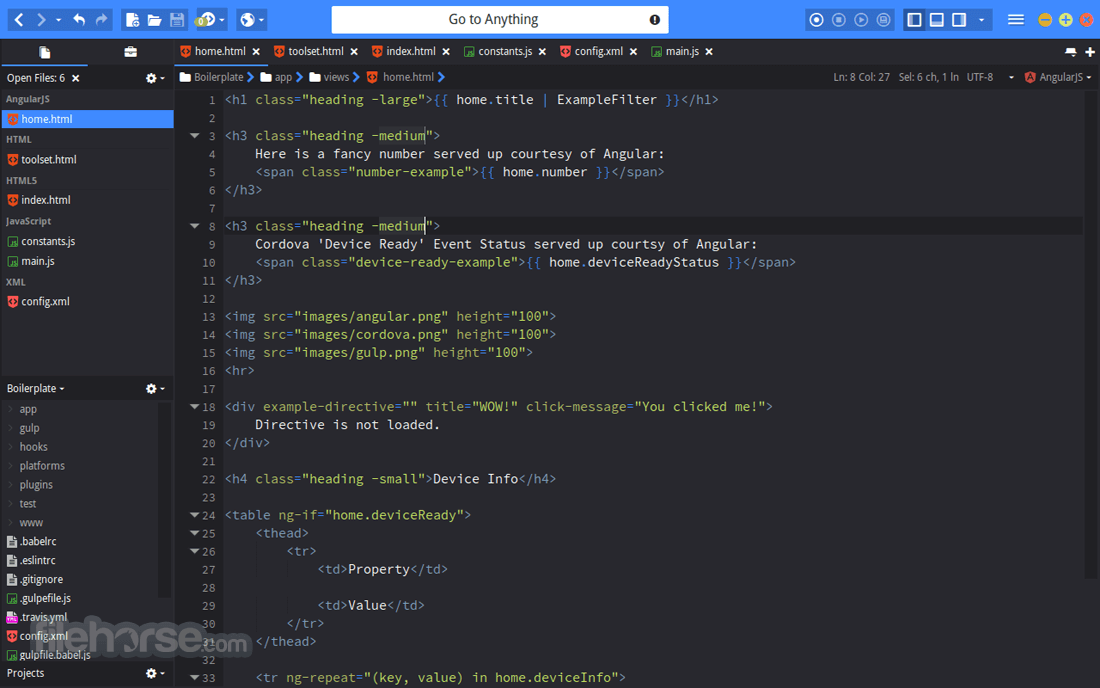
Komodo Edit 是 ActiveState 推出的免費開源編輯器,主打多平台、多語言支援,涵蓋 PHP、Python、Ruby、Perl、Tcl、JavaScript、CSS、HTML 以及 RHTML、Django 等模板語言。它最顯眼的特色是背景語法檢查與語法著色,能在輸入當下就標出錯誤,搭配自動補全與呼叫提示,讓寫程式時少一點來回切換的麻煩。這套軟體在開發者工具分類中評價普遍不錯,但更新步調已明顯放緩,屬於穩定但不算特別活躍的選擇。
如果你常用動態語言或模板語法,又不想為了寫小專案就開起完整 IDE,Komodo Edit 會是輕量但夠用的方案。它支援 XPI 擴充套件,沿用 Firefox 的 Mozilla 架構,想自己寫外掛的人有相當大的彈性。與 BlueStacks、Turbo C++ 等熱門工具相比,它定位更偏向純編輯而非模擬器或編譯環境,取捨上少了整合除錯與建置功能,但換來更單純的編輯體驗。需注意的是介面僅有英文,且授權雖為開源,Windows 與 macOS 皆有版本,Linux 用戶也能使用。
##
翻譯排程處理中,以下暫以英文原文呈現
軟體介紹
Komodo Edit from ActiveState is a free, open-source, multi-platform, multi-language editor (PHP, Python, Ruby, Perl and Tcl, JavaScript, CSS, HTML and template languages like RHTML, Template-Toolkit, HTML-Smarty, and Django).
Background syntax checking and syntax coloring catch errors immediately, while autocomplete and calltips guide you as you write. Available on Windows, macOS, and Linux.
XPI extensions allow you to create your own plug-ins. XPI extension support provides the same capability as Firefox, with all standard Mozilla APIs based on XUL, XBL, and XPCOM, plus own for Python and JavaScript.
Other features include Vi emulation, Emacs keybindings, Code Folding, and Code Snippets.
Komodo Edit is a great editor if you're looking for something powerful, yet simple.
If you find yourself needing more advanced functionality such as debugging, unit testing, code refactoring, code profiling, plus some great integrations with other technologies (Gulp, Grunt, PhoneGap, Docker, Vagrant, etc.), Komodo IDE may be the tool you need.
Features and Highlights
Track Changes
The editor has gained a new left margin, which highlights unsaved changes, as well as any uncommitted SCC changes. Clicking on the margin shows a diff dialog of the changes, and allows you to revert individual changes. Sweet!
Commando (Go to Anything)
This powerful popup dialog is the combined successor of the Fast Open and Invoke Tool dialogs in previous versions of Komodo. Commando provides fuzzy matching, match highlighting, search for files (find any file under a folder), toolbox search, bookmark integration, shortcuts (go-tool) integration as well as custom category filtering.
GoLang Support
Google Go (GoLang) is now supported in Komodo and features syntax coloring, code folding, syntax checking (linting) and code intelligence
Markdown Viewer
For Markdown files, Komodo provides a preview of the generated HTML directly within a Komodo split view and contents dynamically update whenever you make a change to the Markdown text - it doesn't even need to be saved.
Kopy.io Helper
Like Pastebin, now you can easily share snippets of code with other people directly from Komodo. Simply make a text selection and use the editor: right-click context menu and choose Share Code via Kopy.io. Kopy.io supports client-side encryption, so you can make those shared pastes more secure.
Color Schemes and Themes
"We've updated the Komodo color schemes and we've made Tomorrow_Dark the new default Komodo color scheme (a dark-based scheme). The Komodo UI has been updated to match the latest operating systems, so Komodo now looks even better. We also added the ability to tweak the editor line height spacing."
Notifications
Notification messages shown to the user now appear in a separate popup panel that overlays the main Komodo editor window (they previously appeared in the Komodo status bar). This makes for more intuitive and informative use of Komodo; no more asking yourself "What just happened?".
Language Icons
Language icons have been overhauled to be consistent and easily identifiable by their colors and emblems. Komodo dynamically generates new icons for filetypes that it has not previously encountered, so you'll always have unique icons for each language.
New Developer SDK
An overhaul of the Komodo APIs makes it easier to load and access the methods inside of Komodo. It's now making use of CommonJS (aka Node.js) require() calls to load individual modules.
PROS
Also Available: Download Komodo Edit for Mac
Download Komodo Edit Latest Version Why is this app published on FileHorse? (More info)
Background syntax checking and syntax coloring catch errors immediately, while autocomplete and calltips guide you as you write. Available on Windows, macOS, and Linux.
XPI extensions allow you to create your own plug-ins. XPI extension support provides the same capability as Firefox, with all standard Mozilla APIs based on XUL, XBL, and XPCOM, plus own for Python and JavaScript.
Other features include Vi emulation, Emacs keybindings, Code Folding, and Code Snippets.
Komodo Edit is a great editor if you're looking for something powerful, yet simple.
If you find yourself needing more advanced functionality such as debugging, unit testing, code refactoring, code profiling, plus some great integrations with other technologies (Gulp, Grunt, PhoneGap, Docker, Vagrant, etc.), Komodo IDE may be the tool you need.
Features and Highlights
Track Changes
The editor has gained a new left margin, which highlights unsaved changes, as well as any uncommitted SCC changes. Clicking on the margin shows a diff dialog of the changes, and allows you to revert individual changes. Sweet!
Commando (Go to Anything)
This powerful popup dialog is the combined successor of the Fast Open and Invoke Tool dialogs in previous versions of Komodo. Commando provides fuzzy matching, match highlighting, search for files (find any file under a folder), toolbox search, bookmark integration, shortcuts (go-tool) integration as well as custom category filtering.
GoLang Support
Google Go (GoLang) is now supported in Komodo and features syntax coloring, code folding, syntax checking (linting) and code intelligence
Markdown Viewer
For Markdown files, Komodo provides a preview of the generated HTML directly within a Komodo split view and contents dynamically update whenever you make a change to the Markdown text - it doesn't even need to be saved.
Kopy.io Helper
Like Pastebin, now you can easily share snippets of code with other people directly from Komodo. Simply make a text selection and use the editor: right-click context menu and choose Share Code via Kopy.io. Kopy.io supports client-side encryption, so you can make those shared pastes more secure.
Color Schemes and Themes
"We've updated the Komodo color schemes and we've made Tomorrow_Dark the new default Komodo color scheme (a dark-based scheme). The Komodo UI has been updated to match the latest operating systems, so Komodo now looks even better. We also added the ability to tweak the editor line height spacing."
Notifications
Notification messages shown to the user now appear in a separate popup panel that overlays the main Komodo editor window (they previously appeared in the Komodo status bar). This makes for more intuitive and informative use of Komodo; no more asking yourself "What just happened?".
Language Icons
Language icons have been overhauled to be consistent and easily identifiable by their colors and emblems. Komodo dynamically generates new icons for filetypes that it has not previously encountered, so you'll always have unique icons for each language.
New Developer SDK
An overhaul of the Komodo APIs makes it easier to load and access the methods inside of Komodo. It's now making use of CommonJS (aka Node.js) require() calls to load individual modules.
PROS
- Multi-platform & language support
- Syntax checking & coloring
- Extensive plugin capabilities
- Advanced features in Komodo IDE
- Commando for quick navigation
- GoLang & Markdown support
- Integrated code sharing via Kopy.io
- Customizable themes & color schemes
- Improved notification system
- Developer-friendly SDK
- IDE features require Komodo IDE
- Learning curve for advanced functionality
Also Available: Download Komodo Edit for Mac
Download Komodo Edit Latest Version Why is this app published on FileHorse? (More info)
##
畫面截圖
- 2025-04-29 Komodo Edit 12.0.1 Build 18441 74.8 MB
- 2020-01-16 Komodo Edit 12.0.0 Build 18431 74.8 MB
- 2019-01-09 Komodo Edit 11.1.1 Build 18206 74.8 MB
- 2018-06-21 Komodo Edit 11.1.0 Build 18196 74.8 MB
- 2017-12-20 Komodo Edit 11.0.2 Build 18122 74.73 MB
- 2017-10-31 Komodo Edit 11.0.1 Build 18119 74.73 MB
- 2017-09-26 Komodo Edit 11.0.0 Build 18063 74.71 MB
- 2017-07-25 Komodo Edit 10.2.3 Build 17708 74.7 MB