⚠ 這是歷史版本頁面 — 查看 LAV Filters 最新版本 →

LAV Filters 0.75.1
v 0.75.1
Windows
開源軟體
7.6/10 (33)
- 目前版本0.75.1
- 更新日期2021-06-21
- 檔案大小13.4 MB
- 檔案名稱LAVFilters-0.75.1-Installer.exe
- 作業系統Windows 7 / Windows 8 / Windows 10 / Windows 11
- 支援語系English
- 授權型式開源軟體
- 開發商 Hendrik Leppkes
- 軟體分類Windows 軟體 / 影片軟體
##
編輯短評
LAV Filters 是一套以 FFmpeg 為核心的 DirectShow 解碼器集合,主要解決 Windows 上影音格式支援不足的問題。它幾乎能解碼所有常見的多媒體格式,並支援 DXVA2 硬體加速,讓播放過程更流暢。這套工具長期維護、更新活躍,在同類解碼器中屬於口碑不錯的小眾選擇,常被整合進 MPC-HC 等播放器,作為影音播放的關鍵元件。
這套軟體適合喜歡自行組裝播放環境、不想安裝整套肥大解碼包的使用者。與 K-Lite 這類整合包相比,LAV Filters 更輕量、更貼近底層,但需要搭配其他播放器或介面才能使用。它僅提供英文介面,且只支援 Windows 平台,對不熟悉 DirectShow 架構的人來說,初期設定可能稍嫌門檻,但熟悉後就能享受乾淨且彈性的解碼方案。
##
翻譯排程處理中,以下暫以英文原文呈現
軟體介紹
LAV Filters is an open-source collection of DirectShow filters that enables the playback of a wide range of video and audio formats on Windows systems.
Based on the popular FFmpeg multimedia library, LAV Filters offers robust decoding support and aims to provide seamless playback without relying on bloated codec packs.
It serves as a vital component in many media player setups, including MPC-HC and other DirectShow-based applications.
Features
Wide Format Support: Decodes almost every multimedia format, including MKV, MP4, AVI, FLV, MOV, and more.
Hardware Acceleration: Supports DXVA2 (copy-back and native), Intel QuickSync, NVIDIA CUVID, and D3D11 for smoother playback.
Bitstreaming: Enables audio bitstreaming for Dolby TrueHD, DTS-HD Master Audio, and other HD audio formats.
Subtitles Handling: Built-in support for embedded and external subtitle streams.
Multi-threaded Decoding: Optimized for multi-core CPUs to ensure smooth decoding performance.
Splitters and Demuxers: Efficiently demuxes audio/video streams from containers like MKV and MP4.
User Interface
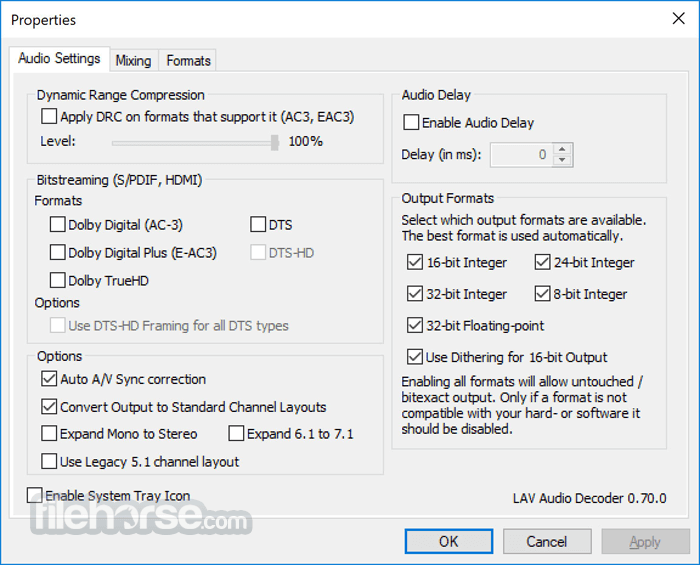
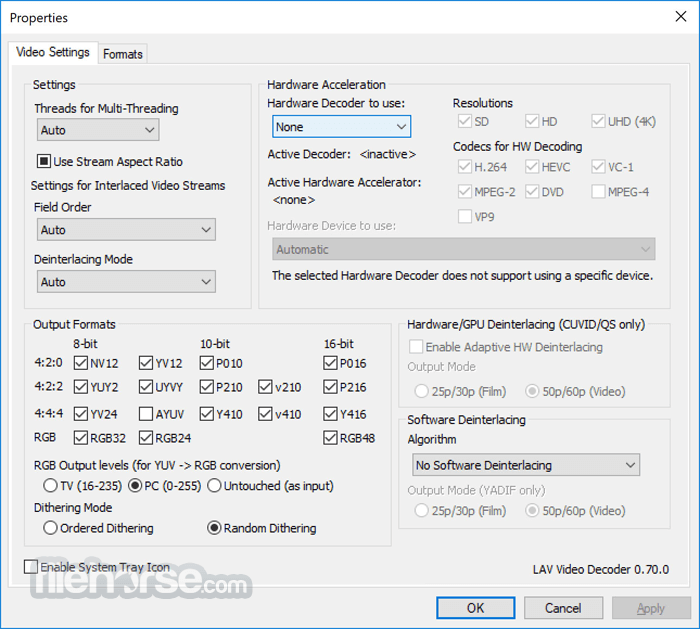
LAV Filters does not have a full GUI but includes a functional system tray settings panel for each component (LAV Audio, LAV Video, and LAV Splitter).
These panels allow users to toggle options like hardware acceleration, format selection, audio mixing, and subtitle prioritization. It’s minimal but very configurable for power users.
Installation and Setup
Installing this tool is straightforward. The official installer packages all components and provides checkboxes to select which filters to install. During setup, users can choose to register the filters for use with DirectShow players.
Advanced users may also manually tweak the filter merit or use external tools like GraphStudioNext for fine-grained control.
How to Use
Once installed, LAV Filters works silently in the background. Most modern media players will automatically use LAV Filters if registered. You can right-click the filter icon in the system tray during playback to access the settings menu.
Here, you can adjust formats, enable hardware acceleration, or customize audio settings. It’s also compatible with tools like madVR for advanced video rendering setups.
FAQ
Do I need LAV Filters if I use VLC?
No. VLC uses its own built-in codecs and does not rely on DirectShow or external filters.
Can LAV Filters improve video quality?
Not directly, but when paired with renderers like madVR, it ensures optimal decoding which indirectly enhances playback quality.
How do I update LAV Filters?
Uninstall the previous version, then install the latest version from the official website. Settings are typically retained.
Why isn't LAV Filters working with my player?
Make sure your player supports DirectShow and that LAV Filters are registered correctly.
Does it support 4K and HDR?
Yes, with proper hardware and renderer configuration, it supports 4K and HDR content decoding.
Alternatives
K-Lite Codec Pack Full: Includes LAV Filters but also adds other tools and codecs.
ffdshow: An older decoder with similar goals but less actively maintained.
Shark007’s Codec Pack: Feature-rich pack that includes LAV and other decoding tools.
MPC-HC with built-in LAV: Ideal for users who want a media player bundled with the filters.
Pricing
This program is completely FREE and open-source under the GNU GPL license. No premium versions or hidden costs.
System Requirements
Download LAV Filters Latest Version Why is this app published on FileHorse? (More info)
Based on the popular FFmpeg multimedia library, LAV Filters offers robust decoding support and aims to provide seamless playback without relying on bloated codec packs.
It serves as a vital component in many media player setups, including MPC-HC and other DirectShow-based applications.
Features
Wide Format Support: Decodes almost every multimedia format, including MKV, MP4, AVI, FLV, MOV, and more.
Hardware Acceleration: Supports DXVA2 (copy-back and native), Intel QuickSync, NVIDIA CUVID, and D3D11 for smoother playback.
Bitstreaming: Enables audio bitstreaming for Dolby TrueHD, DTS-HD Master Audio, and other HD audio formats.
Subtitles Handling: Built-in support for embedded and external subtitle streams.
Multi-threaded Decoding: Optimized for multi-core CPUs to ensure smooth decoding performance.
Splitters and Demuxers: Efficiently demuxes audio/video streams from containers like MKV and MP4.
User Interface
LAV Filters does not have a full GUI but includes a functional system tray settings panel for each component (LAV Audio, LAV Video, and LAV Splitter).
These panels allow users to toggle options like hardware acceleration, format selection, audio mixing, and subtitle prioritization. It’s minimal but very configurable for power users.
Installation and Setup
Installing this tool is straightforward. The official installer packages all components and provides checkboxes to select which filters to install. During setup, users can choose to register the filters for use with DirectShow players.
Advanced users may also manually tweak the filter merit or use external tools like GraphStudioNext for fine-grained control.
How to Use
Once installed, LAV Filters works silently in the background. Most modern media players will automatically use LAV Filters if registered. You can right-click the filter icon in the system tray during playback to access the settings menu.
Here, you can adjust formats, enable hardware acceleration, or customize audio settings. It’s also compatible with tools like madVR for advanced video rendering setups.
FAQ
Do I need LAV Filters if I use VLC?
No. VLC uses its own built-in codecs and does not rely on DirectShow or external filters.
Can LAV Filters improve video quality?
Not directly, but when paired with renderers like madVR, it ensures optimal decoding which indirectly enhances playback quality.
How do I update LAV Filters?
Uninstall the previous version, then install the latest version from the official website. Settings are typically retained.
Why isn't LAV Filters working with my player?
Make sure your player supports DirectShow and that LAV Filters are registered correctly.
Does it support 4K and HDR?
Yes, with proper hardware and renderer configuration, it supports 4K and HDR content decoding.
Alternatives
K-Lite Codec Pack Full: Includes LAV Filters but also adds other tools and codecs.
ffdshow: An older decoder with similar goals but less actively maintained.
Shark007’s Codec Pack: Feature-rich pack that includes LAV and other decoding tools.
MPC-HC with built-in LAV: Ideal for users who want a media player bundled with the filters.
Pricing
This program is completely FREE and open-source under the GNU GPL license. No premium versions or hidden costs.
System Requirements
- OS: Windows 11, 10, 8 or 7
- CPU: Dual-core or higher recommended
- GPU: For hardware acceleration, compatible Intel, NVIDIA, or AMD GPU
- RAM: 2 GB or more
- Lightweight and efficient
- Broad format support
- Hardware acceleration
- Highly customizable
- Actively maintained
- No full graphical interface
- May require technical knowledge to configure optimally
- Limited use for non-DirectShow players
Download LAV Filters Latest Version Why is this app published on FileHorse? (More info)
##
畫面截圖
- 2026-06-10 LAV Filters 0.82.0 15.5 MB
- 2026-01-12 LAV Filters 0.81.0 15.4 MB
- 2025-06-20 LAV Filters 0.80.0 15.5 MB
- 2024-04-08 LAV Filters 0.79.2 14.9 MB
- 2024-03-28 LAV Filters 0.79.1 14.9 MB
- 2024-03-26 LAV Filters 0.79 14.9 MB
- 2023-10-25 LAV Filters 0.78 14.5 MB
- 2023-03-08 LAV Filters 0.77.2 13.9 MB