- 目前版本2.6.944893
- 更新日期2026-08-11
- 檔案大小43.1 MB
- 檔案名稱logioptionsplus_installer.exe
- 作業系統Windows 10 / Windows 11
- 支援語系English
- 授權型式免費軟體
- 開發商 Logitech
- 軟體分類Windows 軟體 / 桌面強化
##
翻譯排程處理中,以下暫以英文原文呈現
軟體介紹
Logi Options+ is the latest iteration of Logitech’s configuration PC software designed to maximize the functionality of Logitech’s peripherals such as mice, keyboards, and other input devices.
Building on the foundation of the previous Logitech Options software, Logi Options Plus introduces a more modern interface, enhanced customization capabilities, and an improved overall experience.
The software aims to give users the ability to assign functions, remap buttons, set custom gestures, and create application-specific profiles, optimizing the workflow for both productivity and gaming.
With Logi Options+, Logitech continues its commitment to offering users a seamless and intuitive experience with their hardware by enabling extensive control over peripheral functionality.
What`s New
Introducing Logi AI Prompt Builder, the latest innovation in Options+ that allows you to build prompts faster, easier enhancing your efficiency and creativity.
How To Get Started
The Logi AI Prompt Builder is available in English only.
Key Features
Advanced Customization
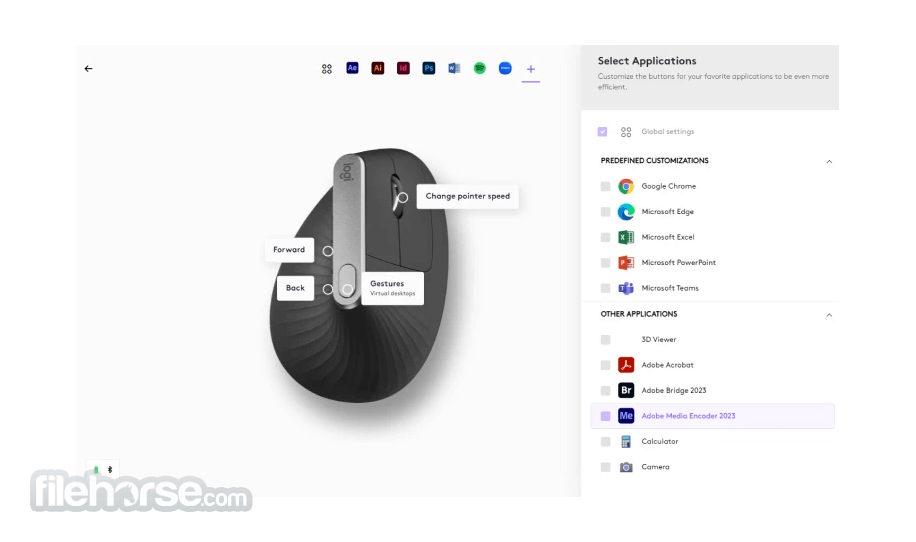
Users can configure nearly every button on supported devices. This includes creating custom shortcuts for specific applications and setting different functions for each button. For example, a button on your Logitech mouse can open Photoshop while the same button can have a different function when you’re using Excel.
Flow Technology
It includes Logitech’s signature Flow technology, which allows users to move their cursor across multiple devices seamlessly. If you use multiple computers, Flow makes it easy to copy and paste content from one machine to another, even if they run different operating systems.
Gestures and Shortcuts
Logitech enhances productivity by supporting customizable gestures on supported devices, such as the Logitech MX Master series. Gestures can be mapped to specific tasks like opening the desktop or switching between open applications, all with the flick of a finger.
Smart Actions
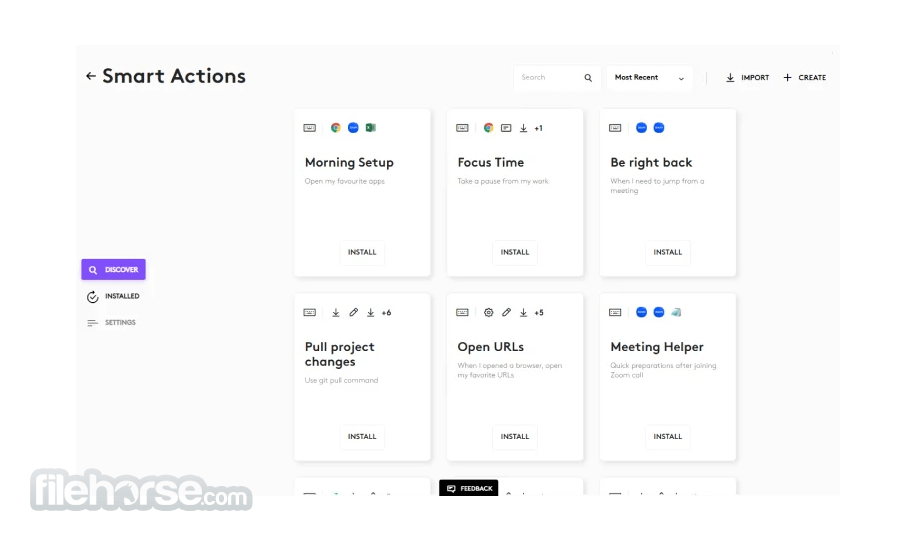
The Smart Actions feature allows users to automate multiple tasks with a single button press. For example, a single click could open a web browser, start a playlist, and launch an application, all automatically.
Application-Specific Profiles
Users can create different profiles that are automatically triggered based on the active application. This allows for specific customizations to be applied instantly when switching between software.
Battery Monitoring
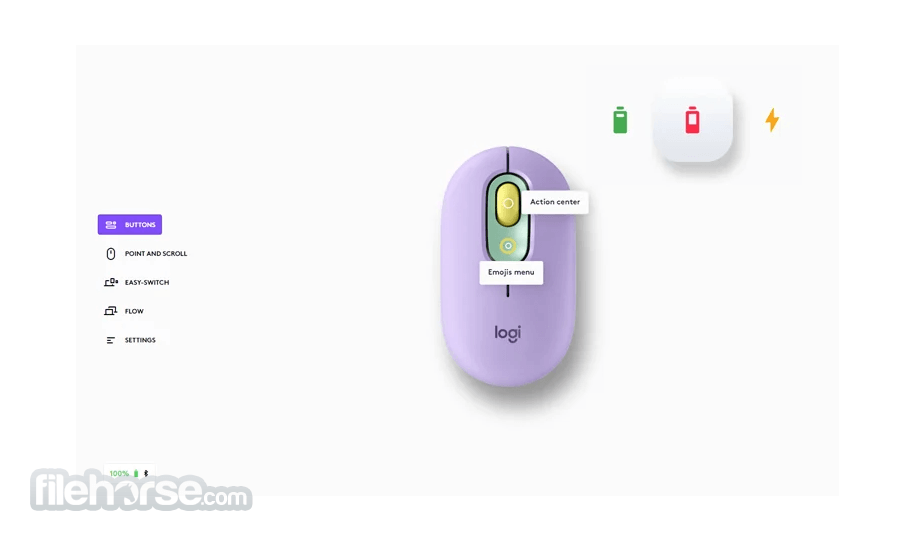
For wireless devices, this software displays battery life status, ensuring users stay informed and can recharge their devices in a timely manner.
Cloud Backup
Settings and custom profiles can be backed up and synced across devices via the cloud, making it easy to transfer configurations to a new computer or restore after a system reset.
User Interface
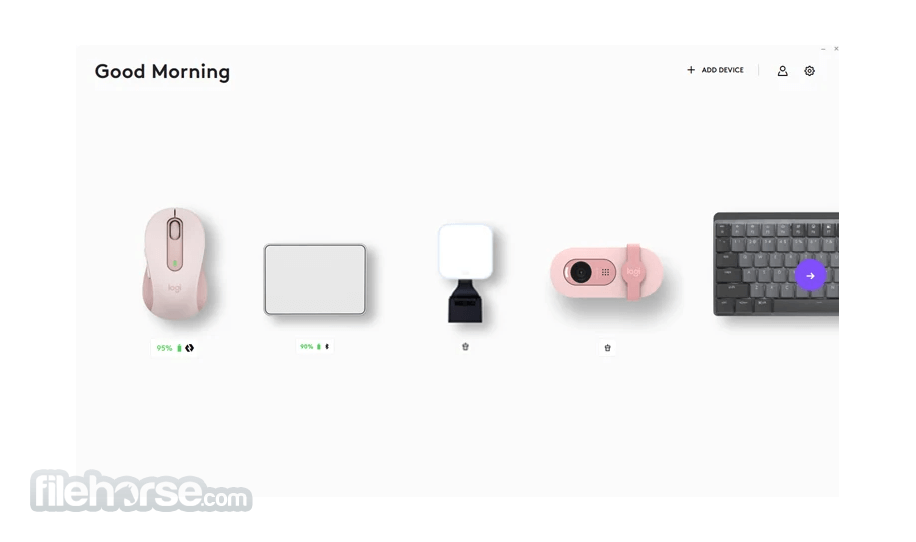
It features a sleek, modern interface that is more streamlined compared to its predecessor, Logitech Options. The layout is clean and intuitive, with a dashboard that provides an overview of connected devices.
Each device has a dedicated configuration window where users can adjust settings like pointer speed, scrolling preferences, and button functions.
The navigation is smooth and user-friendly, designed with both casual users and advanced tinkerers in mind. Options are categorized clearly, ensuring that users can access functions with minimal effort.
Each configuration panel comes with tooltips and guides, making it easy for new users to understand how to make the most out of their Logitech peripherals.
Installation and Setup
Download: The software is available for download from the official website or FileHorse and supports both Windows and macOS. The download size is moderate, requiring only a few minutes on a standard broadband connection.
Installation: The installation wizard is simple, guiding users through a quick setup process. No additional software is required, and the installation typically completes in under five minutes.
Device Detection: Upon launch, it automatically detects any connected Logitech devices, such as mice or keyboards. It prompts users to configure these devices right away, streamlining the customization process.
Updates: It automatically checks for firmware updates for connected devices and software updates for itself, ensuring users always have the latest features.
How to Use
Device Selection: When the software opens, it will display all the connected Logitech devices. Clicking on any device opens its specific configuration panel.
Customization: Users can assign different functions to buttons and keys, adjust scrolling and pointer sensitivity, and apply other customizations. If a device supports gestures, users can configure them here as well.
Flow Setup: To enable Flow, users need to have at least two computers connected to the same network. Once set up, moving the cursor between devices happens seamlessly. There’s also a setting for enabling clipboard sharing between machines.
Profiles and Smart Actions: For users looking to streamline their workflow, creating custom profiles and smart actions is easy. From the customization menu, you can define specific actions or profiles based on the active application.
FAQ
Can I use Logi Options Plus on multiple computers?
Yes, it supports syncing configurations across multiple computers through cloud backup, and Flow technology allows seamless control of multiple devices.
Is Logi Options+ compatible with older Logitech devices?
It supports most newer Logitech devices but may not be compatible with some legacy products. You can check device compatibility on Logitech’s website.
Can I revert to the older Logitech Options software?
Yes, you can uninstall Logi Options+ and reinstall Logitech Options, although some features exclusive to Logi Options+ like the new interface and Smart Actions won’t be available.
How do I configure gestures on my mouse?
Gestures can be configured in the customization panel under the device-specific settings. Users can assign gestures to different functions depending on the active application.
Does Logi Options+ work with non-Logitech devices?
No, this program is specifically designed for Logitech devices and doesn’t support third-party hardware.
Do I have to pay to use Logi AI Prompt Builder?
The version of the Logi AI Prompt Builder is FREE to use.
Does Logitech have access to the data submitted through Logi AI Prompt Builder?
No, Logitech does not access or store the data you input with your ChatGPT queries. Logitech does not share any personal data or other data with OpenAI, nor does OpenAI share any personal data or other data with Logitech.
Alternatives
Razer Synapse: A powerful configuration tool for Razer devices, offering extensive customization for gaming peripherals.
Corsair iCUE: A robust tool for Corsair devices, allowing users to control RGB lighting, create macros, and manage devices.
SteelSeries Engine: SteelSeries offers a feature-packed app with customizable profiles, lighting, and key mapping for SteelSeries products.
System Requirements
You need to be on Options version 8.54 and up to have both Logitech Options and Logi Options+ installed.
Languages
Simplified Chinese, Traditional Chinese, Danish, Dutch, English, Finnish, French, German, Greek, Italian, Japanese, Korean, Norwegian, Polish, Brazilian Portuguese, Portuguese, Russian, Spanish and Swedish.
PROS
Logi Options+ is an impressive upgrade to the already powerful Logitech Options software. With its modern interface, increased functionality, and seamless device control through Flow technology, it offers an unmatched user experience for Logitech peripheral owners.
Whether you’re looking to enhance productivity or personalize your hardware, it delivers in both areas, making it a must-have for any Logitech user. Best of all, it’s completely FREE, further solidifying Logitech’s reputation for user-centric solutions.
Also Available: Download Logi Options+ for Mac
Download Logi Options+ Latest Version Why is this app published on FileHorse? (More info)
Building on the foundation of the previous Logitech Options software, Logi Options Plus introduces a more modern interface, enhanced customization capabilities, and an improved overall experience.
The software aims to give users the ability to assign functions, remap buttons, set custom gestures, and create application-specific profiles, optimizing the workflow for both productivity and gaming.
With Logi Options+, Logitech continues its commitment to offering users a seamless and intuitive experience with their hardware by enabling extensive control over peripheral functionality.
What`s New
Introducing Logi AI Prompt Builder, the latest innovation in Options+ that allows you to build prompts faster, easier enhancing your efficiency and creativity.
How To Get Started
- Download and Install Logi Options+ Desktop App or update it to the latest version
- Click on the Logi AI Prompt Builder icon in the Options+ App
- Assign Logi AI Prompt Builder to your Logitech mouse button or keyboard key
- Trigger Logi AI Prompt Builder by pressing the assigned button or key
The Logi AI Prompt Builder is available in English only.
Key Features
Advanced Customization
Users can configure nearly every button on supported devices. This includes creating custom shortcuts for specific applications and setting different functions for each button. For example, a button on your Logitech mouse can open Photoshop while the same button can have a different function when you’re using Excel.
Flow Technology
It includes Logitech’s signature Flow technology, which allows users to move their cursor across multiple devices seamlessly. If you use multiple computers, Flow makes it easy to copy and paste content from one machine to another, even if they run different operating systems.
Gestures and Shortcuts
Logitech enhances productivity by supporting customizable gestures on supported devices, such as the Logitech MX Master series. Gestures can be mapped to specific tasks like opening the desktop or switching between open applications, all with the flick of a finger.
Smart Actions
The Smart Actions feature allows users to automate multiple tasks with a single button press. For example, a single click could open a web browser, start a playlist, and launch an application, all automatically.
Application-Specific Profiles
Users can create different profiles that are automatically triggered based on the active application. This allows for specific customizations to be applied instantly when switching between software.
Battery Monitoring
For wireless devices, this software displays battery life status, ensuring users stay informed and can recharge their devices in a timely manner.
Cloud Backup
Settings and custom profiles can be backed up and synced across devices via the cloud, making it easy to transfer configurations to a new computer or restore after a system reset.
User Interface
It features a sleek, modern interface that is more streamlined compared to its predecessor, Logitech Options. The layout is clean and intuitive, with a dashboard that provides an overview of connected devices.
Each device has a dedicated configuration window where users can adjust settings like pointer speed, scrolling preferences, and button functions.
The navigation is smooth and user-friendly, designed with both casual users and advanced tinkerers in mind. Options are categorized clearly, ensuring that users can access functions with minimal effort.
Each configuration panel comes with tooltips and guides, making it easy for new users to understand how to make the most out of their Logitech peripherals.
Installation and Setup
Download: The software is available for download from the official website or FileHorse and supports both Windows and macOS. The download size is moderate, requiring only a few minutes on a standard broadband connection.
Installation: The installation wizard is simple, guiding users through a quick setup process. No additional software is required, and the installation typically completes in under five minutes.
Device Detection: Upon launch, it automatically detects any connected Logitech devices, such as mice or keyboards. It prompts users to configure these devices right away, streamlining the customization process.
Updates: It automatically checks for firmware updates for connected devices and software updates for itself, ensuring users always have the latest features.
How to Use
Device Selection: When the software opens, it will display all the connected Logitech devices. Clicking on any device opens its specific configuration panel.
Customization: Users can assign different functions to buttons and keys, adjust scrolling and pointer sensitivity, and apply other customizations. If a device supports gestures, users can configure them here as well.
Flow Setup: To enable Flow, users need to have at least two computers connected to the same network. Once set up, moving the cursor between devices happens seamlessly. There’s also a setting for enabling clipboard sharing between machines.
Profiles and Smart Actions: For users looking to streamline their workflow, creating custom profiles and smart actions is easy. From the customization menu, you can define specific actions or profiles based on the active application.
FAQ
Can I use Logi Options Plus on multiple computers?
Yes, it supports syncing configurations across multiple computers through cloud backup, and Flow technology allows seamless control of multiple devices.
Is Logi Options+ compatible with older Logitech devices?
It supports most newer Logitech devices but may not be compatible with some legacy products. You can check device compatibility on Logitech’s website.
Can I revert to the older Logitech Options software?
Yes, you can uninstall Logi Options+ and reinstall Logitech Options, although some features exclusive to Logi Options+ like the new interface and Smart Actions won’t be available.
How do I configure gestures on my mouse?
Gestures can be configured in the customization panel under the device-specific settings. Users can assign gestures to different functions depending on the active application.
Does Logi Options+ work with non-Logitech devices?
No, this program is specifically designed for Logitech devices and doesn’t support third-party hardware.
Do I have to pay to use Logi AI Prompt Builder?
The version of the Logi AI Prompt Builder is FREE to use.
Does Logitech have access to the data submitted through Logi AI Prompt Builder?
No, Logitech does not access or store the data you input with your ChatGPT queries. Logitech does not share any personal data or other data with OpenAI, nor does OpenAI share any personal data or other data with Logitech.
Alternatives
Razer Synapse: A powerful configuration tool for Razer devices, offering extensive customization for gaming peripherals.
Corsair iCUE: A robust tool for Corsair devices, allowing users to control RGB lighting, create macros, and manage devices.
SteelSeries Engine: SteelSeries offers a feature-packed app with customizable profiles, lighting, and key mapping for SteelSeries products.
System Requirements
- OS: Windows 11 and Windows 10
- RAM: 2 GB minimum
- Storage: 200 MB of available space
You need to be on Options version 8.54 and up to have both Logitech Options and Logi Options+ installed.
Languages
Simplified Chinese, Traditional Chinese, Danish, Dutch, English, Finnish, French, German, Greek, Italian, Japanese, Korean, Norwegian, Polish, Brazilian Portuguese, Portuguese, Russian, Spanish and Swedish.
PROS
- The Logi AI Prompt Builder.
- Intuitive and modern user interface.
- Advanced customization options.
- Flow technology for multi-device control.
- Free and easy to install.
- Cloud backup for settings.
- Limited to Logitech devices.
- Some legacy devices may not be supported.
Logi Options+ is an impressive upgrade to the already powerful Logitech Options software. With its modern interface, increased functionality, and seamless device control through Flow technology, it offers an unmatched user experience for Logitech peripheral owners.
Whether you’re looking to enhance productivity or personalize your hardware, it delivers in both areas, making it a must-have for any Logitech user. Best of all, it’s completely FREE, further solidifying Logitech’s reputation for user-centric solutions.
Also Available: Download Logi Options+ for Mac
Download Logi Options+ Latest Version Why is this app published on FileHorse? (More info)
##
影片介紹
##
畫面截圖