⚠ 這是歷史版本頁面 — 查看 Disk Drill 最新版本 →

- 目前版本5.2.1215
- 更新日期2023-05-03
- 檔案大小58.7 MB
- 檔案名稱diskdrill.dmg
- 作業系統macOS 10.15 Catalina or later
- 支援語系English
- 授權型式試用版
- 開發商 Cleverfiles
- 軟體分類Mac 軟體 / 備份還原
##
編輯短評
Disk Drill 是 macOS 上常見的資料救援工具,主打從幾乎任何能連上 Mac 的儲存裝置中找回遺失檔案。無論是外接硬碟、記憶卡還是隨身碟,只要裝置還能被系統辨識,它就有機會掃描並還原誤刪或遺失的資料;即使裝置目前無法正常讀取,這套軟體也提供免付費的救援途徑,涵蓋多數主流檔案類型與檔案系統。它在同類備份還原工具中屬於熱門選擇,評價普遍不錯,且近一年來仍持續更新,維護上算相當活躍。
這套軟體適合曾因誤刪、格式化或裝置異常而損失檔案的使用者,尤其是手邊沒有其他備份方案時,可作為最後一線的救援嘗試。與 RAR、WinZip 或 Google Drive 等側重壓縮或雲端同步的工具相比,Disk Drill 的定位更專注於「從裝置本身救回資料」,而非檔案管理或備份。需要注意的是,它提供的是試用版授權,且介面僅有英文,使用前最好先確認自己的裝置能否被 macOS 正常偵測,以免白忙一場。
##
翻譯排程處理中,以下暫以英文原文呈現
軟體介紹
Disk Drill for Mac can recover your data from virtually any storage device. Whatever device you lost data from, if you can connect it to a Mac, the tool can scan it and has a good chance of recovering your lost data.
Even if you're currently having issues accessing your hard drive or external device directly, there's a possibility-free data recovery software for macOS that can rescue data from it. Disk Drill means recovery for all major file types and file systems.
Note: Instead of buying a license for this app, at Setapp you could get access to this one plus another 230+ commonly used macOS apps for only $9.99/month. CLICK HERE to download and install all the apps you need for a single monthly price!
For fast, reliable file recovery the app comes with advanced scanning algorithms to identify and reconstruct deleted files in over 400 different file formats, including the new raw photo, videos, and audio formats.
Updated FAT32, NTFS, HFS+, and APFS recovery algorithms, powered by Disk Drill's smart scans, find more recoverable files, which allows for an improved (up to a 200%) recovery efficiency.
The data might still be there, but the "map" the Mac computer needs to find the data might be lost. The program enables you to restore the lost partition and get back your data if it's still there. All mountable devices are supported. Various recovery methods are available based on the file system, even formatted drives are recoverable.
Top Use Cases for Mac Data Recovery:
Disk Health
Free S.M.A.R.T. Disk Monitoring Stays Alert for Any Potential Disk Issues.
Mac Cleanup
Analyze Disk Space, Locate Unused Files and Space Hogs, Free Up Your Storage Effortlessly.
Duplicate Finder
Easily Find and Remove Duplicate Files in Multiple Locations on Your Drive.
Recovery Drive
Create Your Own Bootable USB Drive for Free macOS Data Recovery.
Data Protection
Protect Your Data with Recovery Vault or Guaranteed Recovery. Recover it for Free.
Data Backup
Create Byte-to-byte Disk & Partition Backups for Future macOS Recovery.
How to Use
Install and Launch: After installation, launch the tool on your Mac computer.
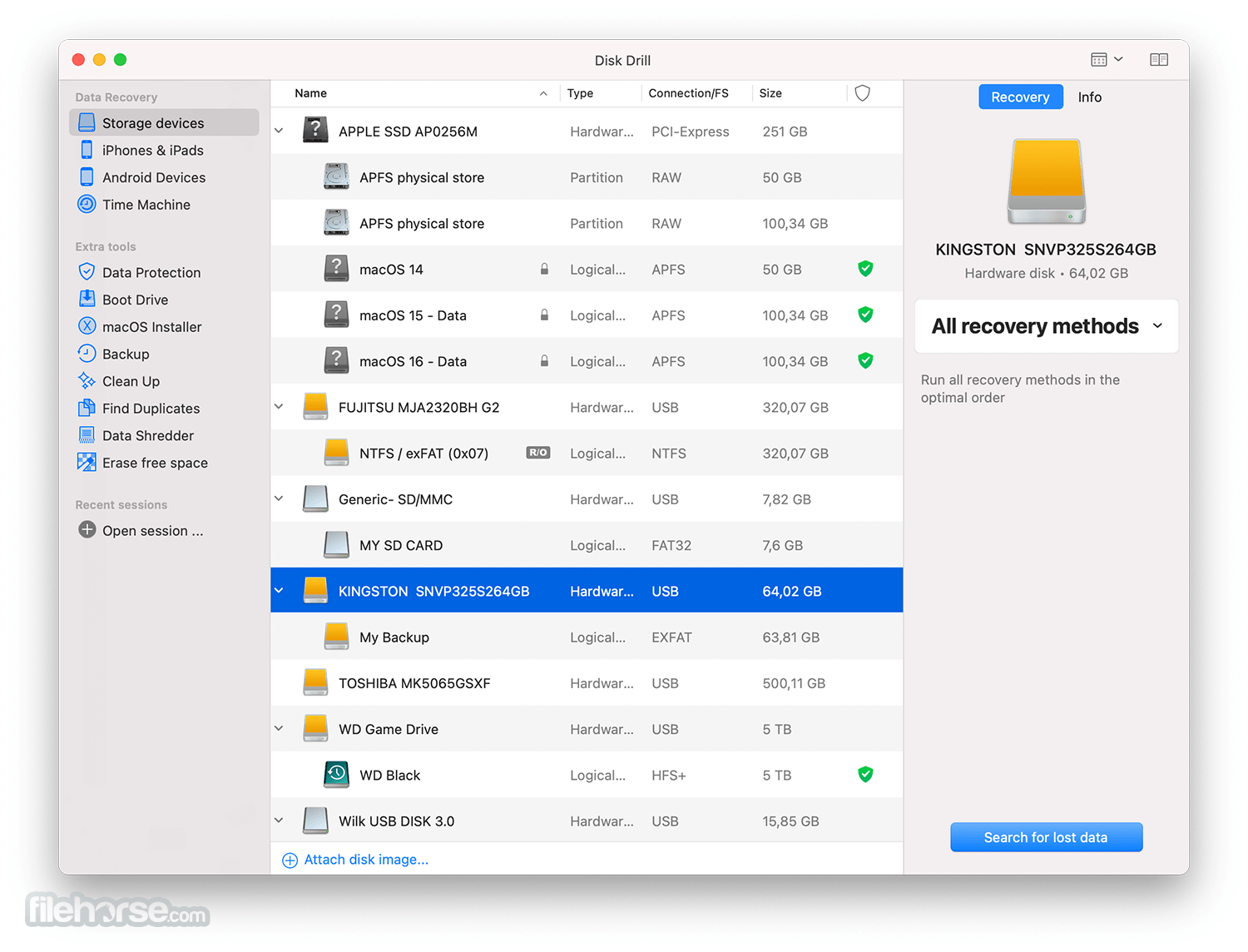
Select the Drive: Choose the drive or storage device from which you want to recover data.
Scan for Lost Data: Click the "Scan" button to start the scanning process. You can choose between Quick Scan and Deep Scan.
Preview and Recover: Once the scan is complete, you can preview the recoverable files. Select the files you want to recover and click the "Recover" button.
Choose Recovery Location: Select a destination folder for the recovered files. It's important not to save them on the same drive from which they were recovered.
Complete Recovery: It will now recover your selected files to the chosen location.
Alternatives
Recoverit: An amazing data recovery software for Mac users with a simple interface.
4DDiG Mac Data Recovery: An free/demo data recovery tool that specializes in recovering multimedia files.
EaseUS Data Recovery Wizard: Offers a range of data recovery features and is available for both Windows and macOS.
Pricing
It offers both a free version and a Pro version. The Pro version, which includes advanced features such as recovery of lost partitions, can be purchased for a one-time fee.
Pricing may vary depending on the platform (Windows or macOS) and the edition (Basic, Pro, or Enterprise).
The Pro version typically ranges from $89 to $399, with occasional discounts and promotions.
System Requirements
Requires macOS 10.15.7-15.x.
PROS
Also Available: Download Disk Drill for Windows
Download Disk Drill for Mac Latest Version Why is this app published on FileHorse? (More info)
Even if you're currently having issues accessing your hard drive or external device directly, there's a possibility-free data recovery software for macOS that can rescue data from it. Disk Drill means recovery for all major file types and file systems.
Note: Instead of buying a license for this app, at Setapp you could get access to this one plus another 230+ commonly used macOS apps for only $9.99/month. CLICK HERE to download and install all the apps you need for a single monthly price!
For fast, reliable file recovery the app comes with advanced scanning algorithms to identify and reconstruct deleted files in over 400 different file formats, including the new raw photo, videos, and audio formats.
Updated FAT32, NTFS, HFS+, and APFS recovery algorithms, powered by Disk Drill's smart scans, find more recoverable files, which allows for an improved (up to a 200%) recovery efficiency.
- The ability to recover data from devices with the T2 encryption chip
- An increased number of supported file signatures
- Newly supported video and raw photo file formats include
- Support for Time Machine recovery
- Data recovery from the latest version of iOS and Android, including iOS 14
- Data Shredder and Free Space erasure
- A redesigned user interface and dark mode compatibility
The data might still be there, but the "map" the Mac computer needs to find the data might be lost. The program enables you to restore the lost partition and get back your data if it's still there. All mountable devices are supported. Various recovery methods are available based on the file system, even formatted drives are recoverable.
Top Use Cases for Mac Data Recovery:
- Recover lost data from FAT, NTFS, HFS+, etc.
- How to recover SD card on macOS
- How to recover deleted photos and music on Mac
- USB flash drive recovery macOS software
- How to recover deleted files after emptying the trash on Mac
- Easy Apple data recovery software
- How to recover Macintosh data yourself
- Do-it-yourself Mac files recovery software
Disk Health
Free S.M.A.R.T. Disk Monitoring Stays Alert for Any Potential Disk Issues.
Mac Cleanup
Analyze Disk Space, Locate Unused Files and Space Hogs, Free Up Your Storage Effortlessly.
Duplicate Finder
Easily Find and Remove Duplicate Files in Multiple Locations on Your Drive.
Recovery Drive
Create Your Own Bootable USB Drive for Free macOS Data Recovery.
Data Protection
Protect Your Data with Recovery Vault or Guaranteed Recovery. Recover it for Free.
Data Backup
Create Byte-to-byte Disk & Partition Backups for Future macOS Recovery.
How to Use
Install and Launch: After installation, launch the tool on your Mac computer.
Select the Drive: Choose the drive or storage device from which you want to recover data.
Scan for Lost Data: Click the "Scan" button to start the scanning process. You can choose between Quick Scan and Deep Scan.
Preview and Recover: Once the scan is complete, you can preview the recoverable files. Select the files you want to recover and click the "Recover" button.
Choose Recovery Location: Select a destination folder for the recovered files. It's important not to save them on the same drive from which they were recovered.
Complete Recovery: It will now recover your selected files to the chosen location.
Alternatives
Recoverit: An amazing data recovery software for Mac users with a simple interface.
4DDiG Mac Data Recovery: An free/demo data recovery tool that specializes in recovering multimedia files.
EaseUS Data Recovery Wizard: Offers a range of data recovery features and is available for both Windows and macOS.
Pricing
It offers both a free version and a Pro version. The Pro version, which includes advanced features such as recovery of lost partitions, can be purchased for a one-time fee.
Pricing may vary depending on the platform (Windows or macOS) and the edition (Basic, Pro, or Enterprise).
The Pro version typically ranges from $89 to $399, with occasional discounts and promotions.
System Requirements
Requires macOS 10.15.7-15.x.
PROS
- Powerful Data Recovery
- User-Friendly Interface
- Supports Many File Formats
- Free Basic Recovery Tools
- Disk Health Monitoring
- Limited Free Recovery
- Slow Deep Scans
- No Guaranteed Recovery
- High System Resource Usage
Also Available: Download Disk Drill for Windows
Download Disk Drill for Mac Latest Version Why is this app published on FileHorse? (More info)
##
影片介紹
##
畫面截圖


- 2026-07-23 Disk Drill 6.3.2326 67.25 MB
- 2026-03-11 Disk Drill 6.2.2219 69.71 MB
- 2025-11-20 Disk Drill 6.1.2111 72.13 MB
- 2025-06-26 Disk Drill 6.0.2020 62.93 MB
- 2025-03-26 Disk Drill 5.7.1706 61.81 MB
- 2024-12-16 Disk Drill 5.7.1704 61.41 MB
- 2024-10-12 Disk Drill 5.6.1621 61.54 MB
- 2024-05-10 Disk Drill 5.5.1517 59.09 MB