- 目前版本1.12.1
- 更新日期2026-01-04
- 檔案大小27.6 MB
- 檔案名稱DriveDx.1.12.1.zip
- 作業系統Mac OS X 10.9 or later
- 支援語系English
- 授權型式商業試用
- 開發商 BinaryFruit
- 軟體分類Mac 軟體 / 系統優化
##
翻譯排程處理中,以下暫以英文原文呈現
軟體介紹
DriveDx for Mac is a fully featured storage drive health diagnostic and monitoring utility designed specifically to provide Mac owners a complete insights into the status of their built-in hardware.
This app is designed to help users avoid data loss and downtime associated with unexpected hard drive failures by providing real-time monitoring of SSD and HDD health status.
The app is unique in its approach, as it not only monitors the drive's built-in S.M.A.R.T. status but also analyzes the changes of all drive health indicators closely related to SSD or HDD failures, alerting the user immediately if anything goes wrong and sends strong notifications if the failure rate surpasses the chosen limits.
This proactive approach enables users to take preventative measures to protect their data and prolong the lifespan of their drives.
DriveDx is particularly useful for individuals and professionals who rely heavily on their data, such as photographers, videographers, and business owners. By monitoring drive health in real-time, users can identify potential issues before they become critical, ensuring that their data remains safe and accessible.
The app's user-friendly interface and intuitive design make it easy to use, even for those without extensive technical knowledge.
Main Features
Installation and Setup
To install this tool, users simply need to download this app from the official website or secure FileHorse servers and follow the streamlined installation instructions.
Once installed, users can launch the app and start monitoring their drives immediately without any additional setup steps or configuration.
How to Use
This starts getting valuable insights from this helpful monitoring utility, users simply need to launch the app and select the drives they want to monitor.
The app will then provide real-time monitoring stats of the selected drives, generate health reports, and automatically alert the user to any potential issues.
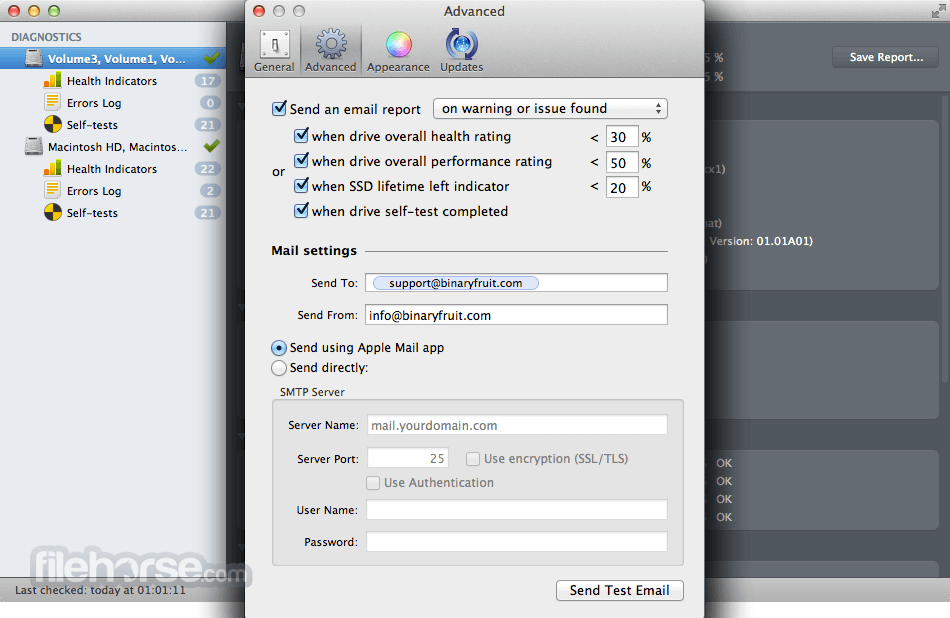
Users can also configure the app to send automatic reports via email, allowing them to stay informed about their drive health even when they're not actively using the app. Even better, they can set what thresholds need to be met in order for Emails to be sent. Those emails can include an overall health rating, drive performance rating, SSD lifetime left indicator, and regular self-test report (if the drive supports this feature).
It is important to note that this is not a storage repair utility, but a highly sophisticated monitoring tool that can notify users about impending hardware issues that can lead to potential data loss and eventual complete failure of the drive.
User Interface
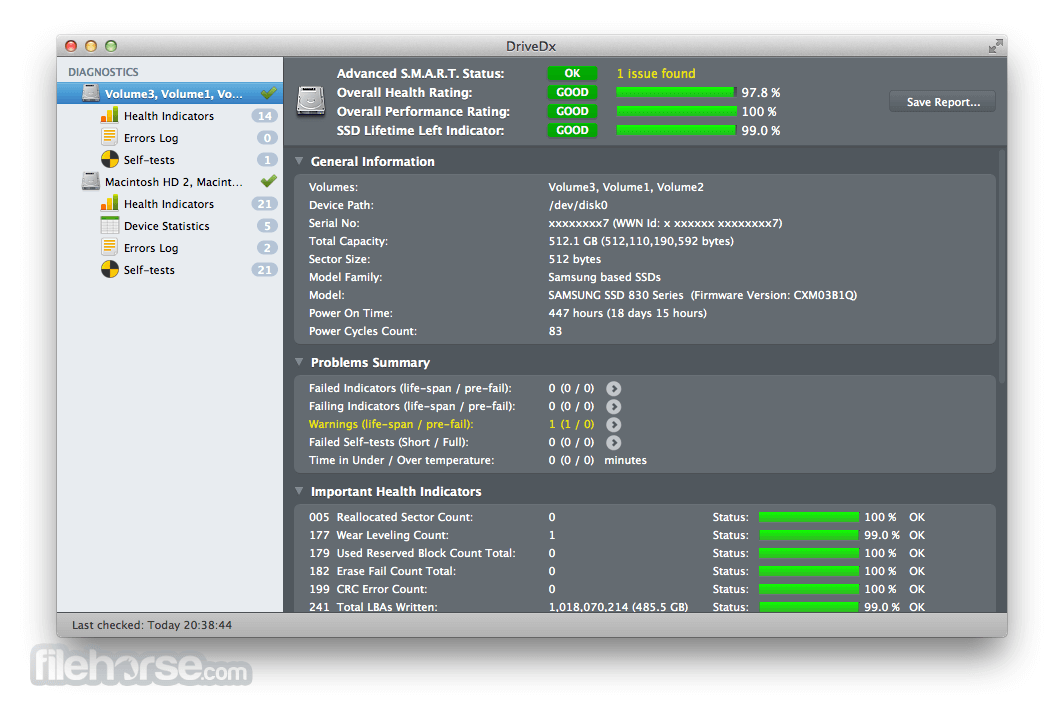
The user interface of this app is designed to be intuitive and easy to use, even for those without extensive technical knowledge. The main dashboard provides clear and concise explanations of the drive health indicators, making it easy for users to understand the status of their drives.
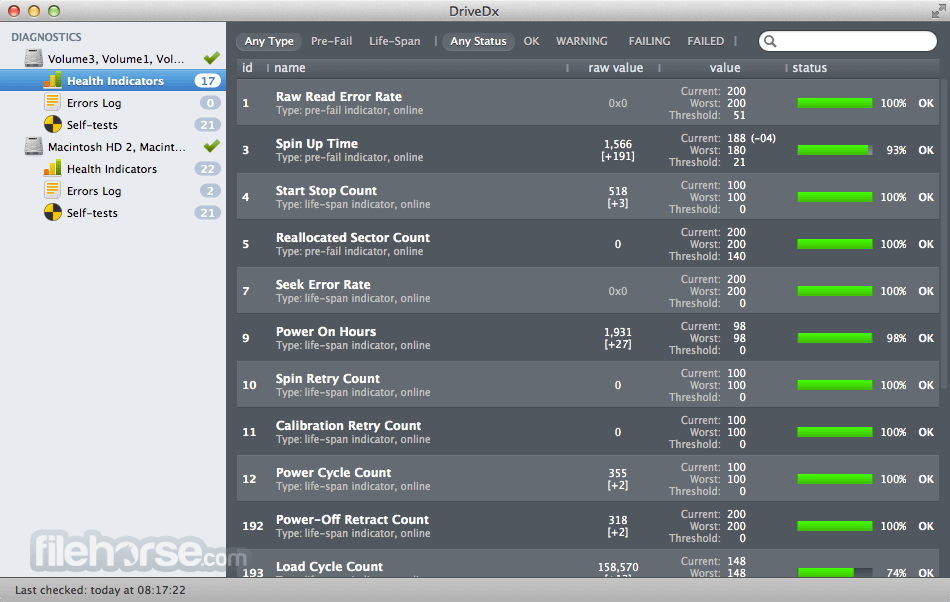
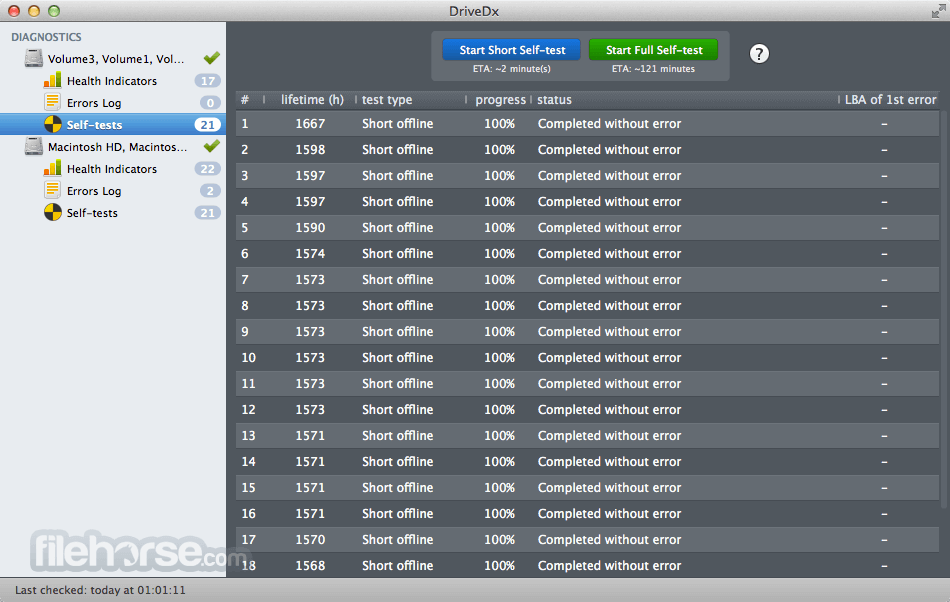
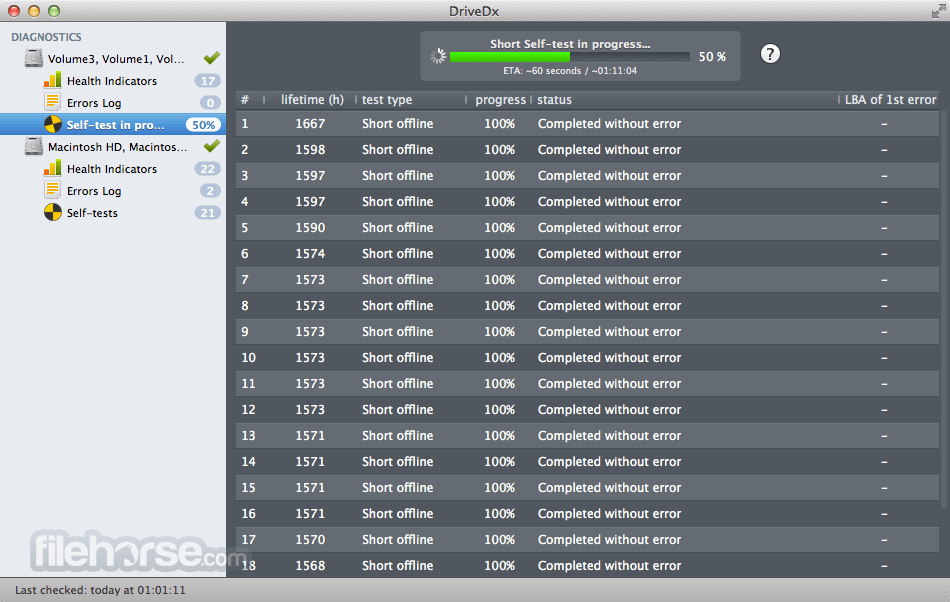
The default layout consists of two main sections - detected drive listing on the left (with separate tabs for reports - Health Indicators, Errors Log, and Self-tests), and the central report listing section that takes the majority of the footprint.
The interface is also customizable, allowing users to tailor the app to their specific needs.
FAQs
What is DriveDx?
It is a comprehensive storage drive health diagnostic and monitoring utility designed to help users avoid data loss and downtime associated with unexpected drive failures.
Is it safe?
100% yes. This is a safe and reliable app, designed by a reputable development team.
Alternatives
GSmartControl - A popular alternative to this app, offering similar features and functionality.
Drive Genius - A feature-rich drive management and disk repair suite.
Pricing
The app is compatible with macOS 10.9 and is fully optimized for the latest macOS 26 Tahoe and all Apple Silicon Macs.
PROS
DriveDx for Mac is a powerful and comprehensive drive health diagnostic and monitoring utility that can help both novices and commercial customers monitor their valuable storage drives and receive instant notifications if any drive health status warning is detected, well before the total failure status of the drive.
With its real-time monitoring, drive failure prediction, and multi-tier warning system, this app represents an essential tool for anyone who relies heavily on their data.
Note: 10-day trial version, 2-hour session time limit.
Download DriveDx for Mac Latest Version Why is this app published on FileHorse? (More info)
This app is designed to help users avoid data loss and downtime associated with unexpected hard drive failures by providing real-time monitoring of SSD and HDD health status.
The app is unique in its approach, as it not only monitors the drive's built-in S.M.A.R.T. status but also analyzes the changes of all drive health indicators closely related to SSD or HDD failures, alerting the user immediately if anything goes wrong and sends strong notifications if the failure rate surpasses the chosen limits.
This proactive approach enables users to take preventative measures to protect their data and prolong the lifespan of their drives.
DriveDx is particularly useful for individuals and professionals who rely heavily on their data, such as photographers, videographers, and business owners. By monitoring drive health in real-time, users can identify potential issues before they become critical, ensuring that their data remains safe and accessible.
The app's user-friendly interface and intuitive design make it easy to use, even for those without extensive technical knowledge.
Main Features
- Real-time SSD and HDD health status monitoring.
- Pre-failure state early detection.
- Four tiers of drive status warnings: OK, Warning, Failing, and Failed.
- Multi-tier notification warning system.
- Automatic Email notifications with attached detailed reports.
- Periodic overall health and performance reports.
- HDD and SSD lifetime left indicator.
- Real-time drive temperature monitoring.
- History-based drive health evaluations.
- In-depth S.M.A.R.T. error logs.
Installation and Setup
To install this tool, users simply need to download this app from the official website or secure FileHorse servers and follow the streamlined installation instructions.
Once installed, users can launch the app and start monitoring their drives immediately without any additional setup steps or configuration.
How to Use
This starts getting valuable insights from this helpful monitoring utility, users simply need to launch the app and select the drives they want to monitor.
The app will then provide real-time monitoring stats of the selected drives, generate health reports, and automatically alert the user to any potential issues.
Users can also configure the app to send automatic reports via email, allowing them to stay informed about their drive health even when they're not actively using the app. Even better, they can set what thresholds need to be met in order for Emails to be sent. Those emails can include an overall health rating, drive performance rating, SSD lifetime left indicator, and regular self-test report (if the drive supports this feature).
It is important to note that this is not a storage repair utility, but a highly sophisticated monitoring tool that can notify users about impending hardware issues that can lead to potential data loss and eventual complete failure of the drive.
User Interface
The user interface of this app is designed to be intuitive and easy to use, even for those without extensive technical knowledge. The main dashboard provides clear and concise explanations of the drive health indicators, making it easy for users to understand the status of their drives.
The default layout consists of two main sections - detected drive listing on the left (with separate tabs for reports - Health Indicators, Errors Log, and Self-tests), and the central report listing section that takes the majority of the footprint.
The interface is also customizable, allowing users to tailor the app to their specific needs.
FAQs
What is DriveDx?
It is a comprehensive storage drive health diagnostic and monitoring utility designed to help users avoid data loss and downtime associated with unexpected drive failures.
Is it safe?
100% yes. This is a safe and reliable app, designed by a reputable development team.
Alternatives
GSmartControl - A popular alternative to this app, offering similar features and functionality.
Drive Genius - A feature-rich drive management and disk repair suite.
Pricing
- Free Demo: New users can test the app during the 15-day Trial period.
- Personal License: $19.99 one-time purchase for 3 non-commercial home computers.
- Family License: $39.99 one-time purchase for 6 commercial computers inside a single household.
- Business License: $49.99 to $4499.99 flexible license offering for 2-500 commercial computers.
- Consultant License: $49.99 to $749.99 flexible license offering for up to 20 IT consultant users, with exclusive portable mode and scanning of 3rd party-owned drives/Macs.
The app is compatible with macOS 10.9 and is fully optimized for the latest macOS 26 Tahoe and all Apple Silicon Macs.
PROS
- Real-time monitoring of drive health.
- Support all types of storage drives.
- Drive failure prediction.
- Multi-tier warning system.
- User-friendly interface.
- No free tier of use.
DriveDx for Mac is a powerful and comprehensive drive health diagnostic and monitoring utility that can help both novices and commercial customers monitor their valuable storage drives and receive instant notifications if any drive health status warning is detected, well before the total failure status of the drive.
With its real-time monitoring, drive failure prediction, and multi-tier warning system, this app represents an essential tool for anyone who relies heavily on their data.
Note: 10-day trial version, 2-hour session time limit.
Download DriveDx for Mac Latest Version Why is this app published on FileHorse? (More info)
##
畫面截圖