Install Disk Creator 1.9.1
v 1.9.1
macOS
免費軟體
8.34/10 (12)
- 目前版本1.9.1
- 更新日期2025-08-21
- 檔案大小1.1 MB
- 檔案名稱InstallDiskCreator.zip
- 作業系統Mac OS X 10.7 or later
- 支援語系English
- 授權型式免費軟體
- 開發商 MacDaddy
- 軟體分類Mac 軟體 / 系統優化
##
翻譯排程處理中,以下暫以英文原文呈現
軟體介紹
Install Disk Creator for Mac is a lightweight but highly effective OS management utility designed to help users of all ages and technical knowledge elves simplify the process of creating bootable macOS installation disks.
Its streamlined dashboard and toolset make it an essential tool for anyone who needs to reinstall their operating system or create a backup.
Due to its intuitive interface and straightforward functionality, this app is perfect for both novices and seasoned users who want to create a bootable macOS installation disk without the need for technical expertise.
It features compatibility with all macOS versions, making it highly attractive not only to home users but also to those who need to reinstall their operating system frequently, such as developers, IT professionals, or anyone who works with multiple Macs.
Main Features
To Install this app, users simply need to download the installer archive from the official website or the secure FileHorse server.
Once installed, the app can be launched without any other additional setup steps.
How to Use
To create a bootable macOS installation on a flash drive, users need to follow these simple steps:
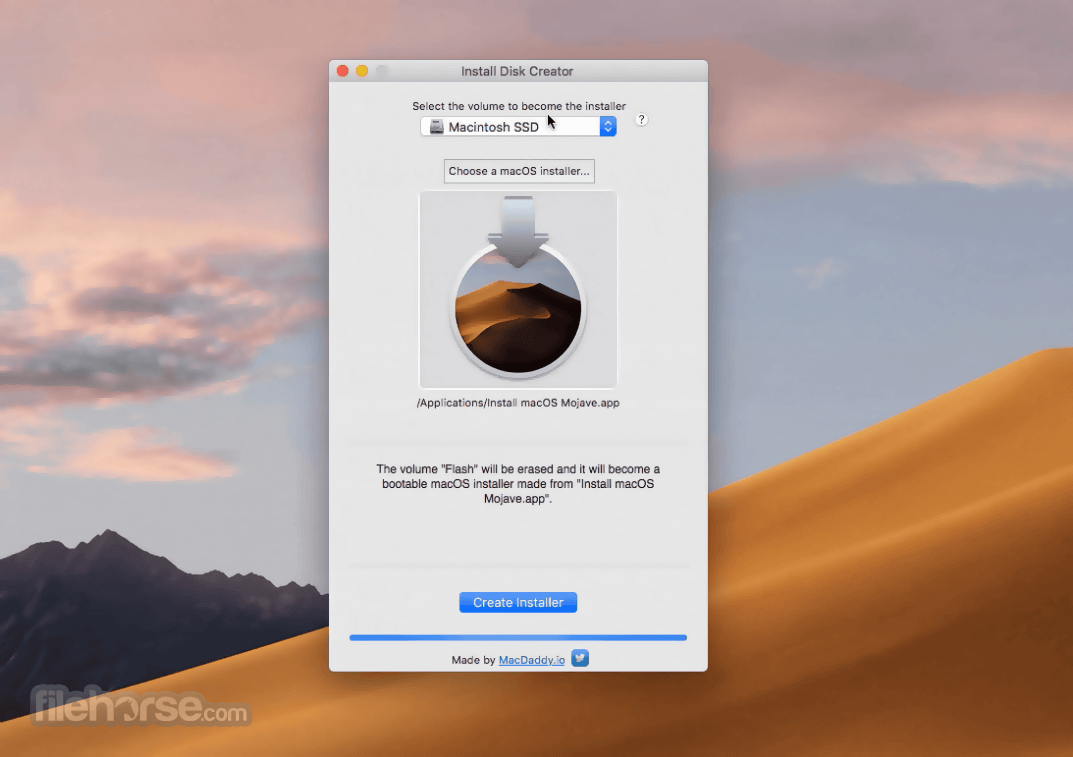
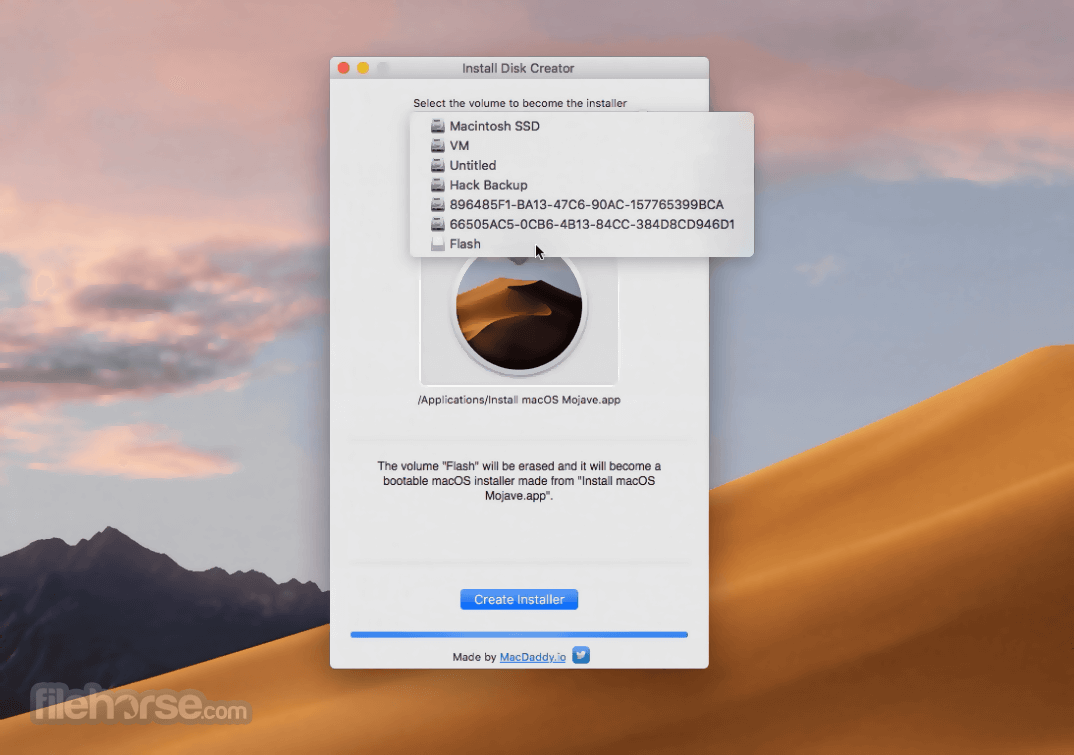
Launch the app. Select the volume to become the installer (a fast portable USB stick is recommended). Choose a macOS installer (users need to have it present in their local storage). Click on the blue “Create Installed” button.
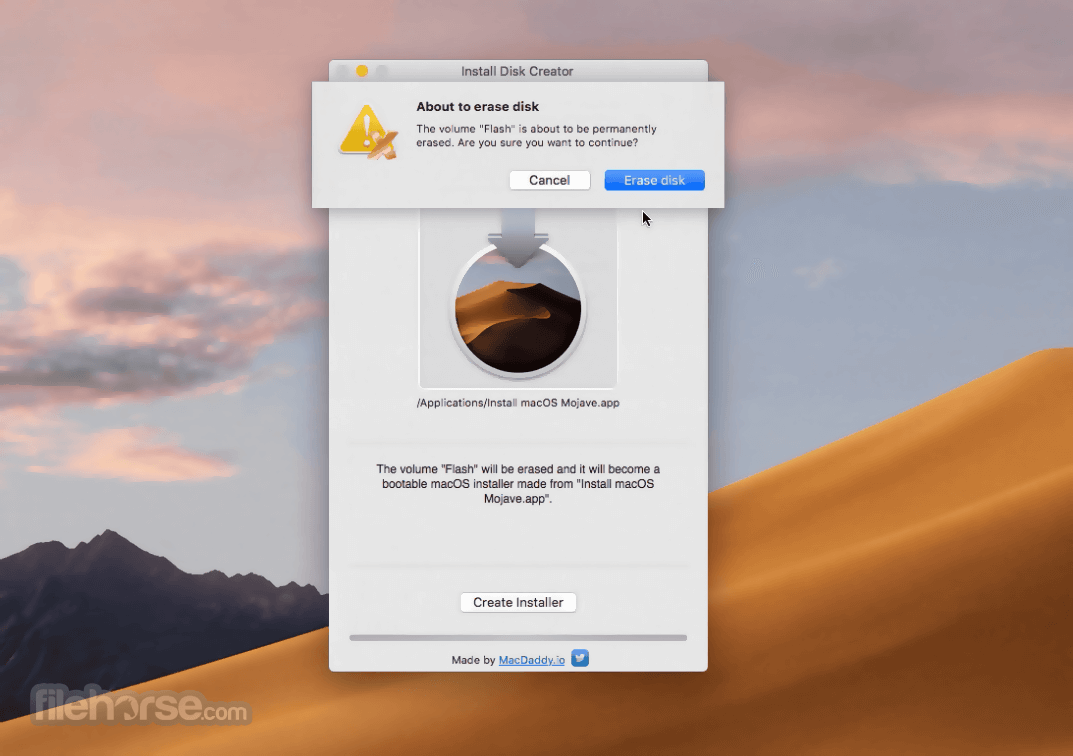
The procedure of creating an installer will need a blank drive, which the app will create automatically by clicking on the “Erase Disk” command. Users are highly recommended to back up their important data on the target drive before creating a bootable OS installer.
NOTICE: This app does not have any built-in file backup service on flash drives where bootable Mac installation packages are transferred.
Users are highly recommended to back up their valuable data either manually or with the help of 3rd party apps such as Mac Backup Guru (paid) or Duplicate (free). Already deleted files can be potentially recovered with an app such as Mac Data Recovery Guru (paid).
User Interface
This app’s user interface is clean and intuitive, promoting simplicity and ease of use. The main dashboard consists of three interactive buttons (drive selector, OS installer selector, and “Create Installer” button, with one status bar located at the very bottom of the app.
Each section is clearly labeled and easy to navigate, making it easy for users to create a bootable installation disk without any technical expertise.
FAQ
What is Install Disk Creator?
It is a lightweight tool designed specifically for Mac computers that simplifies the process of creating bootable macOS installation disks.
Is it safe?
Yes. This is a safe and reliable tool that is free from malware and viruses.
Alternatives
UNetbootin – A cross-platform utility for automated downloading and creating of bootable Linux OS installations.
WinDiskWriter – A macOS app that creates bootable USB drives for Windows.
DiskMaker X – A macOS application that simplifies the creation of bootable USB drives for installing macOS, enabling users to easily prepare external drives for system recovery or installation.
Pricing
This app is 100% free.
System Requirements
macOS 10.7 or later
PROS
Install Disk Creator for Mac is a useful free tool for creating bootable macOS installers on USB sticks. Its easy-to-use interface and a no-nonsense approach make it perfect for both novices and seasoned technicians.
Download Install Disk Creator for Mac Latest Version Why is this app published on FileHorse? (More info)
Its streamlined dashboard and toolset make it an essential tool for anyone who needs to reinstall their operating system or create a backup.
Due to its intuitive interface and straightforward functionality, this app is perfect for both novices and seasoned users who want to create a bootable macOS installation disk without the need for technical expertise.
It features compatibility with all macOS versions, making it highly attractive not only to home users but also to those who need to reinstall their operating system frequently, such as developers, IT professionals, or anyone who works with multiple Macs.
Main Features
- Streamlined macOS installation creation – Create a bootable macOS installation disk from a USB drive or other external storage device.
- Easy to Use – Get a new OS installation ready in just a few clicks, perfect for both novices and seasoned technicians.
- Wide Compatibility – Compatible with all macOS versions, from Lion to Big Sur.
- 100% Free – Get it up and running on any modern Mac in seconds.
To Install this app, users simply need to download the installer archive from the official website or the secure FileHorse server.
Once installed, the app can be launched without any other additional setup steps.
How to Use
To create a bootable macOS installation on a flash drive, users need to follow these simple steps:
The procedure of creating an installer will need a blank drive, which the app will create automatically by clicking on the “Erase Disk” command. Users are highly recommended to back up their important data on the target drive before creating a bootable OS installer.
NOTICE: This app does not have any built-in file backup service on flash drives where bootable Mac installation packages are transferred.
Users are highly recommended to back up their valuable data either manually or with the help of 3rd party apps such as Mac Backup Guru (paid) or Duplicate (free). Already deleted files can be potentially recovered with an app such as Mac Data Recovery Guru (paid).
User Interface
This app’s user interface is clean and intuitive, promoting simplicity and ease of use. The main dashboard consists of three interactive buttons (drive selector, OS installer selector, and “Create Installer” button, with one status bar located at the very bottom of the app.
Each section is clearly labeled and easy to navigate, making it easy for users to create a bootable installation disk without any technical expertise.
FAQ
What is Install Disk Creator?
It is a lightweight tool designed specifically for Mac computers that simplifies the process of creating bootable macOS installation disks.
Is it safe?
Yes. This is a safe and reliable tool that is free from malware and viruses.
Alternatives
UNetbootin – A cross-platform utility for automated downloading and creating of bootable Linux OS installations.
WinDiskWriter – A macOS app that creates bootable USB drives for Windows.
DiskMaker X – A macOS application that simplifies the creation of bootable USB drives for installing macOS, enabling users to easily prepare external drives for system recovery or installation.
Pricing
This app is 100% free.
System Requirements
macOS 10.7 or later
PROS
- A reliable way of making bootable macOS installation USB sticks.
- Wide OS compatibility.
- Easy to use.
- 100% Free.
- No customization.
- Lack of file backup tools.
Install Disk Creator for Mac is a useful free tool for creating bootable macOS installers on USB sticks. Its easy-to-use interface and a no-nonsense approach make it perfect for both novices and seasoned technicians.
Download Install Disk Creator for Mac Latest Version Why is this app published on FileHorse? (More info)
##
畫面截圖