- 目前版本3.5.2
- 更新日期2026-08-04
- 檔案大小4.86 MB
- 檔案名稱Maintenance.dmg
- 作業系統macOS 26.0 Tahoe or later
- 支援語系English
- 授權型式免費軟體
- 開發商 Titanium Software
- 軟體分類Mac 軟體 / 系統優化
##
翻譯排程處理中,以下暫以英文原文呈現
軟體介紹
Maintenance is a free utility for cleaning and maintaining many important sections of your Mac system, helping it to remain not only stable and optimized but also better protected from countless problems that can cause problems.
Among many of its powerful features, most important ones are without a doubt ability to run periodic scripts, rebuild LaunchServices database, repair permissions, reset Spotlight's Index, delete applications, work with Font and System cache and maintain your hard drive.
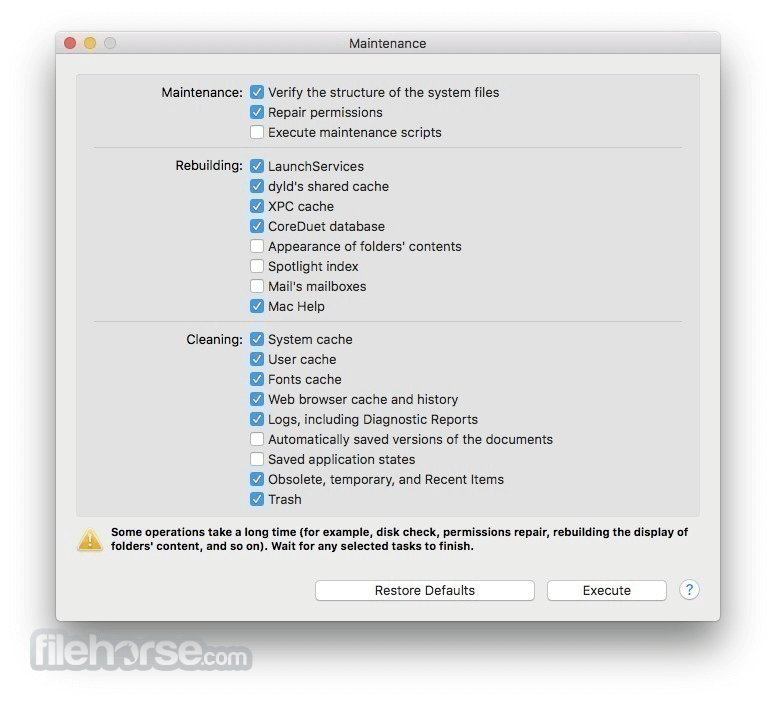
All of those features and many more can be accessed and activated via highly intuitive interface that showcases one-screen dashboard that lists tools that are separated in 3 sections – Maintenance for macOS, Cleaning and Rebuilding.
For novices who are scared to create too much of changes in their system, Maintenance app also supports “Restore Defaults” that will put your system back in original setting of system optimization.
If you are macOS user of any knowledge level (both novices and seasoned users who are not fully learned how to tweak all the aspects of their computer) that feels that his OS is getting slower with each day, the app is perfect application for you.
It was built from the ground up to be easily accessible, fast, reliable, and to take very little processing power out of your Mac.
By focusing on tightening up the interface to just one dashboard screen, developers of Main tenance for Mac from Titanium Software team has managed to create a universal utility that will bring better performance and stability to anyone who owns a Mac.
How to Use
Select tasks you want to perform (e.g. clear caches)
Click the "Execute" button to start operations
Wait for the process to complete and confirm results
Repeat periodically for optimal system performance
System Requirements
Download Maintenance for Mac Latest Version Why is this app published on FileHorse? (More info)
Among many of its powerful features, most important ones are without a doubt ability to run periodic scripts, rebuild LaunchServices database, repair permissions, reset Spotlight's Index, delete applications, work with Font and System cache and maintain your hard drive.
All of those features and many more can be accessed and activated via highly intuitive interface that showcases one-screen dashboard that lists tools that are separated in 3 sections – Maintenance for macOS, Cleaning and Rebuilding.
For novices who are scared to create too much of changes in their system, Maintenance app also supports “Restore Defaults” that will put your system back in original setting of system optimization.
If you are macOS user of any knowledge level (both novices and seasoned users who are not fully learned how to tweak all the aspects of their computer) that feels that his OS is getting slower with each day, the app is perfect application for you.
It was built from the ground up to be easily accessible, fast, reliable, and to take very little processing power out of your Mac.
By focusing on tightening up the interface to just one dashboard screen, developers of Main tenance for Mac from Titanium Software team has managed to create a universal utility that will bring better performance and stability to anyone who owns a Mac.
How to Use
Select tasks you want to perform (e.g. clear caches)
Click the "Execute" button to start operations
Wait for the process to complete and confirm results
Repeat periodically for optimal system performance
System Requirements
- macOS 10.10 (Yosemite) or later
- Intel or Apple Silicon (M1/M2) supported
- Minimum 2 GB RAM
- At least 100 MB of free disk space
- Administrator privileges required
- Easy to use for beginners
- One-click maintenance tools
- Cleans system and user caches
- Improves system performance
- No advanced configuration needed
- Limited customization options
- No real-time monitoring
- No scheduling functionality
- Free version has feature limits
Download Maintenance for Mac Latest Version Why is this app published on FileHorse? (More info)
##
畫面截圖