⚠ 這是歷史版本頁面 — 查看 MPlayerX 1.1.4 Build 最新版本 →

- 目前版本1.0.13
- 更新日期2012-02-09
- 檔案大小14.81 MB
- 檔案名稱MPlayerX-1.0.13.zip
- 作業系統Mac OS X
- 支援語系English
- 授權型式開源軟體
- 開發商 Zongyao QU
- 軟體分類Mac 軟體 / 影片軟體
##
編輯短評
MPlayerX 是一款開源的 macOS 影片播放器,以 mplayer 與 ffmpeg-mt 為核心,能解碼幾乎所有常見影音格式,即使 Full HD 內容也能流暢播放。它的最大辨識度在於簡潔的黑色介面與框內控制,靈感來自 QuickTime X,並支援多點觸控手勢,讓操作更直覺。不過,這個專案近期已停止活躍更新,屬於小眾工具,評價人數不多但普遍認為穩定實用。
它適合追求輕量、不想要複雜功能選單的 Mac 使用者,尤其習慣觸控板操作的人。與 VLC 等主流播放器相比,MPlayerX 的介面更簡潔,但更新頻率低,可能無法即時支援最新編碼格式。授權為 GPLv2 開源軟體,僅提供英文介面,使用前需留意語系與後續維護的取捨。
##
翻譯排程處理中,以下暫以英文原文呈現
軟體介紹
MPlayerX is an open-source project under GPLv2, which aims to be the most powerful, beautiful, easy to use multimedia player on Mac OS X.
By taking advantage of mplayer and ffmpeg-mt, MPlayerX for Mac is able to decode almost any format of files on your computer.
And even FullHD contents, the playback goes smoothly. Catching up with the latest technology Apple has disclosed, Multi-Touch, the app will dance on your fingers, no mouse, no keyboard short-cuts.
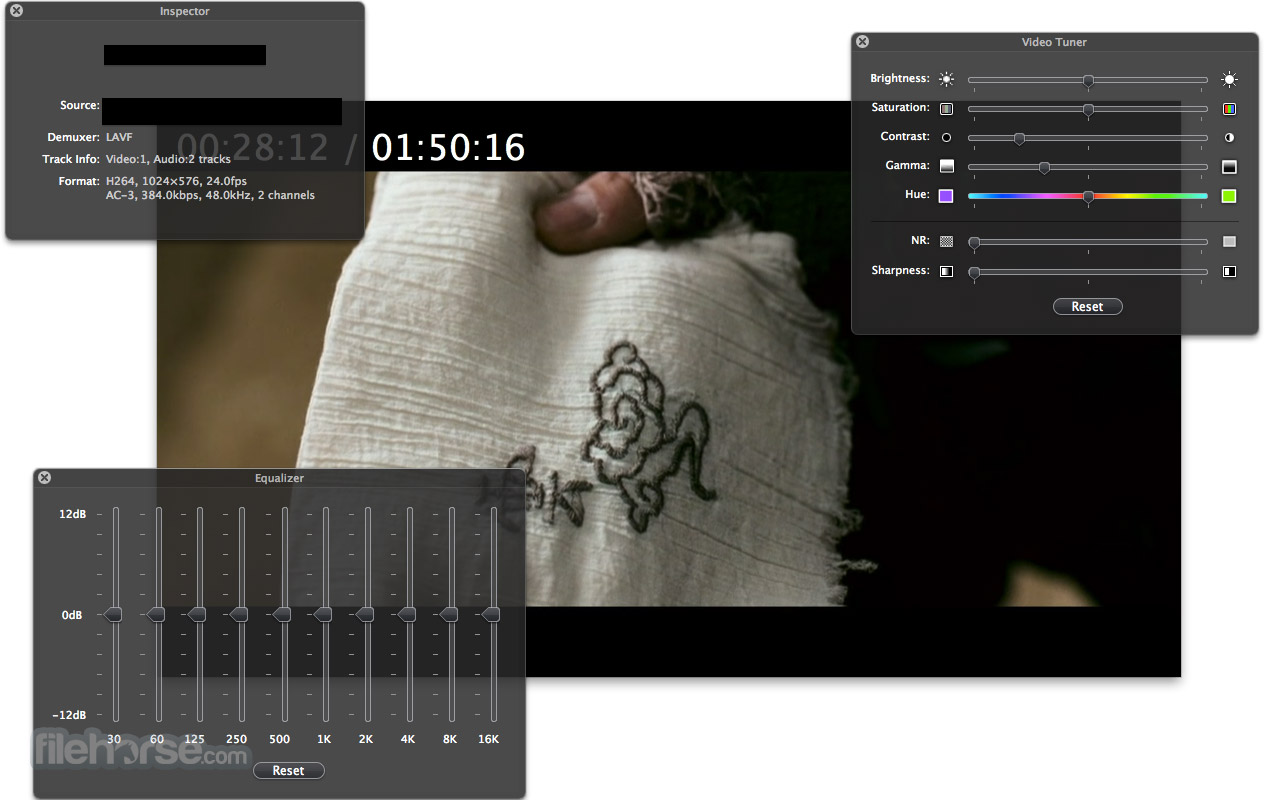
Inspired by QuickTime X, MPlayerX for macOS has the simply, black interface, and in-frame minimal controls. All of those helps users to focus on the contents, rather than the software itself.
⚠️ Note: This product is not developed anymore and might not function properly.
Features and Highlights
All in one. One for all
Just drop anything to it, the tool will give you a clear and smooth playback. The app is armed by FFmpeg and MPlayer, which means it could handle any media format in the world without extra plug-ins or codec packages.
Dance on your fingers
Pinch, tap or swipe, the program provides you the easiest way to control the playback. Don't have to remember the keyboard shortcuts or move the cursor among the buttons, the app will follow your gestures.
Any subtitle you watch
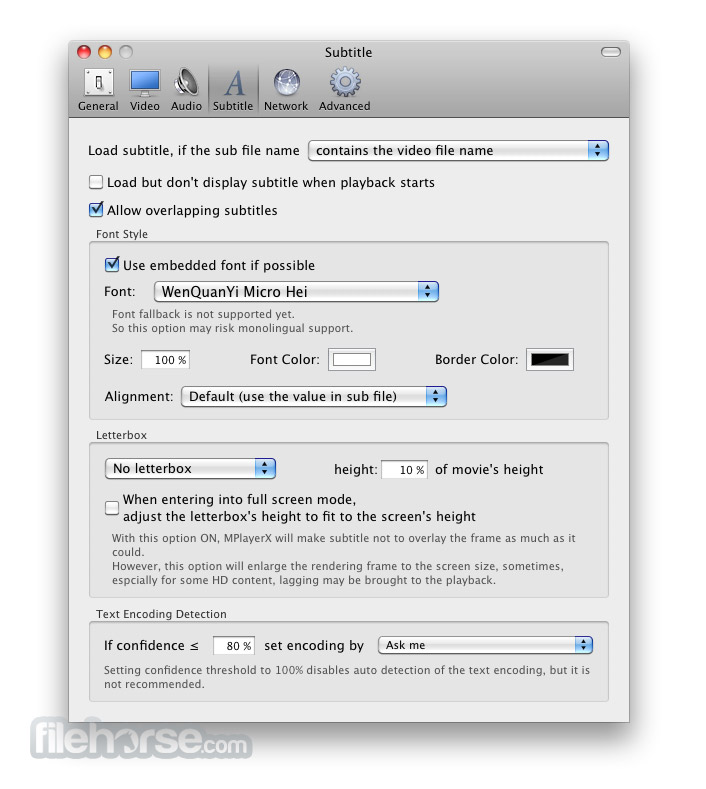
The app will detect and convert the encoding method of the subtitle file automatically and seamlessly. Not only Latins but also Eastern Asian languages, Arabic, Hebrew are well handled too.
1-Click for Online Video
The tool seamlessly plays your favorite in youtube, Vimeo, and many others.
No play-list? Not really necessary
As long as the file names are numbered in any guessable pattern, the app could find the next episode in the same folder for you.
Enjoy your home theater system
Plug your SPDIF cable, MPlayer X will recognize it automatically and output the raw DTS/AC3 stream. No more extra settings.
Apple Remote support
Keep relaxing in your couch, Apple Remote controls your MPX. It also supports Remote Buddy and Sofa Control.
Alternatives
VLC Media Player – Free, open-source, and versatile.
Movist – Simple interface with advanced codec support.
Elmedia Player – Free media player for Mac.
5KPlayer – Supports 4K, AirPlay, and DLNA streaming.
IINA – Modern Mac-style player with gesture controls.
MPV Player – Lightweight, powerful, and customizable.
Plex for Mac – Media server with streaming and organization tools.
Kodi – Media center with extensive plugin support.
PROS
Download MPlayerX for Mac Latest Version Why is this app published on FileHorse? (More info)
By taking advantage of mplayer and ffmpeg-mt, MPlayerX for Mac is able to decode almost any format of files on your computer.
And even FullHD contents, the playback goes smoothly. Catching up with the latest technology Apple has disclosed, Multi-Touch, the app will dance on your fingers, no mouse, no keyboard short-cuts.
Inspired by QuickTime X, MPlayerX for macOS has the simply, black interface, and in-frame minimal controls. All of those helps users to focus on the contents, rather than the software itself.
⚠️ Note: This product is not developed anymore and might not function properly.
Features and Highlights
All in one. One for all
Just drop anything to it, the tool will give you a clear and smooth playback. The app is armed by FFmpeg and MPlayer, which means it could handle any media format in the world without extra plug-ins or codec packages.
Dance on your fingers
Pinch, tap or swipe, the program provides you the easiest way to control the playback. Don't have to remember the keyboard shortcuts or move the cursor among the buttons, the app will follow your gestures.
Any subtitle you watch
The app will detect and convert the encoding method of the subtitle file automatically and seamlessly. Not only Latins but also Eastern Asian languages, Arabic, Hebrew are well handled too.
1-Click for Online Video
The tool seamlessly plays your favorite in youtube, Vimeo, and many others.
No play-list? Not really necessary
As long as the file names are numbered in any guessable pattern, the app could find the next episode in the same folder for you.
Enjoy your home theater system
Plug your SPDIF cable, MPlayer X will recognize it automatically and output the raw DTS/AC3 stream. No more extra settings.
Apple Remote support
Keep relaxing in your couch, Apple Remote controls your MPX. It also supports Remote Buddy and Sofa Control.
Alternatives
VLC Media Player – Free, open-source, and versatile.
Movist – Simple interface with advanced codec support.
Elmedia Player – Free media player for Mac.
5KPlayer – Supports 4K, AirPlay, and DLNA streaming.
IINA – Modern Mac-style player with gesture controls.
MPV Player – Lightweight, powerful, and customizable.
Plex for Mac – Media server with streaming and organization tools.
Kodi – Media center with extensive plugin support.
PROS
- Lightweight and Fast – Minimal system resource usage.
- Wide Format Support – Plays almost any media file.
- Smooth Playback – Hardware acceleration support.
- Gesture Controls – Intuitive trackpad gestures.
- Minimalist UI – Clean, distraction-free interface.
- No Longer Updated – Development has stopped.
- MacOS Compatibility Issues – May not work on new versions.
- Potential Adware Risks – Some installers bundle unwanted software.
- Limited Customization – Fewer advanced settings.
- No Official Support – No help for troubleshooting
Download MPlayerX for Mac Latest Version Why is this app published on FileHorse? (More info)
##
畫面截圖

- 2025-02-13 MPlayerX 1.1.4 Build 1920 37.49 MB
- 2016-06-13 MPlayerX 1.1.3 Build 1913 37.05 MB
- 2015-10-29 MPlayerX 1.1.1 Build 1887 36.55 MB
- 2015-06-21 MPlayerX 1.1.0 Build 1854 37.03 MB
- 2014-01-27 MPlayerX 1.0.22 33.93 MB
- 2014-01-27 MPlayerX 1.0.22.1 33.93 MB
- 2013-12-27 MPlayerX 1.0.21 33.83 MB
- 2013-11-28 MPlayerX 1.0.20 33.63 MB