⚠ 這是歷史版本頁面 — 查看 NetWorx 最新版本 →

- 目前版本7.2.1
- 更新日期2024-10-02
- 檔案大小11.31 MB
- 檔案名稱networx_macos.dmg
- 作業系統macOS 11.0 Big Sur or later
- 支援語系English
- 授權型式商業試用
- 開發商 SoftPerfect Research
- 軟體分類Mac 軟體 / 檔案傳輸與網路
##
翻譯排程處理中,以下暫以英文原文呈現
軟體介紹
NetWorx for Mac is a simple and free, yet powerful tool that helps you objectively evaluate your bandwidth consumption situation. You can use it to collect bandwidth usage data and measure the speed of your Internet or any other network connections.
NetWorx for macOS can help you identify possible sources of network problems, ensure that you do not exceed the bandwidth limits specified by your ISP, or track down suspicious network activity characteristic of Trojan horses and hacker attacks.
The program allows you to monitor all your network connections or just a specific network connection, such as Wireless or Mobile Broadband. The software also features an array of highly customizable visual and sound alerts.
You can set it up to alert you when the network connection is down or when some suspicious activity — such as unusually heavy data flow — occurs. It can also automatically disconnect all dial-up connections and shut the system down.
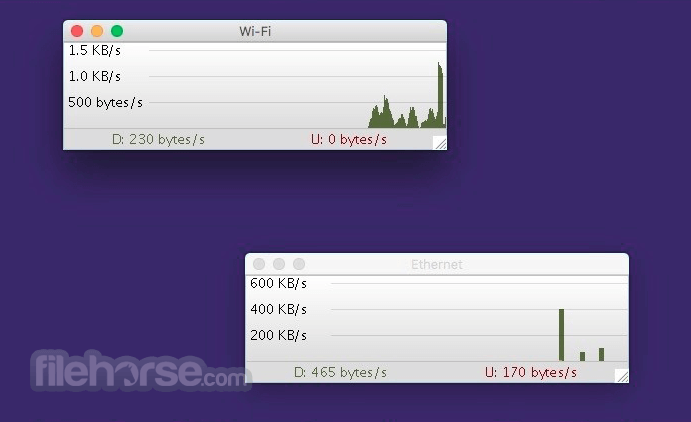
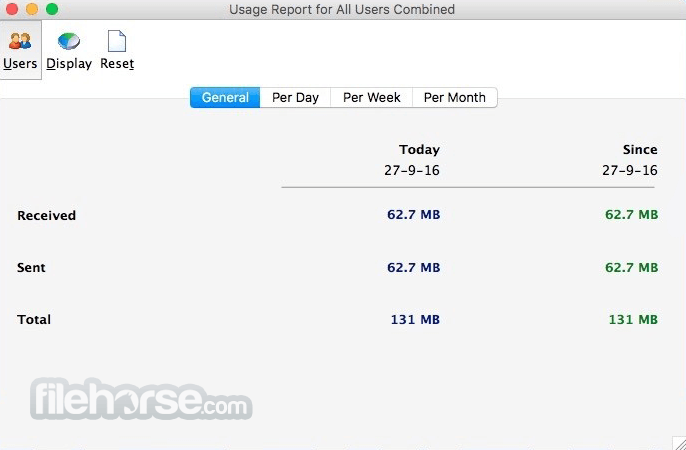
The incoming and outgoing traffic is represented on a line chart and logged into a file so that you can always view statistics about your daily, weekly and monthly bandwidth usage and dial-up duration.
The reports can be exported to a variety of formats, such as HTML, MS Word, and Excel, for further analysis.
Features and Highlights
Open the downloaded .dmg file and install the app
Launch NetWorx from your Applications folder
Grant necessary permissions for monitoring network
Choose network interfaces to track (Wi-Fi, Ethernet, etc.)
Access real-time bandwidth usage from the menu bar
Set usage quotas or alerts in the settings menu
View detailed reports and daily/monthly usage stats
Export usage data to HTML, CSV, or other formats
Customize graph display and notification preferences
System Requirements
Also Available: Download NetWorx for Windows
Download NetWorx for Mac Latest Version Why is this app published on FileHorse? (More info)
NetWorx for macOS can help you identify possible sources of network problems, ensure that you do not exceed the bandwidth limits specified by your ISP, or track down suspicious network activity characteristic of Trojan horses and hacker attacks.
The program allows you to monitor all your network connections or just a specific network connection, such as Wireless or Mobile Broadband. The software also features an array of highly customizable visual and sound alerts.
You can set it up to alert you when the network connection is down or when some suspicious activity — such as unusually heavy data flow — occurs. It can also automatically disconnect all dial-up connections and shut the system down.
The incoming and outgoing traffic is represented on a line chart and logged into a file so that you can always view statistics about your daily, weekly and monthly bandwidth usage and dial-up duration.
The reports can be exported to a variety of formats, such as HTML, MS Word, and Excel, for further analysis.
Features and Highlights
- Clear graphic and/or numeric display
- Usage reports with export to a variety of file formats, including Excel, MS Word, and HTML
- Permits close supervision of uploads and downloads
- Works with dial-up, ISDN, cable modems, ADSL, Ethernet cards, and more
- Includes network information and testing tools with advanced netstat that displays applications using your Internet connection
- Option to notify user or disconnect from the Internet automatically when network activity exceeds a certain level
- Speed meter to accurately time downloads and report the average transfer rates
- Dial-up session journal with detailed information about every session
- Absolutely free and does not contain any adware/spyware/malware
Open the downloaded .dmg file and install the app
Launch NetWorx from your Applications folder
Grant necessary permissions for monitoring network
Choose network interfaces to track (Wi-Fi, Ethernet, etc.)
Access real-time bandwidth usage from the menu bar
Set usage quotas or alerts in the settings menu
View detailed reports and daily/monthly usage stats
Export usage data to HTML, CSV, or other formats
Customize graph display and notification preferences
System Requirements
- macOS 10.11 (El Capitan) or later
- 64-bit Intel or Apple Silicon (M1/M2) processor
- Minimum 50 MB free disk space
- Internet connection for initial download and updates
- Administrative rights for installation and permissions
- Simple and clean user interface
- Real-time bandwidth usage monitoring
- Customizable usage alerts and quotas
- Detailed reports with export options
- Low system resource consumption
- Limited advanced features for pros
- No firewall or blocking capability
- May miss data if permissions denied
- No mobile version or sync options
- Some features hidden in menus
Also Available: Download NetWorx for Windows
Download NetWorx for Mac Latest Version Why is this app published on FileHorse? (More info)
##
畫面截圖
- 2026-05-07 NetWorx 26.5 12.17 MB
- 2026-01-09 NetWorx 26.1 11.72 MB
- 2025-12-05 NetWorx 25.12 11.68 MB
- 2025-11-03 NetWorx 25.11 11.67 MB
- 2025-07-22 NetWorx 25.7 11.63 MB
- 2025-06-02 NetWorx 7.3.2 11.58 MB
- 2025-05-29 NetWorx 7.3.1 11.58 MB
- 2025-03-20 NetWorx 7.3.0 11.57 MB