- 目前版本9.1.0
- 更新日期2026-05-03
- 檔案大小1 GB
- 檔案名稱PictoBlox-Setup-9.1.0.dmg
- 作業系統macOS 10.13 High Sierra or later
- 支援語系English
- 授權型式免費軟體
- 開發商 Agilo Research Pvt. Ltd.
- 軟體分類Mac 軟體 / 開發者工具
##
翻譯排程處理中,以下暫以英文原文呈現
軟體介紹
PictoBlox for Mac is a Scratch-based graphical (or block) programming software for macOS that makes coding for kids fun! Learn to code with Scratch, the most popular block based coding language for kids in the world.
PictoBlox app for macOS is a graphical programming software based on the latest version of Scratch that makes coding fun and easy. With a user-friendly interface and drag-and-drop functionality, it is the ideal companion for setting the first step into the world of programming.
One can learn to code, make interactive animations and games, interesting projects based on IoT, program actions for robots, and much more!
PictoBlox is a programming software based on Scratch 3.0, hence basic functionality is similar. As additional features, it has various extensions related to hardware, robotics, Artificial Intelligence, and Machine learning.
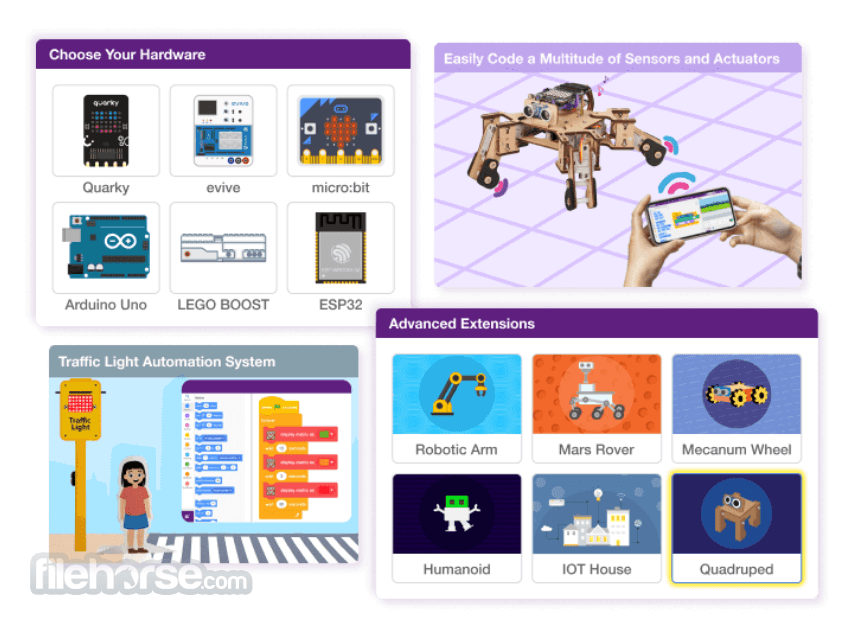
You can control generic sensors, actuators & microcontrollers like microbit, Arduino Uno, Mega, esp32, and many more in real-time by connecting via Bluetooth. It also has an upload mode where you can upload your code inside the hardware. You can also capture/record stage output inside the PictoBlox for Mac.
Is available free to use for individuals & non-commercial purposes. If you are willing to use PictoBlox for commercial purposes.
Highlights
Learn AI and Machine Learning
Recognize text, faces, and objects, make your own virtual assistant, train models to make cool projects, and more.
Code Actions for Robots
Create and upload Scratch code to your robots to make them perform tasks such as picking up objects or avoiding obstacles.
Make Interactive Scratch Games
Create your own games, animations, make characters mimic your actions, and enact stories by setting up the stage for them.
Master the Internet of Things
Automate your home, monitor the temperature, access data based on location, publish on the Internet & much more.
Learn to Code on the Go
Learn to code anytime and anywhere with PictoBlox’s pocket version and bring your creations to life with Scratch coding on your phone.
Features
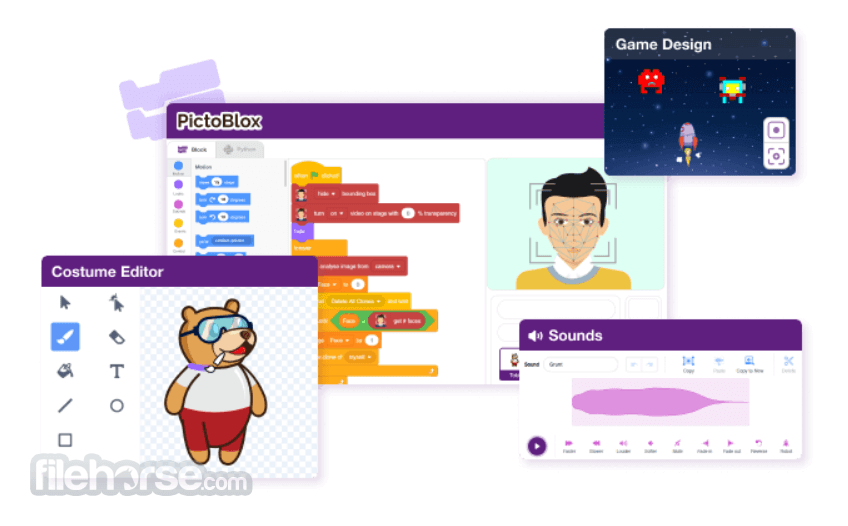
Game & Animation Creation with Blocks – User-friendly interface to build interactive games and animations with customizable costumes and sounds. Snap together colorful blocks to create scripts, export blocks, save scripts, and record outputs as videos.
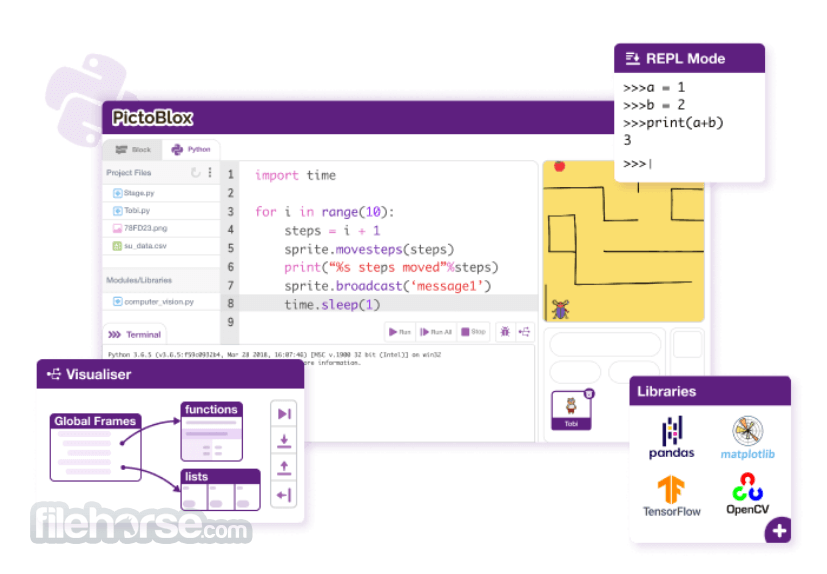
Python Programming for Kids – Feature-rich Python 3 editor with sprite support, project files, and libraries. Includes a step-by-step visualizer, debugger, auto-complete, REPL mode, and built-in PIP package manager for an interactive coding experience.
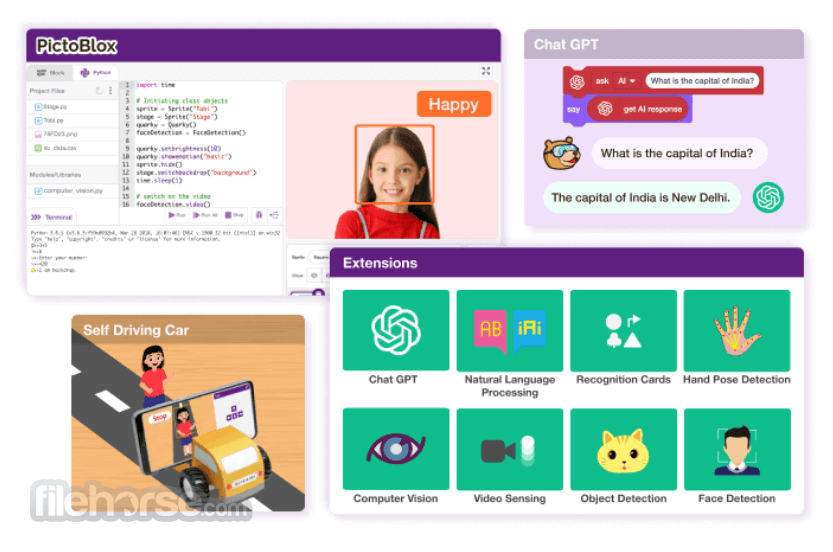
AI-Powered Interactive Projects – Easily add AI features to projects using Block or Python coding. Integrate AI for self-driving cars, attendance systems, chatbots with ChatGPT, speech recognition, and text-to-speech.
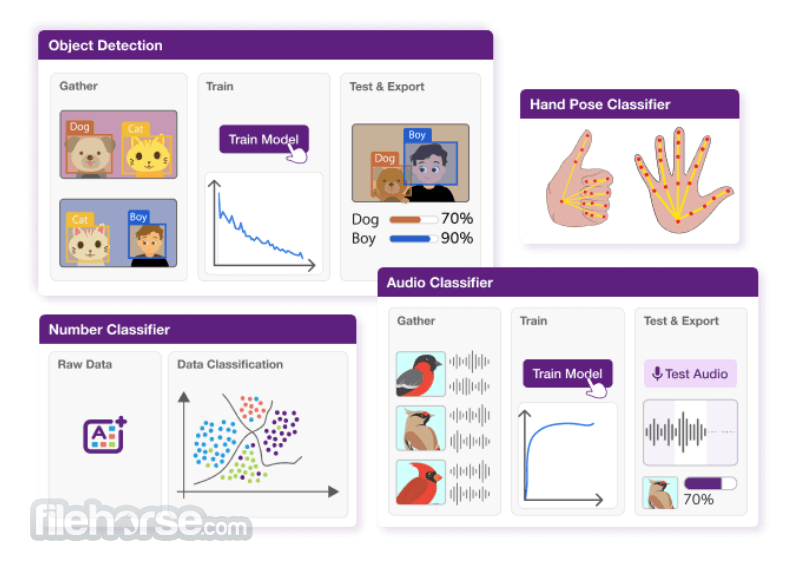
Machine Learning for Kids – Simplified ML model creation with data import, training, testing, and export. Supports seven types of ML models, including Image, Object, Hand Pose, Pose, Audio, Text, and Number classification, with no prior coding experience needed.
Hardware Programming Made Easy – Control hardware in real-time via USB or Bluetooth. Upload code to microcontroller boards like Arduino, Micro:bit, evive, and Lego. Supports both Block-based and Python coding.
Python Notebook for Kids 12+ – An interactive Python notebook to test and tweak code in real-time, visualize data with graphs and charts, and share projects with classmates for collaboration.
Junior Blocks for Kids (Ages 4-7) – Play-based AI activities for young learners to explore coding, AI, and robotics. Develop creativity with an intuitive interface, AI hand gestures, and face detection animations.
3D & XR Studio for AR/VR Creation – Build immersive 3D, AR, and VR projects using 3D models, animations, and physics. Create VR games, AR filters, and simulations, and export projects to devices like Google Cardboard VR, Pico VR, and Meta Quest.
FAQs
What age group is PictoBlox suitable for?
PictoBlox is primarily targeted at school-going children aged 8-16, but anyone interested in learning coding in a fun and interactive way can use it.
Can PictoBlox be used without any prior coding experience?
Yes, PictoBlox is designed for beginners and does not require any prior coding knowledge.
Does PictoBlox support hardware other than robots?
Yes, it supports interaction with various hardware components, including IoT devices, allowing users to create diverse projects.
Is PictoBlox available on platforms other than Windows?
Yes, PictoBlox is available for Mac, Linux, iOS, and Android platforms.
Are there any costs associated with using PictoBlox?
It offers a free version with basic features and paid versions that unlock additional functionalities.
PROS
Download PictoBlox for Mac Latest Version Why is this app published on FileHorse? (More info)
PictoBlox app for macOS is a graphical programming software based on the latest version of Scratch that makes coding fun and easy. With a user-friendly interface and drag-and-drop functionality, it is the ideal companion for setting the first step into the world of programming.
One can learn to code, make interactive animations and games, interesting projects based on IoT, program actions for robots, and much more!
PictoBlox is a programming software based on Scratch 3.0, hence basic functionality is similar. As additional features, it has various extensions related to hardware, robotics, Artificial Intelligence, and Machine learning.
You can control generic sensors, actuators & microcontrollers like microbit, Arduino Uno, Mega, esp32, and many more in real-time by connecting via Bluetooth. It also has an upload mode where you can upload your code inside the hardware. You can also capture/record stage output inside the PictoBlox for Mac.
Is available free to use for individuals & non-commercial purposes. If you are willing to use PictoBlox for commercial purposes.
Highlights
Learn AI and Machine Learning
Recognize text, faces, and objects, make your own virtual assistant, train models to make cool projects, and more.
Code Actions for Robots
Create and upload Scratch code to your robots to make them perform tasks such as picking up objects or avoiding obstacles.
Make Interactive Scratch Games
Create your own games, animations, make characters mimic your actions, and enact stories by setting up the stage for them.
Master the Internet of Things
Automate your home, monitor the temperature, access data based on location, publish on the Internet & much more.
Learn to Code on the Go
Learn to code anytime and anywhere with PictoBlox’s pocket version and bring your creations to life with Scratch coding on your phone.
Features
Game & Animation Creation with Blocks – User-friendly interface to build interactive games and animations with customizable costumes and sounds. Snap together colorful blocks to create scripts, export blocks, save scripts, and record outputs as videos.
Python Programming for Kids – Feature-rich Python 3 editor with sprite support, project files, and libraries. Includes a step-by-step visualizer, debugger, auto-complete, REPL mode, and built-in PIP package manager for an interactive coding experience.
AI-Powered Interactive Projects – Easily add AI features to projects using Block or Python coding. Integrate AI for self-driving cars, attendance systems, chatbots with ChatGPT, speech recognition, and text-to-speech.
Machine Learning for Kids – Simplified ML model creation with data import, training, testing, and export. Supports seven types of ML models, including Image, Object, Hand Pose, Pose, Audio, Text, and Number classification, with no prior coding experience needed.
Hardware Programming Made Easy – Control hardware in real-time via USB or Bluetooth. Upload code to microcontroller boards like Arduino, Micro:bit, evive, and Lego. Supports both Block-based and Python coding.
Python Notebook for Kids 12+ – An interactive Python notebook to test and tweak code in real-time, visualize data with graphs and charts, and share projects with classmates for collaboration.
Junior Blocks for Kids (Ages 4-7) – Play-based AI activities for young learners to explore coding, AI, and robotics. Develop creativity with an intuitive interface, AI hand gestures, and face detection animations.
3D & XR Studio for AR/VR Creation – Build immersive 3D, AR, and VR projects using 3D models, animations, and physics. Create VR games, AR filters, and simulations, and export projects to devices like Google Cardboard VR, Pico VR, and Meta Quest.
FAQs
What age group is PictoBlox suitable for?
PictoBlox is primarily targeted at school-going children aged 8-16, but anyone interested in learning coding in a fun and interactive way can use it.
Can PictoBlox be used without any prior coding experience?
Yes, PictoBlox is designed for beginners and does not require any prior coding knowledge.
Does PictoBlox support hardware other than robots?
Yes, it supports interaction with various hardware components, including IoT devices, allowing users to create diverse projects.
Is PictoBlox available on platforms other than Windows?
Yes, PictoBlox is available for Mac, Linux, iOS, and Android platforms.
Are there any costs associated with using PictoBlox?
It offers a free version with basic features and paid versions that unlock additional functionalities.
PROS
- User-friendly interface suitable for beginners
- Supports hardware interaction, enhancing practical learning
- Incorporates AI and ML extensions for advanced projects
- Offers interactive tutorials and templates
- Advanced users may find it limiting for complex projects
- Some features require a paid subscription
Download PictoBlox for Mac Latest Version Why is this app published on FileHorse? (More info)
##
影片介紹
##
畫面截圖