⚠ 這是歷史版本頁面 — 查看 Proxifier 最新版本 →

- 目前版本3.2.1
- 更新日期2020-11-26
- 檔案大小2.77 MB
- 檔案名稱ProxifierMac3.dmg
- 作業系統macOS 12.0 Monterey or later
- 支援語系English
- 授權型式商業試用
- 開發商 Initex Software
- 軟體分類Mac 軟體 / VPN
##
編輯短評
Proxifier 是一款能讓不支援代理伺服器的網路應用程式,強制透過 SOCKS 或 HTTPS 代理連線的工具。它的核心價值在於,當你身處需要代理才能上網的環境(例如公司內網、特定區域網路),卻碰到某些軟體或遊戲不提供代理設定時,Proxifier 就能在系統層級攔截所有對外連線,讓這些程式乖乖走代理。它支援完整的 IPv6,也能將 IPv4 流量透過 IPv6 代理轉送,並相容 SOCKS 4/4A 與 HTTPS 代理的常見驗證方式。這套軟體由 Initex 開發,長期持續維護,更新頻率穩定,在同類工具中屬於口碑不錯的熱門選擇,不過目前僅提供英文介面。
這款工具特別適合需要精準控制應用程式連線路線的使用者,例如工程師、跨國團隊成員,或是想繞過特定網路限制的進階用戶。與 Hotspot Shield、NordVPN 這類提供完整 VPN 服務的軟體不同,Proxifier 本身不提供代理伺服器,而是扮演「連線導流」的角色,因此你得先有可用的代理來源。它的優勢在於輕量、免安裝即可使用,且能針對單一程式設定規則;但代價是需要花點時間理解規則邏輯,且試用版有功能限制。若你只需要偶爾讓某個老舊程式走代理,它會比架設整套 VPN 環境來得省事許多。
##
翻譯排程處理中,以下暫以英文原文呈現
軟體介紹
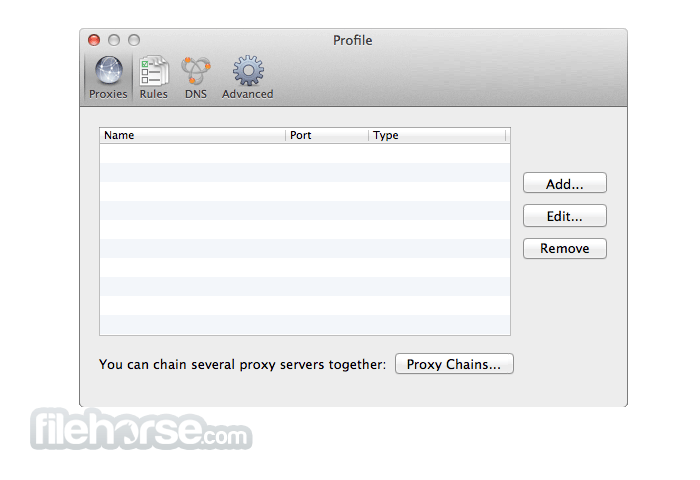
Proxifier for Mac allows network applications that do not support working through proxy servers to operate through a SOCKS or HTTPS proxy and chains.
Features include work with any Internet client through a proxy, improve network performance or ensure privacy, easy yet powerful UI with live data, and up to date with new technologies.
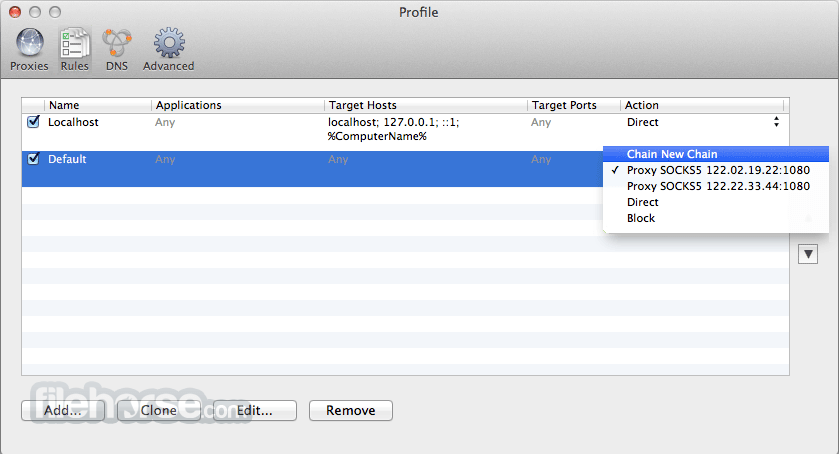
Other features include Proxifier for macOS can process all outgoing TCP connections, full IPv6 support, tunnel IPv4 connections through IPv6 proxy and vice versa, SOCKS 4 and SOCKS 4A (hostnames support) with User ID authentication, HTTPS with Basic and NTLM authentication, proxy failure is transparent for the client application if redundancy is enabled, selected proxies in the chain can be enabled or disabled, convenient UI that allows chain creation and reordering with drag-and-drop, system DNS and DNS over proxy modes, automatic DNS mode detection, and proxification rules can be based on application names, IP addresses, hostnames, and port numbers.
PROS
Also Available: Download Proxifier for Windows
Download Proxifier for Mac Latest Version Why is this app published on FileHorse? (More info)
Features include work with any Internet client through a proxy, improve network performance or ensure privacy, easy yet powerful UI with live data, and up to date with new technologies.
Other features include Proxifier for macOS can process all outgoing TCP connections, full IPv6 support, tunnel IPv4 connections through IPv6 proxy and vice versa, SOCKS 4 and SOCKS 4A (hostnames support) with User ID authentication, HTTPS with Basic and NTLM authentication, proxy failure is transparent for the client application if redundancy is enabled, selected proxies in the chain can be enabled or disabled, convenient UI that allows chain creation and reordering with drag-and-drop, system DNS and DNS over proxy modes, automatic DNS mode detection, and proxification rules can be based on application names, IP addresses, hostnames, and port numbers.
PROS
- Routes All Traffic via Proxy – Bypasses restrictions.
- Supports Multiple Proxy Types – SOCKS, HTTPS, etc.
- Detailed Traffic Monitoring – View real-time connections.
- Custom Rules & Filters – Advanced proxy control.
- Lightweight & Fast – Minimal system impact.
- No Free Version – Only available as paid software.
- Requires Proxy Setup – No built-in proxy servers.
- Not a VPN – Lacks encryption for privacy.
- Complex for Beginners – Requires manual configuration.
- Limited Streaming Support – May not unblock all sites.
Also Available: Download Proxifier for Windows
Download Proxifier for Mac Latest Version Why is this app published on FileHorse? (More info)
##
畫面截圖
- 2025-09-24 Proxifier 3.15.0 2.63 MB
- 2025-04-21 Proxifier 3.14.0 2.63 MB
- 2024-09-27 Proxifier 3.12.0 2.63 MB
- 2023-10-27 Proxifier 3.11.0 2.62 MB
- 2023-10-20 Proxifier 3.9.0 2.62 MB
- 2023-04-21 Proxifier 3.8.0 2.63 MB
- 2022-02-15 Proxifier 3.7.1 3.17 MB
- 2021-08-27 Proxifier 3.6 2.75 MB