⚠ 這是歷史版本頁面 — 查看 ScreenFlow 最新版本 →

- 目前版本9.0.3
- 更新日期2020-04-01
- 檔案大小54.9 MB
- 檔案名稱ScreenFlow-9.0.3.dmg
- 作業系統macOS 10.15 Catalina or later
- 支援語系English
- 授權型式試用版
- 開發商 Telestream, LLC
- 軟體分類Mac 軟體 / 影片軟體
##
編輯短評
ScreenFlow 是 macOS 上相当成熟的屏幕录制与影片剪辑工具,能一次捕捉整个显示器、视讯镜头、麦克风与系统音效,并透过直觉的编辑介面加入图片、文字、音乐与转场,适合制作软体演示、教学影片或应用程式预览。它由 Telestream 长期维护,更新相当活跃,在同类型软体中属于热门选择,使用者评价普遍不错。
若你常需要制作软体教学、课堂简报或产品展示,ScreenFlow 能大幅缩短从录影到输出的流程,尤其适合想快速发布到 YouTube 或 Vimeo 的创作者。与 Adobe Premiere Pro 或 After Effects 相比,它更专注在录屏与轻量剪辑,学习门槛较低,但进阶特效与调色弹性较受限。需留意的是,它仅支援 macOS 平台,目前提供的是试用版授权,且介面为英文,使用前请先确认是否符合需求。
##
翻譯排程處理中,以下暫以英文原文呈現
軟體介紹
With ScreenFlow for Mac you can record the contents of your entire monitor while also capturing your video camera, microphone and your computer audio.
The easy-to-use editing interface lets you creatively edit your video, and add additional images, text, music and transitions for a truly professional-looking video. The finished result is a QuickTime or Windows Media movie, ready for publishing to your Web site or blog or directly to YouTube or Vimeo.
Use ScreenFlow to create high-quality software demos, tutorials, app previews, training, presentations and more.
ScreenFlow for macOS is powerful, easy-to-use screencasting software for the Mac. With the tool you can record the contents of your entire monitor while also capturing your video camera, microphone and your computer audio.
The easy-to-use editing interface lets you creatively edit your video, and add additional images, text, music and transitions for a truly professional-looking video.
The finished result is a QuickTime or Windows Media movie, ready for publishing to your Web site or blog or directly to YouTube or Vimeo. Use the app to create high-quality software demos, tutorials, app previews, training, presentations and more.
Record Anything
With the app screen recording, you can record any part of your monitor while also capturing a video camera, iOS device, microphone, multi-channel audio device and computer audio.
Edit Everything
The easy-to-use editing interface lets you creatively edit your video, and add additional images, text, music, animations and transitions for a professional-looking screencast.
Share Anywhere
Export an MP4, MOV, M4V or even an animated GIF to the Web or publish directly to your YouTube, Vimeo, Wistia, Facebook, Google Drive or Dropbox.
Features and Highlights
Partial Screen Capture
Record any part of your screen. Record just a single application window, define a region, or just record the entire desktop.
Animated GIF Export
Create animated GIFs right from your projects. It’s easy to export great looking short animations for the web, memes, tutorials or social sharing.
New Motion Tab & Powerful Animation Effects
We’ve added three, all new motion-animated effects – Spring, Gravity, Pulse. Simply click to apply them to your clips and create professional-looking animations without the hassle or time-consuming key frames or writing custom code.
Multi-Channel Audio Mixer
ScreenFlow now sees and records multiple audio channel inputs from USB mixers. Record up to 16 discrete audio channels from a single USB input, and mix and adjust them separately in ScreenFlow’s inspector.
Redesigned Waveforms
Audio wave forms are now drawn using a new implementation for better performance and more accuracy.
iOS Audio Monitoring
Now you can listen to your iOS device’s audio WHILE you are capturing and recording it! Great for mobile gamers, app developers, musicians – anyone who needs to demo an app where audio is crucial part of the operation.
Extract Audio Channels
Now you can pull out any audio channel into its own track. Great for isolating audio channels or inputs inside multi-channel audio clips.
Redesigned Countdown Overlay
Now the app will tell you exactly what sources are going to be recorded while it counts down to start the recording. No more last-minute second guessing!
New Editing Option, Replace Clip
Swap clips in the timeline without changing the overall duration of the segment, or having to reset your in and out points on the new clip.
New Motion Curves
We’ve added Exponential curve types, both in and out, for more dynamic effects and animations!
Updated and Improved User Interface
We’ve added new icons in the timeline and canvas for greater control. Now you can mute your video or audio on a track independently, use a quick-access pop-up to set your project dimensions, and mute your audio monitors with a new headphone button.
New Video Property, Corner Matte
Now you can easily add an attractive matte to your video clips and images by rounding their corners and hard edges using a slider in the video properties tab.
Export Progress Over Dock Icon
Quickly determine how much time is left on your exports with a handy progress bar overlaying the Screen Flow icon in the dock.
PROS
Download ScreenFlow for Mac Latest Version Why is this app published on FileHorse? (More info)
The easy-to-use editing interface lets you creatively edit your video, and add additional images, text, music and transitions for a truly professional-looking video. The finished result is a QuickTime or Windows Media movie, ready for publishing to your Web site or blog or directly to YouTube or Vimeo.
Use ScreenFlow to create high-quality software demos, tutorials, app previews, training, presentations and more.
ScreenFlow for macOS is powerful, easy-to-use screencasting software for the Mac. With the tool you can record the contents of your entire monitor while also capturing your video camera, microphone and your computer audio.
The easy-to-use editing interface lets you creatively edit your video, and add additional images, text, music and transitions for a truly professional-looking video.
The finished result is a QuickTime or Windows Media movie, ready for publishing to your Web site or blog or directly to YouTube or Vimeo. Use the app to create high-quality software demos, tutorials, app previews, training, presentations and more.
Record Anything
With the app screen recording, you can record any part of your monitor while also capturing a video camera, iOS device, microphone, multi-channel audio device and computer audio.
Edit Everything
The easy-to-use editing interface lets you creatively edit your video, and add additional images, text, music, animations and transitions for a professional-looking screencast.
Share Anywhere
Export an MP4, MOV, M4V or even an animated GIF to the Web or publish directly to your YouTube, Vimeo, Wistia, Facebook, Google Drive or Dropbox.
Features and Highlights
Partial Screen Capture
Record any part of your screen. Record just a single application window, define a region, or just record the entire desktop.
Animated GIF Export
Create animated GIFs right from your projects. It’s easy to export great looking short animations for the web, memes, tutorials or social sharing.
New Motion Tab & Powerful Animation Effects
We’ve added three, all new motion-animated effects – Spring, Gravity, Pulse. Simply click to apply them to your clips and create professional-looking animations without the hassle or time-consuming key frames or writing custom code.
Multi-Channel Audio Mixer
ScreenFlow now sees and records multiple audio channel inputs from USB mixers. Record up to 16 discrete audio channels from a single USB input, and mix and adjust them separately in ScreenFlow’s inspector.
Redesigned Waveforms
Audio wave forms are now drawn using a new implementation for better performance and more accuracy.
iOS Audio Monitoring
Now you can listen to your iOS device’s audio WHILE you are capturing and recording it! Great for mobile gamers, app developers, musicians – anyone who needs to demo an app where audio is crucial part of the operation.
Extract Audio Channels
Now you can pull out any audio channel into its own track. Great for isolating audio channels or inputs inside multi-channel audio clips.
Redesigned Countdown Overlay
Now the app will tell you exactly what sources are going to be recorded while it counts down to start the recording. No more last-minute second guessing!
New Editing Option, Replace Clip
Swap clips in the timeline without changing the overall duration of the segment, or having to reset your in and out points on the new clip.
New Motion Curves
We’ve added Exponential curve types, both in and out, for more dynamic effects and animations!
Updated and Improved User Interface
We’ve added new icons in the timeline and canvas for greater control. Now you can mute your video or audio on a track independently, use a quick-access pop-up to set your project dimensions, and mute your audio monitors with a new headphone button.
New Video Property, Corner Matte
Now you can easily add an attractive matte to your video clips and images by rounding their corners and hard edges using a slider in the video properties tab.
Export Progress Over Dock Icon
Quickly determine how much time is left on your exports with a handy progress bar overlaying the Screen Flow icon in the dock.
PROS
- High-Quality Screen Recording – Crisp and smooth captures.
- Powerful Editing Tools – Advanced video editing features.
- Intuitive Interface – User-friendly and easy to navigate.
- Multi-Track Timeline – Precise control over media layers.
- Direct Export Options – Upload to YouTube, Vimeo, and more.
- Expensive Pricing – Costly compared to competitors.
- Limited Free Version – Watermark on trial exports.
- Occasional Performance Issues – Lags with large files.
- No Built-in Stock Library – Must purchase separately.
Download ScreenFlow for Mac Latest Version Why is this app published on FileHorse? (More info)
##
畫面截圖
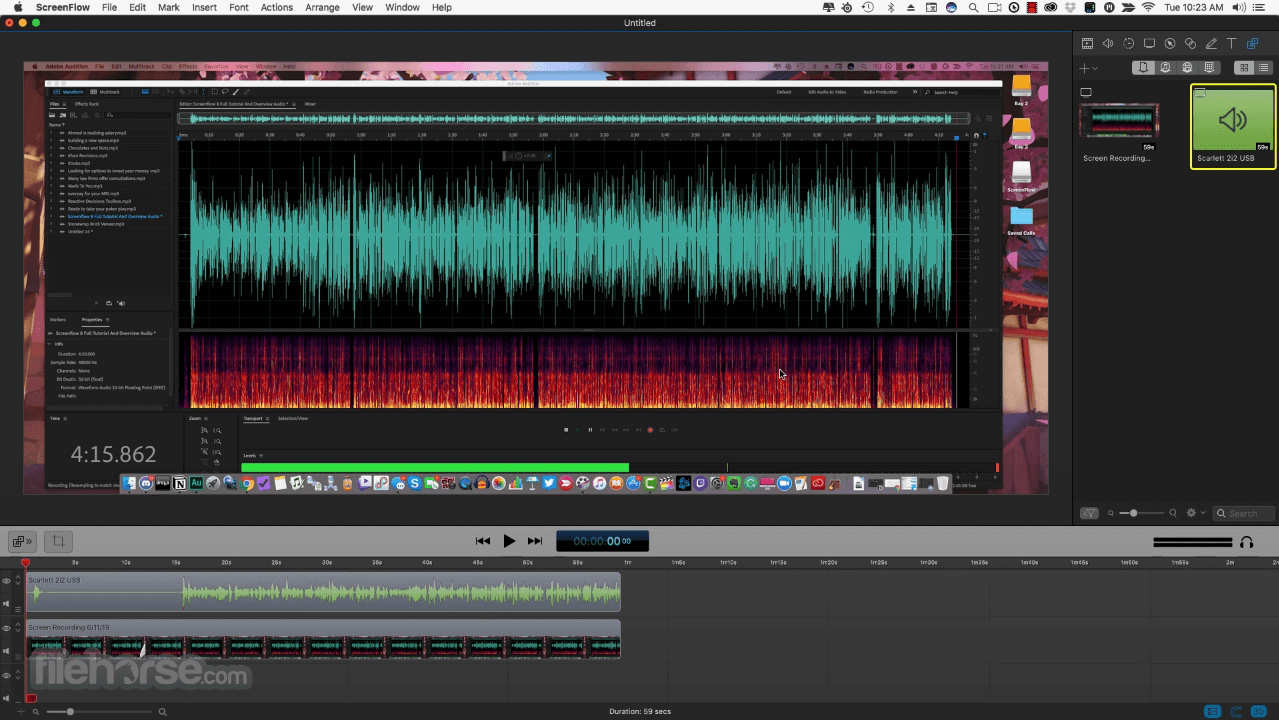
- 2026-02-16 ScreenFlow 10.5.2 84.9 MB
- 2025-11-18 ScreenFlow 10.5.1 84.9 MB
- 2025-08-18 ScreenFlow 10.5 85.1 MB
- 2023-11-01 ScreenFlow 10.0.10 84.7 MB
- 2023-03-30 ScreenFlow 10.0.9 84.7 MB
- 2022-11-18 ScreenFlow 10.0.8 84.6 MB
- 2022-10-24 ScreenFlow 10.0.7 84.7 MB
- 2022-07-12 ScreenFlow 10.0.6 84.7 MB