- 目前版本7.9.7
- 更新日期2026-06-29
- 檔案大小288 MB
- 檔案名稱sejda-desktop_7.9.7.dmg
- 作業系統macOS 10.15 Catalina or later
- 支援語系English
- 授權型式試用版
- 開發商 Eduard Weissman
- 軟體分類Mac 軟體 / 辦公商務
##
翻譯排程處理中,以下暫以英文原文呈現
軟體介紹
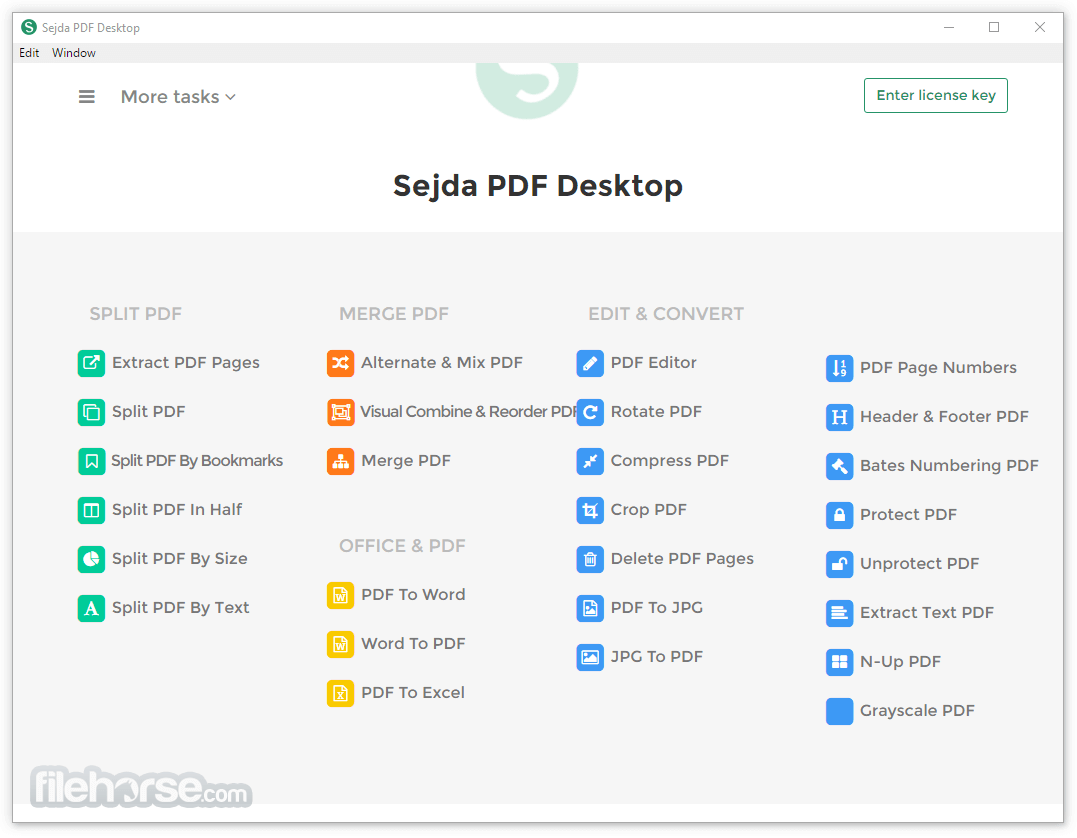
Sejda PDF Desktop for Mac is a free and simple user-friendly PDF management software for macOS. Perform an impressively broad range of PDF tasks!
Features and Highlights
Merge files into one PDF
Visually combine and reorder pages, merge multiple PDF files. Alternate and mix odd and even page files.
Split PDF files
Split documents by pages. Extract separate documents. Split by size, bookmarks or text occurrences. Divide two-page layout scans.
Convert PDF files to Office and image formats
Convert PDF files to Word, Excel, and image. Convert images to PDF files.
Compress PDF
Reduce the size of PDF files. Optimize images and resources.
Edit PDF files
Add, edit or move text in your PDF. Change the font type, size, and style. Insert, reorder, move or delete pages. Add signature, highlight text and insert geometric shapes.
Apply PDF passwords and permissions
Add copy and edit protection to a PDF. Include a password to protect your PDF from unapproved access.
How to Use
Launch the app and choose a PDF tool from the dashboard
Drag and drop or open a PDF file to start editing
Use options like merge, split, compress, edit, or convert
Save the processed file to your preferred location
System Requirements
Also Available: Download Sejda PDF Desktop for Windows
Download Sejda PDF Desktop for Mac Latest Version Why is this app published on FileHorse? (More info)
Features and Highlights
Merge files into one PDF
Visually combine and reorder pages, merge multiple PDF files. Alternate and mix odd and even page files.
Split PDF files
Split documents by pages. Extract separate documents. Split by size, bookmarks or text occurrences. Divide two-page layout scans.
Convert PDF files to Office and image formats
Convert PDF files to Word, Excel, and image. Convert images to PDF files.
Compress PDF
Reduce the size of PDF files. Optimize images and resources.
Edit PDF files
Add, edit or move text in your PDF. Change the font type, size, and style. Insert, reorder, move or delete pages. Add signature, highlight text and insert geometric shapes.
Apply PDF passwords and permissions
Add copy and edit protection to a PDF. Include a password to protect your PDF from unapproved access.
How to Use
Launch the app and choose a PDF tool from the dashboard
Drag and drop or open a PDF file to start editing
Use options like merge, split, compress, edit, or convert
Save the processed file to your preferred location
System Requirements
- macOS 10.13 (High Sierra) or later
- 64-bit Intel or Apple Silicon (M1/M2) processor
- At least 4 GB RAM
- 300 MB available disk space
- Internet connection for certain features
- User-friendly interface for all PDF tasks
- Supports batch processing of multiple files
- Wide range of editing and conversion tools
- No watermarks in free desktop version
- Works offline without needing a browser
- Free version has daily usage limits
- Limited OCR functionality
- No cloud sync or file backup options
- Not ideal for complex form editing
- Occasional lag with large PDF files
Also Available: Download Sejda PDF Desktop for Windows
Download Sejda PDF Desktop for Mac Latest Version Why is this app published on FileHorse? (More info)
##
畫面截圖