- 目前版本1.4.2
- 更新日期2026-01-04
- 檔案大小68.45 MB
- 檔案名稱Soda Player 1.4.2.dmg
- 作業系統Mac OS X 10.9 or later
- 支援語系English
- 授權型式免費軟體
- 開發商 Freedom Island Privacy Inc.
- 軟體分類Mac 軟體 / 影片軟體
##
翻譯排程處理中,以下暫以英文原文呈現
軟體介紹
Soda Player for Mac is a legacy media player designed to provide a seamless viewing experience for a wide range of video formats, including local files, web streams, and BitTorrent videos.
This app is particularly useful for novice users who want to focus their multimedia viewing experience on streamed video content without the need for additional codec plugins, making it an ideal choice for those with limited storage space.
The app’s ability to play BitTorrent videos instantly, with support for DHT, PEX, UDP trackers, hardware H264/H265/HEVC decoding, and other technologies ensures that users can access their favorite content quickly and efficiently.
This video player features go beyond just playing video files, as it also includes a built-in VPN to protect user privacy when playing non-local files.
The app's automatic subtitle finder is another notable feature, which can find subtitles in many languages for the content being played. This feature is particularly useful for those who prefer to watch videos with subtitles, as it saves the user the hassle of manually searching for subtitles online.
Additionally, Soda Player supports Chromecast and AirPlay, allowing users to stream videos to their TVs and devices with just one click.
However, users should be aware that the developers of this app have stopped updating it, and the official website is down.
Main Features
To install this tool, users must download the installation package from a verified source (such as secure FileHorse servers) because the app’s official website is no longer accessible.
After a standard installation procedure, users can start the app without any need for additional customization or setup.
How to Use
The app can be started manually or associated with all local file extension formats so that it is launched immediately by double-clicking on video files.
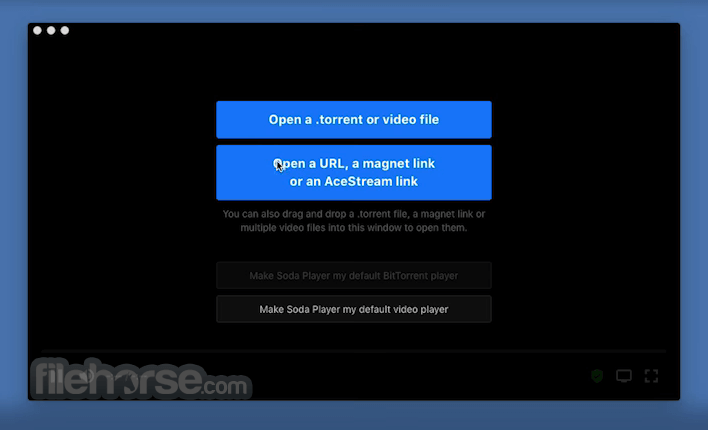
One special feature that this program offers is linking with the BitTorrent file type, enabling users to easily start the process of P2P video streaming using nothing more than .torrent files or Magnet links.
Due to the built-in codec pack, it can flawlessly reproduce all modern file types, including containers such as MKV, MP4, AVI, WebM, and WMV.
The only advanced configuration the app offers relates to its built-in VPN and BitTorrent streaming, where users can set up their security routing and connection preferences.
User Interface
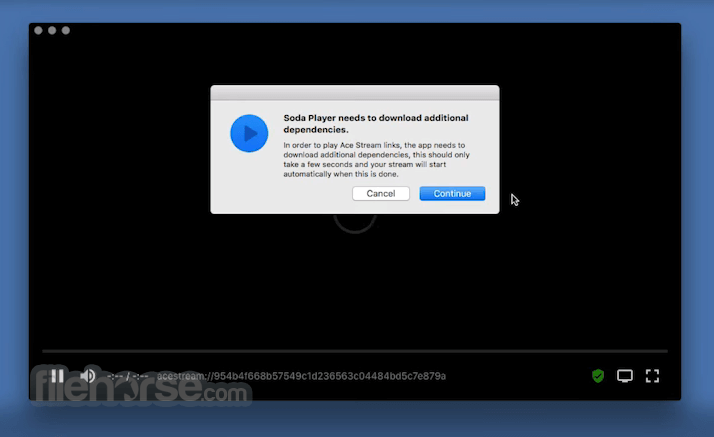
The user interface of Soda Player is clean and intuitive, with easy-to-use controls for playback, volume adjustment, and subtitle management.
The app's design is minimalistic, making it easy to navigate and use, even for those who are not tech-savvy.
FAQs
What is Soda Player?
It is a video media player that allows users to play a wide range of video formats, including local files, web streams, and P2P BitTorrent videos.
Is it safe?
This app is no longer in active development and can’t be downloaded from its official website. It is safe to use only if the last updated version is downloaded from a reliable source.
Alternatives
VLC Media Player - The most popular open-source media player, known for its extensive format support and robust feature set.
Elmedia Player - A feature-rich video player that is fully optimized for modern Apple Silicon Macs.
Kodi - An open-source media center application that allows users to stream and manage digital media content, including videos, music, and photos, with customizable add-ons and a user-friendly interface.
Pricing
This is a free app.
System Requirements
Soda Player is compatible with Mac OS X 10.9 or later.
It is optimized for Intel-based Macs.
PROS
Soda Player for Mac is a legacy media player that offers a seamless viewing experience for a wide range of video formats. It features a special focus on facilitating a seamless streaming video experience, with built-in support for BitTorrent video streaming and secure VPN routing.
However, users should be aware that this app can only run on Intel-based devices and is no longer in active development.
Also Available: Download Soda Player for Windows
Download Soda Player for Mac Latest Version Why is this app published on FileHorse? (More info)
This app is particularly useful for novice users who want to focus their multimedia viewing experience on streamed video content without the need for additional codec plugins, making it an ideal choice for those with limited storage space.
The app’s ability to play BitTorrent videos instantly, with support for DHT, PEX, UDP trackers, hardware H264/H265/HEVC decoding, and other technologies ensures that users can access their favorite content quickly and efficiently.
This video player features go beyond just playing video files, as it also includes a built-in VPN to protect user privacy when playing non-local files.
The app's automatic subtitle finder is another notable feature, which can find subtitles in many languages for the content being played. This feature is particularly useful for those who prefer to watch videos with subtitles, as it saves the user the hassle of manually searching for subtitles online.
Additionally, Soda Player supports Chromecast and AirPlay, allowing users to stream videos to their TVs and devices with just one click.
However, users should be aware that the developers of this app have stopped updating it, and the official website is down.
Main Features
- Plays BitTorrent videos instantly.
- Supports DHT, PEX, UDP trackers, fast SOCKS5 proxy servers, and other key BitTorrent technologies.
- Built-in VPN to protect user privacy.
- Automatic subtitle finder.
- Supports Chromecast and AirPlay.
- Comes bundled with all modern audio/video codecs.
- Native support for 5.1 and 7.1 surround sound playback.
- Supports playback of 4K and high-framerate video content.
- Supports DVD, CD, and Blu-ray discs.
To install this tool, users must download the installation package from a verified source (such as secure FileHorse servers) because the app’s official website is no longer accessible.
After a standard installation procedure, users can start the app without any need for additional customization or setup.
How to Use
The app can be started manually or associated with all local file extension formats so that it is launched immediately by double-clicking on video files.
One special feature that this program offers is linking with the BitTorrent file type, enabling users to easily start the process of P2P video streaming using nothing more than .torrent files or Magnet links.
Due to the built-in codec pack, it can flawlessly reproduce all modern file types, including containers such as MKV, MP4, AVI, WebM, and WMV.
The only advanced configuration the app offers relates to its built-in VPN and BitTorrent streaming, where users can set up their security routing and connection preferences.
User Interface
The user interface of Soda Player is clean and intuitive, with easy-to-use controls for playback, volume adjustment, and subtitle management.
The app's design is minimalistic, making it easy to navigate and use, even for those who are not tech-savvy.
FAQs
What is Soda Player?
It is a video media player that allows users to play a wide range of video formats, including local files, web streams, and P2P BitTorrent videos.
Is it safe?
This app is no longer in active development and can’t be downloaded from its official website. It is safe to use only if the last updated version is downloaded from a reliable source.
Alternatives
VLC Media Player - The most popular open-source media player, known for its extensive format support and robust feature set.
Elmedia Player - A feature-rich video player that is fully optimized for modern Apple Silicon Macs.
Kodi - An open-source media center application that allows users to stream and manage digital media content, including videos, music, and photos, with customizable add-ons and a user-friendly interface.
Pricing
This is a free app.
System Requirements
Soda Player is compatible with Mac OS X 10.9 or later.
It is optimized for Intel-based Macs.
PROS
- Supports a wide range of video formats.
- Optimized reproduction of web streams and BitTorrent videos.
- Built-in VPN to protect user privacy.
- Supports Chromecast and AirPlay.
- Automatic subtitle finder.
- Free.
- No longer updated or offered on the official website.
- Does not natively run on M-series Macs.
Soda Player for Mac is a legacy media player that offers a seamless viewing experience for a wide range of video formats. It features a special focus on facilitating a seamless streaming video experience, with built-in support for BitTorrent video streaming and secure VPN routing.
However, users should be aware that this app can only run on Intel-based devices and is no longer in active development.
Also Available: Download Soda Player for Windows
Download Soda Player for Mac Latest Version Why is this app published on FileHorse? (More info)
##
畫面截圖