⚠ 這是歷史版本頁面 — 查看 Subler 最新版本 →

- 目前版本1.6.14
- 更新日期2021-12-07
- 檔案大小18.35 MB
- 檔案名稱Subler-1.6.14.zip
- 作業系統Mac OS X 10.11 or later
- 支援語系English
- 授權型式免費軟體
- 開發商 Damiano Galassi
- 軟體分類Mac 軟體 / 影片軟體
##
編輯短評
Subler 是一款專為 macOS 設計的免費影片封裝工具,主要解決 MKV 或 MOV 容器內影音串流的管理問題。它能讓使用者輕鬆新增、移除或調整影片中的音訊、視訊、章節與字幕軌,並可建立新的 MKV 檔案,或輸出能在 Apple 裝置(從電腦到攜帶裝置甚至 Apple TV)上播放的相容串流。介面設計相當直覺,主控台能快速載入既有檔案進行編輯,是 Mac 上處理影片封裝的實用選擇。此軟體由開發者 Damiano Galassi 持續維護,更新頻率穩定,在同類工具中屬於評價不錯的小眾選項。
Subler 特別適合需要將 MKV 或 MOV 檔案轉換為 Apple 生態系相容格式的使用者,例如想在 iPhone、iPad 或 Apple TV 上觀看影片,卻又不想動用完整剪輯軟體的人。與 Adobe Premiere Pro 或 After Effects 這類專業剪輯工具相比,Subler 專注於封裝與串流管理,功能單純且資源需求低,但相對地不具備畫面剪接或特效處理能力。軟體為免費授權,僅支援 macOS 平台,介面語言為英文,對於不熟悉英文介面的使用者可能需要稍微適應,但操作邏輯簡單,整體學習成本不高。
##
翻譯排程處理中,以下暫以英文原文呈現
軟體介紹
Subler is a simple mp4 file format muxer created by the developer Damiano Galassi to enable all Mac users with the ability to easily manage their video files packaged in MKV or MOV containers and easily add, remove or manage audio, video, chapter and subtitle streams that are held in them.
This also includes the creation of new MKV files, and streams that will be compatible with reproduction on all apple devices from home computers to portable devices and even Apple TV.
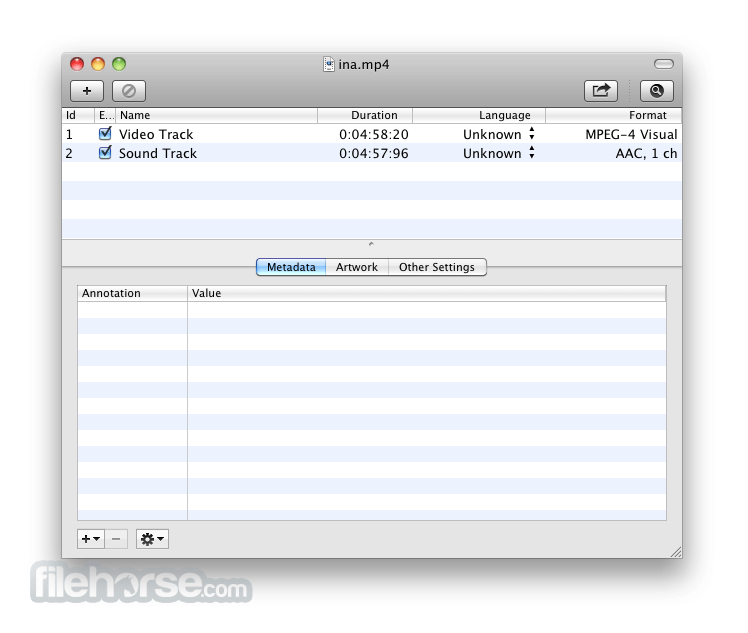
The interface of Subler for Mac is very easy for use. The main dashboard enables easy loading of existing MKV, MP4 or MOV files, and listing of the files that are held in them.
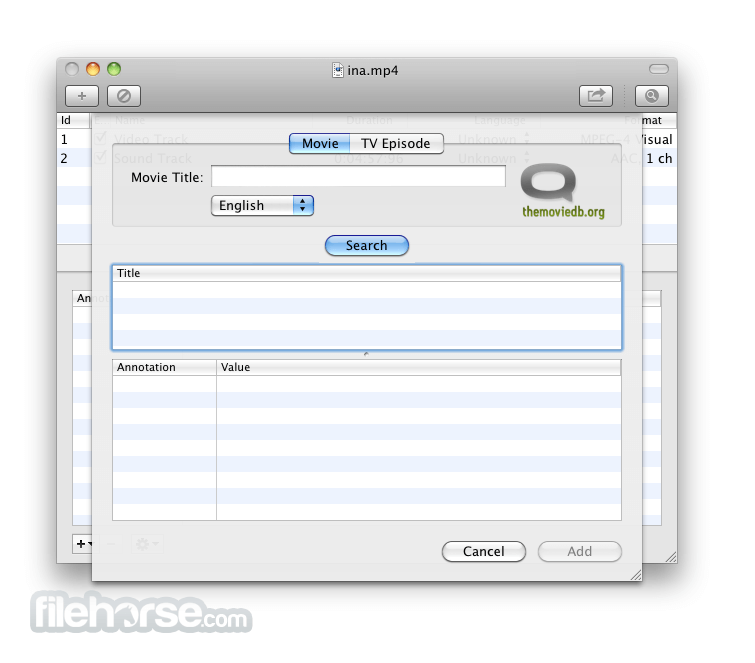
From there users can easily add new streams (more audio languages, new subtitles), remove existing streams from the video container (remove unnecessary audio tracks for example), or even edit data by adding new metadata which can even be automatically fetched from the internet database themoviedb.org.
App also supports limited transcoding capabilities, all in line to enable your video and audio streams to be compatible with Apple standards.
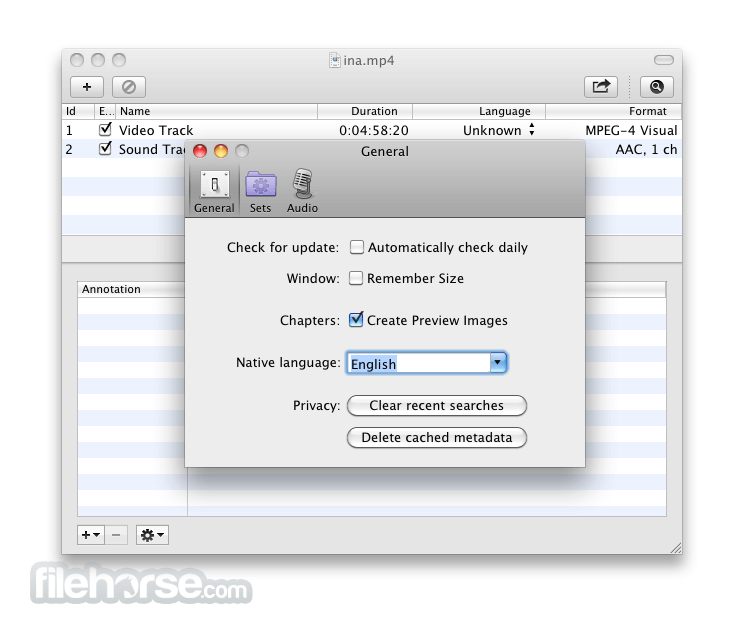
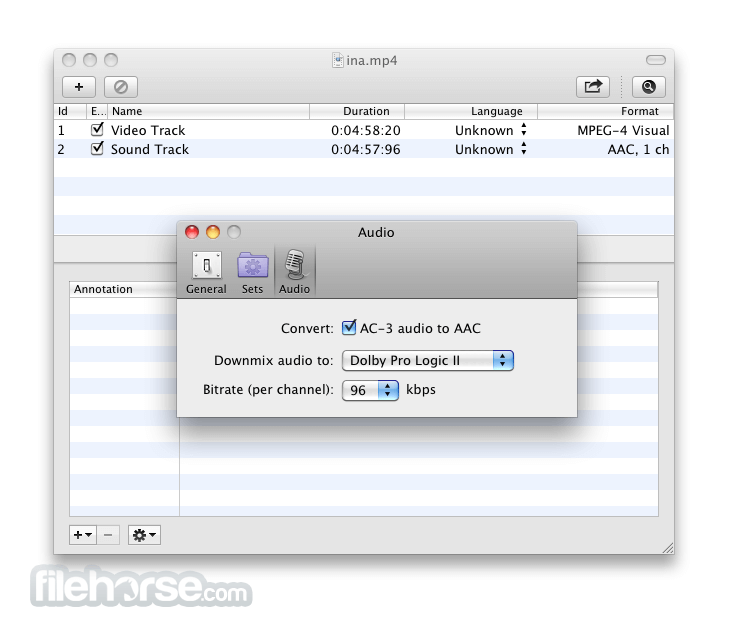
Those video and audio options can be tweaked in Customization screen that features tweaks separated in three main tabs – General, Sets, and Audio (downmix to stereo or surround, with user-selectable bitrate per channel).
With Subler for macOS, anyone can very quickly remux MKV, MP4 or MOV files to widely used MP4 container, with full control or managing which audio/video/subtitle/chapter tracks you want to preserve in your new file.
The main features are:
macOS 10.9 Mavericks or later
64-bit Intel processor or Apple Silicon
Minimum 4GB RAM
100MB available disk space
Requires QuickTime for previewing content
PROS
Download Subler for Mac Latest Version Why is this app published on FileHorse? (More info)
This also includes the creation of new MKV files, and streams that will be compatible with reproduction on all apple devices from home computers to portable devices and even Apple TV.
The interface of Subler for Mac is very easy for use. The main dashboard enables easy loading of existing MKV, MP4 or MOV files, and listing of the files that are held in them.
From there users can easily add new streams (more audio languages, new subtitles), remove existing streams from the video container (remove unnecessary audio tracks for example), or even edit data by adding new metadata which can even be automatically fetched from the internet database themoviedb.org.
App also supports limited transcoding capabilities, all in line to enable your video and audio streams to be compatible with Apple standards.
Those video and audio options can be tweaked in Customization screen that features tweaks separated in three main tabs – General, Sets, and Audio (downmix to stereo or surround, with user-selectable bitrate per channel).
With Subler for macOS, anyone can very quickly remux MKV, MP4 or MOV files to widely used MP4 container, with full control or managing which audio/video/subtitle/chapter tracks you want to preserve in your new file.
The main features are:
- Creation of tx3g subtitles tracks, compatible with all Apple's devices (iPod, AppleTV, iPhone, QuickTime).
- Mux video, audio, chapters, subtitles and closed captions tracks from mov, mp4, and mkv.
- Raw formats: H.264 Elementary streams (.h264, .264), AAC (.aac), AC3 (.ac3), Scenarist (.scc)
- iTunes metadata editing and TMDb and TVDB support.
- Click the "+" button to add a video file
- Drag and drop subtitle/audio tracks into the window
- Edit metadata fields as needed
- Choose output format (usually M4V or MP4)
- Click "Save" or "Command+S" to begin muxing
- Wait for process to complete and verify output
macOS 10.9 Mavericks or later
64-bit Intel processor or Apple Silicon
Minimum 4GB RAM
100MB available disk space
Requires QuickTime for previewing content
PROS
- Lightweight and fast muxing tool
- Supports multiple subtitle formats
- Simple interface for metadata editing
- Preserves video quality during muxing
- Free and open-source software
- No built-in video conversion
- Limited UI customization options
- Lacks real-time subtitle preview
- Not suitable for advanced editing
- Minimal official documentation available
Download Subler for Mac Latest Version Why is this app published on FileHorse? (More info)
##
畫面截圖
- 2025-09-25 Subler 1.9.1 24.8 MB
- 2025-09-18 Subler 1.9.0 24.8 MB
- 2025-09-09 Subler 1.8.9 16.2 MB
- 2025-03-23 Subler 1.8.8 16.1 MB
- 2025-03-17 Subler 1.8.7 16.1 MB
- 2024-08-10 Subler 1.8.5 16.1 MB
- 2022-06-17 Subler 1.7.5 18.47 MB
- 2022-04-11 Subler 1.7.4 18.47 MB