- 目前版本21.0.11
- 更新日期2026-07-17
- 作業系統macOS 10.13 High Sierra or later
- 支援語系English
- 授權型式未分類
- 開發商 Micromat Inc
- 軟體分類Mac 軟體 / 系統優化
##
翻譯排程處理中,以下暫以英文原文呈現
軟體介紹
TechTool Pro for Mac has long been one of the foremost utilities for keeping your Mac running smoothly and efficiently. With the release of version 9, it has become more proficient than ever.
Techtool Pro provides tools for maintaining and troubleshooting your Mac, including drive repair, RAM testing, and data protection.
Features and Highlights
TechTool Protection - Reengineered to better protect your Mac
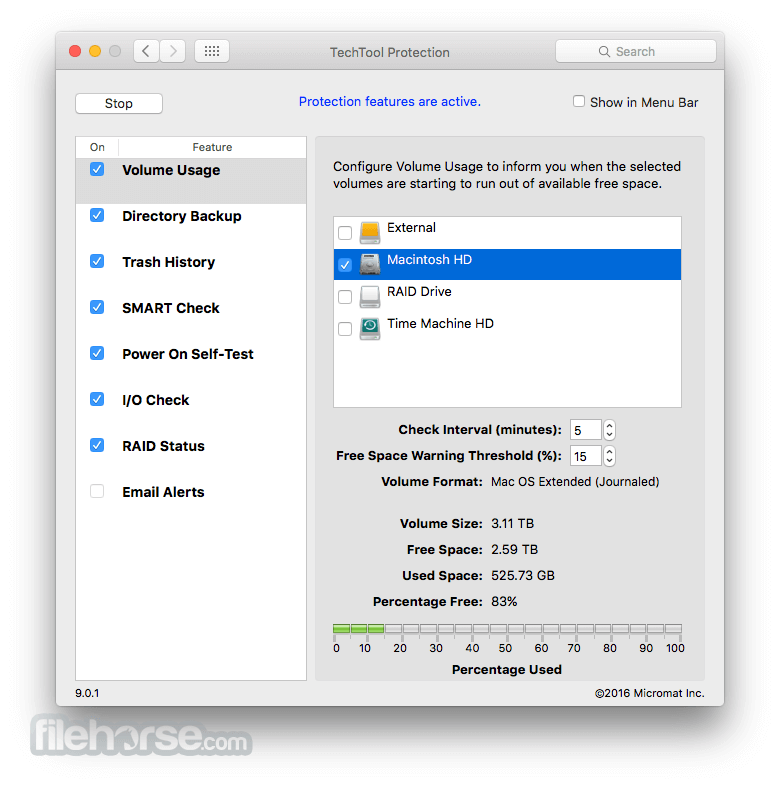
TechTool Pro for macOS includes the option of installing a system preference pane to keep watch over your Mac. New features include check for I/O errors, Power On Self-Test errors, Mac notebook internal battery condition, and RAID status (if applicable). It also includes the same improvements to the SMART check in the app. All of that, wrapped in an entirely new interface.
Check Computer - Now you're in control
Check Computer is a handy way to tell the tool to run the entire suite of tests to give you the best possible snapshot of your Mac's health. Sometimes, though, it's nice to be able to leave tests out, or to skip certain drives. Using the new configuration panel, you have total control of the Check Computer suite. Power to the people.
Partition Map - new drive test
The app has long been known for testing your Mac's file system. It is important also to test the data structures that contain the Mac's file system: the Partition Map. The new Partition Map test checks the partition map of a given drive for errors. Partition map errors can cause entire volumes to go missing, or prevent a Mac from booting. If errors are found, they can be repaired using the Partition Repair tool.
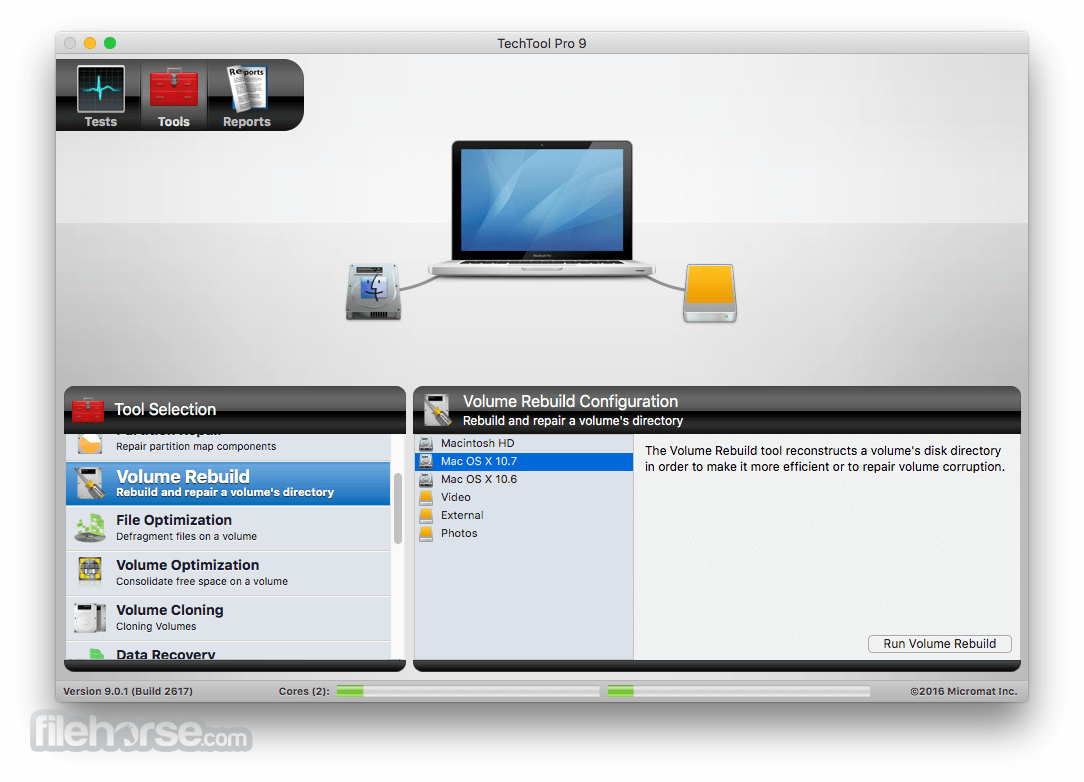
Partition Repair - new drive repair tool
Along with Volume Rebuild, which repairs Mac file systems, the Partition Repair tool repairs the remaining portions of the drive which keeps track of the volumes on your hard drive. This includes hidden partitions which keep track of your Mac's startup process. The Partition Repair tool does just what it says, repairing the partition maps or drives where needed.
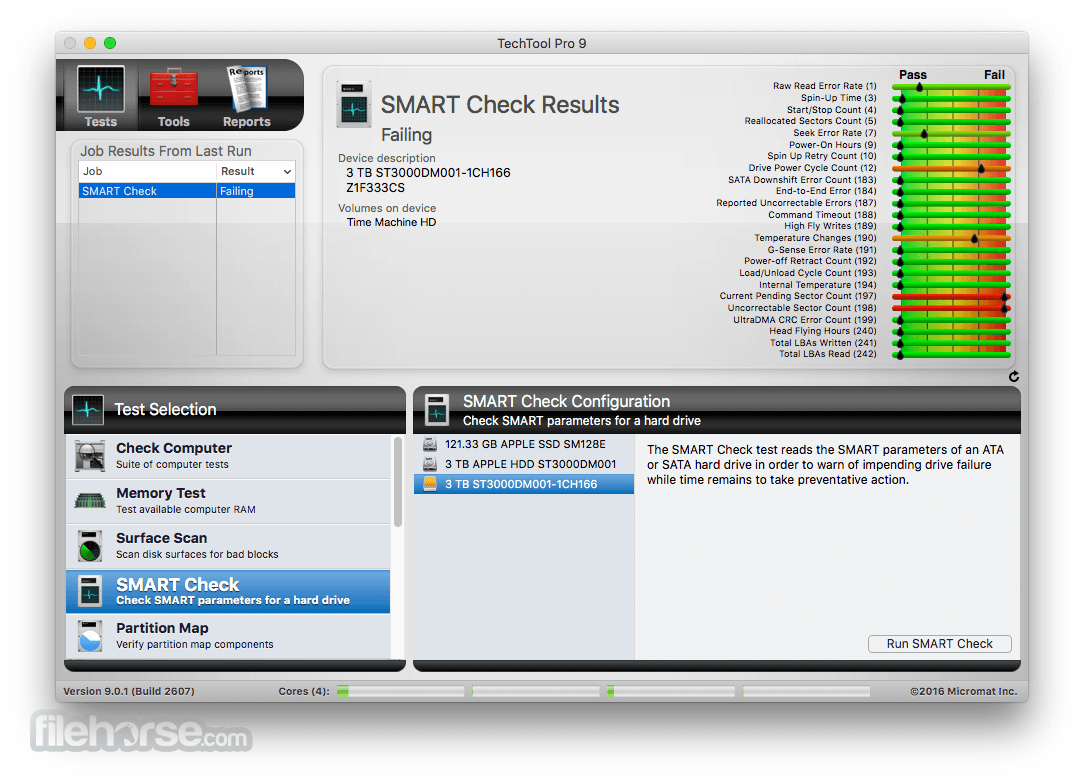
SMART Check - Now even smarter
Hard drives include a technology called SMART (Self Monitoring, Analysis and Reporting Technology) which can inform a computer about the health of its hard drives. In most utilities, just the overall results - passed or failed - are reported to the user. In the failed state, often there is little or no time to back up data before the drive fails entirely. Previous versions of the app reported the overall status of each attribute, but some attributes don't contribute to the failure of a drive. Now, the SMART Check has gotten smarter. The app now knows which attributes contribute to drive failure, and will report a failing result before the drive fails completely. Giving you time to rescue your data.
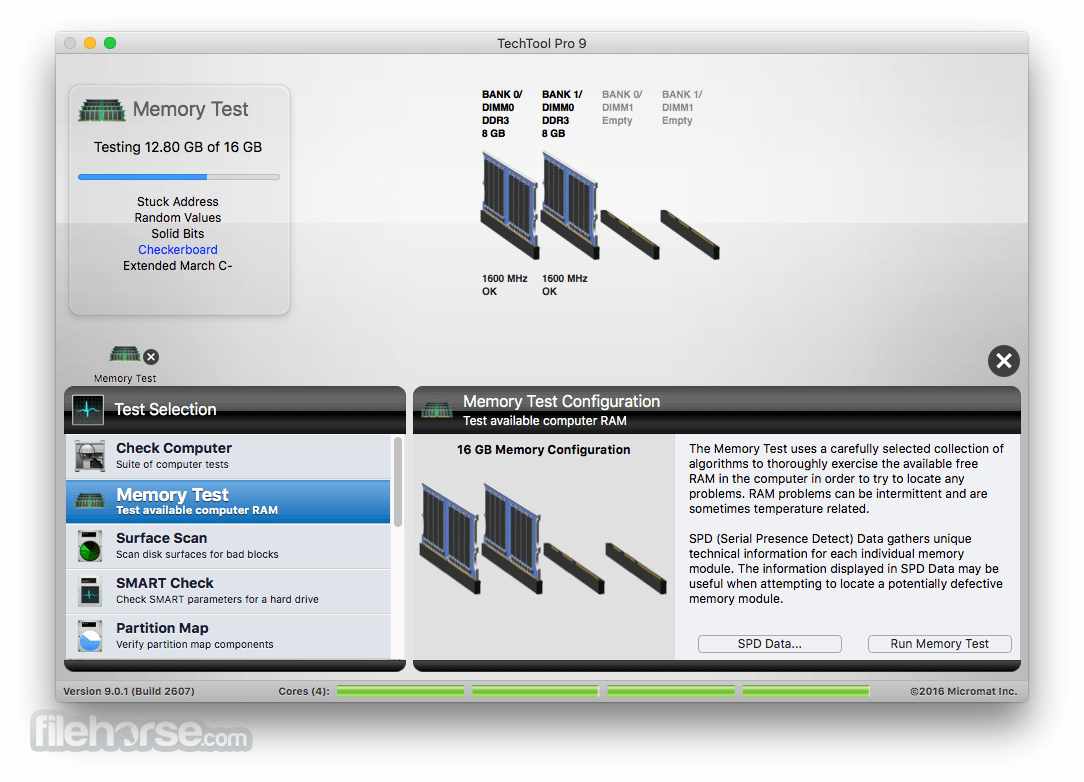
Memory Test - Now better than ever before
The program took a revolutionary step in testing memory, making the app's memory testing suite the most comprehensive test available for the Mac. "In TechTool Pro , we've taken some of the additional advancements used by ATOMIC, our dedicated Memory Tester, and integrated them into Tech Tool Pro." Now, memory is 'cleaned' before testing, reclaimed from macOS, maximizing the amount of RAM that can be tested.
Processor Benchmark
Get an objective measurement of your Mac's processor performance. The Processor Benchmark too uses industry-standard measurement algorithms to test processor performance. Using this tool, you can get metrics that can be used to compare processor speeds apples-to-apples. Avoids the confusion of comparison using Megahertz.
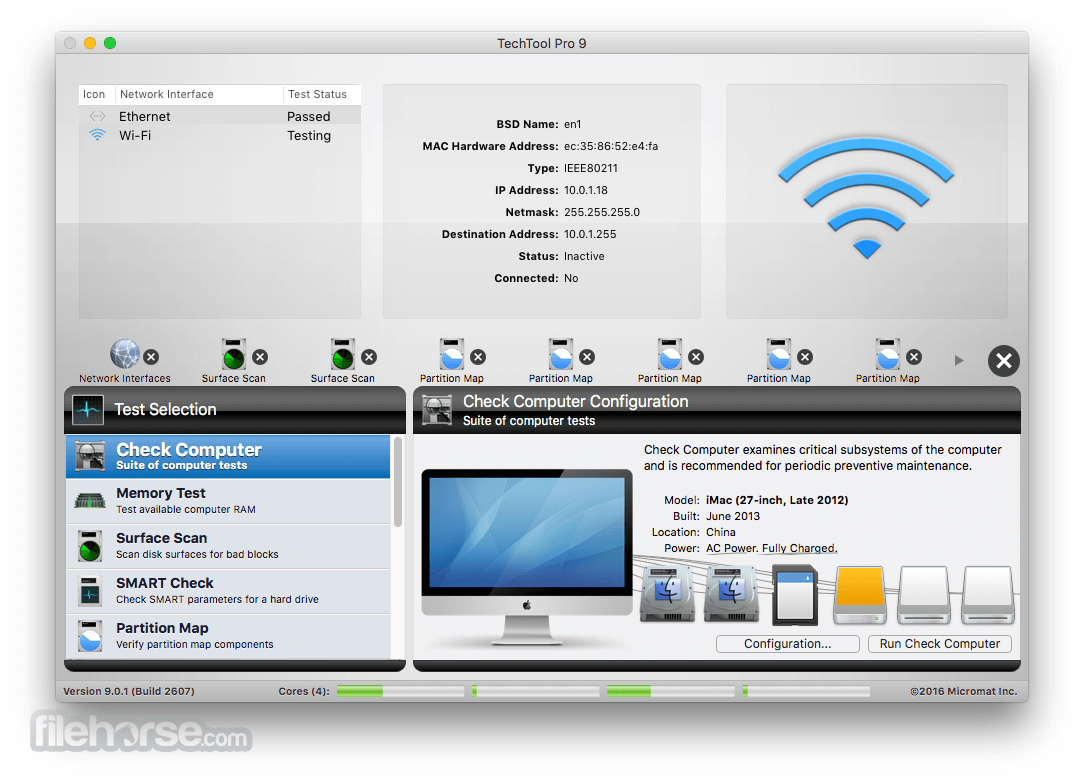
Network Interfaces - New test
Most Macs spend the majority of their lives connected to the internet. If the ethernet or wifi adapters in your Mac aren't working, the valuable connection to the internet can fail. The new Network Interfaces test can test any connected network interface for errors. It not only tests ethernet and wifi, but also any other supported internet connection, ethernet over USB, VPN connections, even a FireWire network conneciton. Ensure the reilability of your internet and intranet connections by testing your Mac's network interfaces.
How to Use
macOS 10.14 Mojave or later
64-bit Intel or Apple Silicon (via Rosetta)
Minimum 4 GB RAM (8 GB recommended)
At least 1 GB of disk space
Internet connection for updates
PROS
Download TechTool Pro for Mac Latest Version Why is this app published on FileHorse? (More info)
Techtool Pro provides tools for maintaining and troubleshooting your Mac, including drive repair, RAM testing, and data protection.
Features and Highlights
TechTool Protection - Reengineered to better protect your Mac
TechTool Pro for macOS includes the option of installing a system preference pane to keep watch over your Mac. New features include check for I/O errors, Power On Self-Test errors, Mac notebook internal battery condition, and RAID status (if applicable). It also includes the same improvements to the SMART check in the app. All of that, wrapped in an entirely new interface.
Check Computer - Now you're in control
Check Computer is a handy way to tell the tool to run the entire suite of tests to give you the best possible snapshot of your Mac's health. Sometimes, though, it's nice to be able to leave tests out, or to skip certain drives. Using the new configuration panel, you have total control of the Check Computer suite. Power to the people.
Partition Map - new drive test
The app has long been known for testing your Mac's file system. It is important also to test the data structures that contain the Mac's file system: the Partition Map. The new Partition Map test checks the partition map of a given drive for errors. Partition map errors can cause entire volumes to go missing, or prevent a Mac from booting. If errors are found, they can be repaired using the Partition Repair tool.
Partition Repair - new drive repair tool
Along with Volume Rebuild, which repairs Mac file systems, the Partition Repair tool repairs the remaining portions of the drive which keeps track of the volumes on your hard drive. This includes hidden partitions which keep track of your Mac's startup process. The Partition Repair tool does just what it says, repairing the partition maps or drives where needed.
SMART Check - Now even smarter
Hard drives include a technology called SMART (Self Monitoring, Analysis and Reporting Technology) which can inform a computer about the health of its hard drives. In most utilities, just the overall results - passed or failed - are reported to the user. In the failed state, often there is little or no time to back up data before the drive fails entirely. Previous versions of the app reported the overall status of each attribute, but some attributes don't contribute to the failure of a drive. Now, the SMART Check has gotten smarter. The app now knows which attributes contribute to drive failure, and will report a failing result before the drive fails completely. Giving you time to rescue your data.
Memory Test - Now better than ever before
The program took a revolutionary step in testing memory, making the app's memory testing suite the most comprehensive test available for the Mac. "In TechTool Pro , we've taken some of the additional advancements used by ATOMIC, our dedicated Memory Tester, and integrated them into Tech Tool Pro." Now, memory is 'cleaned' before testing, reclaimed from macOS, maximizing the amount of RAM that can be tested.
Processor Benchmark
Get an objective measurement of your Mac's processor performance. The Processor Benchmark too uses industry-standard measurement algorithms to test processor performance. Using this tool, you can get metrics that can be used to compare processor speeds apples-to-apples. Avoids the confusion of comparison using Megahertz.
Network Interfaces - New test
Most Macs spend the majority of their lives connected to the internet. If the ethernet or wifi adapters in your Mac aren't working, the valuable connection to the internet can fail. The new Network Interfaces test can test any connected network interface for errors. It not only tests ethernet and wifi, but also any other supported internet connection, ethernet over USB, VPN connections, even a FireWire network conneciton. Ensure the reilability of your internet and intranet connections by testing your Mac's network interfaces.
How to Use
- Launch the application from the Applications folder
- Run the “Check Computer” for full diagnostics
- Use “Volume Rebuild” to repair directory structures
- Perform “Surface Scan” to check for physical drive issues
- Use “Memory Test” to diagnose RAM problems
- Back up your drive using the cloning feature
- Use “eDrive” to create a bootable recovery partition
- Schedule regular tests via the Preferences panel
- Review reports and fix issues as needed
macOS 10.14 Mojave or later
64-bit Intel or Apple Silicon (via Rosetta)
Minimum 4 GB RAM (8 GB recommended)
At least 1 GB of disk space
Internet connection for updates
PROS
- Comprehensive hardware diagnostics
- eDrive bootable recovery partition
- Extensive disk repair and optimization
- RAM and video memory testing included
- Advanced drive monitoring tools
- Higher price than competitors
- Interface may feel outdated
- Limited features on Apple Silicon
- Not beginner-friendly
- Slow full disk scans on older Macs
Download TechTool Pro for Mac Latest Version Why is this app published on FileHorse? (More info)
##
畫面截圖