- 目前版本6.0.2
- 更新日期2026-08-11
- 檔案大小214 MB
- 檔案名稱texmaker-6.0.2.dmg
- 作業系統macOS 11.0 Big Sur or later
- 支援語系English
- 授權型式開源軟體
- 開發商 Pascal Brachet
- 軟體分類Mac 軟體 / 辦公商務
##
翻譯排程處理中,以下暫以英文原文呈現
軟體介紹
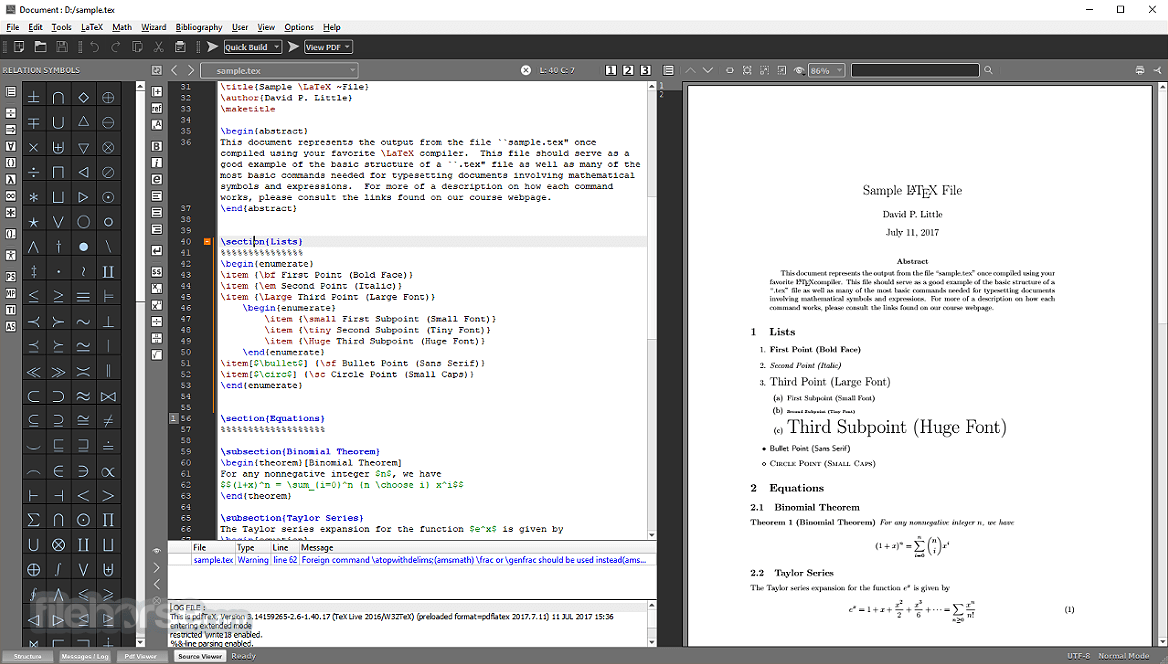
TeXMaker for Mac is a free, modern and cross-platform LaTeX editor for linux, macOS and windows systems that integrates many tools needed to develop documents with LaTeX, in just one application.
The software includes unicode support, spell checking, auto-completion, code folding and a built-in pdf viewer with synctex support and continuous view mode.
TeXMaker is easy to use and to configure. TeXMaker for macOS is released under the GPL license.
Features and Highlights
Unicode editor
The program is fully unicode and supports a large variety of encodings.
Spell checker
The tool includes spell checking while typing.
Code completion
The main LaTeX commands can be quickly inserted while typing.
Fast navigation
The app includes a "structure view" which is automatically updated while typing.
"Master" mode
Texmaker for Mac allows you to work easily onto documents separated in several files with the "master mode".
Integrated Pdf viewer
The app includes a built-in pdf viewer with continuous scrolling and synctex support.
Easy compilation
"One-click" compilation with the predefined "Quick build" commands.
Mathematical symbols
370 mathematical symbols can be inserted in just one click.
Wizards
The program includes wizards to generate the most standard LateX code ('Quick document', 'Quick Beamer Presentation', 'Quick letter', tabular, tabbing and array environments.
Error Handling
The app automatically locates errors and warnings detected in the log file after a compilation and you can reach the corresponding lines in the document in one-click.
Find in folders
With the tool, you can search for text in all the latex documents included in a folder (and the subfolders). If you click on a line, the app will open the corresponding document at the right line.
Rectangular block selection
Easy rectangular selection with the mouse+Alt key. Users can easily cut/copy/paste columns of a table.
LaTeX documentation
Extensive LaTeX documentation is furnished with the app.
Unlimited number of snippets
With Tex maker, users can define an unlimited number of snippets with keyboard triggers.
How to Use
macOS 10.13 High Sierra or later
Intel or Apple Silicon processor
At least 200 MB of available disk space
TeX distribution installed (e.g., MacTeX)
Minimum 2 GB RAM recommended
PROS
Also Available: Download TeXMaker for Windows
Download TeXMaker for Mac Latest Version Why is this app published on FileHorse? (More info)
The software includes unicode support, spell checking, auto-completion, code folding and a built-in pdf viewer with synctex support and continuous view mode.
TeXMaker is easy to use and to configure. TeXMaker for macOS is released under the GPL license.
Features and Highlights
Unicode editor
The program is fully unicode and supports a large variety of encodings.
Spell checker
The tool includes spell checking while typing.
Code completion
The main LaTeX commands can be quickly inserted while typing.
Fast navigation
The app includes a "structure view" which is automatically updated while typing.
"Master" mode
Texmaker for Mac allows you to work easily onto documents separated in several files with the "master mode".
Integrated Pdf viewer
The app includes a built-in pdf viewer with continuous scrolling and synctex support.
Easy compilation
"One-click" compilation with the predefined "Quick build" commands.
Mathematical symbols
370 mathematical symbols can be inserted in just one click.
Wizards
The program includes wizards to generate the most standard LateX code ('Quick document', 'Quick Beamer Presentation', 'Quick letter', tabular, tabbing and array environments.
Error Handling
The app automatically locates errors and warnings detected in the log file after a compilation and you can reach the corresponding lines in the document in one-click.
Find in folders
With the tool, you can search for text in all the latex documents included in a folder (and the subfolders). If you click on a line, the app will open the corresponding document at the right line.
Rectangular block selection
Easy rectangular selection with the mouse+Alt key. Users can easily cut/copy/paste columns of a table.
LaTeX documentation
Extensive LaTeX documentation is furnished with the app.
Unlimited number of snippets
With Tex maker, users can define an unlimited number of snippets with keyboard triggers.
How to Use
- Open the application and configure TeX distribution
- Create a new .tex document or open an existing one
- Write LaTeX code using the built-in editor
- Use the Quick Build button to compile the document
- View output in the integrated PDF viewer
- Use syntax highlighting and code folding for navigation
- Utilize structure panel to manage sections and labels
- Set custom build commands if needed in preferences
- Save or export the final PDF for distribution
macOS 10.13 High Sierra or later
Intel or Apple Silicon processor
At least 200 MB of available disk space
TeX distribution installed (e.g., MacTeX)
Minimum 2 GB RAM recommended
PROS
- Integrated PDF viewer with synctex support
- Cross-platform and open-source
- Customizable build tools and commands
- Syntax highlighting for LaTeX code
- Efficient interface with structure navigation
- No built-in spell checker for all languages
- Lacks advanced collaboration features
- Limited modern UI elements or themes
- Can crash with very large documents
- Initial setup requires TeX distribution install
Also Available: Download TeXMaker for Windows
Download TeXMaker for Mac Latest Version Why is this app published on FileHorse? (More info)
##
畫面截圖