- 目前版本24
- 更新日期2025-05-31
- 檔案大小21.67 MB
- 檔案名稱VeraCrypt_1.26.24.dmg
- 作業系統macOS 12.0 Monterey or later
- 支援語系English
- 授權型式開源軟體
- 開發商 IDRIX
- 軟體分類Mac 軟體 / 系統優化
##
翻譯排程處理中,以下暫以英文原文呈現
軟體介紹
VeraCrypt is a free disk encryption software for macOS. VeraCrypt picks up from where TrueCrypt left and it adds enhanced security to the algorithms used for system and partitions encryption making it immune to new developments in brute-force attacks.
VeraCrypt for Mac also solves many vulnerabilities and security issues found in TrueCrypt. It can load TrueCrypt volume and it offers the possibility to convert TC containers and non-system partitions to the app format.
It adds enhanced security to the algorithms used for system and partitions encryption making it immune to new developments in brute-force attacks. It also solves many vulnerabilities and security issues found in TrueCrypt for macOS.
This enhanced security adds some delay ONLY to the opening of encrypted partitions without any performance impact on the application use phase. This is acceptable to the legitimate owner but it makes it much harder for an attacker to gain access to the encrypted data.
The app can mount TrueCrypt volumes. It also can convert them to Vera Crypt format.
Features and Highlights
macOS 10.7 or later
Intel or Apple Silicon (via Rosetta 2)
100 MB free disk space
Admin privileges required
FUSE for macOS required for full functionality
PROS
Download VeraCrypt for Mac Latest Version Why is this app published on FileHorse? (More info)
VeraCrypt for Mac also solves many vulnerabilities and security issues found in TrueCrypt. It can load TrueCrypt volume and it offers the possibility to convert TC containers and non-system partitions to the app format.
It adds enhanced security to the algorithms used for system and partitions encryption making it immune to new developments in brute-force attacks. It also solves many vulnerabilities and security issues found in TrueCrypt for macOS.
This enhanced security adds some delay ONLY to the opening of encrypted partitions without any performance impact on the application use phase. This is acceptable to the legitimate owner but it makes it much harder for an attacker to gain access to the encrypted data.
The app can mount TrueCrypt volumes. It also can convert them to Vera Crypt format.
Features and Highlights
- Creates a virtual encrypted disk within a file and mounts it as a real disk.
- Encrypts an entire partition or storage device such as a USB flash drive or hard drive.
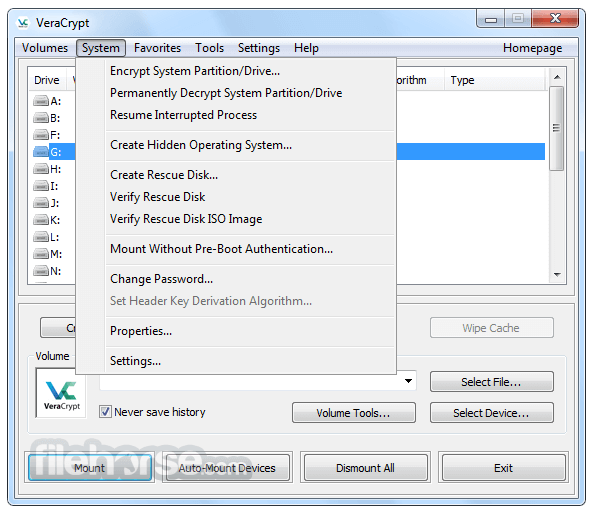
- Encrypts a partition or drive where Mac is installed (pre-boot authentication).
- Encryption is automatic, real-time(on-the-fly) and transparent.
- Parallelization and pipelining allow data to be read and written as fast as if the drive was not encrypted.
- Encryption can be hardware-accelerated on modern processors.
- Provides plausible deniability, in case an adversary forces you to reveal the password: Hidden volume (steganography) and hidden operating system.
- Install VeraCrypt by dragging it to Applications
- Launch the app and enter your admin password
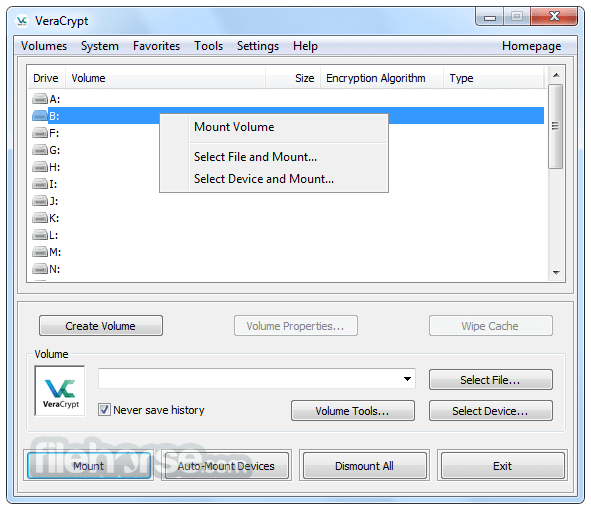
- Click “Create Volume” to start the encryption wizard
- Choose “Create an encrypted file container”
- Select encryption algorithm and volume size
- Set a strong password for the volume
- Format and mount the volume as a virtual disk
- Move files into the mounted volume for encryption
- Dismount the volume when finished to secure data
macOS 10.7 or later
Intel or Apple Silicon (via Rosetta 2)
100 MB free disk space
Admin privileges required
FUSE for macOS required for full functionality
PROS
- Strong encryption with multiple algorithms
- Open-source and regularly updated
- Supports hidden volumes and plausible deniability
- Cross-platform with Windows and Linux support
- No telemetry or background data tracking
- User interface feels outdated
- Requires third-party FUSE installation
- No native Apple Silicon version yet
- Complex setup for beginners
- No support for encrypting system drive on Mac
Download VeraCrypt for Mac Latest Version Why is this app published on FileHorse? (More info)
##
畫面截圖