- 目前版本2.23.11
- 更新日期2026-07-07
- 檔案大小69.4 MB
- 檔案名稱Windscribe_2.23.11_universal.dmg
- 作業系統Mac OS X 10.11 or later
- 支援語系English
- 授權型式試用版
- 開發商 Windscribe Limited
- 軟體分類Mac 軟體 / VPN
##
翻譯排程處理中,以下暫以英文原文呈現
軟體介紹
In an age where digital privacy and security have become paramount, Virtual Private Networks (VPNs) have emerged as essential tools for protecting your online identity and data.
Among the plethora of VPN options available, Windscribe VPN for Mac stands out as a reliable and feature-rich solution.
In this comprehensive review, we'll delve into the software's description, features, user interface, installation process, usage instructions, frequently asked questions, alternatives, pricing, system requirements, pros and cons, and conclude with an overall assessment of its performance.
Review
Windscribe VPN for macOS is a powerful virtual private network service designed to safeguard your online activities by encrypting your internet connection and allowing you to browse the web securely and anonymously.
It offers both free and premium subscription plans, each providing various features to cater to different user needs.
Robust Security: It employs AES-256 encryption to secure your internet connection, making it virtually impossible for third parties to intercept and decipher your data.
Multiple Server Locations: With servers spanning across 110 cities in over 63 countries, It offers a wide range of server options, enabling you to bypass geo-restrictions and access content from different regions.
No-Logs Policy: It maintains a strict no-logs policy, ensuring that your online activities remain private and confidential.
Ad and Tracker Blocking: The software includes an integrated ad and tracker blocker, enhancing your browsing experience by reducing unwanted advertisements and preserving your privacy.
Kill Switch: It features a kill switch that automatically disconnects your internet connection if the VPN connection drops, preventing your data from being exposed.
User Interface
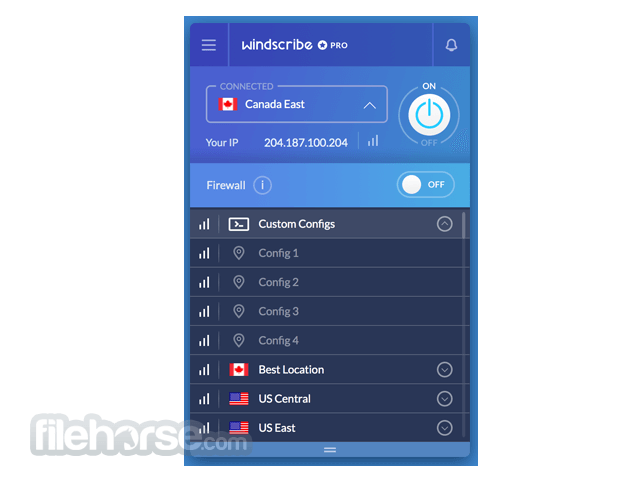
The main dashboard presents essential information such as your current connection status, selected server location, and data usage.
Navigating through the application's settings and features is straightforward, even for users who are new to VPNs.
Installation and Setup
Download and Installation: To install the app, visit the official website or FileHorse and download the appropriate version for your operating system (Windows, macOS, Linux) or device (iOS, Android). The installation process is quick and hassle-free.
Account Creation: After installation, create a Windscribe account. You can choose from the free plan or opt for one of the premium plans based on your needs.
Connection: Launch the application, log in to your account, and connect to a server location of your choice. You can also enable additional features like the ad blocker and kill switch.
How to Use
Is Windscribe VPN truly secure?
Yes, it utilizes strong encryption protocols to ensure your data remains secure and private.
Can Windscribe bypass geo-restrictions?
Yes, it has servers in various countries, allowing you to access region-locked content.
Does Windscribe keep logs of user activities?
No, the app follows a strict no-logs policy, ensuring your online activities are not stored.
What is the difference between the free and premium plans?
The free plan has limited server options and data allocation, while premium plans offer more servers, unlimited data, and additional features.
Can I use Windscribe VPN on multiple devices?
Yes, it supports multiple devices under a single account, but the number of simultaneous connections varies based on your plan.
What is the best VPN for Mac?
There are lots of VPNs available for Mac computers. When choosing the best VPN for Mac, consider key features like strong security, large network, a no-logs policy, and user-friendly software. Windscribe is an excellent choice as it provides robust encryption, unlimited device connections, and has a wide range of servers, making it a secure and robust option for privacy and streaming needs.
Alternatives
ExpressVPN - Connect to any one of over 3,000 secure servers in 160 locations!
NordVPN - Extra protection 24/7 - Fastest VPN experience.
PrivadoVPN - Stay Safe & Secure, No Matter Where You Are.
Hotspot Shield - Protect Your Privacy. Secure Your Data. Unblock Websites!
SurfShark VPN - Enjoy everything good that the Internet has to offer, worry-free!
Pricing
Free/Demo Plan: Limited servers, 10GB/month data limit.
Monthly Plan - $9.00/m: Unlimited data, and access to all servers.
Yearly Plan - $69/y: Unlimited data, access to all servers, discounted rate.
System Requirements
Also Available: Download Windscribe for Windows
Download Windscribe for Mac Latest Version Why is this app published on FileHorse? (More info)
Among the plethora of VPN options available, Windscribe VPN for Mac stands out as a reliable and feature-rich solution.
In this comprehensive review, we'll delve into the software's description, features, user interface, installation process, usage instructions, frequently asked questions, alternatives, pricing, system requirements, pros and cons, and conclude with an overall assessment of its performance.
Review
Windscribe VPN for macOS is a powerful virtual private network service designed to safeguard your online activities by encrypting your internet connection and allowing you to browse the web securely and anonymously.
It offers both free and premium subscription plans, each providing various features to cater to different user needs.
- Unlimited Data - Infinite Protection
- Unlock All Locations - Over 69 Countries and 112 Cities
- Config Generator - OpenVPN, IKEv2, WireGuard
- R.O.B.E.R.T - Blocks Ads, Trackers and Malware
Robust Security: It employs AES-256 encryption to secure your internet connection, making it virtually impossible for third parties to intercept and decipher your data.
Multiple Server Locations: With servers spanning across 110 cities in over 63 countries, It offers a wide range of server options, enabling you to bypass geo-restrictions and access content from different regions.
No-Logs Policy: It maintains a strict no-logs policy, ensuring that your online activities remain private and confidential.
Ad and Tracker Blocking: The software includes an integrated ad and tracker blocker, enhancing your browsing experience by reducing unwanted advertisements and preserving your privacy.
Kill Switch: It features a kill switch that automatically disconnects your internet connection if the VPN connection drops, preventing your data from being exposed.
User Interface
The main dashboard presents essential information such as your current connection status, selected server location, and data usage.
Navigating through the application's settings and features is straightforward, even for users who are new to VPNs.
Installation and Setup
Download and Installation: To install the app, visit the official website or FileHorse and download the appropriate version for your operating system (Windows, macOS, Linux) or device (iOS, Android). The installation process is quick and hassle-free.
Account Creation: After installation, create a Windscribe account. You can choose from the free plan or opt for one of the premium plans based on your needs.
Connection: Launch the application, log in to your account, and connect to a server location of your choice. You can also enable additional features like the ad blocker and kill switch.
How to Use
- Launch the Application: Open the VPN application.
- Log In: Log in using your account credentials.
- Select a Server: Choose a server location from the list of available options.
- Connect: Click the "Connect" button to establish a secure VPN connection.
- Browsing: Once connected, you can browse the internet with enhanced privacy and security.
Is Windscribe VPN truly secure?
Yes, it utilizes strong encryption protocols to ensure your data remains secure and private.
Can Windscribe bypass geo-restrictions?
Yes, it has servers in various countries, allowing you to access region-locked content.
Does Windscribe keep logs of user activities?
No, the app follows a strict no-logs policy, ensuring your online activities are not stored.
What is the difference between the free and premium plans?
The free plan has limited server options and data allocation, while premium plans offer more servers, unlimited data, and additional features.
Can I use Windscribe VPN on multiple devices?
Yes, it supports multiple devices under a single account, but the number of simultaneous connections varies based on your plan.
What is the best VPN for Mac?
There are lots of VPNs available for Mac computers. When choosing the best VPN for Mac, consider key features like strong security, large network, a no-logs policy, and user-friendly software. Windscribe is an excellent choice as it provides robust encryption, unlimited device connections, and has a wide range of servers, making it a secure and robust option for privacy and streaming needs.
Alternatives
ExpressVPN - Connect to any one of over 3,000 secure servers in 160 locations!
NordVPN - Extra protection 24/7 - Fastest VPN experience.
PrivadoVPN - Stay Safe & Secure, No Matter Where You Are.
Hotspot Shield - Protect Your Privacy. Secure Your Data. Unblock Websites!
SurfShark VPN - Enjoy everything good that the Internet has to offer, worry-free!
Pricing
Free/Demo Plan: Limited servers, 10GB/month data limit.
Monthly Plan - $9.00/m: Unlimited data, and access to all servers.
Yearly Plan - $69/y: Unlimited data, access to all servers, discounted rate.
System Requirements
- Operating System: macOS
- Processor: Intel Processor
- RAM: 1 GB RAM or more
- Storage: 50 MB of free disk space for installation
- Internet Connection: Required for initial setup and connecting to VPN servers
- Strong security and encryption.
- Wide range of server locations.
- No-logs policy.
- User-friendly interface.
- Free plan with limited features available.
- Free plan has limited data allocation.
- Premium plans might be relatively expensive compared to some alternatives.
Also Available: Download Windscribe for Windows
Download Windscribe for Mac Latest Version Why is this app published on FileHorse? (More info)
##
畫面截圖