⚠ 這是歷史版本頁面 — 查看 MediaInfo 最新版本 →

- 目前版本24.06
- 更新日期2024-06-29
- 檔案大小7 MB
- 檔案名稱MediaInfo_GUI_24.06_Windows.exe
- 作業系統Windows 7 64 / Windows 8 64 / Windows 10 64 / Windows 11
- 支援語系English
- 授權型式開源軟體
- 開發商 MediaInfo Team
- 軟體分類Windows 軟體 / 影片軟體
##
編輯短評
MediaInfo 是一套輕量級的開源工具,專門用來讀取影音檔案的詳細技術資訊,例如編碼格式、解析度、位元率、影格率,以及內嵌的標籤與中繼資料。它的最大辨識度在於精準且支援格式廣泛,無論是常見的 MP4、MKV 還是較冷門的容器,多半都能正確判讀。這套軟體由 MediaArea 團隊長期維護,更新算活躍,在影音工具圈內是頗受信賴的實用選擇,雖然評分人數不多,但整體評價偏向正面。
它適合影片剪輯者、內容創作者,或任何需要確認檔案規格是否合乎需求的人,例如上傳前檢查編碼參數、比對轉檔前後的差異,或單純想了解手邊影片的來歷。與 KMPlayer、K-Lite Codec Pack 這類播放或解碼工具相比,MediaInfo 不做播放,而是專注於資訊檢視,定位更單純。軟體本身為開源免費,提供 Windows 與 macOS 版本,但介面僅有英文,沒有官方中文版,對不熟悉英文介面的使用者來說,可能需要稍微適應一下。
##
翻譯排程處理中,以下暫以英文原文呈現
軟體介紹
MediaInfo is a lightweight, open-source utility for Windows designed to provide detailed information about media files.
Whether you are a video editor, content creator, or a casual user looking to understand the properties of a media file, MediaInfo offers in-depth technical and tag information about audio and video files.
Developed by MediaArea, this tool is known for its simplicity, accuracy, and wide format support.
Available across multiple platforms, the Windows version is particularly popular due to its speed and easy integration with the operating system.
Main Features
Detailed Technical Info: Displays codec, bitrate, frame rate, aspect ratio, channel layout, and more.
Tag Extraction: Shows metadata like title, author, album, track number, and subtitles.
Wide Format Support: Supports popular and niche formats including MKV, MP4, AVI, MOV, WMV, MP3, FLAC, and more.
Multiple View Modes: Offers text, tree, HTML, XML, and JSON output views.
Export Options: Enables export of reports in various formats for documentation or analysis.
Command Line Interface: Ideal for automation and scripting.
Localization: Available in over 40 languages.
Integration Capabilities: Can integrate with Windows Explorer and third-party media players/editors.
User Interface
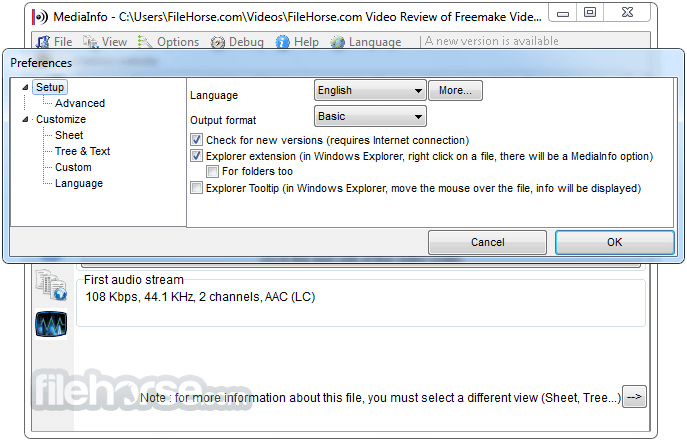
It has a clean, no-frills interface. The main window allows users to open files or folders and choose between different viewing modes such as Basic, Tree, or HTML.
The tab-based navigation and right-click context menu make it intuitive, even for first-time users. Although not visually modern, it prioritizes function over form and performs excellently in that regard.
Installation and Setup
Installing MediaInfo is straightforward. The installer is lightweight (around 5 MB) and supports both 32-bit and 64-bit systems.
Users can choose between a GUI version, CLI version, or a DLL for integration.
During setup, you can enable shell integration for right-click file analysis. There’s no bloatware or hidden installations.
How to Use
Open a media file by clicking the folder icon or dragging and dropping the file.
Switch view modes to explore different layers of information.
Export the report using the File > Export function or copy to clipboard.
Use shell integration by right-clicking a media file in Windows Explorer and selecting "MediaInfo."
FAQs
Can MediaInfo analyze video streams inside ISO or DVD folders?
Yes, it supports DVD video structures and ISO files.
Does MediaInfo work offline?
Yes, all analysis is done locally and does not require an internet connection.
Can I analyze multiple files at once?
Yes, batch analysis is supported via the GUI or CLI version.
Is MediaInfo safe to use?
Yes, it is open-source and regularly maintained with no known adware or spyware.
Can it extract subtitle or audio language information?
Yes, it detects all streams including language, subtitle formats, and codec details.
Alternatives
VLC Media Player: Includes basic media info but not as detailed.
FFmpeg: Command-line based, powerful but less user-friendly.
Pricing
MediaInfo is free and open-source under the BSD license. Donations are encouraged to support development, but no paid version or restrictions exist.
System Requirements
OS: Windows 11, 10, 8 or 7
RAM: 512 MB minimum
Disk Space: ~10 MB
CPU: Any modern processor
PROS
MediaInfo is an essential tool for anyone who works with or manages media files. Its ability to deliver deep insight into video and audio properties, paired with its small footprint and ease of use, makes it a go-to utility for professionals and hobbyists alike.
Also Available: Download MediaInfo for Mac
Download MediaInfo Latest Version Why is this app published on FileHorse? (More info)
Whether you are a video editor, content creator, or a casual user looking to understand the properties of a media file, MediaInfo offers in-depth technical and tag information about audio and video files.
Developed by MediaArea, this tool is known for its simplicity, accuracy, and wide format support.
Available across multiple platforms, the Windows version is particularly popular due to its speed and easy integration with the operating system.
Main Features
Detailed Technical Info: Displays codec, bitrate, frame rate, aspect ratio, channel layout, and more.
Tag Extraction: Shows metadata like title, author, album, track number, and subtitles.
Wide Format Support: Supports popular and niche formats including MKV, MP4, AVI, MOV, WMV, MP3, FLAC, and more.
Multiple View Modes: Offers text, tree, HTML, XML, and JSON output views.
Export Options: Enables export of reports in various formats for documentation or analysis.
Command Line Interface: Ideal for automation and scripting.
Localization: Available in over 40 languages.
Integration Capabilities: Can integrate with Windows Explorer and third-party media players/editors.
User Interface
It has a clean, no-frills interface. The main window allows users to open files or folders and choose between different viewing modes such as Basic, Tree, or HTML.
The tab-based navigation and right-click context menu make it intuitive, even for first-time users. Although not visually modern, it prioritizes function over form and performs excellently in that regard.
Installation and Setup
Installing MediaInfo is straightforward. The installer is lightweight (around 5 MB) and supports both 32-bit and 64-bit systems.
Users can choose between a GUI version, CLI version, or a DLL for integration.
During setup, you can enable shell integration for right-click file analysis. There’s no bloatware or hidden installations.
How to Use
Open a media file by clicking the folder icon or dragging and dropping the file.
Switch view modes to explore different layers of information.
Export the report using the File > Export function or copy to clipboard.
Use shell integration by right-clicking a media file in Windows Explorer and selecting "MediaInfo."
FAQs
Can MediaInfo analyze video streams inside ISO or DVD folders?
Yes, it supports DVD video structures and ISO files.
Does MediaInfo work offline?
Yes, all analysis is done locally and does not require an internet connection.
Can I analyze multiple files at once?
Yes, batch analysis is supported via the GUI or CLI version.
Is MediaInfo safe to use?
Yes, it is open-source and regularly maintained with no known adware or spyware.
Can it extract subtitle or audio language information?
Yes, it detects all streams including language, subtitle formats, and codec details.
Alternatives
VLC Media Player: Includes basic media info but not as detailed.
FFmpeg: Command-line based, powerful but less user-friendly.
Pricing
MediaInfo is free and open-source under the BSD license. Donations are encouraged to support development, but no paid version or restrictions exist.
System Requirements
OS: Windows 11, 10, 8 or 7
RAM: 512 MB minimum
Disk Space: ~10 MB
CPU: Any modern processor
PROS
- Comprehensive format and metadata support
- Free and open-source
- Multiple output views
- Lightweight and fast
- Shell integration
- Interface is dated
- No editing or tagging capabilities
- Lacks modern UI theming
MediaInfo is an essential tool for anyone who works with or manages media files. Its ability to deliver deep insight into video and audio properties, paired with its small footprint and ease of use, makes it a go-to utility for professionals and hobbyists alike.
Also Available: Download MediaInfo for Mac
Download MediaInfo Latest Version Why is this app published on FileHorse? (More info)
##
畫面截圖


- 2026-05-13 MediaInfo 26.05 14.8 MB
- 2026-02-03 MediaInfo 26.01 14.6 MB
- 2025-11-07 MediaInfo 25.10 14.5 MB
- 2025-10-02 MediaInfo 25.09 14.5 MB
- 2025-07-30 MediaInfo 25.07 14.4 MB
- 2025-05-03 MediaInfo 25.04 13.9 MB
- 2025-03-21 MediaInfo 25.03 13.8 MB
- 2024-12-11 MediaInfo 24.12 13.6 MB