
Microsoft Malicious Software Removal Tool 5.131 (64-bit)
v 5.131 (64-bit)
Windows
免費軟體
7/10 (72)
- 目前版本5.131 (64-bit)
- 更新日期2025-01-15
- 檔案大小76.2 MB
- 檔案名稱Windows-KB890830-x64-v5.131.exe
- 作業系統Windows 7 64 / Windows 8 64 / Windows 10 64 / Windows 11
- 支援語系English
- 授權型式免費軟體
- 開發商 Microsoft Corporation
- 軟體分類Windows 軟體 / 防毒軟體
##
編輯短評
Microsoft Malicious Software Removal Tool 是微軟官方提供的免費安全工具,主要用於掃描並移除 Windows 系統中特定類型的惡意軟體,特別是那些可能繞過傳統防毒軟體偵測的威脅。它並非取代防毒軟體,而是作為輔助工具,與常駐的防毒程式互補。這款工具由微軟長期維護,更新頻率穩定,在防毒軟體分類中屬於官方推出的熱門選擇,雖然使用者評分不算突出,但因其免費且由微軟直接提供,仍有一定參考價值。
這款工具適合需要額外掃描確認系統乾淨的使用者,尤其是當懷疑電腦可能感染了不易清除的惡意程式時,可作為第二意見的掃描方案。與 Avast 或 Malwarebytes 等第三方防毒工具相比,它的功能較為單純,僅專注於移除特定威脅,不提供即時防護或進階設定。需要注意的是,它僅支援英文介面,且僅適用於 Windows 系統,下載時請確認符合您的作業系統版本。由於是免費軟體,無需付費即可使用,但建議仍搭配一套完整的防毒軟體以獲得全面保護。
##
翻譯排程處理中,以下暫以英文原文呈現
軟體介紹
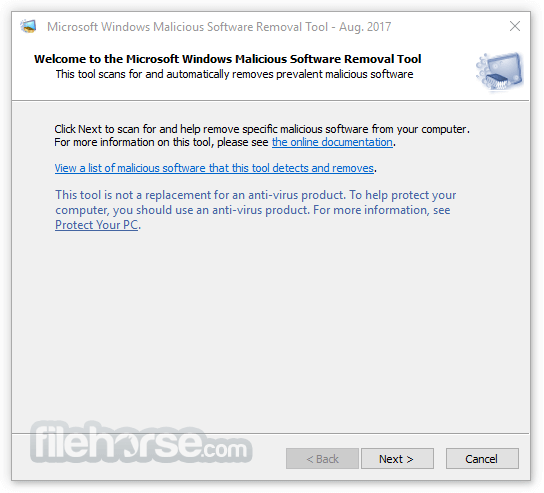
The Microsoft Malicious Software Removal Tool (MSRT) is a free security software provided by Microsoft that helps remove malicious software from computers running Windows.
It is not a replacement for antivirus software, but rather a complementary tool that helps protect against certain types of malware that may evade traditional antivirus protection. The tool is updated monthly and is available for download from the Microsoft website.
Microsoft Windows Malicious Software Removal Tool checks Windows 11, 10, 8.1, Windows Server 2012 R2, Windows 8, Windows Server 2012, Windows 7, and Windows Vista computers for and helps remove infections by specific, prevalent malicious software—including Blaster, Sasser, and Mydoom.
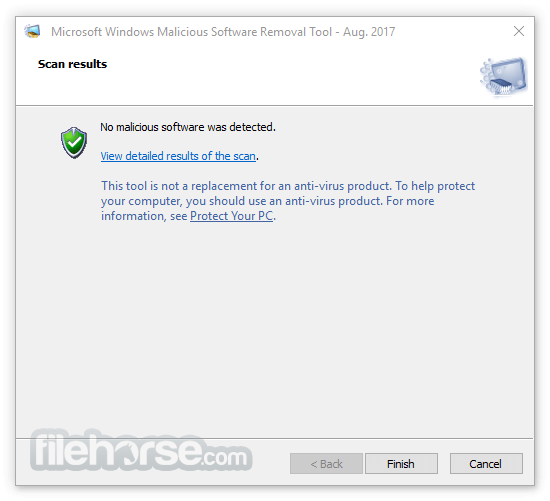
When the detection and removal process is complete, the tool displays a report describing the outcome, including which, if any, malicious software was detected and removed.
This tool checks your computer for infection by specific, prevalent malicious software (including Blaster, Sasser, and Mydoom) and helps to remove the infection if it is found.
Microsoft will release an updated version of this tool on the second Tuesday of each month. Microsoft Malicious Software Removal Tool (MMSRT)is an Amazing Anti-Spyware tool for Windows PC!
This tool is not a replacement for an anti-virus product. To help protect your computer, you should use an anti-virus product.
Features
The MSRT is designed to detect and remove specific types of malware, including viruses, worms, and Trojan horses. It uses signature-based detection to identify malicious files and registry entries on a computer and then removes them.
The tool also scans for prevalent malware families, such as Blaster, Sasser, and Mydoom, as well as newer threats that may be circulating on the internet. In addition, it checks for common vulnerabilities in the Windows operating system and provides recommendations on how to fix them.
How to Use
Microsoft Malicious Software Removal Tool is easy to use and requires no installation. Once downloaded, simply double-click on the executable file and follow the prompts.
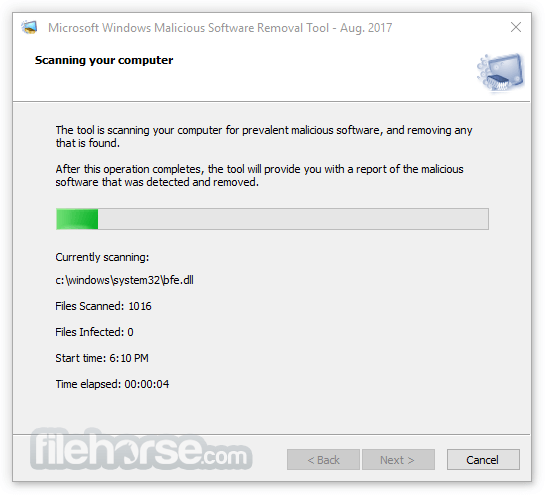
The tool will automatically scan your computer for malware and provide a report on any threats found. If malware is detected, the tool will attempt to remove it.
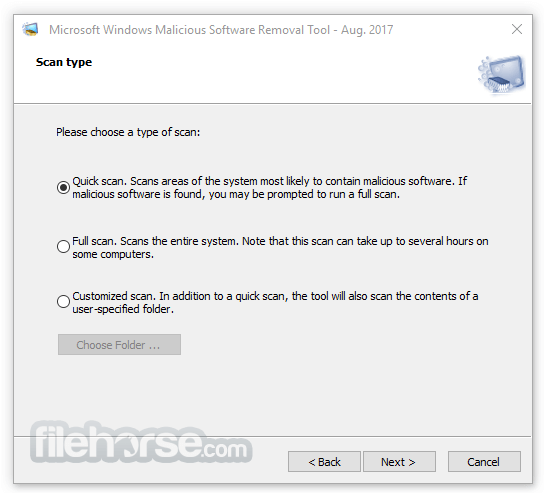
Users can also customize the scan by selecting specific drives or folders to scan, or by running a quick scan or full scan. The MSRT can be run in the background while you continue to use your computer, and it will alert you if any malware is found.
FAQ
Is the MSRT a replacement for antivirus software?
No, the MSRT is not a replacement for antivirus software. It is a complementary tool that helps protect against certain types of malware that may evade traditional antivirus protection.
How often is the MSRT updated?
The MSRT is updated monthly, usually on the second Tuesday of the month, along with other Microsoft security updates.
Does the Microsoft Malicious Software Removal Tool remove all types of malware?
No, the MSRT is designed to detect and remove specific types of malware, including viruses, worms, and Trojan horses. It may not detect or remove all types of malware.
Can I run the MSRT alongside my antivirus software?
Yes, it can be run alongside antivirus software without any conflicts.
Does the MSRT slow down my computer?
No, the MSRT is designed to run efficiently in the background without slowing down your computer. However, a full scan may take some time to complete depending on the size of your hard drive.
Alternatives
There are several alternative malware removal tools on the market, including Malwarebytes, AdwCleaner, and HitmanPro.
However, the MSRT is unique in that it is provided by Microsoft and is updated monthly to detect and remove specific types of malware that may evade traditional antivirus protection.
System Requirements
The MSRT is compatible with computers running Windows 11, Windows 10, Windows 8.1, Windows Server 2012 R2, Windows 8, Windows Server 2012, Windows 7, Windows Server 2008 R2, or Windows Server 2008.
It requires at least 1 GB of RAM and 200 MB of free hard disk space.
PROS
The MSRT is a valuable addition to any computer security toolkit and is recommended for all Windows users. However, it is important to note that the MSRT may not detect or remove all types of malware, and users should still exercise caution when downloading and opening files from the internet.
In addition, the tool is not a substitute for good security practices such as keeping software up-to-date, using strong passwords, and avoiding suspicious websites and email attachments.
Overall, the Microsoft Malicious Software Removal Tool is a solid security tool that can help protect against certain types of malware. Its ease of use and regular updates make it a valuable addition to any computer security toolkit.
Download Microsoft Malicious Software Removal Tool Latest Version Why is this app published on FileHorse? (More info)
It is not a replacement for antivirus software, but rather a complementary tool that helps protect against certain types of malware that may evade traditional antivirus protection. The tool is updated monthly and is available for download from the Microsoft website.
Microsoft Windows Malicious Software Removal Tool checks Windows 11, 10, 8.1, Windows Server 2012 R2, Windows 8, Windows Server 2012, Windows 7, and Windows Vista computers for and helps remove infections by specific, prevalent malicious software—including Blaster, Sasser, and Mydoom.
When the detection and removal process is complete, the tool displays a report describing the outcome, including which, if any, malicious software was detected and removed.
This tool checks your computer for infection by specific, prevalent malicious software (including Blaster, Sasser, and Mydoom) and helps to remove the infection if it is found.
Microsoft will release an updated version of this tool on the second Tuesday of each month. Microsoft Malicious Software Removal Tool (MMSRT)is an Amazing Anti-Spyware tool for Windows PC!
This tool is not a replacement for an anti-virus product. To help protect your computer, you should use an anti-virus product.
Features
The MSRT is designed to detect and remove specific types of malware, including viruses, worms, and Trojan horses. It uses signature-based detection to identify malicious files and registry entries on a computer and then removes them.
The tool also scans for prevalent malware families, such as Blaster, Sasser, and Mydoom, as well as newer threats that may be circulating on the internet. In addition, it checks for common vulnerabilities in the Windows operating system and provides recommendations on how to fix them.
How to Use
Microsoft Malicious Software Removal Tool is easy to use and requires no installation. Once downloaded, simply double-click on the executable file and follow the prompts.
The tool will automatically scan your computer for malware and provide a report on any threats found. If malware is detected, the tool will attempt to remove it.
Users can also customize the scan by selecting specific drives or folders to scan, or by running a quick scan or full scan. The MSRT can be run in the background while you continue to use your computer, and it will alert you if any malware is found.
FAQ
Is the MSRT a replacement for antivirus software?
No, the MSRT is not a replacement for antivirus software. It is a complementary tool that helps protect against certain types of malware that may evade traditional antivirus protection.
How often is the MSRT updated?
The MSRT is updated monthly, usually on the second Tuesday of the month, along with other Microsoft security updates.
Does the Microsoft Malicious Software Removal Tool remove all types of malware?
No, the MSRT is designed to detect and remove specific types of malware, including viruses, worms, and Trojan horses. It may not detect or remove all types of malware.
Can I run the MSRT alongside my antivirus software?
Yes, it can be run alongside antivirus software without any conflicts.
Does the MSRT slow down my computer?
No, the MSRT is designed to run efficiently in the background without slowing down your computer. However, a full scan may take some time to complete depending on the size of your hard drive.
Alternatives
There are several alternative malware removal tools on the market, including Malwarebytes, AdwCleaner, and HitmanPro.
However, the MSRT is unique in that it is provided by Microsoft and is updated monthly to detect and remove specific types of malware that may evade traditional antivirus protection.
System Requirements
The MSRT is compatible with computers running Windows 11, Windows 10, Windows 8.1, Windows Server 2012 R2, Windows 8, Windows Server 2012, Windows 7, Windows Server 2008 R2, or Windows Server 2008.
It requires at least 1 GB of RAM and 200 MB of free hard disk space.
PROS
- Free and easy to use
- Complements antivirus software by detecting and removing specific types of malware
- Updated monthly to detect and remove prevalent malware families
- Checks for common vulnerabilities in the Windows operating system and provides recommendations on how to fix them
- Can be run alongside antivirus software without conflicts
- Only detects and removes specific types of malware, may not detect or remove all types
The MSRT is a valuable addition to any computer security toolkit and is recommended for all Windows users. However, it is important to note that the MSRT may not detect or remove all types of malware, and users should still exercise caution when downloading and opening files from the internet.
In addition, the tool is not a substitute for good security practices such as keeping software up-to-date, using strong passwords, and avoiding suspicious websites and email attachments.
Overall, the Microsoft Malicious Software Removal Tool is a solid security tool that can help protect against certain types of malware. Its ease of use and regular updates make it a valuable addition to any computer security toolkit.
Download Microsoft Malicious Software Removal Tool Latest Version Why is this app published on FileHorse? (More info)
##
畫面截圖
- 2026-08-12 Microsoft Malicious Software Removal Tool 5.144 (32-bit) 84.32 MB
- 2026-08-12 Microsoft Malicious Software Removal Tool 5.144 (64-bit) 85.18 MB
- 2026-07-15 Microsoft Malicious Software Removal Tool 5.143 (32-bit) 84.33 MB
- 2026-07-15 Microsoft Malicious Software Removal Tool 5.143 (64-bit) 85.65 MB
- 2026-06-11 Microsoft Malicious Software Removal Tool 5.142 (32-bit) 82.7 MB
- 2026-06-11 Microsoft Malicious Software Removal Tool 5.142 (64-bit) 83.57 MB
- 2026-05-13 Microsoft Malicious Software Removal Tool 5.141 (32-bit) 81.7 MB
- 2026-05-13 Microsoft Malicious Software Removal Tool 5.141 (64-bit) 83.01 MB