⚠ 這是歷史版本頁面 — 查看 MiKTeX 最新版本 →

- 目前版本21.12
- 更新日期2021-12-08
- 檔案大小120.02 MB
- 檔案名稱basic-miktex-21.12-x64.exe
- 作業系統Windows 10 (64-bit) / Windows 11
- 支援語系English
- 授權型式免費軟體
- 開發商 Christian Schenk
- 軟體分類Windows 軟體 / 辦公商務
##
編輯短評
MiKTeX 是 Windows 平台上歷史悠久的 TeX/LaTeX 排版系統實作,主要解決學術論文、技術文件與大量數學公式的專業排版需求。它最鮮明的特色是內建整合套件管理器,編譯文件時若發現缺少元件,會自動下載安裝,大幅降低新手入門的門檻。安裝過程有圖形化精靈引導,不需具備電腦專家等級的知識。此軟體長期持續維護,在同類工具中屬於主流首選之一,使用者評價普遍不錯,但整體介面僅提供英文。
這套軟體特別適合需要撰寫含大量數學符號的學術研究者、研究生或理工領域工作者,當你追求排版品質勝過操作便利性時會派上用場。與 Microsoft Office 這類所見即所得文書軟體相比,MiKTeX 採用編譯式排版,學習曲線較陡峭,但換來的是極度精確的版面控制與跨平台一致的輸出結果。它是免費軟體,僅支援 Windows 平台,且介面為英文,使用前需留意中文文件可能需要額外設定字型與編碼。
##
翻譯排程處理中,以下暫以英文原文呈現
軟體介紹
MiKTeX (pronounced mick-tech) is an up-to-date implementation of TeX/LaTeX and related programs. TeX is a typesetting system written by Donald Ervin Knuth who says that it is intended for the creation of beautiful books - and especially for books that contain a lot of mathematics.
It is very easy to install MiKTeX on Windows PC. The Setup Wizard guides you through the installation process. You don't have to be a computer expert. A complete set of additions (programs, styles, fonts) are available to help you typeset your documents.
MiKTeX's integrated package manager installs missing components from the Internet if required. This allows you to keep your TeX installation as minimal as possible (“Just enough TeX”). It Console helps you to keep your TeX system up-to-date by installing the latest package updates.
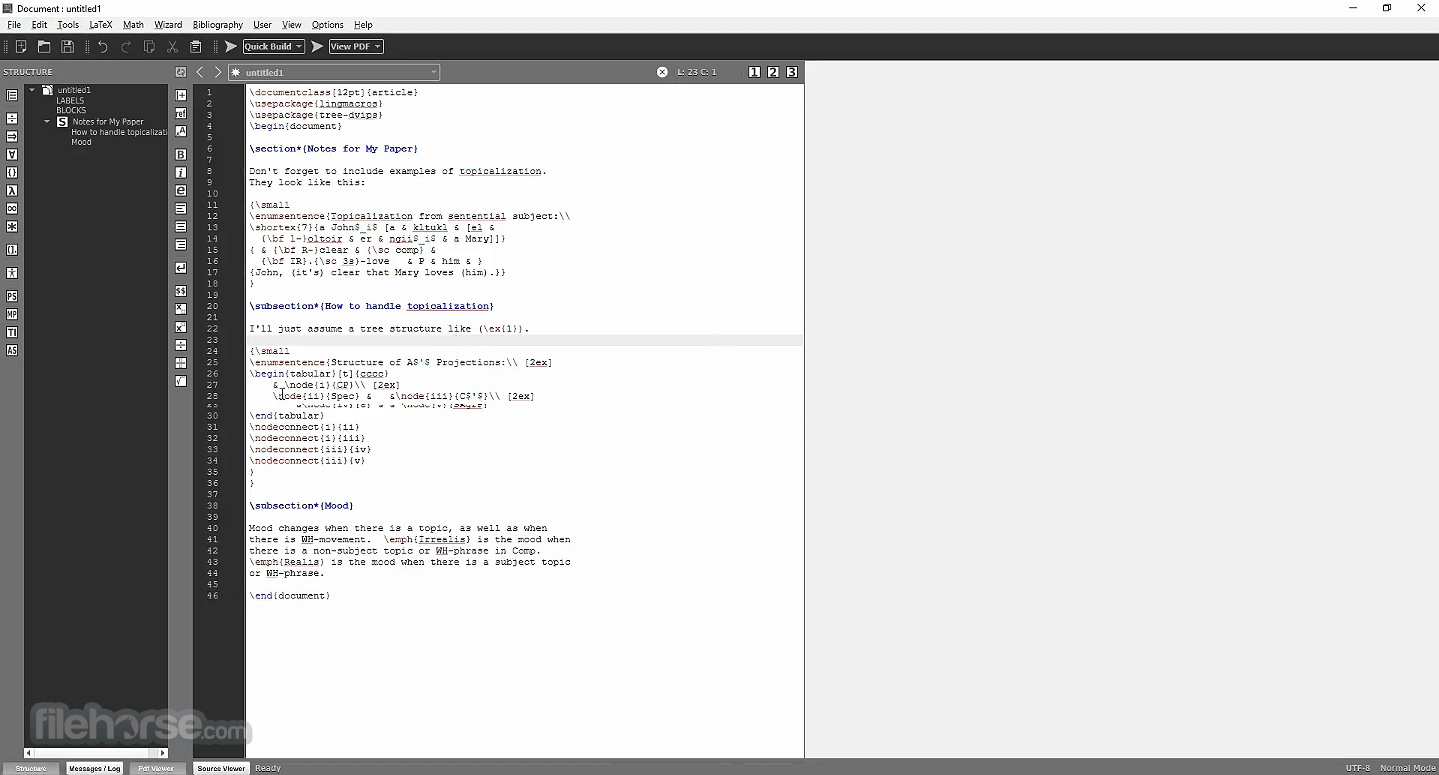
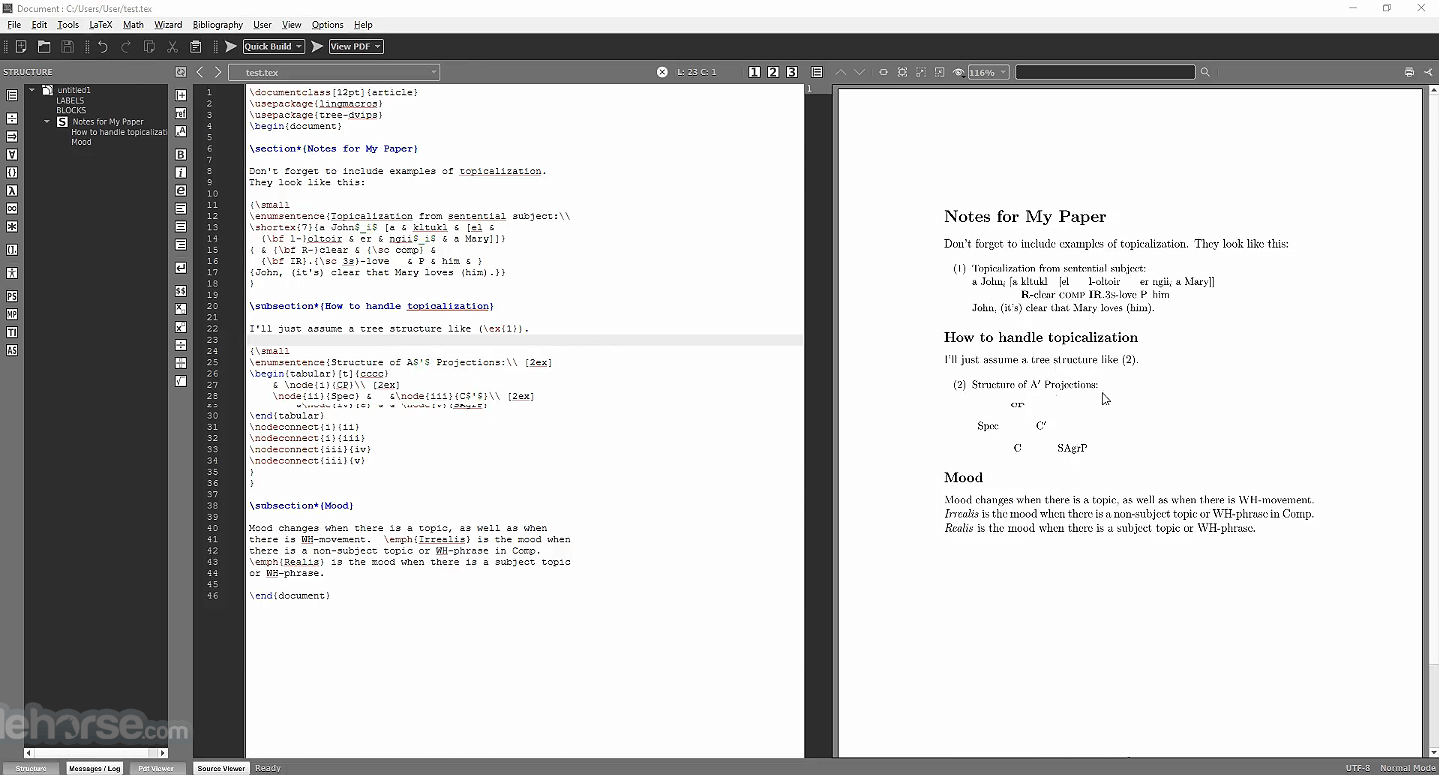
It comes with TeXworks, a TeX frontend that you can use to edit and preview LaTeX documents. The program is open source. You are welcome to redistribute the tool under certain conditions.
To set up a basic TeX/LaTeX system, download and run the Basic MiK TeX Installer. The software has the ability to install missing packages automatically, i.e., this installer is suitable for computers connected to the Internet.
Highlights
LaTeX Support
It provides full support for the LaTeX typesetting system, which is the de facto standard for academic and scientific publishing.
Automatic Package Installation
One of the standout features of this program is its ability to automatically install missing packages as needed, ensuring that users have the necessary resources to compile their documents.
Integrated Editor
It comes with an integrated editor, TeXworks, that allows users to write, edit, and compile LaTeX files within the same environment.
Cross-platform Support
MiKTeX is available for Windows, macOS, and Linux, making it accessible to users across different platforms.
User-Friendly Interface
The interface is simple and easy to navigate, with features designed for both beginners and advanced users alike.
Customizable
It allows users to adjust settings, such as the location of installed packages, and provides robust configuration options.
Bibliography Management
It integrates with bibliographic tools such as BibTeX to help manage citations and references effortlessly.
High-Quality PDF Output
The app compiles documents into PDFs with high-quality output, suitable for professional publishing.
User Interface
Console: A central hub for managing installations, updating packages, and configuring settings.
TeXworks: An integrated editor for writing LaTeX code. It provides a simple, distraction-free writing environment with syntax highlighting and basic error detection.
Log Viewer: When compiling LaTeX files, the Log Viewer helps users troubleshoot and debug issues.
Package Manager: A tool to manage installed packages and ensure that all required resources are present.
For more advanced users, it also provides a powerful command-line interface for greater control over the compilation and installation process.
Installation and Setup
Download: Visit the official website or FileHorse.com and download the latest version for your Windows operating system.
Run the Installer: Open the downloaded file and follow the on-screen instructions. You can choose between a typical or custom installation, depending on your preferences.
Initial Setup: After installation, it will need to update its package database. This process will automatically download any necessary files and packages.
Configuration: You can configure this software to automatically install missing packages or to run updates periodically. The MiKTeX Console provides an easy way to customize these settings.
Test Run: To test if the installation was successful, you can compile a simple LaTeX document in TeXworks.
How to Use
Write Your Document: Open TeXworks and start writing your LaTeX document. The editor provides syntax highlighting and error detection to help with the writing process.
Compile the Document: Once your document is ready, click the "Typeset" button in TeXworks. It will automatically detect missing packages and install them if necessary. The document will then be compiled into a PDF.
Fix Errors: If there are any errors in the LaTeX code, the Log Viewer will show detailed messages to help you identify and resolve the issues.
Bibliographies and Citations: Use BibTeX to manage references, and the app will format the citations and bibliography automatically.
Customize Output: It allows you to customize the output document with different LaTeX packages and formatting options.
FAQ
How do I install missing LaTeX packages in MiKTeX?
It will automatically download and install any missing packages when you compile your document. You can also manually install packages using the MiKTeX Console.
Is MiKTeX free to use?
Yes, this program is free for personal and academic use. However, a commercial license is required for businesses.
Does MiKTeX support BibTeX for bibliography management?
Yes, it supports BibTeX and other bibliographic tools for citation management.
How do I update MiKTeX?
You can update MiKTeX through the MiKTeX Console, where you can check for updates and install the latest versions of installed packages.
Pricing
This software is FREE for individual users and students, and there is no cost associated with the personal use of the program.
However, commercial users must purchase a license. For business purposes, a professional version with extended support is available.
System Requirements
MiKTeX is an excellent choice for anyone who needs to produce high-quality documents, particularly in academic and scientific fields. With automatic package installation, an easy-to-use interface, and full support for LaTeX, it’s a powerful tool for creating professional documents.
While the learning curve can be steep for beginners, MiKTeX’s integration with TeXworks and automatic updates make it a solid option for anyone looking to dive into LaTeX. Whether you are a student, researcher, or professional, it offers a comprehensive solution for your typesetting needs.
Download MiKTeX Latest Version Why is this app published on FileHorse? (More info)
It is very easy to install MiKTeX on Windows PC. The Setup Wizard guides you through the installation process. You don't have to be a computer expert. A complete set of additions (programs, styles, fonts) are available to help you typeset your documents.
MiKTeX's integrated package manager installs missing components from the Internet if required. This allows you to keep your TeX installation as minimal as possible (“Just enough TeX”). It Console helps you to keep your TeX system up-to-date by installing the latest package updates.
It comes with TeXworks, a TeX frontend that you can use to edit and preview LaTeX documents. The program is open source. You are welcome to redistribute the tool under certain conditions.
To set up a basic TeX/LaTeX system, download and run the Basic MiK TeX Installer. The software has the ability to install missing packages automatically, i.e., this installer is suitable for computers connected to the Internet.
Highlights
- Easy to install
- Complete: 1600 packages (fonts, macros, ...) are included
- Living: packages are updated regularly
- Easy package management: missing packages can be installed automatically; a wizard helps you to keep your MiK TeX system up-to-date
- Fast previewing: the TeX output viewer Yap allows for an optimized edit-compile-view cycle (if the TeX authoring system in use supports source specials)
LaTeX Support
It provides full support for the LaTeX typesetting system, which is the de facto standard for academic and scientific publishing.
Automatic Package Installation
One of the standout features of this program is its ability to automatically install missing packages as needed, ensuring that users have the necessary resources to compile their documents.
Integrated Editor
It comes with an integrated editor, TeXworks, that allows users to write, edit, and compile LaTeX files within the same environment.
Cross-platform Support
MiKTeX is available for Windows, macOS, and Linux, making it accessible to users across different platforms.
User-Friendly Interface
The interface is simple and easy to navigate, with features designed for both beginners and advanced users alike.
Customizable
It allows users to adjust settings, such as the location of installed packages, and provides robust configuration options.
Bibliography Management
It integrates with bibliographic tools such as BibTeX to help manage citations and references effortlessly.
High-Quality PDF Output
The app compiles documents into PDFs with high-quality output, suitable for professional publishing.
User Interface
Console: A central hub for managing installations, updating packages, and configuring settings.
TeXworks: An integrated editor for writing LaTeX code. It provides a simple, distraction-free writing environment with syntax highlighting and basic error detection.
Log Viewer: When compiling LaTeX files, the Log Viewer helps users troubleshoot and debug issues.
Package Manager: A tool to manage installed packages and ensure that all required resources are present.
For more advanced users, it also provides a powerful command-line interface for greater control over the compilation and installation process.
Installation and Setup
Download: Visit the official website or FileHorse.com and download the latest version for your Windows operating system.
Run the Installer: Open the downloaded file and follow the on-screen instructions. You can choose between a typical or custom installation, depending on your preferences.
Initial Setup: After installation, it will need to update its package database. This process will automatically download any necessary files and packages.
Configuration: You can configure this software to automatically install missing packages or to run updates periodically. The MiKTeX Console provides an easy way to customize these settings.
Test Run: To test if the installation was successful, you can compile a simple LaTeX document in TeXworks.
How to Use
Write Your Document: Open TeXworks and start writing your LaTeX document. The editor provides syntax highlighting and error detection to help with the writing process.
Compile the Document: Once your document is ready, click the "Typeset" button in TeXworks. It will automatically detect missing packages and install them if necessary. The document will then be compiled into a PDF.
Fix Errors: If there are any errors in the LaTeX code, the Log Viewer will show detailed messages to help you identify and resolve the issues.
Bibliographies and Citations: Use BibTeX to manage references, and the app will format the citations and bibliography automatically.
Customize Output: It allows you to customize the output document with different LaTeX packages and formatting options.
FAQ
How do I install missing LaTeX packages in MiKTeX?
It will automatically download and install any missing packages when you compile your document. You can also manually install packages using the MiKTeX Console.
Is MiKTeX free to use?
Yes, this program is free for personal and academic use. However, a commercial license is required for businesses.
Does MiKTeX support BibTeX for bibliography management?
Yes, it supports BibTeX and other bibliographic tools for citation management.
How do I update MiKTeX?
You can update MiKTeX through the MiKTeX Console, where you can check for updates and install the latest versions of installed packages.
Pricing
This software is FREE for individual users and students, and there is no cost associated with the personal use of the program.
However, commercial users must purchase a license. For business purposes, a professional version with extended support is available.
System Requirements
- OS: Windows 11, 10, 8 or 7 (64-bit recommended)
- RAM: At least 2 GB of RAM
- Disk Space: 500 MB or more of free space for a minimal installation
- Free for personal use
- Easy to use and install
- Automatic package management
- Cross-platform support
- High-quality PDF output
- Extensive documentation
- Might be overwhelming for beginners with no experience in LaTeX
- Some advanced features may require command-line knowledge
- Larger installation size for full package set
MiKTeX is an excellent choice for anyone who needs to produce high-quality documents, particularly in academic and scientific fields. With automatic package installation, an easy-to-use interface, and full support for LaTeX, it’s a powerful tool for creating professional documents.
While the learning curve can be steep for beginners, MiKTeX’s integration with TeXworks and automatic updates make it a solid option for anyone looking to dive into LaTeX. Whether you are a student, researcher, or professional, it offers a comprehensive solution for your typesetting needs.
Download MiKTeX Latest Version Why is this app published on FileHorse? (More info)
##
畫面截圖
- 2026-01-01 MiKTeX 25.12 141.99 MB
- 2024-01-28 MiKTeX 24.1 138.08 MB
- 2023-10-06 MiKTeX 23.10 135.05 MB
- 2023-09-26 MiKTeX 23.90 135.01 MB
- 2023-05-08 MiKTeX 23.40 134.86 MB
- 2022-10-17 MiKTeX 22.10 132.66 MB
- 2022-07-18 MiKTeX 22.7 132.71 MB
- 2022-03-18 MiKTeX 22.3 130.61 MB