MoniVisor - Computer Monitoring Software
v MoniVisor - Computer Monitoring Software
Windows
未分類
8.32/10 (16)
- 目前版本MoniVisor - Computer Monitoring Software
- 更新日期2025-10-26
- 作業系統Windows 7 / Windows 8 / Windows 10 / Windows 11
- 支援語系English
- 授權型式未分類
- 開發商 ClevGuard
- 軟體分類Windows 軟體 / 辦公商務
##
翻譯排程處理中,以下暫以英文原文呈現
軟體介紹
With MoniVisor Windows Monitoring, you can easily start monitoring your kids or employees' computers remotely.
Start monitoring your kids or employees' computers remotely - Free Trial
MoniVisor for PC is one of the best pieces of Windows 11/10 monitoring software for various reasons.
Get all the chat messages from web WhatsApp, Facebook (Messenger), Twitter, and Instagram. Check the profile, chat media files like images, videos, emojis, documents, shared contacts, etc. View all the incoming and outgoing call histories, even the missed calls.
Capture Screen Automatically and Silently
Take automatic screenshots of the target computer screen at specified intervals. Sync the captured pictures to your dashboard in real time. Can download or delete the screenshots as you like.
Track Internet Activity & Download History in Workplace
Record all the created internet browsing history. Check the specific visited page on your own computer. Know the exact visiting time. Check all the created download history, even know the file storage path.
Read Sent & Received Emails of Your Employees
Read all the emails sent or received via the web-based email platform. Get into someone's email account without them getting a notification. Know the full attached file path of each email.
Record Every Keystroke from the employee's Computer
See everything that is typed on the keyboard. View even the deleted keystrokes or those typed in incognito browsing mode. Check all the keylogging activities with timestamps.
Remote control
Choose and Purchase a Plan
First of all, choose and purchase a suitable plan to get the product.
Download & Install the Software
Download and install MoniVisor Employee Monitoring Software on the target computer. Then, complete the configuration by following the on-screen instructions.
Install the Chrome Extension
Install the browser extension to unlock the software's ability to monitor employees' email and social media chats.
Start Monitoring on Dashboard
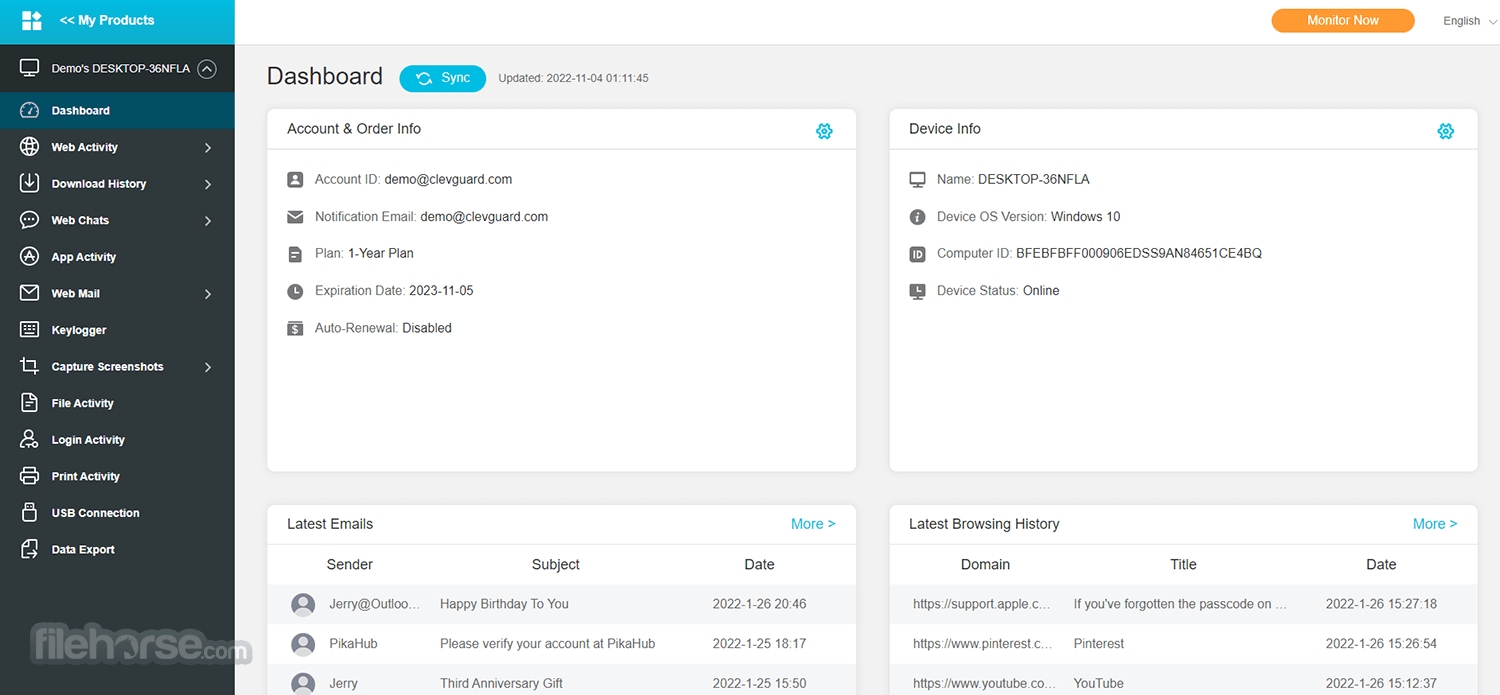
Now go to the ClevGuard website on your own computer and log in with the license account, then you will get into the online dashboard to check all the monitored data from the target computer.
FAQs
Do I require physical access to the target computer?
Yes, physical access to the target computer is necessary for MoniVisor for Win since it is a computer-based software that needs to be installed to monitor data.
How does MoniVisor for Win operate?
MoniVisor for Win functions through concealed computer-based software designed to capture data activities and synchronize them with the dashboard for your convenience.
What is the installation process for MoniVisor computer tracking software?
Upon purchasing a MoniVisor plan, you will be directed to the 'My Products' page, where you can find a step-by-step setup guide. By following this guide, you can effortlessly download and install the software onto the target computer.
Discover Why MoniVisor for Windows Is Different
Individual plans are designed for monitoring a single device.
Alternatives
Insightful Employee Monitoring - A productivity and time-tracking tool that monitors employee activity, app usage, and work patterns in real time.
Buddy Punch - A web-based time clock system that lets employees punch in and out online, manage schedules, and track work hours accurately.
Time Doctor - A detailed time-tracking and productivity software that records tasks, website usage, and idle time to improve team efficiency.
PROS
Download MoniVisor Latest Version Why is this app published on FileHorse? (More info)
Start monitoring your kids or employees' computers remotely - Free Trial
MoniVisor for PC is one of the best pieces of Windows 11/10 monitoring software for various reasons.
- Support over 20 features: WhatsApp chats reading, Gmail intercepting, screen capturing, etc.
- 100% invisible running mode on the target computer.
- Remotely checking monitored data from the online dashboard anywhere and anytime.
- Real-time data syncing and a wonderful data exporting feature are supported.
Get all the chat messages from web WhatsApp, Facebook (Messenger), Twitter, and Instagram. Check the profile, chat media files like images, videos, emojis, documents, shared contacts, etc. View all the incoming and outgoing call histories, even the missed calls.
Capture Screen Automatically and Silently
Take automatic screenshots of the target computer screen at specified intervals. Sync the captured pictures to your dashboard in real time. Can download or delete the screenshots as you like.
Track Internet Activity & Download History in Workplace
Record all the created internet browsing history. Check the specific visited page on your own computer. Know the exact visiting time. Check all the created download history, even know the file storage path.
Read Sent & Received Emails of Your Employees
Read all the emails sent or received via the web-based email platform. Get into someone's email account without them getting a notification. Know the full attached file path of each email.
Record Every Keystroke from the employee's Computer
See everything that is typed on the keyboard. View even the deleted keystrokes or those typed in incognito browsing mode. Check all the keylogging activities with timestamps.
Remote control
- Screenshot capture
- Live screen
- Software usage
- Keystroke logging
- Microphone
- Camera
- Telegram
- Skype
- File activity monitoring
- USB port monitoring
- Clipboard monitoring
- User logins
- Location tracking
- Google Chrome
- Firefox
- Edge
- Opera
Choose and Purchase a Plan
First of all, choose and purchase a suitable plan to get the product.
Download & Install the Software
Download and install MoniVisor Employee Monitoring Software on the target computer. Then, complete the configuration by following the on-screen instructions.
Install the Chrome Extension
Install the browser extension to unlock the software's ability to monitor employees' email and social media chats.
Start Monitoring on Dashboard
Now go to the ClevGuard website on your own computer and log in with the license account, then you will get into the online dashboard to check all the monitored data from the target computer.
FAQs
Do I require physical access to the target computer?
Yes, physical access to the target computer is necessary for MoniVisor for Win since it is a computer-based software that needs to be installed to monitor data.
How does MoniVisor for Win operate?
MoniVisor for Win functions through concealed computer-based software designed to capture data activities and synchronize them with the dashboard for your convenience.
What is the installation process for MoniVisor computer tracking software?
Upon purchasing a MoniVisor plan, you will be directed to the 'My Products' page, where you can find a step-by-step setup guide. By following this guide, you can effortlessly download and install the software onto the target computer.
Discover Why MoniVisor for Windows Is Different
- Multiple Features
- Stealth Monitoring
- Virus-Free
- Easy-Access Console
- Data & Privacy Protection
- Stable to Use
- Clear Guidance
- Free Update
Individual plans are designed for monitoring a single device.
- Individuals 1-Month Plan - $49.99
- Individuals 3-Month Plan - $26.66 /month (Billed quarterly at $79.99)
- Individuals 1-Year Plan - $10.83 /month (Billed annually at $129.99)
Alternatives
Insightful Employee Monitoring - A productivity and time-tracking tool that monitors employee activity, app usage, and work patterns in real time.
Buddy Punch - A web-based time clock system that lets employees punch in and out online, manage schedules, and track work hours accurately.
Time Doctor - A detailed time-tracking and productivity software that records tasks, website usage, and idle time to improve team efficiency.
PROS
- The app's keylogger functions flawlessly.
- Instant receipt of screenshots from the target PC screen.
- The app is reasonably priced.
- Access to visited websites with clickable URLs for verification.
- Provides accurate time tracking for app usage.
- Not compatible with Mac operating systems.
- Unable to track emails received by the target device.
- No results obtained for monitoring web chats.
Download MoniVisor Latest Version Why is this app published on FileHorse? (More info)
##
畫面截圖