MSYS2 2026-06-11
v 2026-06-11
Windows
開源軟體
7/10 (19)
- 目前版本2026-06-11
- 更新日期2026-06-11
- 檔案大小89.7 MB
- 檔案名稱msys2-x86_64-20260611.exe
- 作業系統Windows 7 / Windows 8 / Windows 10 / Windows 11
- 支援語系English
- 授權型式開源軟體
- 開發商 MSYS2 Developer Team
- 軟體分類Windows 軟體 / 開發者工具
##
翻譯排程處理中,以下暫以英文原文呈現
軟體介紹
MSYS2 (Minimal SYStem 2) is a powerful software that provides a Unix-like environment on Windows, enabling developers to use familiar Linux tools, compilers, and package managers.
Built on Cygwin and inspired by Arch Linux’s pacman package manager, MSYS2 is a crucial tool for software developers who need to work with native Windows applications while leveraging a robust POSIX-compatible system.
MSYS2 is widely used to compile open-source software, automate scripts, and install libraries necessary for development.
It is particularly beneficial for those who work with GCC, Clang, or MinGW-w64 compilers.
Key Features
Package Management with Pacman: Efficient package manager based on Arch Linux’s pacman, allowing seamless updates and installations.
POSIX Compatibility: Provides a Unix-like environment on Windows, supporting bash, grep, sed, and other essential Linux utilities.
Multiple Shell Environments: Supports MSYS2, MinGW-w64 (both 32-bit and 64-bit), and UCRT64 for broader compatibility with Windows development.
Native Windows Integration: Works well with Windows executables, enabling cross-platform development.
Active Community Support: Regularly updated packages and strong developer community contributions.
User Interface
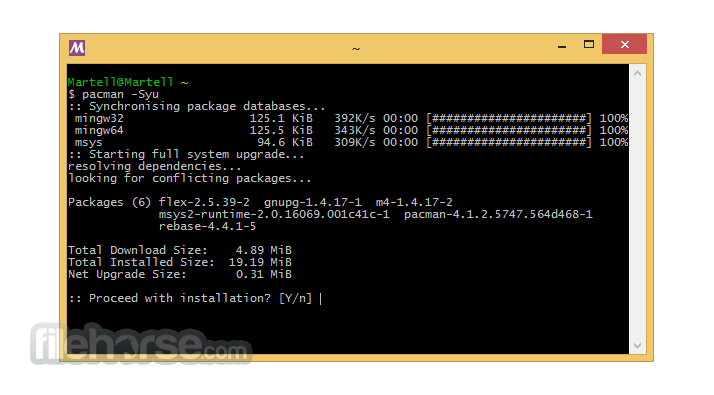
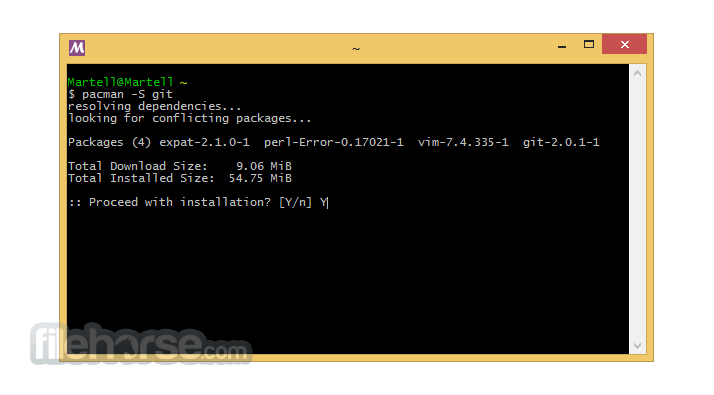
MSYS2 does not have a graphical user interface (GUI) but instead operates through a terminal window. The shell experience is similar to Linux, providing access to bash and other command-line utilities.
The simplicity of the terminal-based approach allows developers to focus on productivity without unnecessary distractions.
How to Use
How is MSYS2 different from Cygwin?
It uses a rolling release package system with pacman and provides better compatibility with Windows development, while Cygwin focuses on full Linux emulation.
Can MSYS2 run Linux binaries?
No, MSYS2 does not support running native Linux binaries. It provides a Unix-like environment on Windows, but all packages must be compiled for Windows.
How do I switch between different shell environments?
You can launch different shells from the Start Menu or use:
Simply delete the MSYS2 installation folder (usually C:\msys64). However, if you want to remove environment variables or registry entries, clean them manually.
Can I install GUI applications with MSYS2?
Yes, you can install some GUI applications available in the repository, but MSYS2 is primarily designed for command-line development.
Alternatives
Cygwin – Provides a similar Unix-like environment but lacks pacman package management.
WSL (Windows Subsystem for Linux) – A full-fledged Linux environment on Windows, better suited for running native Linux applications.
MinGW-w64 – Standalone compiler suite for Windows development but without an integrated package manager.
System Requirements
MSYS2 is an essential tool for Windows developers who need a Unix-like environment, access to a vast package repository, and a powerful compilation system. Its seamless integration with Windows applications, rolling updates through pacman, and robust support for MinGW-w64 make it a superior choice for software compilation and automation.
Download MSYS2 Latest Version Why is this app published on FileHorse? (More info)
Built on Cygwin and inspired by Arch Linux’s pacman package manager, MSYS2 is a crucial tool for software developers who need to work with native Windows applications while leveraging a robust POSIX-compatible system.
MSYS2 is widely used to compile open-source software, automate scripts, and install libraries necessary for development.
It is particularly beneficial for those who work with GCC, Clang, or MinGW-w64 compilers.
Key Features
Package Management with Pacman: Efficient package manager based on Arch Linux’s pacman, allowing seamless updates and installations.
POSIX Compatibility: Provides a Unix-like environment on Windows, supporting bash, grep, sed, and other essential Linux utilities.
Multiple Shell Environments: Supports MSYS2, MinGW-w64 (both 32-bit and 64-bit), and UCRT64 for broader compatibility with Windows development.
Native Windows Integration: Works well with Windows executables, enabling cross-platform development.
Active Community Support: Regularly updated packages and strong developer community contributions.
User Interface
MSYS2 does not have a graphical user interface (GUI) but instead operates through a terminal window. The shell experience is similar to Linux, providing access to bash and other command-line utilities.
The simplicity of the terminal-based approach allows developers to focus on productivity without unnecessary distractions.
How to Use
- Open the MSYS2 Shell (MSYS2, MinGW32, MinGW64, or UCRT64 depending on the environment).
- Use pacman to install additional packages.
- Compile and run your C/C++ or other projects using MinGW-w64 compilers.
- Automate builds and scripts with bash scripting.
- Integrate with Windows-native applications when required.
How is MSYS2 different from Cygwin?
It uses a rolling release package system with pacman and provides better compatibility with Windows development, while Cygwin focuses on full Linux emulation.
Can MSYS2 run Linux binaries?
No, MSYS2 does not support running native Linux binaries. It provides a Unix-like environment on Windows, but all packages must be compiled for Windows.
How do I switch between different shell environments?
You can launch different shells from the Start Menu or use:
- msys2.exe (for Unix-like experience)
- mingw32.exe (for 32-bit development)
- mingw64.exe (for 64-bit development)
Simply delete the MSYS2 installation folder (usually C:\msys64). However, if you want to remove environment variables or registry entries, clean them manually.
Can I install GUI applications with MSYS2?
Yes, you can install some GUI applications available in the repository, but MSYS2 is primarily designed for command-line development.
Alternatives
Cygwin – Provides a similar Unix-like environment but lacks pacman package management.
WSL (Windows Subsystem for Linux) – A full-fledged Linux environment on Windows, better suited for running native Linux applications.
MinGW-w64 – Standalone compiler suite for Windows development but without an integrated package manager.
System Requirements
- Operating System: Windows 7, 8, 10, or 11
- Architecture: 64-bit processor required (x86_64)
- Disk Space: At least 1GB for installation, more for additional packages
- Memory: Minimum 512MB RAM, recommended 2GB+
- Free and open-source
- Efficient package management with pacman
- Supports both 32-bit and 64-bit development environments
- Works seamlessly with Windows-native applications
- Active community and regular updates
- Lacks a GUI, which may be challenging for beginners
- Requires command-line knowledge to use effectively
- Installation and setup can be confusing for new users
- Some packages may not be as up-to-date as Linux distributions
- Compatibility issues with certain Windows software can arise
MSYS2 is an essential tool for Windows developers who need a Unix-like environment, access to a vast package repository, and a powerful compilation system. Its seamless integration with Windows applications, rolling updates through pacman, and robust support for MinGW-w64 make it a superior choice for software compilation and automation.
Download MSYS2 Latest Version Why is this app published on FileHorse? (More info)
##
畫面截圖