- 目前版本5.4.0
- 更新日期2026-03-12
- 檔案大小7.4 MB
- 檔案名稱netsetman_setup_540.exe
- 作業系統Windows 7 / Windows 8 / Windows 10 / Windows 11
- 支援語系English
- 授權型式試用版
- 開發商 NetSetMan GmbH
- 軟體分類Windows 軟體 / 檔案傳輸與網路
##
翻譯排程處理中,以下暫以英文原文呈現
軟體介紹
NetSetMan is a network settings manager for Windows PCs designed to simplify switching between network configurations.
It allows users to create and manage up to six distinct profiles, each containing specific network settings, facilitating seamless transitions between various network environments.
Features
User Interface
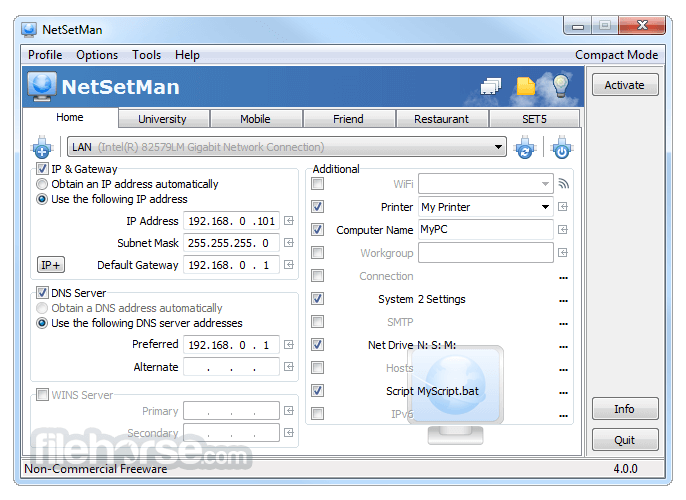
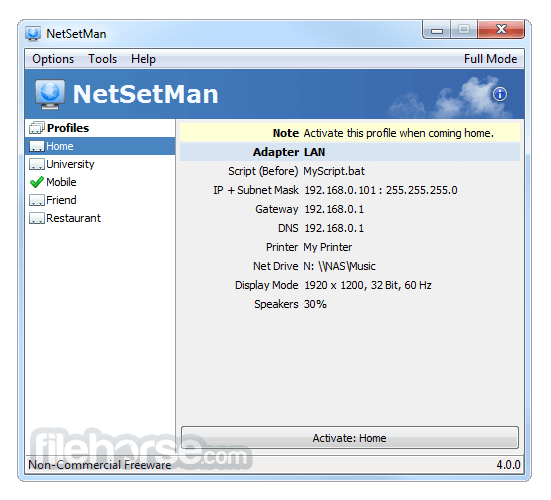
NetSetMan features a clean, tabbed interface, allowing users to easily navigate between different profiles and settings.
Each profile is displayed on a separate tab, with settings organized into categories for straightforward configuration.
Installation and Setup
Installation is straightforward: download the installer from the official website and follow the on-screen prompts.
Post-installation, users can create profiles by entering the desired network settings into the respective fields. Administrative privileges are required for certain configurations.
How to Use
FAQs
Is NetSetMan free?
Yes, it offers a freeware version for non-commercial use. A Pro version with additional features is available for purchase.
Can I use NetSetMan without administrative privileges?
Yes, with the NetSetMan Service installed, limited user accounts can utilize the app without admin rights.
Does NetSetMan support IPv6?
Yes, it supports both IPv4 and IPv6 configurations.
Can I switch profiles via the command line?
Yes, it allows profile activation through command line parameters, enabling integration with scripts and shortcuts.
Is it possible to auto-switch profiles based on location?
Yes, the AutoSwitch feature enables automatic profile activation based on conditions like surrounding Wi-Fi networks or network location awareness.
Pricing
This tool is FREE for non-commercial use.
The Pro version, intended for commercial use, offers additional features and is available for purchase; pricing details are available on the official website.
System Requirements
NetSetMan is a versatile tool for users who frequently switch between different network environments. Its intuitive interface and robust feature set make managing multiple network configurations straightforward and efficient.
Note: Limited functionality in the demo version.
Download NetSetMan Latest Version Why is this app published on FileHorse? (More info)
It allows users to create and manage up to six distinct profiles, each containing specific network settings, facilitating seamless transitions between various network environments.
Features
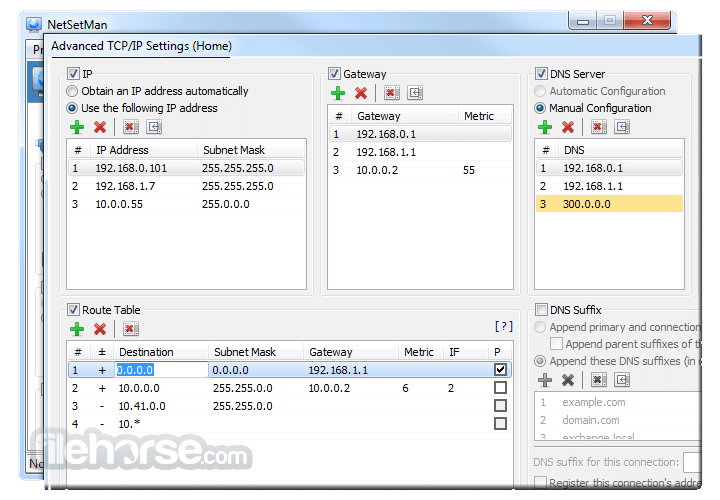
- IP Address Management: Configure IP addresses, gateways, DNS servers, and WINS settings, supporting both IPv4 and IPv6 protocols.
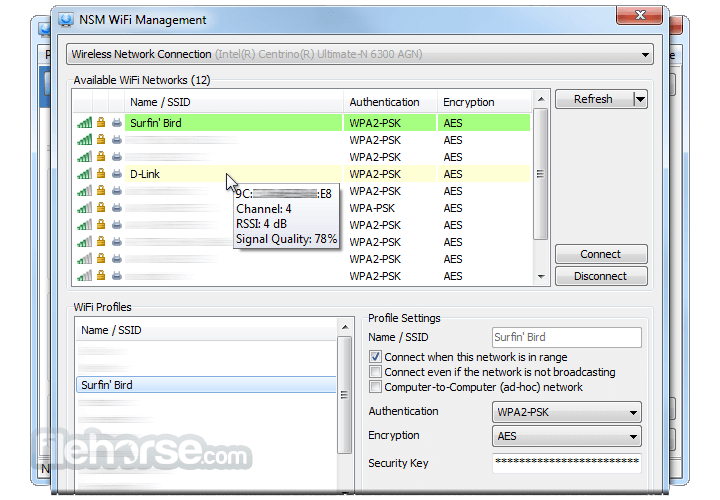
- Wi-Fi Management: Organize, create, delete, and connect to Wi-Fi profiles directly within the program.
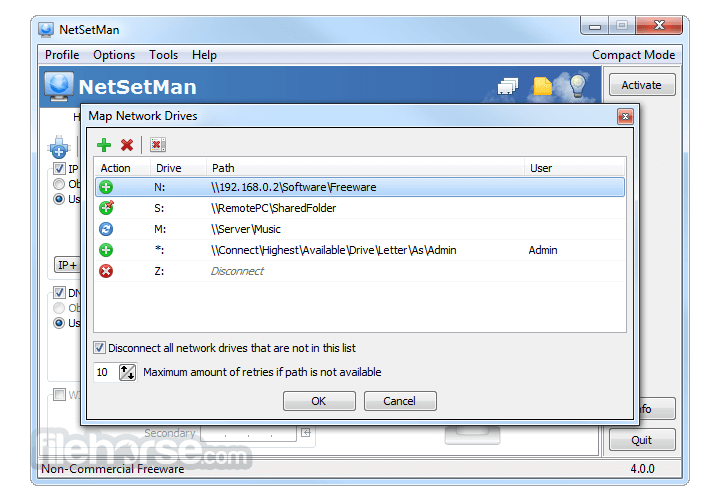
- Network Drives and Printers: Map network drives and set default printers for each profile.
- System Settings: Adjust display modes, screensavers, wallpapers, power plans, and sound schemes based on the active profile.
- Hosts File Entries: Manage custom entries in the hosts file to map hostnames to IP addresses.
- MAC Address Modification: For advanced users, modify the MAC address of network adapters.
- AutoSwitch: Automatically activate profiles based on predefined conditions such as surrounding Wi-Fi networks, network location awareness, gateway MAC, ping responses, network interface status, or specific time frames.
- Added compatibility improvements for Windows 11 build 24H2.
- Strengthened security so the app can run without administrator privileges only when launched from its installation directory; otherwise, a UAC prompt is shown.
- Updated Wi-Fi handling for Windows 11 24H2, where location permission is now required to access the Wi-Fi API used by WiFi-Management and AutoSwitch.
- Added a new dialog that lets users quickly enable the required location privacy settings for Wi-Fi features.
- Introduced Japanese and Korean language support.
- Fixed an issue related to setting the default printer when Windows 11 printer management is enabled.
- Resolved several UI issues in the Driver dialog.
User Interface
NetSetMan features a clean, tabbed interface, allowing users to easily navigate between different profiles and settings.
Each profile is displayed on a separate tab, with settings organized into categories for straightforward configuration.
Installation and Setup
Installation is straightforward: download the installer from the official website and follow the on-screen prompts.
Post-installation, users can create profiles by entering the desired network settings into the respective fields. Administrative privileges are required for certain configurations.
How to Use
- Create a Profile: Open NetSetMan and select an empty profile tab.
- Configure Settings: Enter the necessary network settings, such as IP address, DNS servers, and Wi-Fi credentials.
- Save the Profile: Click the "Save" button to store the configuration.
- Activate the Profile: Select the desired profile and click "Activate" to apply the settings.
FAQs
Is NetSetMan free?
Yes, it offers a freeware version for non-commercial use. A Pro version with additional features is available for purchase.
Can I use NetSetMan without administrative privileges?
Yes, with the NetSetMan Service installed, limited user accounts can utilize the app without admin rights.
Does NetSetMan support IPv6?
Yes, it supports both IPv4 and IPv6 configurations.
Can I switch profiles via the command line?
Yes, it allows profile activation through command line parameters, enabling integration with scripts and shortcuts.
Is it possible to auto-switch profiles based on location?
Yes, the AutoSwitch feature enables automatic profile activation based on conditions like surrounding Wi-Fi networks or network location awareness.
Pricing
This tool is FREE for non-commercial use.
The Pro version, intended for commercial use, offers additional features and is available for purchase; pricing details are available on the official website.
System Requirements
- Operating System: Windows 7, 8, 10, or 11.
- Permissions: Administrative rights are required for certain configurations.
- Simplifies management of multiple network configurations.
- User-friendly interface with organized profile tabs.
- Supports both IPv4 and IPv6.
- AutoSwitch feature enhances automation based on network conditions.
- Some advanced features are restricted to the Pro version.
- Initial setup may require administrative privileges.
NetSetMan is a versatile tool for users who frequently switch between different network environments. Its intuitive interface and robust feature set make managing multiple network configurations straightforward and efficient.
Note: Limited functionality in the demo version.
Download NetSetMan Latest Version Why is this app published on FileHorse? (More info)
##
畫面截圖