⚠ 這是歷史版本頁面 — 查看 OpenVPN 2.7.6 (32-bit) 最新版本 →

- 目前版本2.6.7 (32-bit)
- 更新日期2023-11-10
- 檔案大小4.4 MB
- 檔案名稱OpenVPN-2.6.7-I001-x86.msi
- 作業系統Windows 7 / Windows 8 / Windows 10
- 支援語系English
- 授權型式開源軟體
- 開發商 OpenVPN Inc.
- 軟體分類Windows 軟體 / VPN
##
編輯短評
OpenVPN 是一套歷史悠久且廣受信賴的開源 SSL VPN 解決方案,核心用途是建立加密的網路通道,讓你的連線請求透過遠端伺服器轉送,避免資料在傳輸過程中被竊聽或攔截。它從設計之初就支援最新的加密技術,無論是電腦新手還是大型企業,都能依需求調整連線方式,兼顧安全與隱私。這款軟體在 Windows 平台上的同類工具中屬於主流首選之一,開發商持續投入維護,更新相當活躍,使用者評價普遍不錯,並提供官方影片介紹,可見其成熟度與社群基礎。
這套軟體特別適合重視隱私、需要安全存取遠端資源的使用者,例如經常使用公共 Wi-Fi 的商務人士,或需要連回公司內網的遠端工作者。與 Free VPN、Hotspot Shield 等一鍵式工具相比,OpenVPN 的設定門檻較高,需要手動匯入設定檔或具備基本網路概念,但換來的是更高的自訂彈性與開源透明性。值得注意的是,此版本下載的是原始碼,需自行編譯安裝,且介面僅提供英文,對不熟悉技術操作的人來說可能稍嫌吃力;不過它同時提供 macOS 版本,跨平台支援算是完整。
##
翻譯排程處理中,以下暫以英文原文呈現
軟體介紹
OpenVPN 32bit is an award-winning and fully-featured SSL VPN solution that can allow everyone from computing novices to large companies to configure the way they are accessing the internet, unlocking powerful services for safer and stealthier browsing experience.
Built from the ground up to support latest encryption methods, this app allows you to connect your PC to OpenVPN servers without the fear that anyone will intercept and spy on your data, from where your data requests will be distributed across the rest of the web in a safe and controlled manner.
This downloads the source code. Please download OpenVPN Connect if you need a working OpenVPN GUI client.
By default, the app can distribute your data traffic across many of its servers, making your online location masked and unrecognizable to Internet Service Providers and the rest of the internet in general.
In addition to that, It also comes with the large offering of customization tools that can be used for setting up remote access privileges, site-to-site VPNs, enterprise-scale remote access, adaptive load-balancing, advanced Wi-Fi security, failover services, fine-grained user access control, and much more.
The presence of both automated VPN services and advanced tools have made OpenVPN into #1 secure browsing software of choice for both regular users, organizations of all sizes, and many Fortune 500 companies.
Installation and Use
It comes in a small package that will after installation re-configure the way your computer is accessing the internet. The configuration window of this app is actually very lightweight, and it holds only the most basic of tools for setting the type of your VPN setting (config file, system proxy settings or manual configuration) and a dropdown menu for selecting user interface language (with over 15 available translations).
Originally built for use in enterprise environments, the personal tier of OpenVPN retains the highly advanced technologies and lightweight tools. The core security feature of OpenVPN is based upon OSI layer 2 or 3 secure network extension that is utilizing SSL/TLS protocols. It installs deep into the Windows OS, enabling all the user apps to take advantage of the security features, firewall rules, authentication certificates, and more.
In the real world, ordinary non-business users can encounter various roadblocks that can prevent them from taking full advantage of their home internet connection.
This may include ISP data rate throttling, website content region blocking, or even government-imposed firewalls. It allows users to circumvent these issues, offering you stable and secure data stream to their servers, from which you will be re-routed to any major region in the world, and be able to access its “local” content. No matter if you want to simply access region-specific sites and services (such as streaming platforms content offering) or to read censored news outlets, It can allow you to do that in just a few clicks.
Another benefit of an Open VPN is a unified virtual presence. No matter where you physically are, if you are using Open VPN, the rest of the internet will be able to detect you originating from a single region.
Features and Highlights
Download OpenVPN (32-bit) Latest Version Why is this app published on FileHorse? (More info)
Built from the ground up to support latest encryption methods, this app allows you to connect your PC to OpenVPN servers without the fear that anyone will intercept and spy on your data, from where your data requests will be distributed across the rest of the web in a safe and controlled manner.
This downloads the source code. Please download OpenVPN Connect if you need a working OpenVPN GUI client.
By default, the app can distribute your data traffic across many of its servers, making your online location masked and unrecognizable to Internet Service Providers and the rest of the internet in general.
In addition to that, It also comes with the large offering of customization tools that can be used for setting up remote access privileges, site-to-site VPNs, enterprise-scale remote access, adaptive load-balancing, advanced Wi-Fi security, failover services, fine-grained user access control, and much more.
The presence of both automated VPN services and advanced tools have made OpenVPN into #1 secure browsing software of choice for both regular users, organizations of all sizes, and many Fortune 500 companies.
Installation and Use
It comes in a small package that will after installation re-configure the way your computer is accessing the internet. The configuration window of this app is actually very lightweight, and it holds only the most basic of tools for setting the type of your VPN setting (config file, system proxy settings or manual configuration) and a dropdown menu for selecting user interface language (with over 15 available translations).
Originally built for use in enterprise environments, the personal tier of OpenVPN retains the highly advanced technologies and lightweight tools. The core security feature of OpenVPN is based upon OSI layer 2 or 3 secure network extension that is utilizing SSL/TLS protocols. It installs deep into the Windows OS, enabling all the user apps to take advantage of the security features, firewall rules, authentication certificates, and more.
In the real world, ordinary non-business users can encounter various roadblocks that can prevent them from taking full advantage of their home internet connection.
This may include ISP data rate throttling, website content region blocking, or even government-imposed firewalls. It allows users to circumvent these issues, offering you stable and secure data stream to their servers, from which you will be re-routed to any major region in the world, and be able to access its “local” content. No matter if you want to simply access region-specific sites and services (such as streaming platforms content offering) or to read censored news outlets, It can allow you to do that in just a few clicks.
Another benefit of an Open VPN is a unified virtual presence. No matter where you physically are, if you are using Open VPN, the rest of the internet will be able to detect you originating from a single region.
Features and Highlights
- Core – With over 50 million downloads, the core technology of Open VPN has proven to be one of the leaders in the field of VPN security.
- Advanced AES encryption – It encrypts all outgoing and incoming internet data with the world’s leading standard for encryption.
- Fortified privacy – Effortlessly protect your personal and online identity by location spoofing your IP address.
- Wireless hot spot protection – Prevent unauthorized access to your data while connecting to public and unsecured Wi-Fi sports.
- Travel protection – Mask your online location no matter where you are.
- Worldwide server connection – Gain access and establish your virtual presence at servers that are in 12 regions around the world.
- Unrestricted access – Access OpenVPN servers from any location in the world.
- 24/7 support – Gain access to support 24/7 via email or live webchat.
- Full Windows compatibility – Available on all modern versions of Windows, ranging from Windows 2003 to Windows 11 (both 32-bit and 64-bit).
- Easy to use and scalable for both personal and business use.
- Secure data transport over an encrypted tunnel.
- Cross-platform support for various operating systems.
- Free!
- None.
Download OpenVPN (32-bit) Latest Version Why is this app published on FileHorse? (More info)
##
影片介紹
##
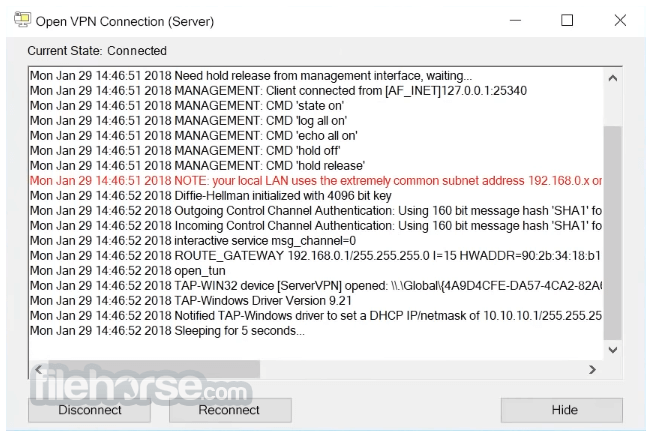
畫面截圖
- 2026-08-06 OpenVPN 2.7.6 (32-bit) 4.9 MB
- 2026-07-02 OpenVPN 2.7.5 (32-bit) 4.9 MB
- 2026-05-01 OpenVPN 2.7.4 (32-bit) 4.9 MB
- 2026-04-28 OpenVPN 2.7.3 (32-bit) 4.9 MB
- 2026-04-23 OpenVPN 2.7.2 (32-bit) 4.9 MB
- 2026-04-03 OpenVPN 2.7.1 (32-bit) 5 MB
- 2026-02-12 OpenVPN 2.7.0 (32-bit) 5.1 MB
- 2026-02-06 OpenVPN 2.6.19 (32-bit) 5 MB