
- 軟體名稱phpMyAdmin
- 目前版本3.4.0
- 更新日期2011-05-12
- 檔案大小3.54MB
- 檔案名稱phpMyAdmin-3.4.0-all-languages.7z
- 作業系統Windows 7 / Windows 8 / Windows 10 / Windows 11
- 支援語系English
- 授權型式免費軟體
- 開發商 phpMyAdmin devel team
- 軟體分類Windows 軟體 / 開發者工具
編輯短評
phpMyAdmin 是一套以 PHP 為基礎的網頁式資料庫管理工具,專門用來處理 MySQL 資料庫的日常操作。它讓管理者不必直接下指令,就能透過瀏覽器介面建立、修改或刪除資料庫與資料表,也能執行檢查、修復、分析與最佳化等維護工作。最有辨識度的特色在於它與 PHP 網頁伺服器緊密整合,等同於遠端管理 MySQL 的入口,並支援多台伺服器管理,以及將資料匯出成 CSV、XML、PDF、Word、Excel 等多種格式。這套軟體由開發團隊長期維護,更新頻率穩定,在同類工具中屬於歷史悠久且廣為使用的熱門選擇,評價普遍不錯。
phpMyAdmin 適合網站開發者、伺服器管理員,以及任何需要以圖形化方式操作 MySQL 資料庫的人,尤其當你使用虛擬主機或共享主機時,它常是內建的管理介面。與 BlueStacks、Turbo C++ 或 VMware 等開發工具相比,phpMyAdmin 專注於資料庫管理,沒有模擬器或編譯器功能,但它在 Web 介面的資料庫操作上更直接且輕量。需要注意的是,它必須搭配 PHP 與 MySQL 環境才能運作,並非免安裝的單機程式;雖然介面可切換繁體中文,但官方僅提供英文語系,中文介面需仰賴翻譯檔。授權為免費軟體,Windows 與 macOS 皆有版本,使用前請確認伺服器環境相容性。
軟體介紹
它最早於 1998 年開發,隨著時間演進,已成為最受歡迎的資料庫管理工具之一,尤其受到網頁開發者與系統管理員的喜愛。
注意:需要 MySQL 與 PHP。請使用 7-Zip 解壓縮檔案。
phpMyAdmin for PC 支援廣泛的操作,例如資料庫建立、修改、刪除與資料表管理,以及直接執行 SQL 指令。
其友善的網頁介面讓使用者更容易與資料庫互動,即使不熟悉MySQL 語法也能輕鬆上手。
它提供了命令列管理資料庫方式之外的另一種可行選擇,特別適合在共享主機環境中工作、終端機存取可能受限的使用者。
主要特色
資料庫管理:使用者可透過網頁介面輕鬆管理資料庫、資料表、欄位、關聯、索引、使用者與權限。
SQL 執行:使用者可直接從介面執行 MySQL 與 MariaDB 查詢,並立即查看結果。
備份與還原:phpMyAdmin 的突出功能之一是能使用 SQL 格式或 ZIP、GZIP 等壓縮格式備份與還原資料庫。
搜尋與取代:內建工具可在資料表中搜尋與取代數值,有助於管理大型資料集。
匯入與匯出資料:提供易於使用的介面,可匯入與匯出多種格式的資料,例如 CSV、SQL 與 Excel。
多使用者支援:管理員可建立與管理多位使用者及其權限。
多語言支援:提供超過 80 種語言,讓全球使用者都能使用。
圖形產生:透過圖形工具與圖表視覺化資料庫結構與資料分佈。
擴充功能支援:支援外掛與主題,可進行自訂與功能擴充。
安全管理:提供使用者驗證、IP 限制,並支援 SSL 加密以確保資料庫存取安全。
完整功能
- 直覺的網頁介面
- 瀏覽與刪除資料庫、資料表、檢視表、欄位與索引
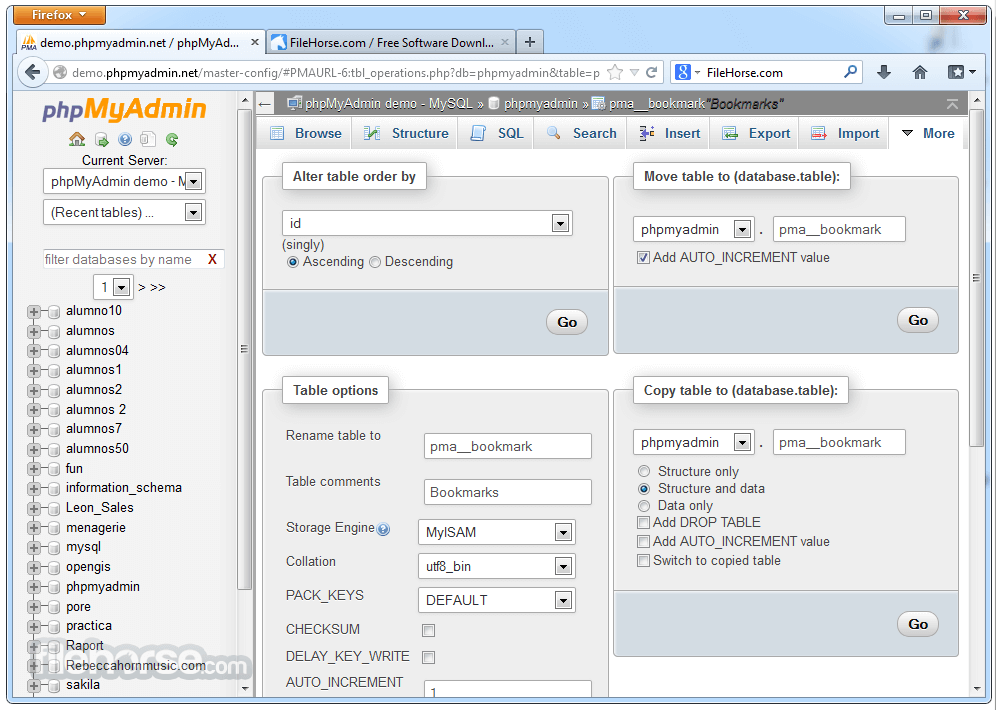
- 建立、複製、刪除、重新命名與修改資料庫、資料表、欄位與索引
- 維護伺服器、資料庫與資料表,並提供伺服器設定建議
- 執行、編輯與書籤任何 SQL 陳述式,甚至批次查詢
- 管理 MySQL 使用者與權限
- 管理預存程序與觸發器
- 從 CSV 與 SQL 匯入資料
- 匯出資料至多種格式:CSV、SQL、XML、PDF、ISO/IEC 26300 - OpenDocument 文字與試算表、Word、Excel、LATEX 等
- 管理多台伺服器
- 建立資料庫配置的 PDF 圖形
- 使用查詢範例 (QBE) 建立複雜查詢
- 在資料庫或其子集中進行全域搜尋
- 使用一組預先定義的函式轉換儲存資料為任何格式,例如將 BLOB 資料顯示為圖片或下載連結
- 還有更多!
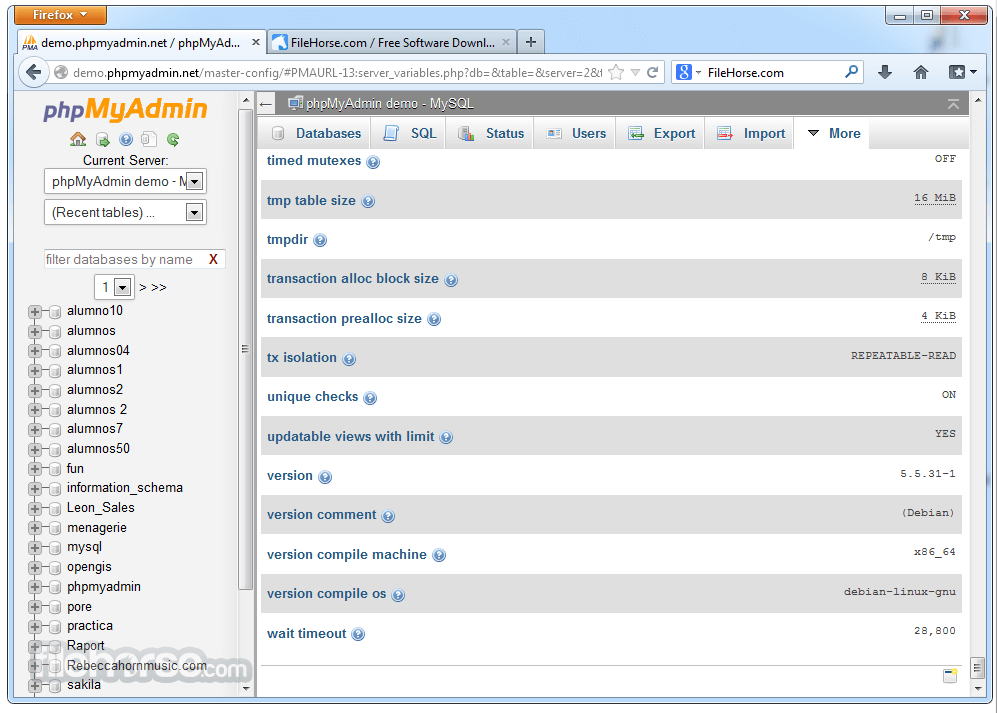
phpMyAdmin 的使用者介面以網頁為基礎,設計上對新手與經驗豐富的資料庫管理員都相當直覺。儀表板呈現所有資料庫、資料表及其結構的組織化總覽。
導覽側邊欄可協助存取不同資料庫,並執行資料表管理或 SQL 執行等操作。
介面分為不同區塊,例如:
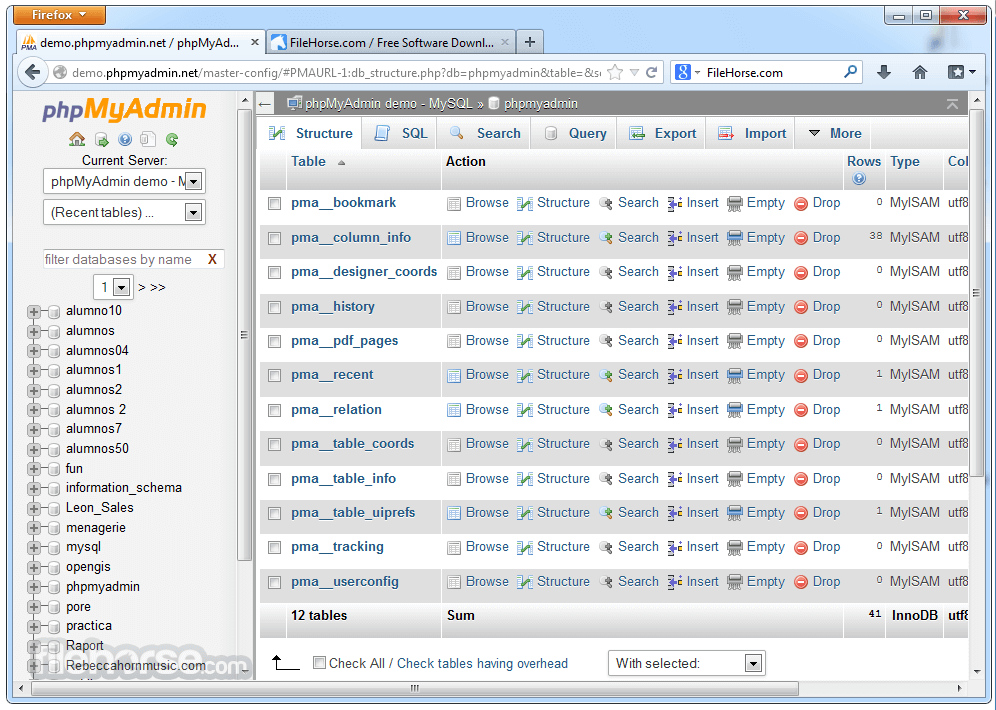
- 資料庫結構檢視:提供資料表、欄位與索引的總覽。
- SQL 查詢視窗:專用空間用於執行 SQL 指令,並具備語法高亮。
- 匯入/匯出工具:用於匯入與匯出資料庫備份。
- 使用者權限管理:可輕鬆處理使用者帳戶與權限的區塊。
- 雖然預設主題功能完善且直接,但支援多種主題與版面配置,讓使用者可依偏好調整外觀與感覺。
可安裝在任何執行 PHP、MySQL 或 MariaDB 的伺服器上。它與 Apache 和 Nginx 等熱門網頁伺服器軟體相容。
安裝步驟包括:
下載與解壓縮:應用程式安裝檔案可從官方網站或 FileHorse 下載。下載後,需將檔案解壓縮至網頁伺服器目錄(例如 Linux 上的 /var/www/html/ 或 Windows 上 XAMPP 使用者的 C:\xampp\htdocs\)。
設定:主要設定檔為 config.inc.php。在此可定義資料庫連線設定,例如資料庫主機、使用者與密碼。此步驟也建議採取基本安全措施,例如啟用 SSL、設定驗證方法與定義目錄保護。
存取:設定完成後,可透過網頁瀏覽器存取(例如 http://localhost/phpmyadmin)。使用者可使用 MySQL 或 MariaDB 憑證登入,開始管理資料庫。
使用方式
安裝完成後,使用此工具需以 MySQL 或 MariaDB 憑證登入介面。
登入後,您會看到列出資料庫的儀表板,並可執行以下操作:
建立資料庫:在側邊欄選擇「新增」選項以建立新資料庫。您可以定義名稱並選擇排序規則。
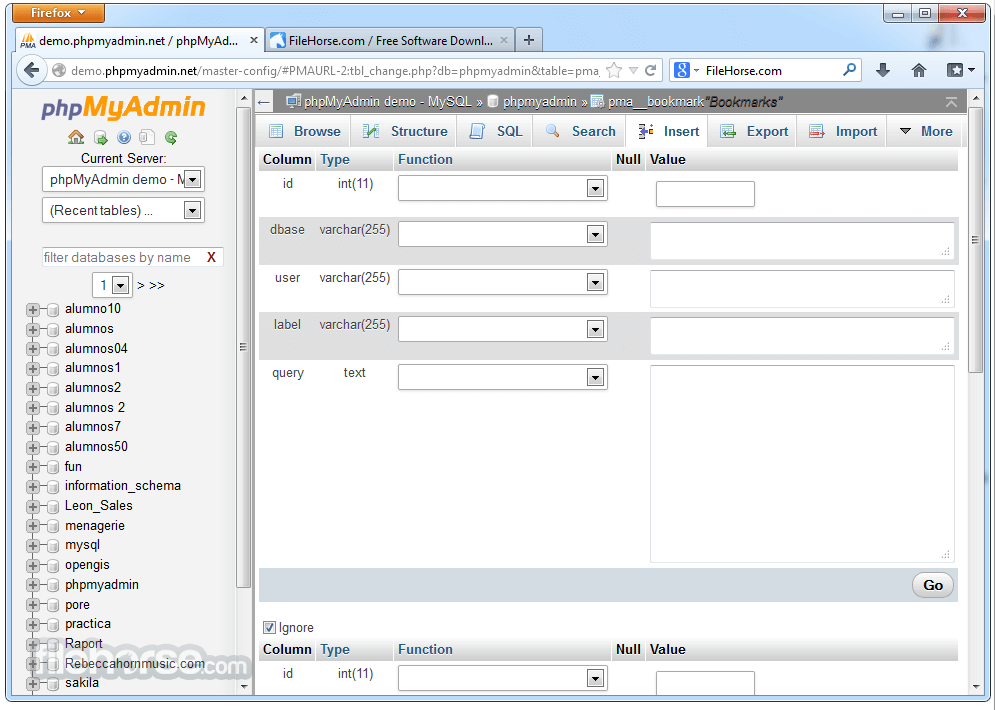
建立與修改資料表:選擇資料庫後,可新增資料表、修改其結構,並定義資料類型與索引。
執行 SQL 查詢:使用 SQL 標籤撰寫與執行查詢。它會立即顯示查詢輸出,讓您檢查與編輯結果。
管理使用者權限:透過「使用者帳戶」標籤,可建立新使用者、指派權限與管理現有使用者。
備份/還原資料庫:使用匯出與匯入工具,可備份整個資料庫或個別資料表為多種格式,並在需要時還原。
常見問題
phpMyAdmin 在正式伺服器上使用安全嗎?
安全,但建議使用 HTTPS、強密碼與 IP 限制來保護。若無必要,請停用遠端存取。
我可以使用 phpMyAdmin 管理多個資料庫嗎?
可以,phpMyAdmin 支援在單一實例中管理多個資料庫。
如何提高 phpMyAdmin 的檔案上傳限制?
可透過修改 php.ini 設定檔中的 upload_max_filesize 與 post_max_size 參數來調整。
phpMyAdmin 與 MariaDB 相容嗎?
相容,它可與 MySQL 和 MariaDB 完美搭配運作。
我可以使用 phpMyAdmin 自動化備份嗎?
此軟體未提供內建自動化功能,但您可以使用 cron 工作(Linux)或工作排程器(Windows)撰寫定期備份腳本。
替代方案
DBeaver:通用資料庫工具,支援多種資料庫,包括 MySQL、PostgreSQL 等。
HeidiSQL:原生 Windows 應用程式,提供類似功能,但為桌面環境。
MySQL Workbench:適用於 Windows 的強大 MySQL 資料庫視覺化編輯器。
價格
此程式完全免費且開源。沒有隱藏成本或付費版本。
社群的貢獻有助於維護與擴展此專案。
系統需求
- PHP 5.5 或更新版本
- MySQL 5.5 或更新版本,或 MariaDB
- 網頁伺服器,如 Apache 或 Nginx
現代網頁瀏覽器(Chrome、Firefox、Edge、Opera)
優點
- 直覺的網頁介面。
- 完整的資料庫管理功能。
- 免費且開源。
- 多語言支援。
- 強大的社群與文件。
- 缺乏官方支援與更新。
- 網頁介面在處理大型資料集時可能較慢。
- 部分安全功能需手動設定。
- 沒有內建的備份自動化功能。
phpMyAdmin 是一款強大且易於使用的資料庫管理工具,填補了命令列互動與現代網頁應用程式之間的差距。
其直覺的介面,加上 SQL 查詢執行、備份/還原選項與使用者權限管理等全面功能,使其成為管理MySQL 或 MariaDB 資料庫的開發者與管理員的理想選擇。
儘管在處理極大型資料集時有些效能限制,它仍是尋求可靠、網頁型工具的首選解決方案。對於任何在伺服器或開發環境中管理資料庫的人來說,這都是必備工具。
另有提供:下載 phpMyAdmin for Mac
下載 phpMyAdmin 最新版本 為什麼此應用程式發佈在 FileHorse 上?(更多資訊)
畫面截圖
5 張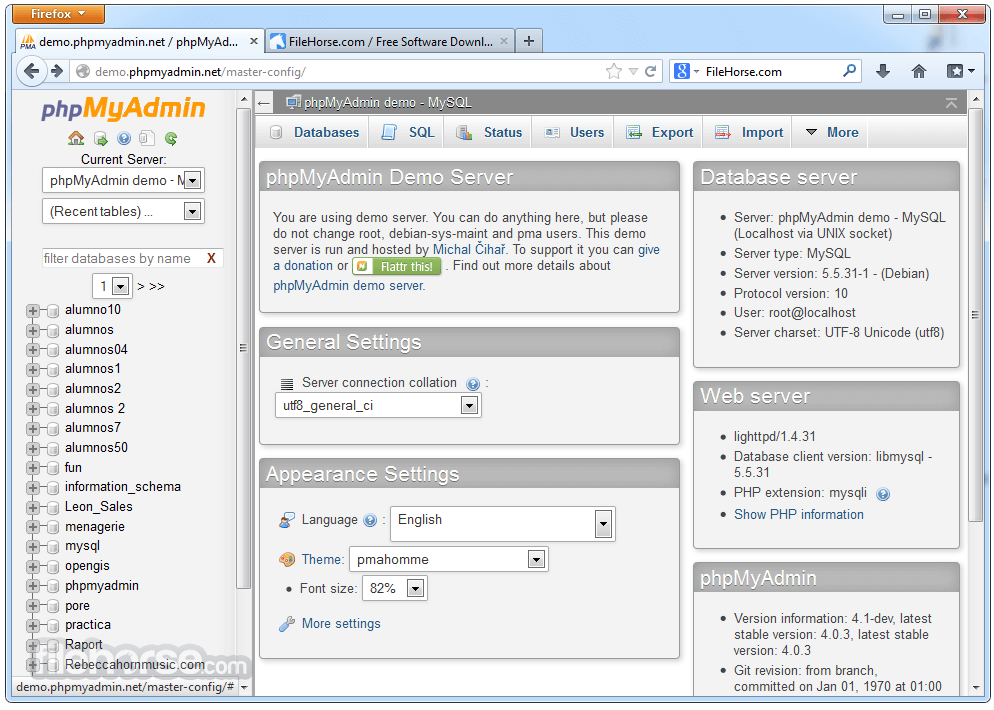

更新日誌
3.4.0 - [view] Enable VIEW rename
- [privileges] Export a user's privileges
- [core] Updated mootools to fix some glitches with Safari.
- [interface] Add REGEXP ^...$ to select dialog.
- [interface] Add insert ignore option to editing row.
- [interface] Show warning when javascript is disabled.
- [edit] Call UUID function separately to show it in insert.
- [export] Allow export of timestamps in UTC.
- [core] Remove config data from session as it brings chicken-egg problem.
- [core] Cookie path now honors PmaAbsoluteUri.
- [core] phpMyAdmin honors https in PmaAbsoluteUri.
- [core] Try moving tables by RENAME and fail to CREATE/INSERT if that fails.
- [core] Force reload js on code change.
- [interface] Do not display long numbers in server status.
- [edit] Add option to just display insert query.
- [interface] Move SSL status to the end, it is usually empty.
- [interface] Show numbers of columns in table structure.
- [inrerface] Add link to reload navigation frame.
- [auth] Signon authentication forwards error message through session data.
- [interface] Move ^1 to the end of message.
- [interface] Grey out non applicable actions in structure
- [interface] Allow to create new table from navigation frame (in light mode).
- [browse] Add direct download of binary fields.
- [browse] Properly display NULL value for BLOB.
- [edit] Allow to set BLOB to/from NULL with ProtectBinary.
- [edit] Do not default to UNHEX when using file upload.
- [core] Add option to configure session_save_path.
- [interface] Provide links to documentation in highlighted SQL.
- [interface] It is now possible to bookmark most pages in JS capable browser.
- [core] Fix SSL detection.
- [doc] Add some hints to chk_rel.php for quick setup.
- [interface] Add class to some elements for easier theming.
- [doc] Add some interesting configs to config.sample.inc.php.
- [doc] Added advice to re-login after changing pmadb settings
- [interface] Prefill "Copy table to" in tbl_operations.php.
- [lang] Add English (United Kingdom) translation.
- [auth] HTTP Basic auth realm name
- [interface] Do not insert doc links to not formatted SQL.
- [lang] Chinese Simplified update.
- [lang] Turkish update.
- [interface] Focus TEXTAREA "sql_query" on click on "SQL" link
- [lang] Uzbek update.
- [import] After import, also list uploaded filename.
- [structure] Clicking on table name in db Structure should Browse the table if possible.
- [search] New search operators.
- [designer] Colored relations based on the primary key
- [core] Provide way for vendors to easily change paths to config files.
- [interface] Add inline query editing.
- [setup] Allow to configure changes tracking in setup script.
- [edit] Optionally disable the Type column
- [edit] Buttons for quicky creating common SQL queries.
- [interface] Convert loading of export/import to jQuery ready event
- [edit] CURRENT_TIMESTAMP is also valid for datetime fields.
- [engines] Fix parsing of PBXT status.
- [interface] Convert upload progress bar to jQuery.
- [interface] Add javascript validation of datetime input.
- [interface] Default sort order is now SMART.
- [interface] Fix flipping of headers in non-IE browsers.
- [interface] Allow to choose servers from configuration for synchronisation.
- [relation] Improve ON DELETE/ON UPDATE drop-downs
- [relation] Improve labels in relation view
- [interface] Use jQuery calendar dialog
- [doc] Incorporate synchronisation docs into main document.
- [core] Include Content Security Policy HTTP headers.
- [CSS] Field attributes use inline CSS
- [interface] Cleanup navigation frame.
- [core] Prevent sending of unnecessary cookies
- [password] Generate password only available if JS is enabled (fixed for Privileges and Change password)
- [core] RecodingEngine now accepts none as valid option.
- [core] Dropped AllowAnywhereRecoding configuration variable.
- [interface] Define tab order in SQL form to allow easier tab navigation.
- [core] Centralized format string expansion, @VARIABLES@ are recommended way now, used by file name templates, default queries, export and title generating.
- [validator] SQL validator works also with SOAP PHP extension.
- [interface] Better formatting for SQL validator results.
- [doc] The linked-tables infrastructure is now called phpMyAdmin configuration storage.
- [interface] Move drop/empty links from being tabs to Operations tab.
- [interface] Fixed rendering of error/notice/info titles background.
- [doc] Language and grammar fixes
- [export] JSON export
- [interface] Editor for SET/ENUM fields.
- [interface] Simplified interface to backup/restore.
- Users preferences
- [relations] Dropped WYSIWYG-PDF configuration variable.
- [relations] Export relations to Dia, SVG and others
- [interface] Added charts to status tab, profiling page and query results
- [interface] AJAXification on various pages
- [core] Remove last remaining parts of profiling code which was removed in 2006.
- [parser] Add workaround for MySQL way of handling backtick.
- [interface] Removed modification options for information_schema
- [config] Add Left frame table filter visibility config option.
- [core] Force generating of new session on login
- [interface] Drop page-break-before as it is useless for smaller tables.
- [interface] Allow to wrap enum values.
- [interface] Do not automatically mark PDF schema rows to delete
- [interface] Do not apply LeftFrameDBSeparator on first character.
- [interface] Column highlighting and marking in table view
- Visual query builder
- [interface] Prevent long queries from being shown in confirmation popup
- [navi] Left panel table grouping incorrect,
- [interface] Avoid double escaping of MySQL errors.
- [interface] Use less noisy message and remove disable link on server charts and database statistics.
- [relation] When displaying results, show a link to the foreign table even when phpMyAdmin configuration storage is not active
- [relation] Foreign key input options
- [export] Better handling of export to PHP array.
- [privileges] No DROP DATABASE warning if you delete a user
- [interface] Add link to documentation for status variables.
- [security] Redirect external links to avoid Referer leakage.
- [interface] Default to not count tables in database.
- [interface] Shortcut for copying table row.
- [auth] Reset user cache on login.
- [interface] Replace hard coded limit with $cfg['LimitChars'].
- [interface] Indicate that bookmark is being used on browse.
- [interface] Indicate shared bookmarks in interface.
- [Search] Ajaxify browse and delete criteria in DB Search
- [interface] New default theme pmahomme, dropped darkblue_orange theme.
- [auth] Allow to pass additional parameters using signon method.
- [auth] Add example for OpenID authentication using signon method.
- [dbi] Default to mysqli extension.
- [interface] Add clear button to SQL edit box.
- [core] Update library PHPExcel to version 1.7.6
- [core] Work without mbstring installed.
- [interface] Add links to variables documentation.
- [import] Fix import of utf-8 XML files.
- [auth] Force signon auth on signon URL change.
- [core] Synchronization does not honor AllowArbitraryServer
- [synchronization] Data containing single quotes prevents sync
- Remove the custom color picker feature
- [privileges] Don't fail silently on missing priviledge to execute REVOKE ALL PRIVILEGES
歷史版本
完整清單 →- 2025-10-08 phpMyAdmin 5.2.3 15.67 MB
- 2025-01-22 phpMyAdmin 5.2.2 15.05 MB
- 2023-02-09 phpMyAdmin 5.2.1 14.4 MB
- 2022-05-12 phpMyAdmin 5.2.0 13.46 MB
- 2022-02-11 phpMyAdmin 5.1.3 13.17 MB
- 2022-01-24 phpMyAdmin 5.1.2 13.17 MB
- 2021-06-04 phpMyAdmin 5.1.1 14.12 MB
- 2021-02-24 phpMyAdmin 5.1.0 14.36 MB