PingPlotter Free 5.27.12
v 5.27.12
Windows
試用版
7.84/10 (12)
- 目前版本5.27.12
- 更新日期2026-07-23
- 檔案大小36.3 MB
- 檔案名稱pingplotter_install.exe
- 作業系統Windows 7 / Windows 8 / Windows 10 / Windows 11
- 支援語系English
- 授權型式試用版
- 開發商 Pingman Tools, LLC.
- 軟體分類Windows 軟體 / 檔案傳輸與網路
##
翻譯排程處理中,以下暫以英文原文呈現
軟體介紹
PingPlotter Free tests your network for high latency and packet loss, then graphs the results so you can show qualified professionals exactly when and where problems are impacting your stream, game, or service.
PingPlotter is a network diagnostic tool designed to help users visualize network performance issues. Developed by Pingman Tools, this software provides an intuitive graphical representation of network latency and packet loss over time. It is particularly useful for troubleshooting connectivity problems, identifying bottlenecks, and monitoring the health of your network connections.
It helps you gather evidence of network problems so you can show qualified technicians and service providers exactly how to troubleshoot. It combines important diagnostic data with easy-to-understand graphs to show exactly where issues occur.
PingPlotter Desktop Free captures all types of data and makes sharing the results quick and easy. Timelines graph latency and packet loss history in 10-minute intervals. See exactly when connection problems happen. In Ping Plotter Standard, timelines cover unlimited time and can be opened for any hop.
It makes getting results quick and easy. The program exports all types of logs, screenshots, and graphs you can send directly to your service provider or other qualified technicians. PingPlotter Desktop can also create unique webpages you can post on forums or support sites for faster turnaround.
Highlights
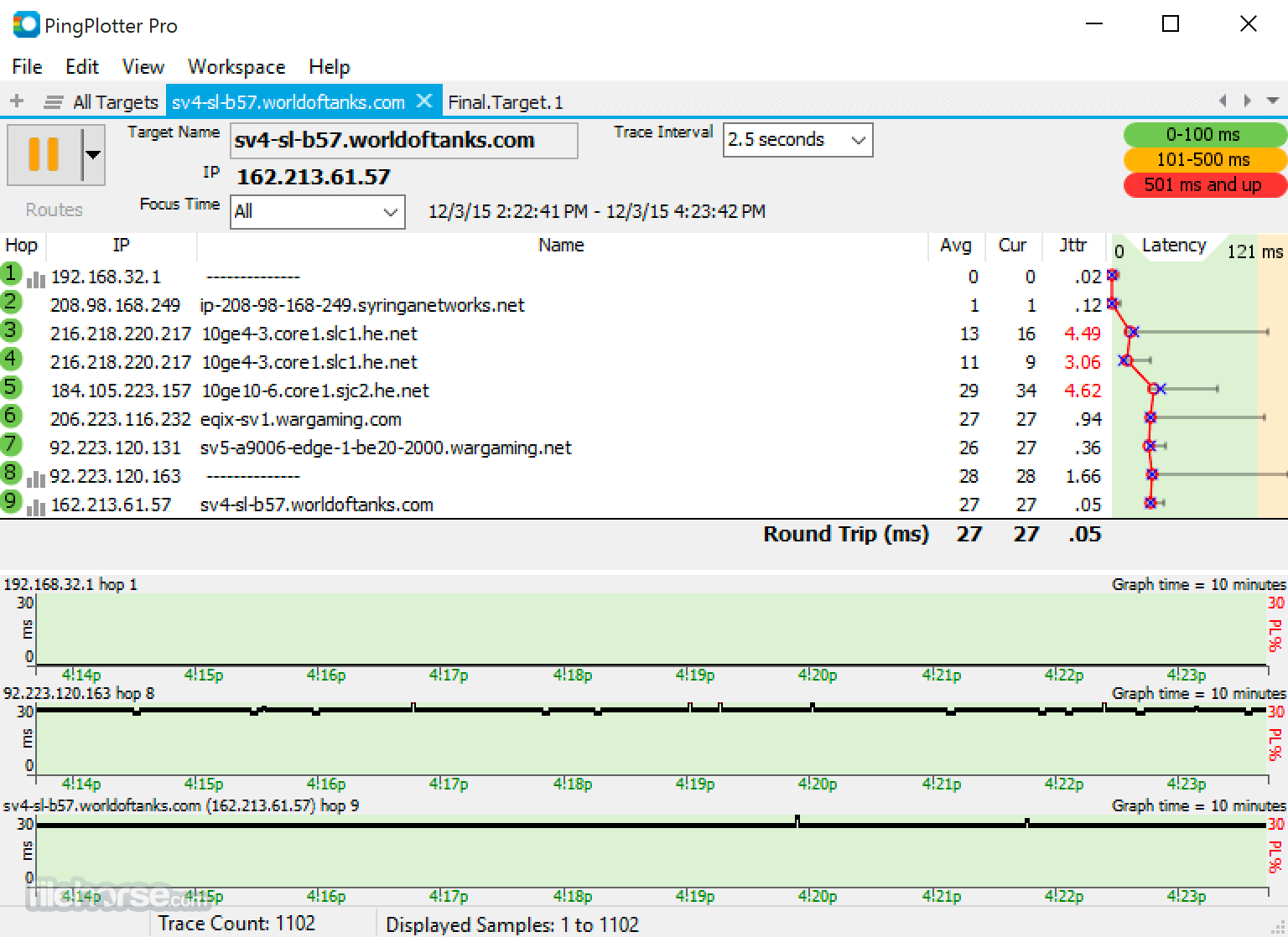
Target Bar: This is where users input the IP address or domain name of the network target they want to monitor.
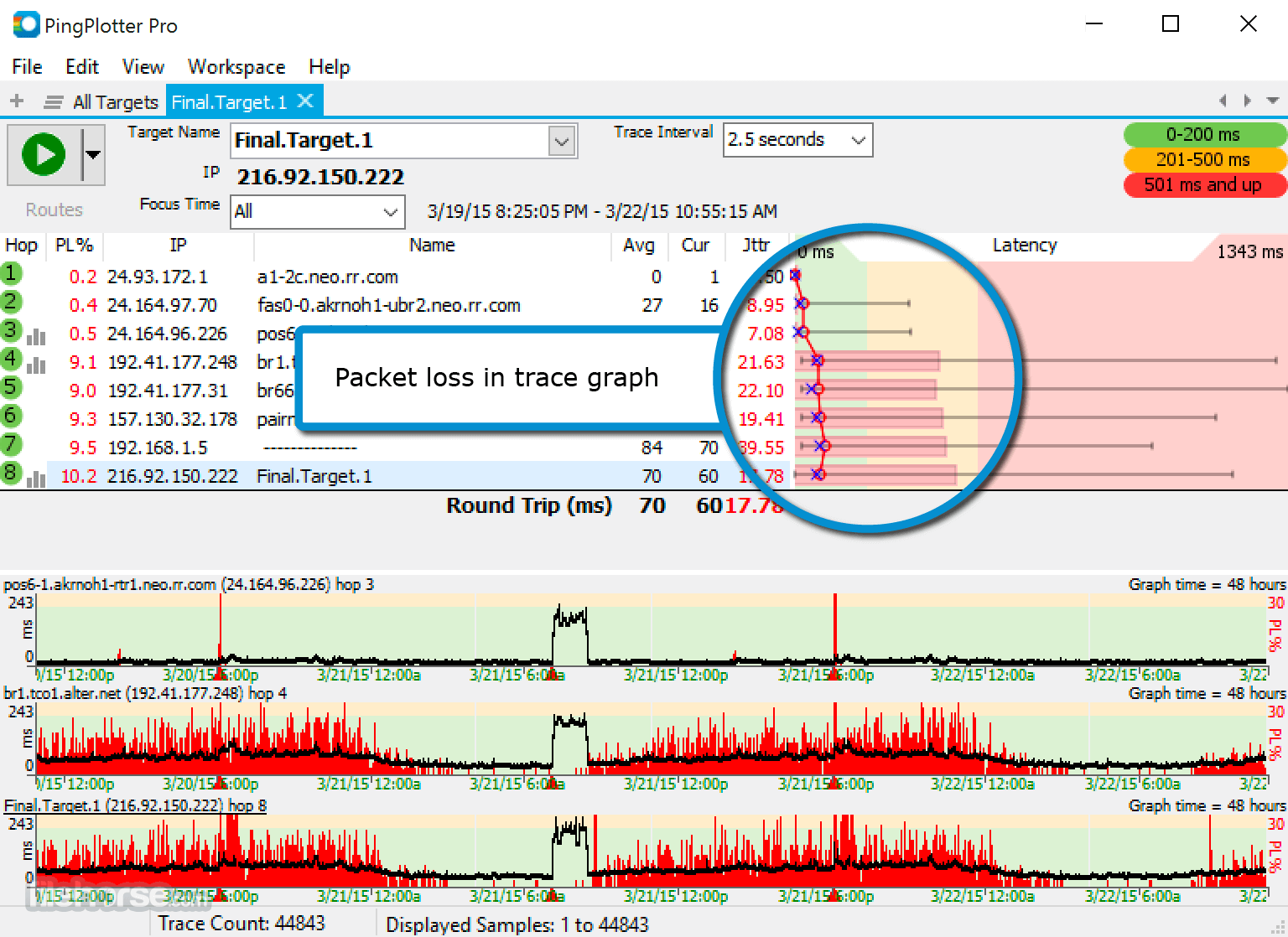
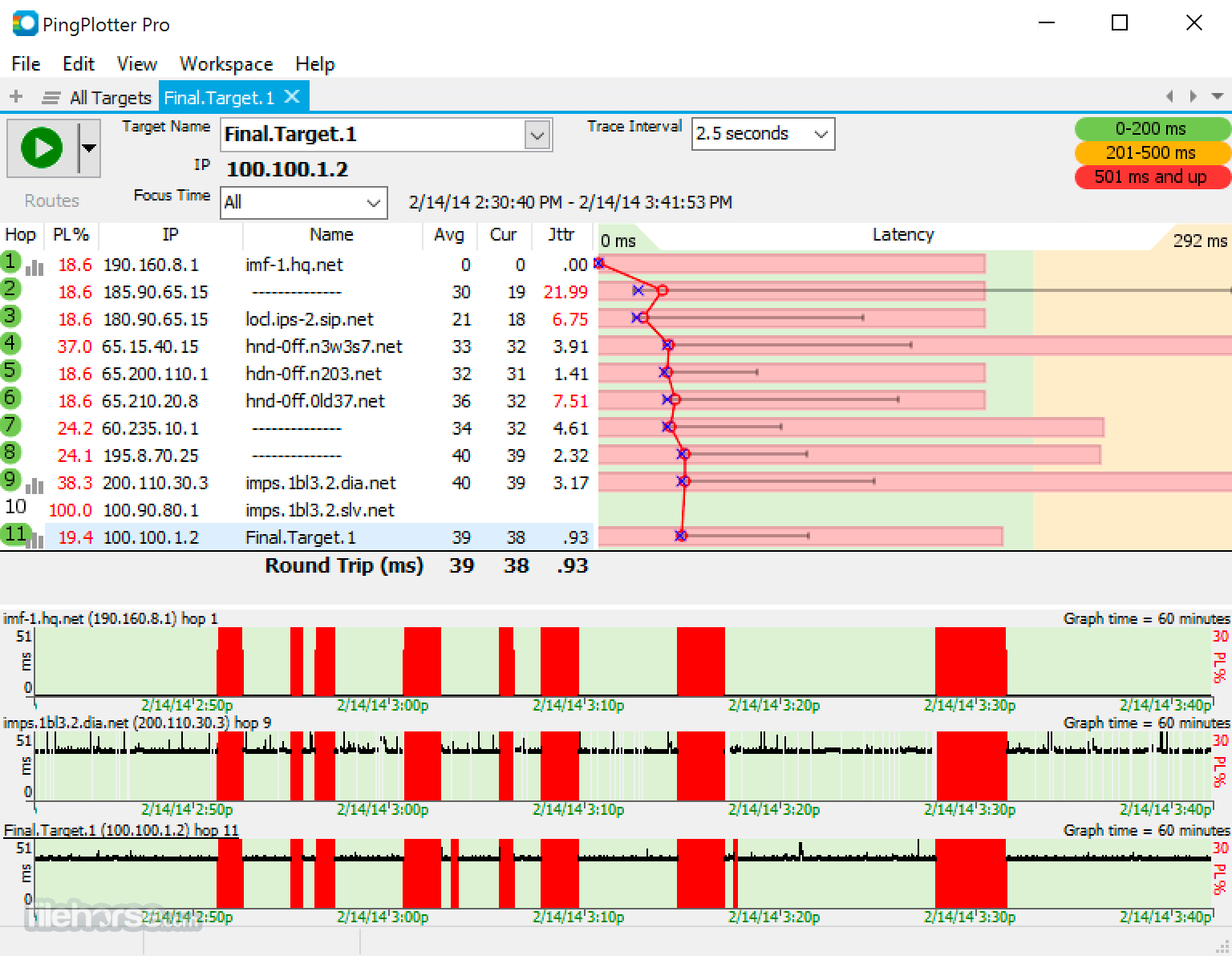
Graph Area: This section displays real-time and historical graphs of latency and packet loss.
Hop Table: Below the graph area, the hop table shows detailed information about each hop along the network path, including IP addresses, round-trip times, and packet loss percentages.
Control Panel: This panel allows users to start, stop, and configure tests, as well as manage alerts and preferences.
Installation and Setup
FAQ
What is PingPlotter Free used for?
The program is used for network diagnostics and troubleshooting. It helps visualize network performance issues such as latency and packet loss, making it easier to identify and resolve connectivity problems.
Can I monitor multiple network paths simultaneously?
Yes, it allows you to monitor multiple network targets at the same time, providing a comparative view of different network paths.
How do I set up alerts in PingPlotter Free?
To set up alerts, go to the 'Alerts' section in the control panel, create a new alert, and define the conditions (e.g., high latency, packet loss) that should trigger a notification.
Is there a way to save and export the data collected by PingPlotter Free?
Yes, you can save your session data for later analysis or export it as a report to share with others. This feature is useful for documenting network performance and sharing findings with technical support.
Are there any limitations to the free version of PingPlotter?
While the software offers many powerful features, it does have some limitations compared to the Pro version. These include fewer configuration options, limited historical data retention, and fewer simultaneous targets.
Alternatives
Paessler PRTG Network Monitor: A versatile network monitoring tool that covers bandwidth usage, network performance, and server health.
Wireshark: A comprehensive network protocol analyzer that provides detailed packet inspection and network troubleshooting capabilities.
Wireshark Portable: Wireshark is a free and open source packet analyzer for PC!
Pricing
The program is available at no cost, making it an accessible option for individuals and small businesses. For more advanced features and capabilities, users can upgrade to PingPlotter Standard or PingPlotter Professional.
The paid versions offer additional benefits such as extended historical data retention, advanced alerting, and more detailed configuration options.
PingPlotter Professional is $29/m or $349 perpetual license.
PingPlotter Free is a powerful and user-friendly tool for network diagnostics and troubleshooting. Its real-time data visualization and hop-by-hop analysis make it easy to identify and address network performance issues. While the free version has some limitations, it offers a robust set of features that are more than sufficient for most users.
Whether you're a network administrator, IT professional, or simply someone looking to improve your internet connectivity, this tool is a valuable addition to your toolkit. For those needing more advanced capabilities, the paid versions provide additional functionality and customization options, ensuring that there's a solution to fit every need.
Note: Limited functionality in the demo version.
Download PingPlotter Free Latest Version Why is this app published on FileHorse? (More info)
PingPlotter is a network diagnostic tool designed to help users visualize network performance issues. Developed by Pingman Tools, this software provides an intuitive graphical representation of network latency and packet loss over time. It is particularly useful for troubleshooting connectivity problems, identifying bottlenecks, and monitoring the health of your network connections.
It helps you gather evidence of network problems so you can show qualified technicians and service providers exactly how to troubleshoot. It combines important diagnostic data with easy-to-understand graphs to show exactly where issues occur.
PingPlotter Desktop Free captures all types of data and makes sharing the results quick and easy. Timelines graph latency and packet loss history in 10-minute intervals. See exactly when connection problems happen. In Ping Plotter Standard, timelines cover unlimited time and can be opened for any hop.
It makes getting results quick and easy. The program exports all types of logs, screenshots, and graphs you can send directly to your service provider or other qualified technicians. PingPlotter Desktop can also create unique webpages you can post on forums or support sites for faster turnaround.
Highlights
- See the route packets follow
- Measure latency and packet loss
- Ten-minute history graph
- Watch performance as it happens
- Save and reload data
- Insert Comments
- ICMP packet support
- High performance, low overhead engine
- Uses multiple threads for increased performance
- Save as image command
- Send email command
- Trace IPv6 addresses
- Real-time Graphs: It offers real-time data visualization, allowing users to see network performance metrics such as latency and packet loss as they occur.
- Historical Data: Users can track network performance over extended periods, providing insights into patterns and recurring issues.
- Multiple Targets: The software can monitor multiple network paths simultaneously, making it easier to compare performance across different connections.
- Hop-by-Hop Analysis: It breaks down the network path into individual hops, showing where delays and losses occur.
- Customizable Alerts: Users can set up alerts based on specific conditions, such as high latency or packet loss, to receive notifications when performance thresholds are exceeded.
Target Bar: This is where users input the IP address or domain name of the network target they want to monitor.
Graph Area: This section displays real-time and historical graphs of latency and packet loss.
Hop Table: Below the graph area, the hop table shows detailed information about each hop along the network path, including IP addresses, round-trip times, and packet loss percentages.
Control Panel: This panel allows users to start, stop, and configure tests, as well as manage alerts and preferences.
Installation and Setup
- Download: Visit the official website or FileHorse and download the free version of the software.
- Run Installer: Open the downloaded file and follow the on-screen instructions to install the software.
- Launch: Once installed, launch the tool from the Start menu or desktop shortcut.
- Initial Setup: The first time you run the software, you may be prompted to configure basic settings, such as default target addresses and alert preferences.
- Enter a Target: In the Target Bar, enter the IP address or domain name of the network device or website you want to monitor.
- Start Monitoring: Click the green 'Start' button to begin the trace. It will start collecting data and display it in the graph area.
- Analyze Data: Use the graphs and hop table to analyze network performance. Look for high latency, packet loss, or other anomalies.
- Set Alerts: Configure alerts to notify you of any performance issues. Go to the 'Alerts' section and define the conditions that should trigger an alert.
- Save and Export Data: Save your session data for later analysis or export it to share with others.
FAQ
What is PingPlotter Free used for?
The program is used for network diagnostics and troubleshooting. It helps visualize network performance issues such as latency and packet loss, making it easier to identify and resolve connectivity problems.
Can I monitor multiple network paths simultaneously?
Yes, it allows you to monitor multiple network targets at the same time, providing a comparative view of different network paths.
How do I set up alerts in PingPlotter Free?
To set up alerts, go to the 'Alerts' section in the control panel, create a new alert, and define the conditions (e.g., high latency, packet loss) that should trigger a notification.
Is there a way to save and export the data collected by PingPlotter Free?
Yes, you can save your session data for later analysis or export it as a report to share with others. This feature is useful for documenting network performance and sharing findings with technical support.
Are there any limitations to the free version of PingPlotter?
While the software offers many powerful features, it does have some limitations compared to the Pro version. These include fewer configuration options, limited historical data retention, and fewer simultaneous targets.
Alternatives
Paessler PRTG Network Monitor: A versatile network monitoring tool that covers bandwidth usage, network performance, and server health.
Wireshark: A comprehensive network protocol analyzer that provides detailed packet inspection and network troubleshooting capabilities.
Wireshark Portable: Wireshark is a free and open source packet analyzer for PC!
Pricing
The program is available at no cost, making it an accessible option for individuals and small businesses. For more advanced features and capabilities, users can upgrade to PingPlotter Standard or PingPlotter Professional.
The paid versions offer additional benefits such as extended historical data retention, advanced alerting, and more detailed configuration options.
PingPlotter Professional is $29/m or $349 perpetual license.
- Monitor latency, packet loss, and jitter for 200+ routes in real-time.
- Discover all devices connected to your network.
- Analyze granular data to identify patterns and prove the source or problems.
- Operating System: Windows 11, 10, 8 or 7
- Processor: 1 GHz or faster
- Memory: 2 GB RAM minimum (4 GB recommended)
- Hard Drive: 100 MB of free space
- Network: Active internet connection for network monitoring
- Easy-to-use interface with real-time data visualization
- Effective for identifying network performance issues
- Allows monitoring of multiple network paths
- Customizable alerts for proactive monitoring
- Free to use with no upfront cost
- Limited advanced features compared to paid versions
- Historical data retention is restricted
- Fewer configuration options for in-depth analysis
PingPlotter Free is a powerful and user-friendly tool for network diagnostics and troubleshooting. Its real-time data visualization and hop-by-hop analysis make it easy to identify and address network performance issues. While the free version has some limitations, it offers a robust set of features that are more than sufficient for most users.
Whether you're a network administrator, IT professional, or simply someone looking to improve your internet connectivity, this tool is a valuable addition to your toolkit. For those needing more advanced capabilities, the paid versions provide additional functionality and customization options, ensuring that there's a solution to fit every need.
Note: Limited functionality in the demo version.
Download PingPlotter Free Latest Version Why is this app published on FileHorse? (More info)
##
畫面截圖