Sherlock AI Detector 1.3
v 1.3
Windows
免費軟體
10/10 (1)
- 目前版本1.3
- 更新日期2026-08-14
- 檔案大小82.2 MB
- 檔案名稱Sherlock+AI+Detector+Installer.exe
- 作業系統Windows XP / Vista / Windows 7 / Windows 8 / Windows 10 / Windows 11
- 支援語系English
- 授權型式免費軟體
- 開發商 EssayRewriterAI
- 軟體分類Windows 軟體 / 辦公商務
##
翻譯排程處理中,以下暫以英文原文呈現
軟體介紹
Sherlock AI Detector is a lightweight writing assistant that can analyze texts of all sizes and determine if the entirety or parts of them were written by AI text services.
This easy-to-use tool was built from the ground up to provide users of all ages a simple way to determine the authenticity of written text and give them assurances that AI-generated content will not end up in their project before it is published online or submitted to school, work, and other destinations that value authenticity and originality.
The value of this tool can especially be extracted in the fields of education and academia, where both students and educators can make sure that the written text they are handling is free from AI influences and is in line with the rules of honesty and fairness. The same can also be said in various business fields that value authenticity, trust, and human-led project management.
This lightweight PC app is distributed as a standalone client that can be easily deployed on any modern Windows OS, and it requires a bare minimum of hardware resources to scan and deliver results even on large text projects.
Main Features
This app does not require the creation of a user account, therefore enabling users of all ages and technical levels to simply download and install it on their home, school, or work PC.
The app is distributed as an automated installer that only asks users to follow a few simple on-screen instructions. Once fully installed in a procedure that lasts less than a minute, users will be able to start the app for the first time.
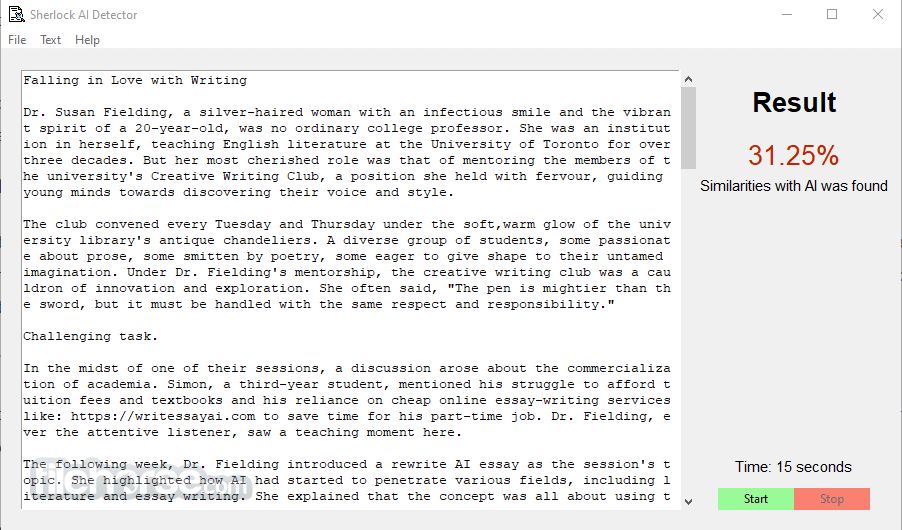
The entirety of the app’s functions is located in a single dashboard that features a very traditional Windows app style, with no stylish elements that will catch your eye.
To start the AI text analysis tool, users simply must load the text they wish to check into a large text field. This can be done either with a Copy/Paste function or by activating the “Open” tool located in the “File” dropdown menu in the top-left corner of the app. This tool supports the automatic loading of text files created in popular file formats such as TXT, PDF, and DOCX.
User Interface
The user interface of this app is incredibly lightweight and streamlined. It consists of a single dashboard window that features just a few on-screen elements. The majority of the app footprint is taken by the large text field where users can load essays and documents for analysis.
To start the analysis, users simply need to click on the green “Start” button located in the bottom-right corner. An active analysis can be terminated by clicking on the nearby “Stop” button.
The rest of the UI elements are located in the three dropdown menu options located at the top-left corner. The file menu hosts the “Open” and “Save As” tools, the Text menu manages Copy and Paste functions, and the final Help menu can be used to find out basic app information written by the developers at www.essayrewriterai.com.
FAQs
What is Sherlock AI Detector?
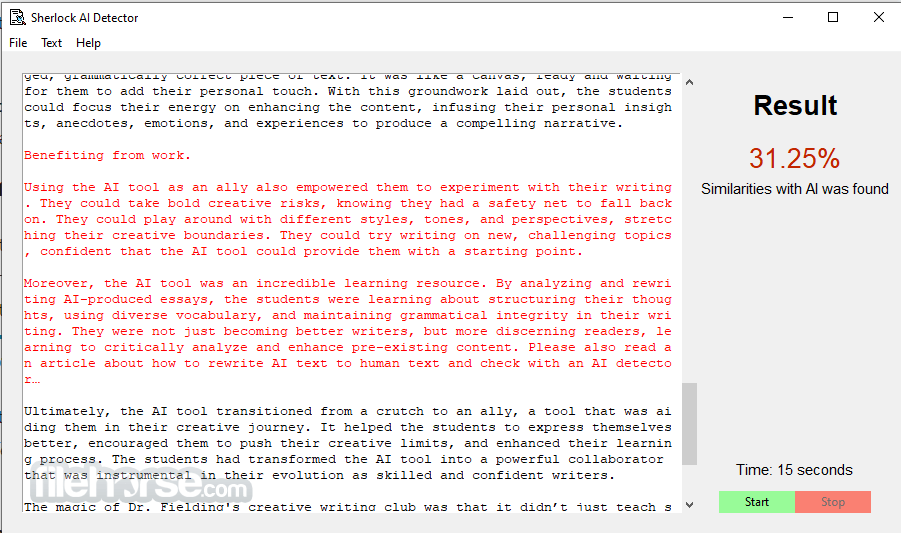
It is a streamlined writing assistant utility that can analyze texts of all sizes and complexities for AI-generated content and provide a percentage-based score of similarity to AI-generated text.
Is it safe?
Yes. This Windows PC app is distributed as a standalone client that is free from viruses and malicious software. During operation, the app does not share the analyzed texts with any outside service.
Does the usage license cover commercial use?
Yes, this is a free-to-use program that can be used without restrictions.
Pricing
This app is 100% FREE to use. It does not feature any subscription plans, hidden premium unlocks, or built-in ads.
Alternatives
Originality.ai - A highly accurate AI content detector that also includes plagiarism and fact-checking tools, along with a handy browser extension and API support - ideal for content creators, publishers, and SEO professionals.
GPTZero - Originally designed for educators, this tool uses perplexity and burstiness metrics to spot AI-generated text, provides sentence-level analysis, and offers customizable settings; it's accessible for free or via affordable educational plans.
System Requirements
This lightweight app requires very few resources to run - just a single-core Pentium CPU, 4GB of RAM, and 100MB of disk space. This makes it perfect to run even on aging laptop PCs and old business PC configurations.
PROS
Sherlock AI Detector can help anyone check their texts for AI-generated content and make it safe for submission to school, work, and online spaces. While it has a truly minimalistic interface and lacks any advanced features, it provides a valuable service that can be run locally without the need to upload the text online to web-based AI-analysis tools.
Download Sherlock AI Detector Latest Version Why is this app published on FileHorse? (More info)
This easy-to-use tool was built from the ground up to provide users of all ages a simple way to determine the authenticity of written text and give them assurances that AI-generated content will not end up in their project before it is published online or submitted to school, work, and other destinations that value authenticity and originality.
The value of this tool can especially be extracted in the fields of education and academia, where both students and educators can make sure that the written text they are handling is free from AI influences and is in line with the rules of honesty and fairness. The same can also be said in various business fields that value authenticity, trust, and human-led project management.
This lightweight PC app is distributed as a standalone client that can be easily deployed on any modern Windows OS, and it requires a bare minimum of hardware resources to scan and deliver results even on large text projects.
Main Features
- Streamlined AI Detection - Start detecting the authenticity of texts with a single button click.
- Percentage-based Scores - Isolate the specific paragraphs that are AI-influenced.
- Fast Text Analysis - Gain instant feedback without prolonged text processing times.
- Wide File Format Compatibility - Copy/Paste texts or load them directly.
- Easy-to-Use Interface - Streamline AI analysis operations with a simple dashboard.
- No limitations on text size - Analyze everything from short social media posts to large PDF documents.
This app does not require the creation of a user account, therefore enabling users of all ages and technical levels to simply download and install it on their home, school, or work PC.
The app is distributed as an automated installer that only asks users to follow a few simple on-screen instructions. Once fully installed in a procedure that lasts less than a minute, users will be able to start the app for the first time.
The entirety of the app’s functions is located in a single dashboard that features a very traditional Windows app style, with no stylish elements that will catch your eye.
To start the AI text analysis tool, users simply must load the text they wish to check into a large text field. This can be done either with a Copy/Paste function or by activating the “Open” tool located in the “File” dropdown menu in the top-left corner of the app. This tool supports the automatic loading of text files created in popular file formats such as TXT, PDF, and DOCX.
User Interface
The user interface of this app is incredibly lightweight and streamlined. It consists of a single dashboard window that features just a few on-screen elements. The majority of the app footprint is taken by the large text field where users can load essays and documents for analysis.
To start the analysis, users simply need to click on the green “Start” button located in the bottom-right corner. An active analysis can be terminated by clicking on the nearby “Stop” button.
The rest of the UI elements are located in the three dropdown menu options located at the top-left corner. The file menu hosts the “Open” and “Save As” tools, the Text menu manages Copy and Paste functions, and the final Help menu can be used to find out basic app information written by the developers at www.essayrewriterai.com.
FAQs
What is Sherlock AI Detector?
It is a streamlined writing assistant utility that can analyze texts of all sizes and complexities for AI-generated content and provide a percentage-based score of similarity to AI-generated text.
Is it safe?
Yes. This Windows PC app is distributed as a standalone client that is free from viruses and malicious software. During operation, the app does not share the analyzed texts with any outside service.
Does the usage license cover commercial use?
Yes, this is a free-to-use program that can be used without restrictions.
Pricing
This app is 100% FREE to use. It does not feature any subscription plans, hidden premium unlocks, or built-in ads.
Alternatives
Originality.ai - A highly accurate AI content detector that also includes plagiarism and fact-checking tools, along with a handy browser extension and API support - ideal for content creators, publishers, and SEO professionals.
GPTZero - Originally designed for educators, this tool uses perplexity and burstiness metrics to spot AI-generated text, provides sentence-level analysis, and offers customizable settings; it's accessible for free or via affordable educational plans.
System Requirements
This lightweight app requires very few resources to run - just a single-core Pentium CPU, 4GB of RAM, and 100MB of disk space. This makes it perfect to run even on aging laptop PCs and old business PC configurations.
PROS
- Accurate AI detection.
- Highlighting of possible AI content.
- Compatibility with popular text file formats.
- Fast operation with both short and long texts.
- Streamlined user interface.
- No advanced features.
Sherlock AI Detector can help anyone check their texts for AI-generated content and make it safe for submission to school, work, and online spaces. While it has a truly minimalistic interface and lacks any advanced features, it provides a valuable service that can be run locally without the need to upload the text online to web-based AI-analysis tools.
Download Sherlock AI Detector Latest Version Why is this app published on FileHorse? (More info)
##
畫面截圖